
1. Product Overview
This manual provides detailed instructions for the installation, operation, and maintenance of your XTRONS 12.3-inch Android 14 Car Stereo. This unit is designed to integrate seamlessly with specific BMW models, offering advanced features and an enhanced in-car experience.
1.1 Applicable Models and Years
This unit is compatible with the following BMW vehicles equipped with the NBT System:
- BMW 3 Series F30/F31/F34/F35 (2013-2016)
- BMW 4 Series F32/F33/F36 (2013-2016)
Important: This unit functions only with the original NBT system.
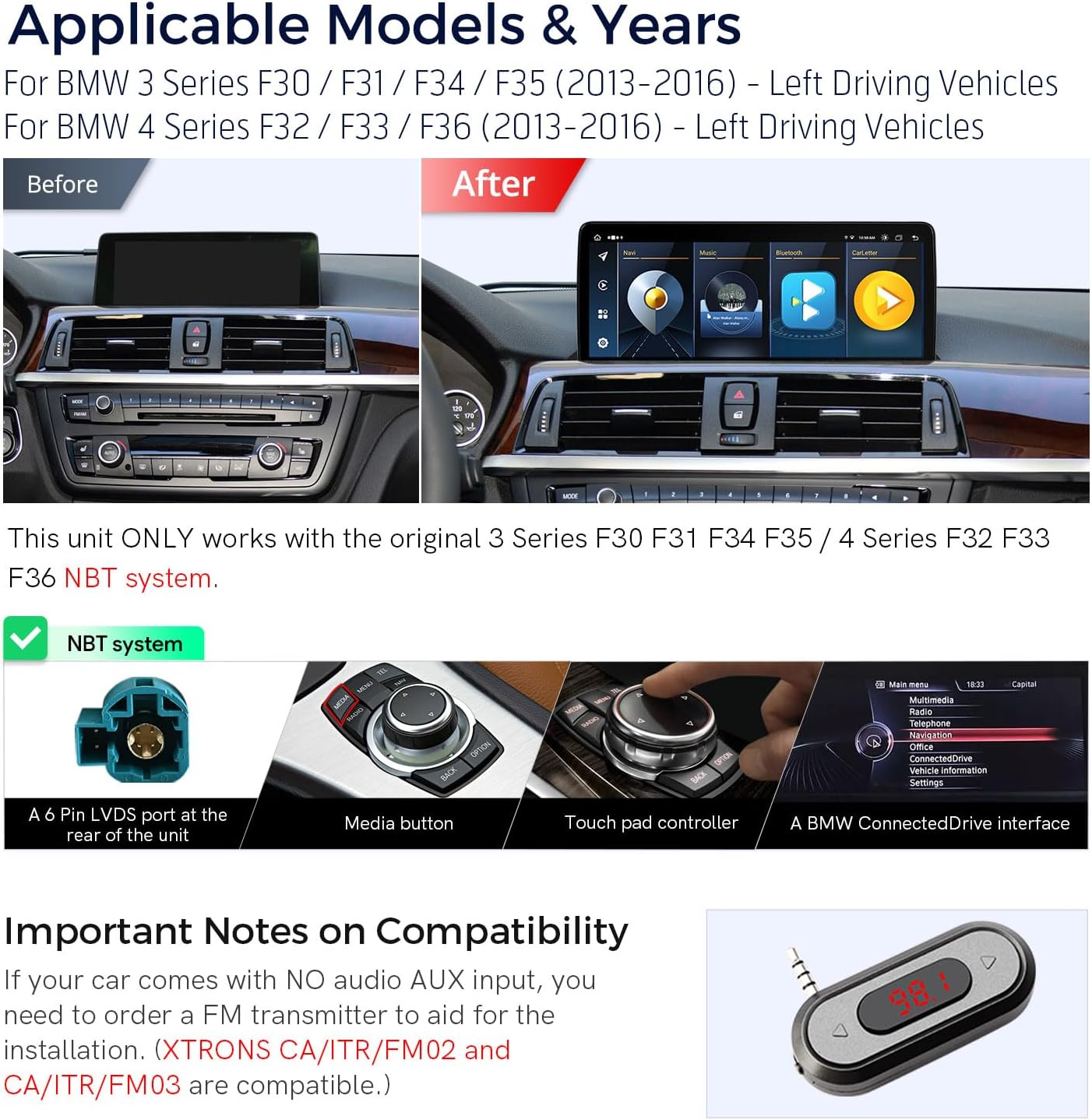
Image: Before and after installation of the XTRONS car stereo, highlighting the NBT system compatibility.
2. Key Features
The XTRONS 12.3-inch Android 14 Car Stereo offers a range of features designed to enhance your driving experience:
- Operating System: Latest Android 14 with Octa-core processor.
- Memory: 4GB DDR4 RAM and 64GB Solid State ROM for efficient performance and storage.
- Display: 12.3-inch 1920x720 HD IPS Touch Screen with 178° viewing angle.
- Smartphone Integration: Built-in Wireless Car Play and Wireless/Wired Android Auto for seamless smartphone connectivity.
- Connectivity: Global 4G LTE support (Micro-SIM card required, not included), Bluetooth 5.0, Dual Wi-Fi Band (2.4GHz/5GHz), and USB tethering.
- Multitasking: Multi-task Display and Picture-in-Picture (PIP) functionality.
- Original System Retention: Retains original iDrive system control, amplifier system, radio, CD player, Bluetooth, backup camera display, and steering wheel control functions.

Image: Overview of the XTRONS unit's key specifications and appearance in a BMW dashboard.

Image: Illustration of original BMW functions retained after installing the XTRONS unit.
3. Setup and Installation
Installation of the XTRONS car stereo requires careful attention to wiring and compatibility. It is recommended to consult the included Installation Instruction for detailed steps or seek professional assistance.
3.1 Included Components
Verify that all components are present in the package:
- 1 x ISO Wiring Harness
- 1 x Audio Cable
- 1 x GPS Antenna
- 1 x Tweezers
- 1 x 4G Antenna
- 1 x USB Cable
- 1 x Installation Instruction
- 1 x User Manual (this document)

Image: Product dimensions and a visual representation of all included accessories.
3.2 Wiring Diagram
Refer to the following diagram for connecting the wiring harness and other components:

Image: Detailed wiring diagram for the XTRONS car stereo.
3.3 Compatibility Notes
- If your vehicle lacks an audio AUX input, an FM transmitter may be required for audio integration. Compatible XTRONS models include CA/ITR/FM02 and CA/ITR/FM03.
- Ensure the correct CAN settings are selected to properly sync with the OEM infotainment system. This may require adjusting settings within the unit's interface.
4. Operating Instructions
4.1 System Navigation
The unit operates on Android 14. Navigate through menus and applications using the 12.3-inch IPS touch screen. The interface is designed for intuitive use, similar to a smartphone or tablet.
4.2 Wireless Car Play & Android Auto
Connect your iPhone via Bluetooth for Wireless Car Play or your Android phone via Bluetooth (wireless) or USB cable (wired) for Android Auto. This allows access to navigation, calls, music, and voice assistants (Siri/Google Assistant) directly from the head unit.
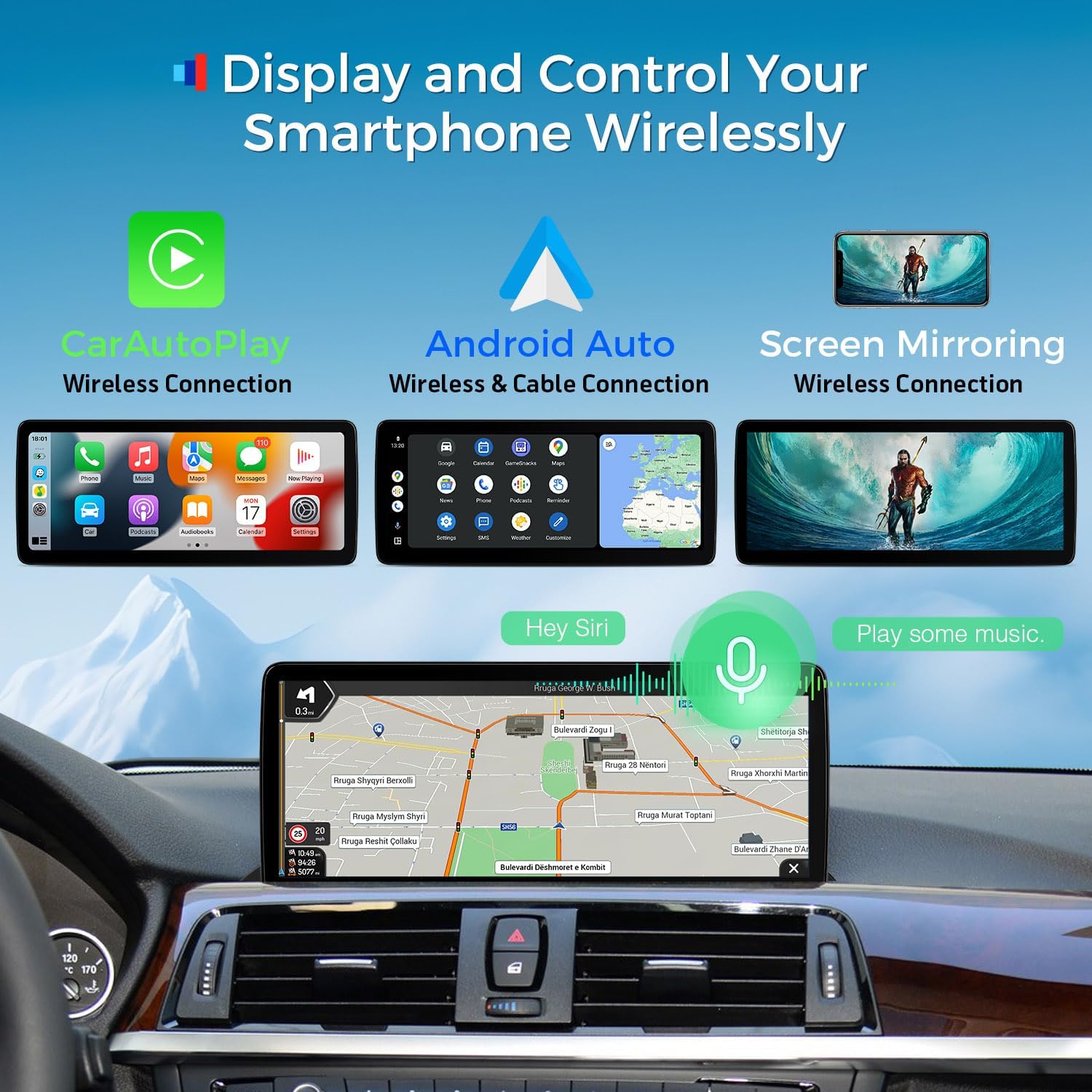
Image: Display and control of smartphone features wirelessly.
4.3 4G LTE Connectivity
Insert a Micro-SIM card (not included) into the designated slot to enable Global 4G LTE connectivity. This provides mobile broadband access for online features. Note that 4G supports SIM data only, not phone calls. USB tethering is also available for internet sharing from your smartphone.
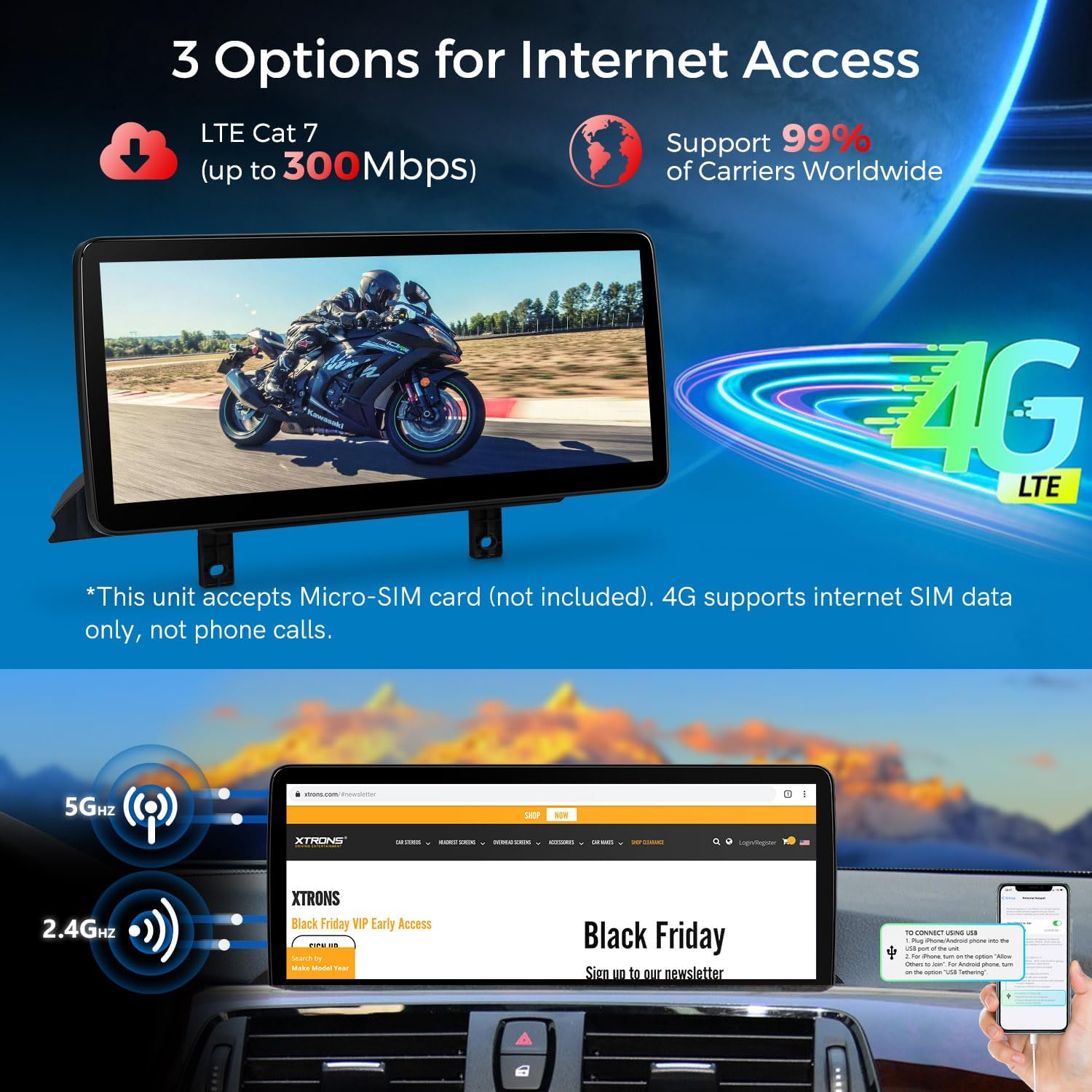
Image: Options for internet access including 4G LTE and Wi-Fi.
4.4 Multi-tasking and Picture-in-Picture (PIP)
The unit supports running two applications simultaneously on the 12.3-inch IPS screen, such as music and navigation. The Picture-in-Picture (PIP) feature allows you to view videos in a small window while using other applications.
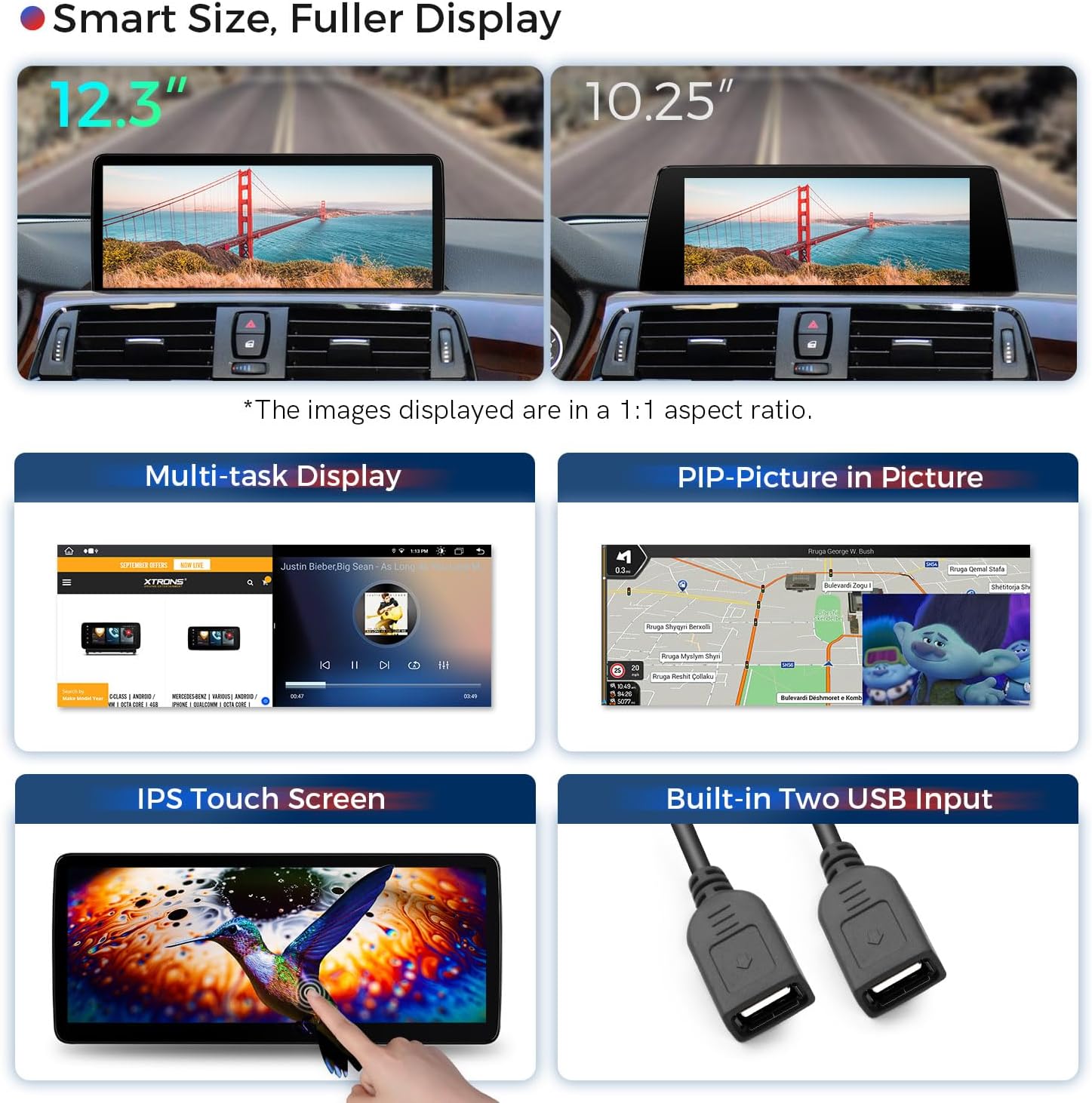
Image: Features like multi-task display, Picture-in-Picture, IPS touch screen, and dual USB inputs.
5. Care and Maintenance
- Screen Cleaning: Use a soft, lint-free cloth to clean the screen. For stubborn marks, lightly dampen the cloth with water or a screen-safe cleaner. Avoid abrasive materials or harsh chemicals.
- General Cleaning: Keep the unit free from dust and debris. Use a dry cloth to wipe the exterior.
- Temperature: Avoid exposing the unit to extreme temperatures, both hot and cold, for extended periods.
- Liquid Exposure: Prevent liquids from entering the unit. In case of accidental spills, power off the unit immediately and allow it to dry completely before use.
6. Troubleshooting
If you encounter issues with your XTRONS car stereo, refer to the following common problems and solutions:
| Problem | Possible Cause | Solution |
|---|---|---|
| Unit does not power on | Incorrect wiring, blown fuse, power supply issue. | Check all power connections, inspect fuses, ensure vehicle battery is charged. |
| No sound output | Audio cable disconnected, incorrect audio settings, amplifier issue. | Verify audio cable connections, check unit's audio output settings, ensure original amplifier system is functioning. |
| Cannot switch between XTRONS and OEM infotainment | Incorrect CAN settings. | Access the unit's settings and adjust the 'CAN' configuration to match your OEM infotainment system. Try 'All other BMW' if specific model settings are unclear. |
| GPS signal issues | GPS antenna not properly installed or obstructed. | Ensure GPS antenna is securely connected and placed in a location with clear sky view. |
| Bluetooth/Wi-Fi connectivity problems | Interference, incorrect settings, device compatibility. | Restart the unit and the connected device. Check Bluetooth/Wi-Fi settings on both devices. Ensure no other devices are causing interference. |
For issues not listed here, or if solutions do not resolve the problem, please contact XTRONS customer support.
7. Technical Specifications
| Feature | Specification |
|---|---|
| Model Name | QLB22NB12THL |
| Operating System | Android 14 |
| Processor | Octa Core |
| RAM | 4GB DDR4 |
| ROM | 64GB Solid State |
| Display Size | 12.3 Inches |
| Resolution | 1920x720 HD IPS |
| Connectivity | Bluetooth 5.0, USB, Dual-band Wi-Fi (2.4GHz/5GHz), Global 4G LTE |
| Special Features | Wireless Car Play, Wireless/Wired Android Auto, GPS Navigation, Multi-task Display, PIP |
| Audio Output Mode | Stereo |
| Mounting Type | Dashboard Mount |
| Product Dimensions | 12.3 x 7.86 x 12.3 inches |
| Item Weight | 5.07 pounds |
8. Warranty and Customer Support
8.1 Warranty Information
This XTRONS product comes with a 1 Year Manufacturer Warranty from the date of purchase. Please retain your proof of purchase for warranty claims. The warranty covers manufacturing defects but does not cover damage caused by improper installation, misuse, accidents, or unauthorized modifications.
8.2 Optional Accessories
Enhance your unit's functionality with optional accessories (sold separately):
- OBD Function: Compatible with models B09D3DVZVR, B015MU8UN6, B07X9JXV28, B08HQ9LQ9X.
- TPMS Function: Compatible with models B07WQFKV5G, B07DKB4GD2.
- External DVR: Compatible with model B07MBYCG4C.
- Reversing AHD Camera: Compatible with model B00GY3BVT6.
8.3 Customer Support
For technical assistance, warranty claims, or further inquiries, please contact XTRONS customer support through their official channels. Refer to the XTRONS website or your purchase documentation for contact details.


