Product Overview
The UBPET F10 Automatic Pet Feeder is an advanced digital dispenser designed to provide fresh meals for your cats and dogs. It features a 5-meal capacity and incorporates semiconductor refrigerating chips for long-lasting food freshness. With its smart digital button panel, you can easily personalize feeding schedules and choose from three cooling modes to suit your pet's dietary needs and environmental conditions.

Image: UBPET F10 Automatic Pet Feeder, showcasing its sleek design and a visible food compartment.
Key Features
- Smart Refrigerated Function: Utilizes semiconductor refrigerating chips for extended food freshness, eliminating the need for ice packs.
- Smart Feeding Time (24Hrs): A digital button panel with memory function allows for personalized feeding schedules. The memory function can be reactivated within 30 minutes of a power failure.
- 5 Meal Food Tray: Features five compartments, each with a capacity of 550ml, allowing for one initial feed and four additional timed feeds.
- Silence and Easy to Set Up: Designed for quiet operation (below 40dB) and simple, quick setup.
- 24 Hours Support: Suitable for cats, small dogs, and pets with specific dietary or feeding needs.

Image: Internal view of the feeder highlighting the semiconductor refrigerating chips for cooling.

Image: The feeder's digital display showing programmed meal times for automated feeding.
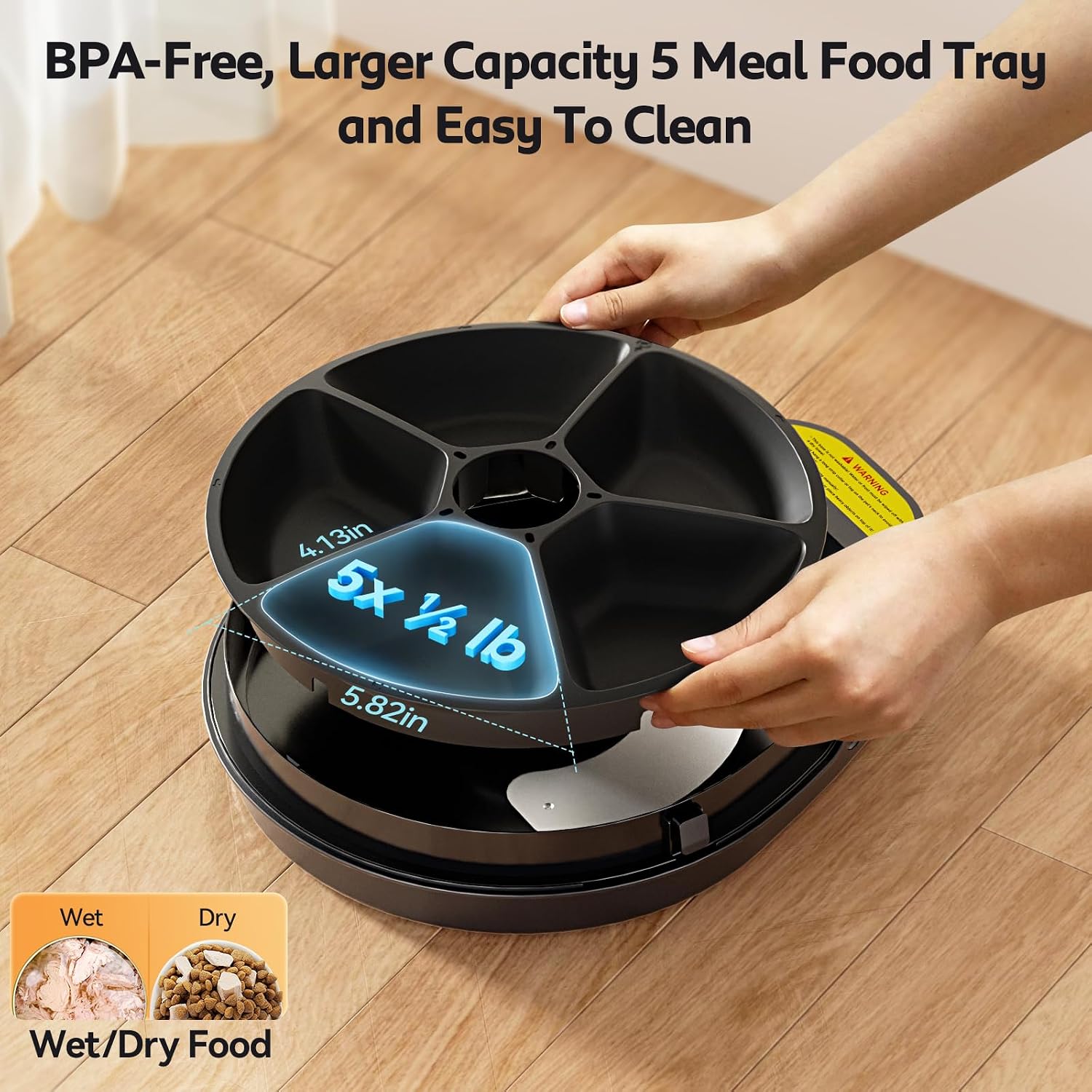
Image: The removable 5-compartment food tray, demonstrating its capacity and ease of handling.
Setup Guide
- Unpack the Feeder: Carefully remove all components from the packaging. Ensure all parts are present: the main feeder unit, the 5-meal food tray, and the power adapter.
- Clean the Food Tray: Before first use, wash the 5-meal food tray with mild soap and water. Rinse thoroughly and dry completely. The main unit should be wiped with a damp cloth only; do not immerse in water.
- Place the Feeder: Position the feeder on a flat, stable surface indoors, away from direct sunlight or heat sources. Ensure there is a power outlet nearby.
- Connect Power: Plug the power adapter into the feeder's power port and then into a wall outlet. The digital display should illuminate.
- Fill the Tray: Place desired pet food into the compartments of the food tray. For wet food, ensure it is consumed within 24 hours.
- Secure the Lid: Place the lid back onto the feeder, ensuring it is securely snapped into place. The tamper-proof lid design prevents pets from accessing the controls or changing settings.

Image: The feeder's compartments filled with various types of pet food, illustrating the recommended food types for each section.

Image: Detail of the secure snap locking mechanism on the feeder's lid.
Operating Instructions
Setting the Clock
The feeder uses a 24-hour clock system.
- Press the "Set" button (usually indicated by a gear icon) to enter time setting mode.
- Use the "Up" and "Down" arrows to adjust the hour. Press "Set" to confirm.
- Repeat for minutes. Press "Set" to confirm and exit time setting.
Programming Feeding Schedules
The UBPET F10 allows for up to 5 timed meals.
- Press the "Program" button (often indicated by a clock icon) to begin setting meal times.
- The display will show "Meal 1". Use the "Up" and "Down" arrows to set the desired time for the first meal. Press "Program" to confirm.
- Repeat for "Meal 2" through "Meal 5". If fewer than 5 meals are needed, simply skip setting a time for the remaining meals.
- After setting all desired meal times, press "Program" again to save and exit.

Image: A cat enjoying a meal from the feeder, with an overlay illustrating the digital display and programmed feeding schedule.
Adjusting Cooling Modes
The feeder offers 3 cooling modes to maintain food freshness.
- Locate the cooling mode button (often indicated by a snowflake icon).
- Press the button repeatedly to cycle through the available cooling modes. The display will show the current mode or temperature setting.
- Select the mode appropriate for your environment and food type. Refer to the temperature chart for guidance.

Image: A hand interacting with the cooling mode button, with a visual representation of the three cooling modes and their corresponding temperature ranges.
Manual Feeding
To dispense a meal manually, press the "Manual Feed" button (if available, or the "Next Meal" button). This will rotate the tray to the next available compartment.

Image: The feeder in use by both a cat and a dog, highlighting its suitability for various pets.
Maintenance and Cleaning
Regular cleaning ensures the longevity and hygiene of your UBPET F10 feeder.
- Disconnect Power: Always unplug the feeder from the power outlet before cleaning.
- Remove Food Tray: Lift the 5-meal food tray from the main unit.
- Wash Food Tray: The food tray is dishwasher safe (top rack recommended) or can be hand washed with warm, soapy water. Rinse thoroughly to remove all soap residue.
- Clean Main Unit: Wipe the exterior and interior of the main feeder unit with a soft, damp cloth. Do not submerge the main unit in water or allow water to enter the electronic components.
- Dry Completely: Ensure all parts are completely dry before reassembling and plugging the feeder back in.
Troubleshooting
| Problem | Possible Cause | Solution |
|---|---|---|
| Feeder not turning on. | No power connection; power adapter faulty. | Check power cable connection to feeder and wall outlet. Try a different outlet. Ensure power adapter is not damaged. |
| Tray not rotating. | Obstruction in tray mechanism; low power; programming error. | Check for food debris or foreign objects blocking the tray. Ensure feeder is properly powered. Re-program the feeding schedule. |
| Food not staying fresh. | Incorrect cooling mode; lid not sealed properly; high ambient temperature. | Select a higher cooling mode. Ensure the lid is securely closed. Place feeder in a cooler area if possible. Wet food should be consumed within 24 hours. |
| Pet accessing food prematurely. | Lid not securely locked. | Ensure the lid is properly snapped and locked into place. The feeder has a tamper-proof lid design. |
| Display not working. | Power issue; internal fault. | Check power connection. If problem persists, contact customer support. |
Specifications
| Attribute | Detail |
|---|---|
| Brand | Hanience |
| Model Name | F10 |
| Item Model Number | F12 |
| ASIN | B0CQM186FS |
| Item Weight | 3.98 pounds |
| Product Dimensions (LxWxH) | 11 x 3 x 14 inches |
| Material | Plastic |
| Color | White |
| Food Tray Capacity | 5 meals (550ml total) |
| Cooling Technology | Semiconductor Refrigerating Chips |
| Noise Level | <40dB |
| Target Species | Cat |
| Recommended Uses | Indoor |
Warranty and Support
Warranty Information
The UBPET F10 Automatic Pet Feeder comes with a 1-year warranty from the date of purchase. This warranty covers manufacturing defects and malfunctions under normal use. Please retain your proof of purchase for warranty claims.
Important Safety Information
Directions: Please keep away from children.
Customer Support
For any questions, technical assistance, or warranty claims, please contact Hanience customer support. Refer to the product packaging or the official Hanience website for contact details.
We are committed to providing 24-hour support to ensure your satisfaction.


