
1. Introduction
The YGiTK Digital Inclinometer KTY006 is a versatile angle measurement device designed for precision tasks in woodworking, construction, decoration, and DIY projects. This manual provides comprehensive instructions for the safe and effective use of your inclinometer, ensuring accurate measurements and optimal performance.

Image 1.1: The YGiTK Digital Inclinometer KTY006, showcasing its compact design, laser lines, and included carrying bag.
2. Product Overview
2.1. Package Contents
Upon unboxing, please verify that all items listed below are present and in good condition:
- 1 x YGiTK Digital Inclinometer KTY006
- 1 x Type-C Charging Cable
- 1 x Carrying Bag
- 1 x User Manual
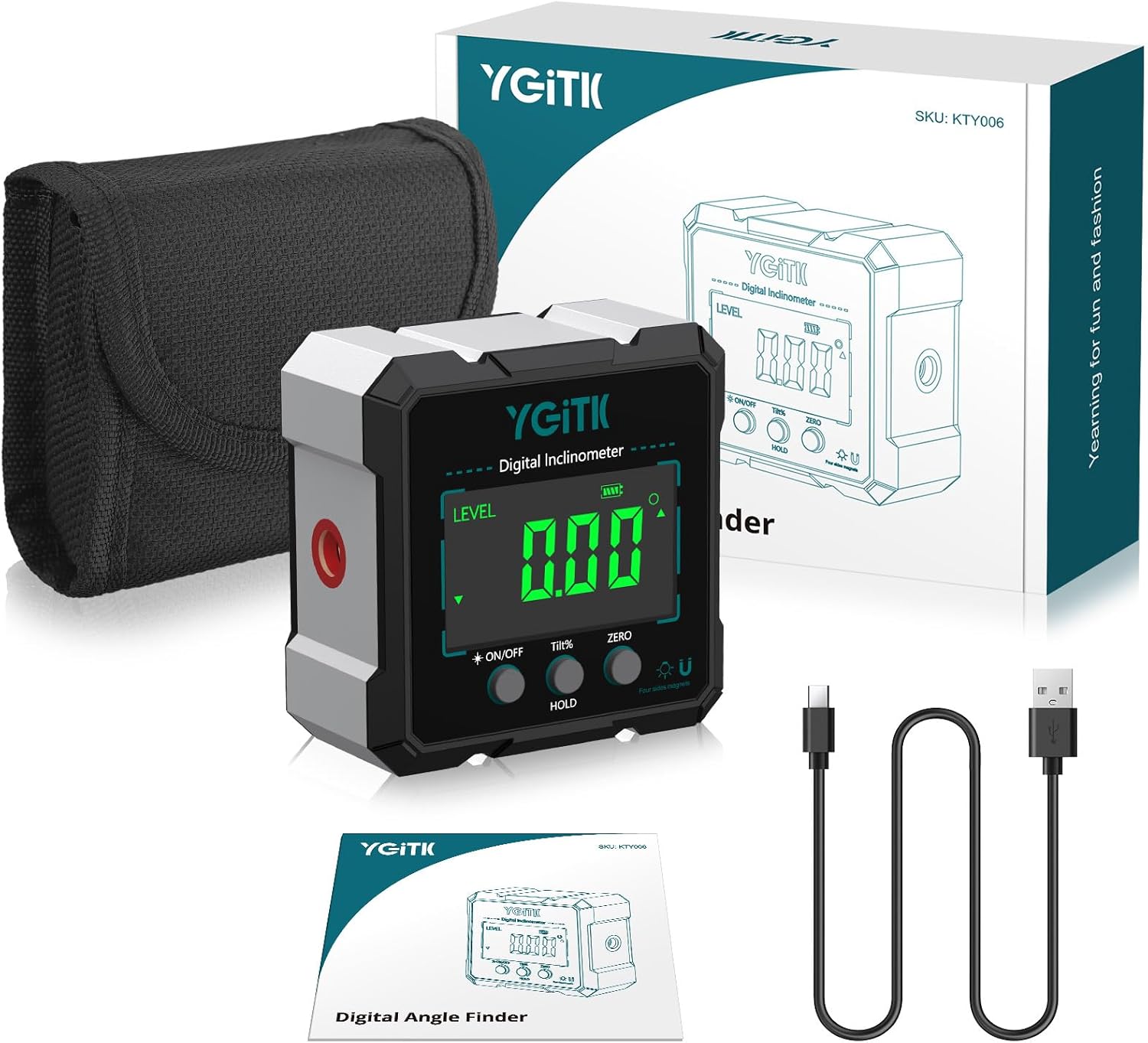
Image 2.1: The complete package contents of the YGiTK Digital Inclinometer KTY006, including the device, charging cable, carrying bag, and user manual.
2.2. Key Features
- Accurate Measurement: Measuring range of 4 x 90° with an accuracy of ±0.1° at 0° and 90°, and ±0.2° for other angles. Resolution of 0.05°.
- Dual Laser Function: Emits horizontal laser lines for clear marking and can be used as a laser level. Laser class 2 (IEC/EN 60825-1/2014).
- LCD Display: Equipped with an LED-backlit display for clear readings in various lighting conditions.
- Rechargeable Battery: Built-in 340mAh rechargeable battery with Type-C charging, providing up to 7 hours of continuous use.
- Magnetic Base: Features 4 built-in magnets on the left, right, bottom, and back for secure attachment to metal surfaces.
- Water Resistance: IP54 rated for protection against dust and splashing water.

Image 2.2: A detailed diagram illustrating the dimensions and key features of the YGiTK Digital Inclinometer KTY006.
3. Setup
3.1. Initial Charging
Before first use, fully charge the inclinometer. Connect the provided Type-C charging cable to the device's charging port and a compatible USB power source (e.g., PC, laptop, USB charger). A full charge takes approximately 2.5 hours.

Image 3.1: The YGiTK Digital Inclinometer KTY006 being charged via its Type-C port.
3.2. Power On/Off
Press the ON/OFF button to power the device on or off. The LCD will illuminate upon activation.
4. Operating Instructions
4.1. Basic Angle Measurement
- Place the inclinometer on the surface you wish to measure.
- The LCD will display the current angle relative to the horizontal plane.
4.2. Zero Calibration
To set a relative zero point:
- Place the inclinometer on the desired reference surface.
- Press the ZERO button. The display will show 0.00°, indicating that this surface is now the reference for subsequent measurements.
4.3. Hold Function
Press the HOLD button to freeze the current measurement on the display. Press it again to release the hold and resume live measurement.
4.4. Unit Conversion (Tilt%)
Press the HOLD/Tilt% button to switch between angle (degrees) and slope (percentage) display modes.
4.5. Laser Function
To activate the dual laser lines, press the ON/OFF button briefly after the device is powered on. The laser lines will project horizontally from the sides of the device. Press the ON/OFF button again to turn off the lasers.

Image 4.1: The inclinometer utilizing its dual laser function to assist in aligning objects, such as picture frames.
4.6. Magnetic Attachment
The inclinometer features strong magnets on four sides, allowing it to be securely attached to ferrous metal surfaces for hands-free operation. This is particularly useful for tasks involving miter saws, band saws, or table saws.

Image 4.2: The inclinometer demonstrating its magnetic attachment capability on a window frame, showing measurements at different angles.
4.7. LCD Display Overview
The LCD provides clear visual feedback on measurements, battery status, and mode indicators.

Image 4.3: An illustration of the LCD display and button functions on the YGiTK Digital Inclinometer KTY006.
5. Maintenance
5.1. Cleaning
Wipe the device with a soft, damp cloth. Do not use abrasive cleaners or solvents. Ensure the device is dry before storage.
5.2. Storage
Store the inclinometer in its carrying bag in a cool, dry place away from direct sunlight and extreme temperatures. Remove the device from the carrying bag if it is accidentally powered on to prevent battery drain.
5.3. Battery Care
To prolong battery life, avoid fully discharging the battery frequently. Recharge the device regularly, especially if it has not been used for an extended period.
6. Troubleshooting
6.1. "Err" Display
If the display shows "Err", it indicates that the device is positioned at an angle greater than 30 degrees from its intended measurement plane, or it is not stable. Ensure the inclinometer is placed firmly on a stable surface within its operational range.

Image 6.1: Visual guide for correct and incorrect measuring positions, explaining the "Err" display.
6.2. Dim Laser
If the laser appears dim, ensure the battery is fully charged. In very bright environments, the laser lines may be less visible. Consider using the device in a shaded area or adjusting ambient lighting.
6.3. Inaccurate Readings
If readings appear inaccurate, perform a zero calibration on a known level surface. Ensure the device is clean and free from debris that might interfere with its placement.
7. Specifications
| Feature | Specification |
|---|---|
| Measuring Range | 4 x 90° |
| Accuracy | ±0.1° (at 0° and 90°), ±0.2° (for other angles) |
| Resolution | 0.05° |
| Water Resistance | IP54 |
| Power Supply | 340mAh Rechargeable Battery (Lithium) |
| Charging Port | Type-C |
| Continuous Use Time | Up to 7 hours (after 2.5 hours charge) |
| Laser Class | Class 2 (IEC/EN 60825-1/2014) |
| Material | Aluminum |
| Item Weight | 160 g |
| Package Dimensions | 12.2 x 10.3 x 3.9 cm |
| Model Number | KTY006 |
8. Safety Information
- Do not stare directly into the laser beam.
- Avoid pointing the laser beam at people or animals.
- Do not disassemble or modify the device. Unauthorized modifications may result in injury or damage to the product.
- Keep the device out of reach of children.
- Use the device only for its intended purpose as an angle measurement tool.
9. Warranty and Support
Information regarding product warranty and customer support was not provided in the source data. Please refer to the product packaging or the retailer's website for details on warranty coverage and how to contact customer support for your YGiTK Digital Inclinometer KTY006.