
1. Introduction
This manual provides detailed instructions for the safe and effective use of your Viconor Red Light Therapy Device. Please read this manual thoroughly before operating the device and retain it for future reference. This device is designed for targeted red light therapy applications.

Image 1.1: The Viconor Red Light Therapy Device with its charging base. The device is blue, pen-shaped, with a curved black tip emitting red light, and a digital display showing settings.
2. Important Safety Information
Please read and understand all safety warnings before using this device.
- Consult a Healthcare Professional: If you have any medical conditions, are pregnant, or are taking medications, consult your doctor before using this device.
- Eye Protection: Avoid direct eye exposure to the red light. Do not look directly into the light source.
- Skin Sensitivity: Discontinue use if you experience any discomfort, redness, or irritation.
- Children: Keep out of reach of children. This device is not intended for use by children without adult supervision.
- Water Exposure: Do not immerse the device in water or use it in wet environments.
- Damage: Do not use the device if it appears damaged. Contact customer support for assistance.
- Medical Disclaimer: This device is not intended to diagnose, treat, cure, or prevent any disease. Statements regarding dietary supplements have not been evaluated by the FDA.
3. Product Components and Features
The Viconor Red Light Therapy Device is a versatile tool designed for both facial and body applications. It features a removable tip for targeted therapy.
3.1. Device Overview
- Main Unit: Handheld device with integrated controls and display.
- Removable Tip: A curved tip for precise application to smaller areas like the mouth, ear, or nose.
- Charging Base: For convenient recharging of the device's internal battery.
- LED Emitters: Utilize 660nm red light and 680nm near-infrared light for therapeutic effects.

Image 3.1: Illustration of the device's modular design, showing how the tip can be attached for targeted facial therapy or removed for broader body applications. The device is shown in both configurations.
3.2. Light Wavelengths
The device emits light in the 660nm (red light) and 680nm (near-infrared light) spectrums. These wavelengths are selected for their ability to penetrate different tissue depths.
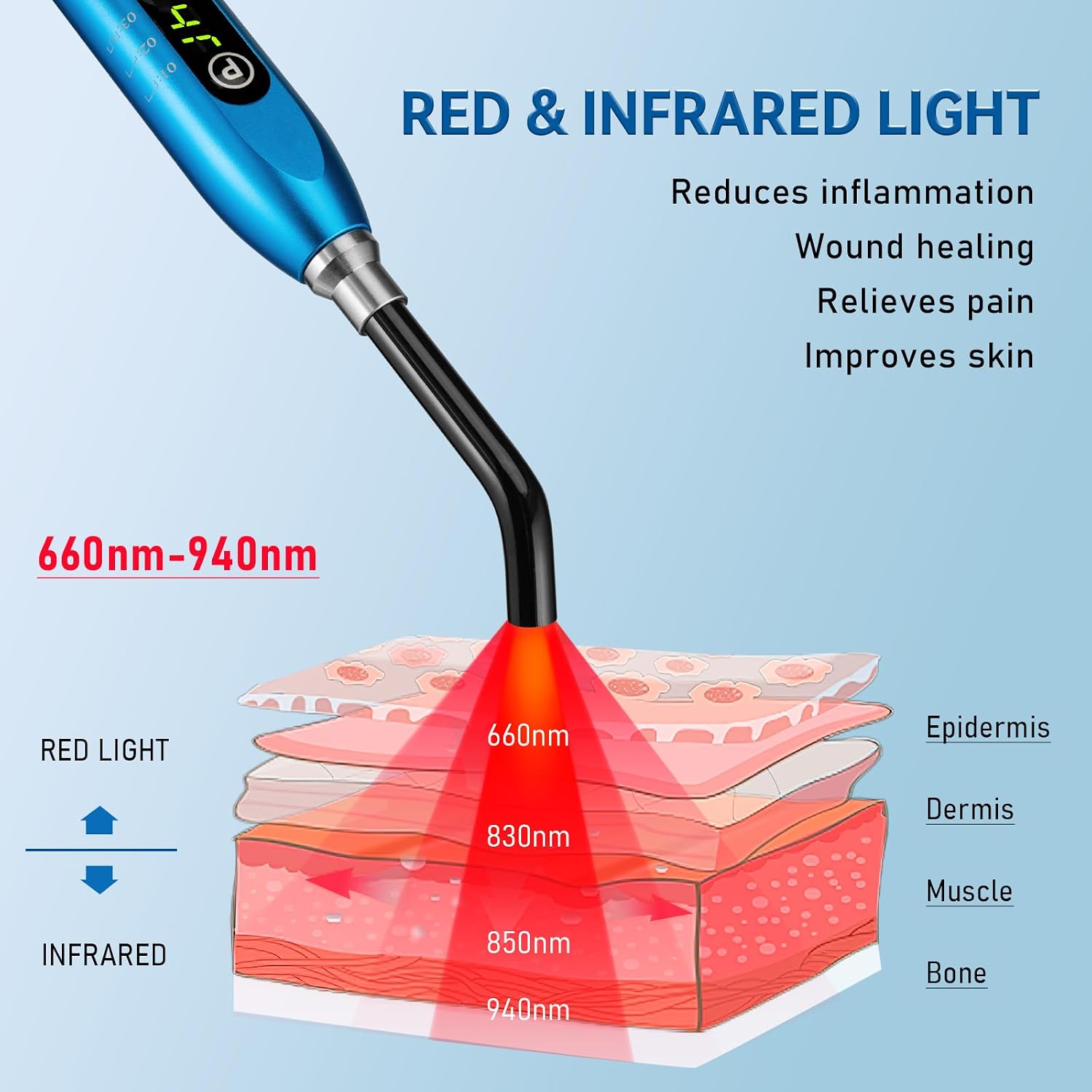
Image 3.2: Diagram illustrating the penetration depths of red light (660nm) and infrared light (830nm, 850nm, 940nm) into the epidermis, dermis, muscle, and bone layers of the skin.
4. Setup and Charging
4.1. Initial Charging
Before first use, fully charge the device. Place the device onto its charging base. The indicator lights on the device will show charging status. A full charge typically takes several hours.
4.2. Attaching/Removing the Tip
- To Attach: Align the tip with the main unit and gently push until it clicks into place. Ensure it is securely fastened.
- To Remove: Gently twist and pull the tip away from the main unit.

Image 4.1: A user demonstrating the use of the device with the tip installed for targeted therapy on the mouth, ear, and nose areas.

Image 4.2: An illustration showing the device with the tip removed, indicating its use for wider areas such as legs, knees, shoulders, neck, waist, back, and finger joints.
5. Operation
5.1. Controls
The device features three primary control buttons:
- P (Power) Button: Toggles the device on/off.
- M (Mode) Button: Switches between the available therapy modes.
- T (Timing) Button: Activates the timing function. Each press adds 5 seconds to the treatment duration. The default session time is 90 seconds.

Image 5.1: Close-up of the device showing the P (Power), M (Mode), and T (Timing) buttons, along with the digital display indicating the selected mode and timer.
5.2. Therapy Modes
The device offers three distinct therapy modes:
- Mode 01: Continuous Infrared Output: Provides a high-density, continuous infrared light output. This mode is suitable for severe pain conditions such as herpes labialis, mouth ulcers, and canker sores.
- Mode 02: Gradual Intensity Continuous Infrared Light: Offers a continuous infrared light output with gradual intensity. This mode is recommended for minor symptoms of surface pain.
- Mode 03: Low Frequency Pulsed Intermittent Infrared Light: Delivers pulsed infrared light at a low frequency. This mode is ideal for general light therapy and minor surface pain symptoms.
5.3. Treatment Guidelines
- Session Duration: Each session is set for 30 minutes. The optimal treatment time is generally 30 minutes.
- Frequency: Use 3-5 times per week.
- Distance: Hold the device approximately 1/2 inch from the skin surface for optimal light delivery.
- Consistency: Consistent use is key to observing results.

Image 5.2: A close-up image of a mouth area with a visible cold sore, illustrating the device's application for oral pain relief, including cold sores, mouth ulcers, and canker sores.
6. Maintenance
6.1. Cleaning
To clean the device, wipe it with a soft, damp cloth. Do not use abrasive cleaners or immerse the device in water. Ensure the device is powered off and unplugged from the charging base before cleaning.
6.2. Storage
Store the device in a cool, dry place away from direct sunlight and extreme temperatures. Keep it in its original packaging or a protective case when not in use to prevent damage.
7. Troubleshooting
| Problem | Possible Cause | Solution |
|---|---|---|
| Device does not turn on. | Low battery or device not charged. | Place the device on the charging base and allow it to charge fully. Ensure the charging base is connected to power. |
| Red light does not emit. | Device is off, low battery, or malfunction. | Press the Power button. Ensure the device is charged. If the issue persists, contact customer support. |
| Tip is loose or falls off. | Tip not properly attached. | Re-attach the tip, ensuring it clicks securely into place. |
| Skin irritation after use. | Overuse or individual sensitivity. | Reduce treatment duration or frequency. Discontinue use if irritation persists and consult a healthcare professional. |
8. Specifications
- Model: B0CQLQ7XYN
- Wavelengths: 660nm (Red Light), 680nm (Near-Infrared Light)
- Power Source: Rechargeable battery (1 A battery included)
- Package Dimensions: 8.39 x 5.71 x 2.52 inches
- Weight: 1.5 Pounds
- Manufacturer: Viconor
9. Warranty and Support
Viconor products are manufactured to high-quality standards. For warranty information, technical support, or service inquiries, please contact Viconor customer support through their official channels or the retailer where the product was purchased.
Please retain your proof of purchase for warranty claims.