
FLIR CM276
Contents
FLIR CM276 IGM Clamp Meter with METERLiNK User Manual
Comprehensive Guide for Operation and Maintenance
1. Product Overview
The FLIR CM276 is an advanced IGM (Infrared Guided Measurement) Clamp Meter designed for electrical professionals. It combines a clamp meter with a thermal imaging camera, allowing users to quickly identify hot spots and potential issues before making contact. Integrated with METERLiNK technology, it facilitates seamless data transfer and reporting.

Front view of the FLIR CM276 IGM Clamp Meter, showcasing its integrated thermal camera display, clamp jaw, and control buttons.
Key Features:
- Infrared Guided Measurement (IGM): 160 x 120 resolution for locating dangerous problems before direct contact.
- VFD Mode: Low-pass filter for accurate voltage, current, and frequency readings in noisy environments.
- Built-in LED Worklights: Illuminates low-light areas for safer inspections.
- METERLiNK App Compatibility: Enables log comparisons, reporting, custom alarm thresholds, and multi-meter connectivity.
- Solar PV DC Power Measurement: Measures up to 1500V with optional PV test leads.
2. Setup
2.1 Unpacking and Initial Inspection
Carefully unpack the FLIR CM276 and all included accessories. Verify that all items listed in the 'What's in the Box' section are present and undamaged. If any items are missing or damaged, contact your supplier immediately.
What's in the Box:
- FLIR CM276 Clamp Meter
- CAT IV 600 V Silicone Test Leads (TA82)
- USB Type-A to Type-C Cable
- Soft Carrying Case
- FLIR Quick Start Guide
- FLIR Warranty Card
2.2 Battery Installation and Charging
The FLIR CM276 uses a rechargeable 3.7V Lithium Ion battery (included). Before first use, ensure the battery is fully charged using the provided USB Type-A to Type-C cable and a compatible USB power adapter (not included). The charging indicator on the device will show the charging status.
2.3 Connecting Test Leads
For electrical measurements, connect the CAT IV 600 V Silicone Test Leads to the appropriate input jacks on the meter. Ensure a secure connection before performing any measurements.
3. Operating Instructions
3.1 Powering On/Off
To power on the device, rotate the rotary dial to any measurement function. To power off, rotate the dial to the 'OFF' position.
3.2 Infrared Guided Measurement (IGM)
The IGM feature allows for non-contact thermal scanning to identify potential electrical issues. The integrated thermal camera displays heat signatures, guiding you to the source of problems. This reduces inspection and troubleshooting time for various systems.

A split image demonstrating the Infrared Guided Measurement (IGM) feature. The thermal image on the left shows a heat signature, while the right image pinpoints the exact location of the temperature anomaly, guiding users to hidden problems.
3.3 VFD Mode for Accurate Measurements
When working with variable frequency drives or other switching electronics, activate the VFD Mode. This mode employs a low-pass filter to ensure that voltage, current, and frequency readings remain accurate despite electrical noise.

The FLIR CM276 in use, measuring electrical parameters on a circuit breaker. This image emphasizes the VFD Mode, which uses a low-pass filter to ensure precise readings even in environments with noisy signals.
3.4 Using the METERLiNK App
The METERLiNK App enhances the functionality of your CM276 by allowing you to connect wirelessly to a mobile device. Through the app, you can log data, compare measurements, set custom alarm thresholds, and generate professional reports. It supports connecting multiple meters simultaneously.
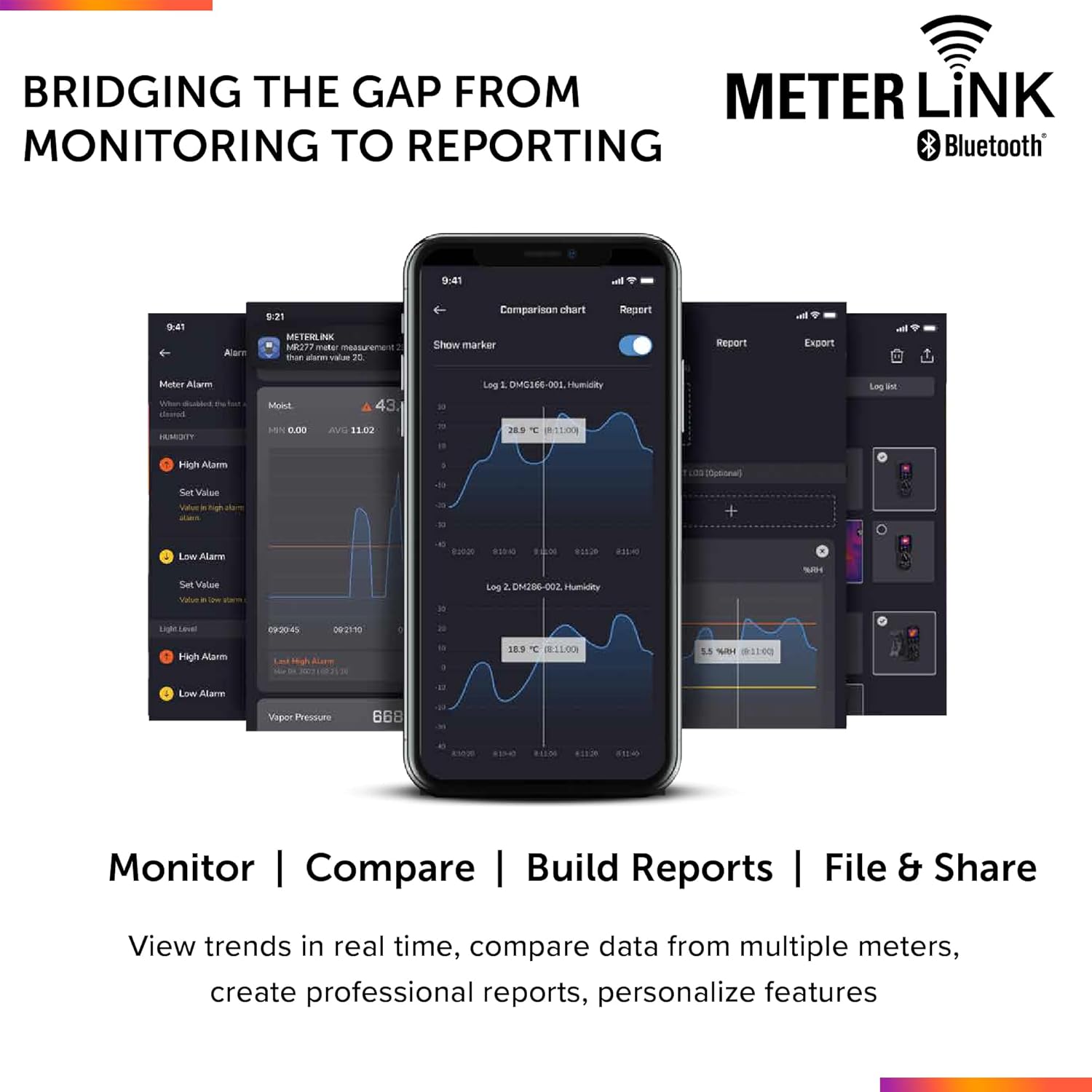
Screenshots of the FLIR METERLiNK App, illustrating its functionalities for monitoring, comparing data, building reports, and sharing information. The app allows viewing trends in real-time and connecting multiple meters.
3.5 General Measurement Functions
The CM276 offers a variety of measurement functions accessible via the rotary dial and function buttons. Refer to the Quick Start Guide for detailed instructions on specific measurement modes such as AC/DC voltage, current, resistance, capacitance, and frequency.
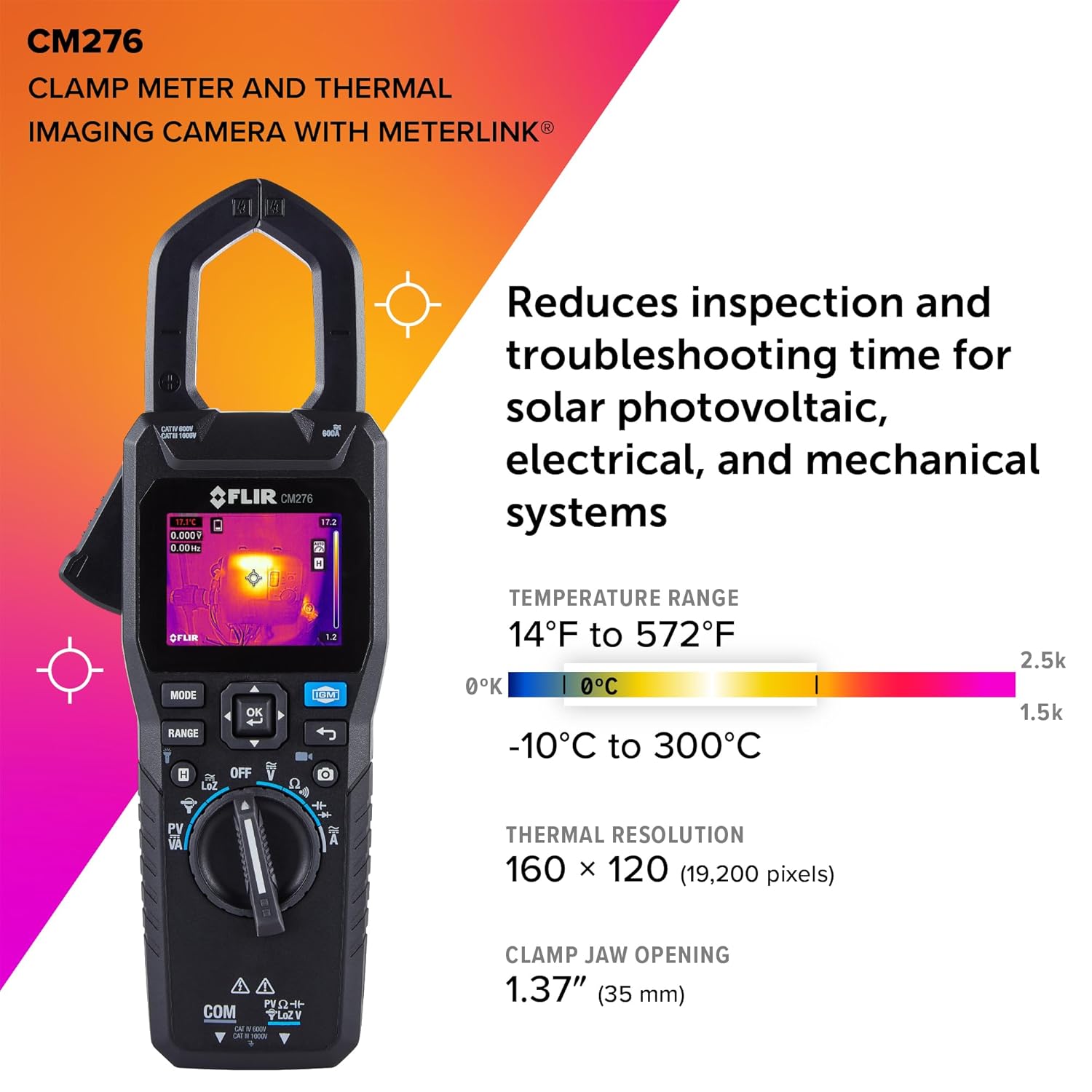
An image highlighting the FLIR CM276's capabilities, including its temperature range of 14°F to 572°F (-10°C to 300°C), thermal resolution of 160 x 120 pixels, and a clamp jaw opening of 1.37 inches (35 mm). This meter reduces inspection and troubleshooting time for solar photovoltaic, electrical, and mechanical systems.
4. Maintenance
4.1 Cleaning the Device
To maintain the accuracy and longevity of your FLIR CM276, regularly clean its exterior with a soft, damp cloth. Do not use abrasive cleaners, solvents, or harsh chemicals. Ensure the device is powered off and disconnected from any power sources before cleaning.
4.2 Battery Care and Storage
For optimal battery life, charge the device regularly. If storing the meter for an extended period, ensure the battery is charged to approximately 50% and store it in a cool, dry place. Avoid extreme temperatures.
4.3 Durability and Protection
The FLIR CM276 is designed for tough environments, featuring an IP40 rated enclosure that protects against dust and water ingress. It is also built to withstand drops from up to 6.5 feet (2 meters).

An image showcasing the robust design of the FLIR CM276, indicating its IP40 rating for dust and water resistance and its ability to withstand a 6.5-foot drop. Key specifications like display type, IR resolution, resistance, capacitance, battery type, and clamp dimensions are also listed.
5. Troubleshooting
5.1 Common Issues and Solutions
- Device not powering on: Ensure the battery is charged. Check that the rotary dial is set to a measurement function and not 'OFF'.
- Inaccurate readings: Verify test lead connections. Ensure the correct measurement mode is selected. For noisy environments, activate VFD Mode.
- Thermal image not clear: Ensure the thermal lens is clean. Check for obstructions.
- METERLiNK connection issues: Ensure Bluetooth is enabled on both the CM276 and your mobile device. Restart both devices and try reconnecting.
If you encounter persistent issues not covered here, refer to the full product manual or contact FLIR customer support.
6. Technical Specifications
| Specification | Value |
|---|---|
| Model Number | CM276 |
| Product Dimensions | 5.91 x 5.91 x 11.22 inches |
| Weight | 0.99 ounces |
| Batteries | 1 Lithium Ion battery (included) |
| Manufacturer | Flir |
| Display | 2.4" LCD color screen |
| IR Resolution | 160 x 120 (19,200 pixels) |
| Temperature Range (IGM) | 14°F to 572°F (-10°C to 300°C) |
| Resistance | 60 KΩ |
| Capacitance | 1000 µF |
| IP Rating | IP40 |
| Clamp Jaw Opening | 1.37" (35 mm) |
7. Warranty and Support
7.1 Manufacturer's Warranty
The FLIR CM276 is manufactured by Flir and comes with a standard manufacturer's warranty. Please refer to the FLIR Warranty Card included in the product packaging for specific terms, conditions, and duration of the warranty.
7.2 Extended Protection Plans
Optional extended protection plans are available for purchase to provide additional coverage beyond the standard manufacturer's warranty. These plans offer peace of mind and can cover repairs or replacements for an extended period.
- 3-Year Protection Plan
- 4-Year Protection Plan
- Complete Protect (monthly plan covering eligible purchases)
7.3 Customer Support
For technical assistance, troubleshooting, or warranty claims, please contact FLIR customer support. Contact information can typically be found on the FLIR website or in the product documentation.
Documents and downloads
Ask a question about this manual
Ask about setup, troubleshooting, compatibility, parts, safety, or missing instructions. Manuals+ will review the question and use this page’s manual context to help answer it.