1. Introduction
This manual provides detailed instructions for the operation and maintenance of your TIDRADIO TD-H3 Ham Radio Handheld. The TD-H3 is a multi-band transceiver designed for reliable communication, featuring advanced capabilities such as USB-C programming and charging, wireless replication, and a 1.44-inch color display.

Figure 1.1: TIDRADIO TD-H3 Ham Radio Handheld and included accessories.
2. Product Overview and Components
The TD-H3 radio is equipped with various ports and controls for optimal functionality.

Figure 2.1: Key components of the TD-H3 radio, including antenna connector, flashlight, Push-to-Talk (PTT) buttons, 2-PIN accessory port, and USB-C ports for charging and programming.
- Female Connector & Flashlight: Located at the top for antenna attachment and illumination.
- PTT A/B Button: Dual Push-to-Talk buttons for transmitting on different bands.
- 2-PIN & USB-C Port: For connecting external audio accessories (mic/earpiece) and programming.
- USB-C Charging Port: Dedicated port for charging the radio.
3. Setup
3.1 Battery Installation and Charging
The TD-H3 is powered by a 2500mAh Lithium Polymer battery. Ensure the battery is fully charged before first use.

Figure 3.1: The 2500mAh battery being charged via the USB-C port.
- Align the battery with the back of the radio and slide it into place until it clicks securely.
- Connect the provided USB-C cable to the USB-C charging port on the radio and to a compatible USB power adapter.
- The charging indicator light will show the charging status. A full charge typically takes several hours.
3.2 Antenna Attachment
Attach the appropriate antenna (TD-771 or standard antenna) to the female connector on top of the radio by screwing it clockwise until finger-tight. Do not overtighten.
3.3 Power On/Off
Rotate the volume knob clockwise to power on the radio. Rotate counter-clockwise until a click is heard to power off.
4. Programming
The TD-H3 offers multiple programming methods for flexibility.

Figure 4.1: The TD-H3 features a built-in programmable chip, enabling various programming options.
4.1 USB-C Programming
The radio supports programming directly via the included USB-C data cable. This cable can also be used for charging.
4.2 Wireless Programming (Odmaster App)
Download the 'Odmaster' app from the Google Play Store or App Store to program the radio wirelessly via Bluetooth.
4.3 CHIRP Software
The TD-H3 is compatible with CHIRP software. Select 'TIDRADIO → TD-H3-Ham' within the software for programming.
4.4 CPS Manufacturer Software
Manufacturer software (CPS) and firmware upgrades are available. Visit walkietalkiesoftware.com for downloads and instructions.
Note: If the USB-C cable is not preferred, the TD-H3 is also compatible with Kenwood 2-PIN programming cables.
5. Operating Instructions
5.1 Multi-Band Transmit/Receive Frequencies
The TD-H3 supports a wide range of frequencies:
- Receive Bands (RX):
- FM: 50-76MHz
- AM: 76-108MHz
- 108-136MHz (Aviation Band)
- VHF: 136-174MHz
- 174-350MHz
- 350-400MHz
- UHF: 400-470MHz
- 470-600MHz
- Transmit Bands (TX):
- VHF: 144-148MHz
- UHF: 420-450MHz
Note: AM frequency programming is currently available only through CPS software. Contact customer support for operational instructions.

Figure 5.1: The radio's display showing AM/FM and aviation band receiving capabilities.
5.2 One Key Frequency Match
This feature allows for quick frequency matching with another transmitting radio.

Figure 5.2: Demonstrating the one-key frequency match function.
- Enable the Dec.code function in Menu 47.
- Long press button [1] to enter the Match interface.
- When another radio transmits, the TD-H3 monitor will display its frequency and CTCSS/DCS codes.
5.3 Wireless Radio Replication
Replicate radio configurations wirelessly between two identical TD-H3 units.

Figure 5.3: Wireless replication of radio settings between two TD-H3 units.
- Long press the Customized button and power on the radio simultaneously to enter the Replication interface.
- Press the Customized Button again to activate the replication process.
Note: Wireless Radio Replication is currently only available between identical radio models.
5.4 DTMF Function
The DTMF (Dual-Tone Multi-Frequency) function allows for various control signals, such as repeater access or remote control.
5.5 FM/AM/NOAA Scan
The radio supports scanning across FM, AM, and NOAA weather bands. Refer to the on-screen menu for scan activation and settings.
6. Key Features
The TIDRADIO TD-H3 incorporates several advanced features for enhanced communication.

Figure 6.1: Visual representation of the TD-H3's primary features.
- Multi-Band Operation: 2 bands for transmitting, 8 bands for receiving.
- USB-C Connectivity: Supports both programming and charging via USB-C.
- Wireless Programming: Program your radio using the Odmaster app.
- One Key Frequency Match: Quickly identify and match frequencies.
- Wireless Radio Replication: Clone settings between radios.
- DTMF Function: For advanced signaling.
- 2500mAh Battery: Extended standby and operation time.
- 1.44-inch TFT Color Screen: Clear display of information.
- AM/FM/NOAA Scan: Access to broadcast and weather channels.
- Flashlight: Integrated LED light for convenience.
- 199 Channels: Ample memory for storing frequencies.
- Dual PTT: Separate PTT buttons for different bands.
- MIC Gain: Adjustable microphone sensitivity.
- Password Protection: Secure your radio settings.
7. Maintenance
7.1 Battery Care
The 2500mAh battery is designed for long service life. To maximize battery life:
- Avoid fully discharging the battery frequently.
- Charge the battery using only the provided USB-C cable and a compatible power adapter.
- Store the radio and battery in a cool, dry place when not in use for extended periods.
- The radio features a POWER SAVING function to prolong battery life during operation.
8. Troubleshooting
This section addresses common issues and their solutions.
8.1 Unable to Transmit
- The TD-H3 is preset to transmit on 144-148MHz (VHF) and 420-450MHz (UHF). Ensure you are within these bands.
- Try resetting the radio to factory mode.
- Consider updating the radio firmware to boost the system.
- If the issue persists, contact customer support.
8.2 About Kill Lock
- In the TD-H3 programming software (CPS), navigate to Edit → DTMF and remove the 'kill' tick, then write the data to the radio.
- To enable DTMF input, press the '*' button, enter your set kill code + '#', then press the PTT button to send.
8.3 Having Trouble Programming
- Ensure you are using compatible software: CHIRP (select 'TIDRADIO → TD-H3-Ham'), manufacturer's CPS software, or the 'Odmaster' app for wireless programming.
- Verify the USB-C cable connection if using wired programming.
8.4 Unable to Hit Repeaters
- Confirm that the receiving and transmitting frequencies for the repeater are correctly set.
- In VFO mode, check that Menu 23 (Direction) and Menu 24 (Offset) are configured properly.
- Set Menu 34, Menu 47, and Menu 49 items to 'OFF'.
8.5 Battery Won't Charge
- Try using a different known-good battery to determine if the issue is with the battery or the radio.
- Ensure the USB-C cable and power adapter are functioning correctly.
- If the problem persists, contact customer support with details and a picture of the battery mark (after removing the label).
9. Specifications
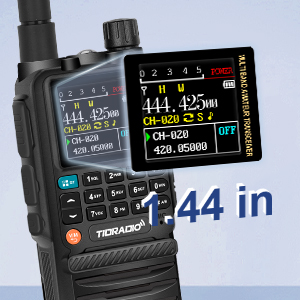
Figure 9.1: The 1.44-inch TFT color screen provides clear information display.
| Feature | Specification |
|---|---|
| Brand | TIDRADIO |
| Model Number | TD-H3 |
| Item Weight | 2.18 pounds |
| Package Dimensions | 9.96 x 8.58 x 2.52 inches |
| Batteries | 2 Lithium Polymer batteries required (included) |
| Voltage | 7.4 Volts |
| Number of Channels | 199 |
| Frequency Range | VHF/UHF (Multi-Band RX, Dual-Band TX) |
| Talking Range Maximum | 5 Mile |
| Water Resistance Level | Not Water Resistant |
| Color | Black |
| Special Features | AM/FM Reception, Multi Band Receiving and Transmitting, One Key Frequency Match, USB-C Programming & Charging, Wireless Radio Replication |
10. Package Contents
The following items are included with your TIDRADIO TD-H3 Ham Radio Handheld purchase:

Figure 10.1: All items included in the TD-H3 package.
- 2 x TIDRADIO TD-H3 Ham Radio Handheld
- 2 x 2500mAh Battery
- 2 x TD-771 Antenna
- 2 x Standard Antenna
- 2 x Tidradio Speaker Mic
- 2 x USB Charger with Cable
- 2 x Back Clip
- 1 x User Manual
- 2 x Lanyard
11. Warranty and Support
TIDRADIO provides a 1-year warranty for the TD-H3. If you encounter any issues or have questions regarding your product, please contact TIDRADIO customer service via Amazon. A dedicated technical team is available to provide professional support and resolve any problems.


