1. Introduction
Thank you for choosing the DEWENWILS 300W Smart Low Voltage Landscape Transformer. This device is designed to provide a safe and efficient power source for your outdoor landscape lighting, offering advanced control options through smart home integration. Please read this manual thoroughly before installation and operation to ensure proper use and longevity of your product.

Figure 1.1: DEWENWILS 300W Smart Low Voltage Landscape Transformer
2. Safety Information
Always adhere to local electrical codes and regulations. Improper installation can lead to electric shock, fire, or damage to the transformer and connected lights.
- Disconnect power before installing or servicing.
- Ensure the transformer is mounted at least 1 foot (30cm) above ground.
- Do not overload the transformer. The maximum power is 300W.
- Use only with low voltage landscape luminaires and fittings.
- Ensure all screw connections are tight to prevent loose wiring.
- Install on a circuit protected by a GFCI (Ground-Fault Circuit Interrupter).
- This product is suitable for outdoor use only.
3. Product Overview
3.1 Key Features
- Safe Low Voltage Output: Converts 120V AC to 12V/15V AC for stable and secure landscape lighting.
- Smart Control: Compatible with Alexa and Google Home Assistant for convenient remote control via smartphone or voice commands (2.4GHz WiFi network required).
- Durable Construction: Made of stainless steel, offering excellent waterproof, durable, and corrosion-resistant properties.
- Multiple Timer Modes: Features Schedule, Circulate, Random, Countdown, and Astronomical modes for automated lighting control.
- Easy Installation: Designed for quick and hassle-free setup with included mounting hardware.
3.2 Components
The transformer unit includes:
- Main Transformer Unit
- Power Cord (18AWG, 3.3FT Heavy Duty)
- Wiring Terminals (for 12V and 15V output)
- On/Off Button and Reset Button
- Indicator Lights (WiFi, Power)
- Mounting Screws and Bracket

Figure 3.1: Control Panel and Wiring Terminals
4. Setup and Installation
Follow these steps for safe and correct installation:
- Choose a Mounting Location: Select a suitable outdoor location, ensuring the transformer is mounted vertically on a wall or sturdy surface, at least 1 foot (30cm) above ground.
- Mount the Transformer: Use the built-in hanging holes and included screws/mounting bracket to securely attach the transformer to the wall.
- Connect Wires: Open the wiring compartment. Connect your landscape light wires to the appropriate 12V or 15V AC output terminals. Ensure common (COM) wires are connected to the COM terminals. Tighten all screw connectors firmly.
- Plug In: Once all connections are secure, plug the transformer's power cord into a GFCI-protected 120V AC outdoor outlet.

Figure 4.1: Wall Mounting the Transformer

Figure 4.2: Connecting Landscape Light Wires
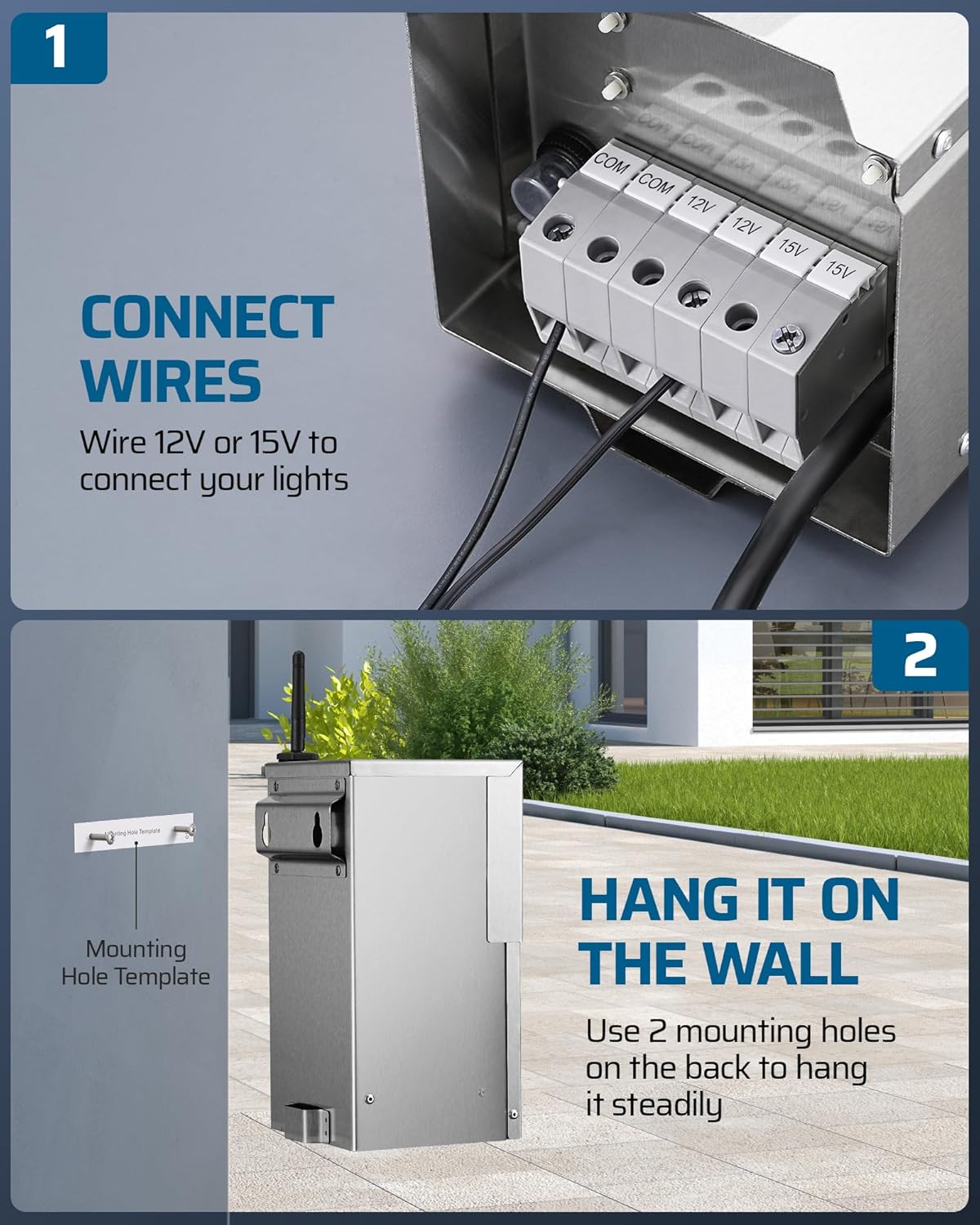
Figure 4.3: Product Dimensions for Installation Planning
5. Operating Instructions
5.1 Manual Control
The transformer features an ON/OFF button on the front panel for manual control of your landscape lights. Press the button to toggle the power.
5.2 Smart APP & Voice Control
The DEWENWILS transformer can be controlled remotely via the DEWENWILS APP and integrated with voice assistants like Alexa and Google Home.
- Download the DEWENWILS APP: Search for "DEWENWILS" in your smartphone's app store and download the application.
- Register/Log In: Create an account or log in to your existing account.
- Add Device: Follow the in-app instructions to add your new transformer. Ensure your phone is connected to a 2.4GHz WiFi network during setup.
- Connect to Voice Assistants: Once the device is added to the DEWENWILS APP, you can link it to Alexa or Google Home Assistant through their respective apps, enabling voice commands for your lighting.
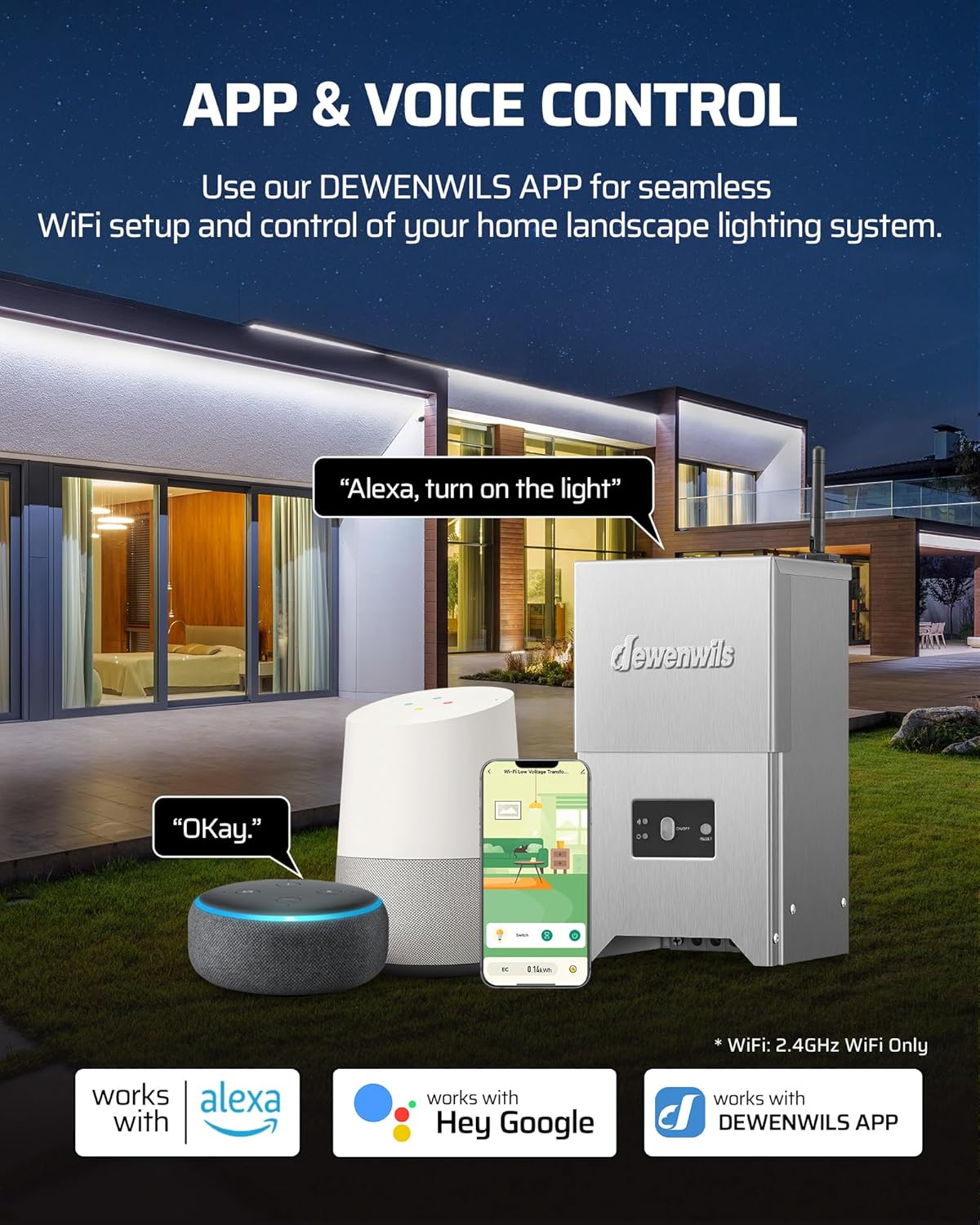
Figure 5.1: App and Voice Control Integration
5.3 Timer Modes
The DEWENWILS APP offers five versatile timer modes to automate your landscape lighting:
- Schedule Mode: Set specific ON/OFF times for your lights on chosen days of the week.
- Circulate Mode: Program lights to turn ON and OFF repeatedly within a set period (e.g., ON for 30 mins, OFF for 10 mins).
- Random Mode: Lights turn ON/OFF randomly within a designated timeframe, creating the impression that someone is home for security purposes.
- Countdown Mode: Set a countdown timer for the lights to turn ON or OFF after a specified duration.
- Astronomical Mode: Automatically turns lights ON at dusk and OFF at dawn based on your geographical location. This feature may require integration with Alexa for full functionality as per some user experiences.

Figure 5.2: Schedule Mode in the App
6. Maintenance
To ensure optimal performance and longevity of your DEWENWILS transformer:
- Regular Cleaning: Periodically wipe down the exterior of the transformer with a soft, damp cloth to remove dirt and debris. Do not use harsh chemicals or abrasive cleaners.
- Inspect Wiring: Annually check all wiring connections for tightness and signs of wear or corrosion. Re-tighten screws if necessary.
- Clear Obstructions: Ensure no vegetation or objects are blocking the transformer's ventilation or access to controls.
- Reset Button: If the transformer trips due to an overload or short circuit, press the reset button on the front panel to restore power after resolving the issue.
7. Troubleshooting
If you encounter issues with your DEWENWILS transformer, refer to the following common problems and solutions:
| Problem | Possible Cause | Solution |
|---|---|---|
| Lights not turning on | No power to transformer; tripped circuit; loose wiring; faulty lights. | Check power outlet and GFCI. Press reset button. Inspect and tighten all wiring connections. Test individual lights. |
| WiFi connection issues | Incorrect WiFi band (only 2.4GHz supported); weak signal; incorrect password. | Ensure your router is broadcasting a 2.4GHz signal. Move transformer closer to router. Re-enter WiFi password carefully in the app. Reset transformer and try pairing again. |
| Timer/Schedule not working | Incorrect app settings; app not synced; time zone issues. | Verify schedule settings in the DEWENWILS APP. Ensure the app is updated and synced. Check device's time zone settings if applicable. For Astronomical mode, ensure location services are enabled and accurate. |
| Lights flickering or dim | Overloaded circuit; too much cable length; loose connections. | Reduce the total wattage of connected lights. Use appropriate gauge wire for cable runs. Check and tighten all wiring connections. |
If problems persist, please contact DEWENWILS customer support.
8. Specifications
| Attribute | Detail |
|---|---|
| Model Number | MTM0300-15-WIFI-SS |
| Input Voltage | 120V AC |
| Output Voltage | 12V AC / 15V AC |
| Max. Power Output | 300W |
| Current Rating | 25 Amps |
| WiFi Frequency | 2.4GHz (only) |
| Material | Stainless Steel |
| Product Dimensions | 4.5"D x 4.9"W x 9"H (12.35 Pounds) |
| Mounting Type | Wall Mount |
| Certifications | FCC Listed, ETL Certified |
9. Warranty and Support
DEWENWILS stands behind the quality of its products.
- Warranty: This product comes with a 1-year industry-leading credit/insurance.
- Customer Support: For any questions, technical assistance, or warranty claims, please contact DEWENWILS customer service. We aim to provide fast response within 24 hours.
Note on Official Product Videos: No official seller-created product videos are available for this model at this time. Please refer to the images and detailed instructions provided in this manual for visual guidance.