1. Introduction
The Jesverty PS-30SWX is a regulated DC power supply designed to convert AC power to a stable DC voltage. It is suitable for powering various 13.8V equipment, including CB, HAM, GMRS, and LMR two-way radios, and scanners. This unit features an adjustable output voltage from 5V to 15V DC and provides a maximum continuous current of 30A.
This manual provides essential information for the safe and efficient operation of your PS-30SWX power supply. Please read it thoroughly before use and retain it for future reference.
2. Safety Precautions
To ensure safe operation and prevent damage to the unit or connected devices, observe the following precautions:
- Do not expose the unit to rain or moisture.
- Do not open the casing; there are no user-serviceable parts inside. Refer all servicing to qualified personnel.
- Ensure proper ventilation. Do not block ventilation openings.
- Connect the unit to a grounded 115V AC outlet.
- Verify that the output voltage and current settings are appropriate for your connected device before powering it on.
- The unit is equipped with overheat, short-circuit, over-voltage, over-current, and overload protection.
3. Product Features and Components
Familiarize yourself with the various parts of your PS-30SWX power supply:

Figure 1: Front and Rear Panel Components. This image displays the Jesverty PS-30SWX power supply with labels pointing to its various components, including the LCD display, power switch, voltage control knob, output terminals, and cooling fan.
Front Panel:
- LCD Display: Shows output voltage and current.
- Power-on Indicator: Illuminates when the unit is powered on.
- Overload Indicator: Illuminates if an overload condition is detected.
- Callsign Setting Button: Used to store a call number in memory.
- Voltage Control Knob: Adjusts the output voltage (5V-15V).
- Power Switch: Turns the unit ON/OFF.
- Snap-in Terminals: Provides up to 6A output.
- Cigar-lighter Socket: Provides up to 10A output.
Rear Panel:
- Phone Jack (SPKR 8Ω): Connects an external speaker for radio signal audio.
- Output Terminals (5-Way Binding Posts): Universal hardwired screw-type connection for up to 30A output.
- Cooling Fan: Temperature-regulated fan for heat dissipation.
- AC Input Socket: For connecting the AC power cord.
4. Setup
Follow these steps to set up your PS-30SWX power supply:
- Placement: Place the power supply on a stable, flat surface, ensuring adequate space around the unit for ventilation. Do not place it near heat sources or in direct sunlight.
- AC Power Connection: Connect the supplied AC power cord to the AC Input Socket on the rear panel of the power supply and then plug it into a standard 115V AC wall outlet.
- DC Device Connection: Connect your DC-powered device to the power supply using one of the following methods:
- Cigar-lighter Socket: For devices requiring up to 10A. Open the cover and insert the cigar-lighter plug.
- Snap-in Terminals: For devices requiring up to 6A. Open the cover and connect the wires.
- Output Terminals (Binding Posts): For devices requiring up to 30A. Connect the positive (+) and negative (-) wires from your device to the corresponding binding posts on the rear panel. Ensure connections are secure.

Figure 2: Cigar-lighter socket access. This image shows the front panel of the power supply with the cover for the cigar-lighter socket opened, revealing the socket.

Figure 3: Rear panel connections. This image highlights the rear panel of the power supply, showing the 5-way binding posts for high-current output and the AC input socket.
- Initial Voltage Setting: Before turning on the power supply, rotate the Voltage Control Knob to the desired output voltage, typically 13.8V for most amateur radio equipment.
5. Operating Instructions
Once the power supply is set up, follow these steps for operation:
- Power On: Flip the Power Switch to the 'ON' position. The LCD display will illuminate, showing the current output voltage and amperage. The Power-on Indicator will also light up.
- Adjusting Voltage: Turn the Voltage Control Knob clockwise to increase the output voltage and counter-clockwise to decrease it. The LCD display will show the adjusted voltage in real-time. The adjustable range is 5V to 15V DC.
- Callsign Storage: To store a callsign, press the Callsign Setting Button. Follow the on-screen prompts or refer to the specific instructions for this feature if available in a separate guide.
- Audio Speaker Function: If your radio signal includes audio, connect an 8Ω speaker to the Phone Jack (SPKR 8Ω) on the rear panel to transfer the radio signal into sound.
- Monitoring: Continuously monitor the LCD display for voltage and current readings during operation. If the Overload Indicator illuminates, reduce the load or check for short circuits.
- Power Off: When finished, turn off your connected device first, then flip the Power Switch on the power supply to the 'OFF' position.

Figure 4: Accurate Back-lit LCD Display. This image shows a close-up of the power supply's front panel, highlighting the clear, back-lit LCD display showing voltage and current readings.
Video 1: Jesverty PS-30SWX DC Regulated Universal Bench Power Supply Overview. This video demonstrates the key features and operation of the PS-30SWX power supply, including AC to DC conversion, various power connection methods (cigar lighter, snap-in, binding posts), voltage adjustment from 3-15V, audio speaker connection, and callsign setting.
6. Maintenance
Regular maintenance helps ensure the longevity and optimal performance of your power supply:
- Cleaning: Disconnect the power supply from the AC outlet before cleaning. Use a soft, dry cloth to wipe the exterior. Do not use liquid cleaners or abrasive materials.
- Ventilation: Periodically check that the ventilation openings and the cooling fan are free from dust and obstructions. Blocked vents can lead to overheating.
- Connections: Ensure all input and output connections remain secure. Loose connections can cause intermittent power or damage.
7. Troubleshooting
If you encounter issues with your PS-30SWX power supply, refer to the following common troubleshooting steps:
- No Power:
- Check if the AC power cord is securely plugged into both the unit and the wall outlet.
- Ensure the Power Switch is in the 'ON' position.
- Verify the wall outlet is functioning by plugging in another device.
- Overload Indicator On:
- The connected device may be drawing too much current. Disconnect the device and check its power requirements.
- Check for any short circuits in the wiring to your connected device.
- Reduce the load on the power supply.
- Incorrect Output Voltage:
- Adjust the Voltage Control Knob to the desired voltage.
- Ensure the LCD display is functioning correctly.
- No Audio from Speaker Jack:
- Verify the speaker is correctly connected to the SPKR 8Ω jack.
- Ensure the connected radio is outputting audio.
- Check the speaker's functionality with another audio source.
If the problem persists after attempting these steps, please contact Jesverty customer support.
8. Specifications
Key technical specifications for the Jesverty PS-30SWX power supply:
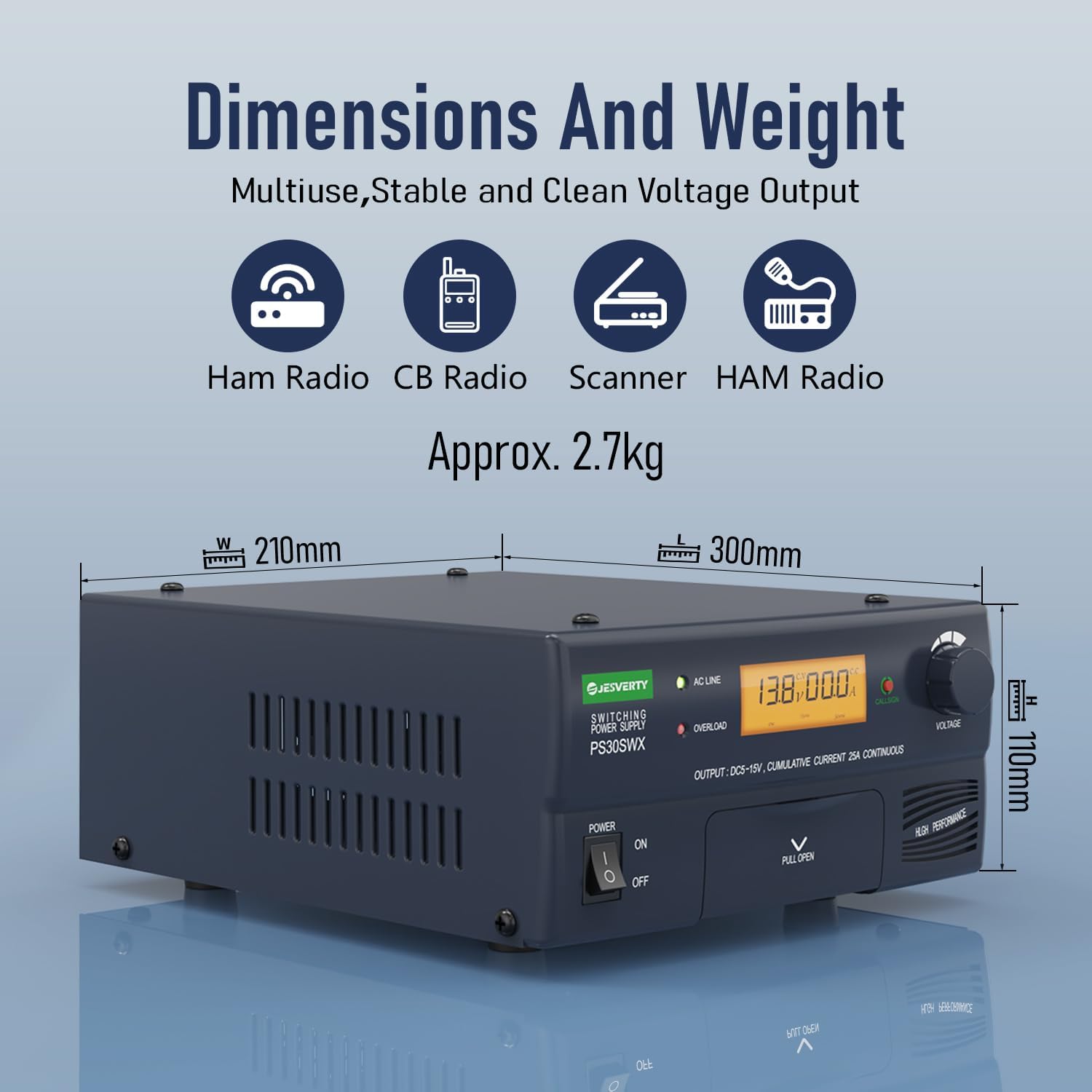
Figure 5: Dimensions and Weight. This image illustrates the physical dimensions (width, length, height) and weight of the PS-30SWX power supply.
| Feature | Specification |
|---|---|
| Model Number | PS-30SWX |
| Input Voltage | 110-130V AC, 60Hz |
| Output Voltage | 5V-15V DC (Adjustable) |
| Max Continuous Current | 30A |
| Cigar Plug Output | 10A |
| Snap-in Terminal Output | 6A |
| Output Terminals (Binding Posts) | 30A Max |
| Audio Speaker Output | 8Ω Phone Jack |
| Safety Protections | Overheat, Short-circuit, Over-voltage, Over-current, Overload |
| Dimensions (L x W x H) | 13.46 x 11.06 x 6.57 inches (Approx. 342 x 281 x 167 mm) |
| Item Weight | 7 pounds (Approx. 3.17 kg) |
| Material | Metal, Plastic |
9. Warranty and Support
Jesverty provides lifetime technical support for the PS-30SWX power supply. If you have any questions, require assistance, or are not satisfied with your product, please do not hesitate to contact us. Our customer service team is available to help.
For support, please refer to the contact information provided with your product packaging or visit the official Jesverty website.


