
1. Introduction
Thank you for choosing the Farpoint Platinum Series 2000 Lumen Rechargeable Flashlight. This durable and versatile flashlight is designed for various applications, offering powerful illumination and the convenience of a portable power bank. Please read this manual carefully to ensure proper use and maintenance of your device.
2. Product Features
- 2000 Lumen COB LED technology for bright, efficient illumination.
- Integrated 2200 mAh rechargeable battery, also functions as a power bank.
- Three light modes: High (2000 lumens), Low (1000 lumens), and Strobe.
- Adjustable bezel for beam focus (floodlight to spotlight).
- Durable aluminum alloy construction.
- Weather-resistant design with an IP4 rating.
- Convenient pocket clip for portability.
- Includes a 29-inch USB-C charging cable.
- Overall length: 7 3/4 inches (approximately 19.7 cm).

Image: The Farpoint Platinum Series flashlight delivers 2000 lumens of bright light and features a built-in power bank function to charge your electronic devices.
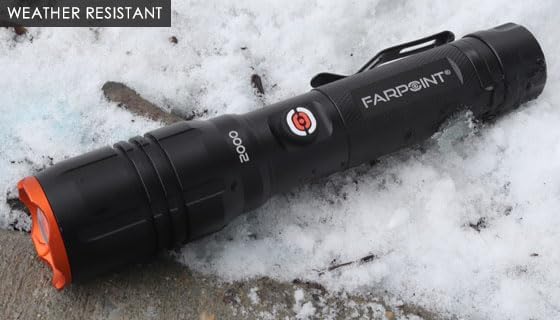
Image: The flashlight is designed to be weather-resistant, making it suitable for use in various outdoor conditions, including snow.
3. Package Contents
- Farpoint Platinum Series 2000 Lumen Rechargeable Flashlight
- 29-inch USB-C Charging Cable
4. Setup
4.1 Initial Charging
Before first use, fully charge the flashlight. Connect the included USB-C cable to the flashlight's charging port and to a compatible USB power source (e.g., wall adapter, computer USB port). The charging indicator will show the charging status.
5. Operating Instructions
5.1 Power On/Off and Mode Selection
The flashlight operates with a single button:
- Press once: Activates High Beam (2000 lumens).
- Press twice: Activates Low Beam (1000 lumens).
- Press a third time: Activates Strobe setting.
- Press again: Turns the flashlight off.
5.2 Focus Adjustment
Rotate the adjustable bezel at the front of the flashlight to change the beam from a wide floodlight to a concentrated spotlight, allowing you to adapt the illumination to your needs.
5.3 Using the Pocket Clip
Utilize the integrated pocket clip to securely attach the flashlight to your pocket, belt, or tool bag for convenient access and hands-free use.
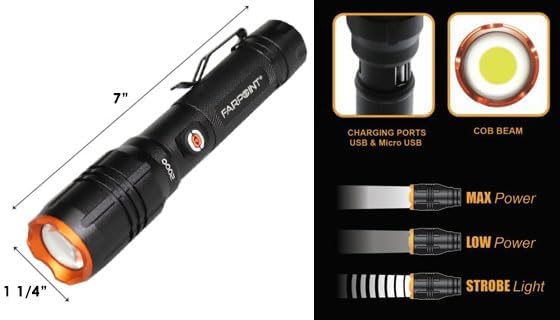
Image: This image illustrates the compact dimensions of the flashlight and its three distinct light modes: Max Power (2000 lumens), Low Power (1000 lumens), and Strobe Light.
6. Charging Instructions
To recharge the flashlight, connect the included USB-C cable to the flashlight's charging port. Plug the other end of the cable into a standard USB power adapter (not included) or a powered USB port. A full charge provides up to 8 hours of runtime on the low setting and up to 3 hours on the high setting.
7. Power Bank Function
The Farpoint Platinum Series flashlight features a 2200 mAh battery that can also serve as a portable power bank for your electronic devices.
7.1 How to Use as a Power Bank
Connect your smartphone or other USB-powered device to the flashlight's USB output port using your device's charging cable. The flashlight will begin charging your device.

Image: The flashlight's 2200 mAh battery can be used to charge other devices, such as smartphones, via its USB output port.
8. Maintenance
8.1 Cleaning
Wipe the flashlight's exterior with a soft, dry cloth. Do not use abrasive cleaners or solvents.
8.2 Storage
Store the flashlight in a cool, dry place away from direct sunlight and extreme temperatures. If storing for extended periods, recharge the battery every 3-6 months to maintain its health and prolong its lifespan.
9. Troubleshooting
- Flashlight not turning on: Ensure the battery is charged. Press the power button firmly and correctly.
- Flashlight not charging: Check that the USB-C cable is securely connected to both the flashlight and the power source. Verify the power source is active.
- Beam not focusing: Rotate the adjustable bezel to ensure it is correctly positioned for floodlight or spotlight mode.
- Device not charging from flashlight: Ensure your device's charging cable is properly connected to the flashlight's USB output port. Verify the flashlight has sufficient charge.
10. Specifications
| Model Number | 23410 |
| Light Source Type | COB LED |
| Lumen Output | 2000 lumens (High), 1000 lumens (Low) |
| Power Source | Rechargeable Battery (2200 mAh) |
| Run Time | Up to 8 hours (Low), Up to 3 hours (High) |
| Material | Aluminum Alloy |
| Weather Resistance | IP4 Rated |
| Dimensions (L x W x D) | 7 3/4 inches (approx. 19.7 cm) x 1 1/4 inches (approx. 3.2 cm) x 2 inches (approx. 5.1 cm) |
| Included Components | USB-C Cable |
11. Warranty & Support
No specific warranty information is provided in the product details. For warranty details, please refer to the manufacturer's official website or contact their customer support directly.
For technical support or inquiries, please contact Farpoint customer service through their official channels.