Introduction
Thank you for choosing the Joyroom Jdots Series JR-DB2 TWS Earbuds. This manual provides detailed instructions on how to set up, operate, maintain, and troubleshoot your new earbuds. Please read this manual carefully before use to ensure optimal performance and longevity of your device.
Safety Information
- Do not disassemble or modify the earbuds or charging case.
- Keep the device away from extreme temperatures, humidity, and liquids.
- Avoid prolonged exposure to high volume levels to prevent hearing damage.
- Clean the earbuds and charging case with a soft, dry cloth only.
- Dispose of the device responsibly according to local regulations.
Package Contents
Please check the package for the following items:
- Joyroom Jdots Series JR-DB2 TWS Earbuds (Left and Right)
- Charging Case
- USB Charging Cable
- User Manual
Product Overview
Familiarize yourself with the components of your JR-DB2 earbuds and charging case.
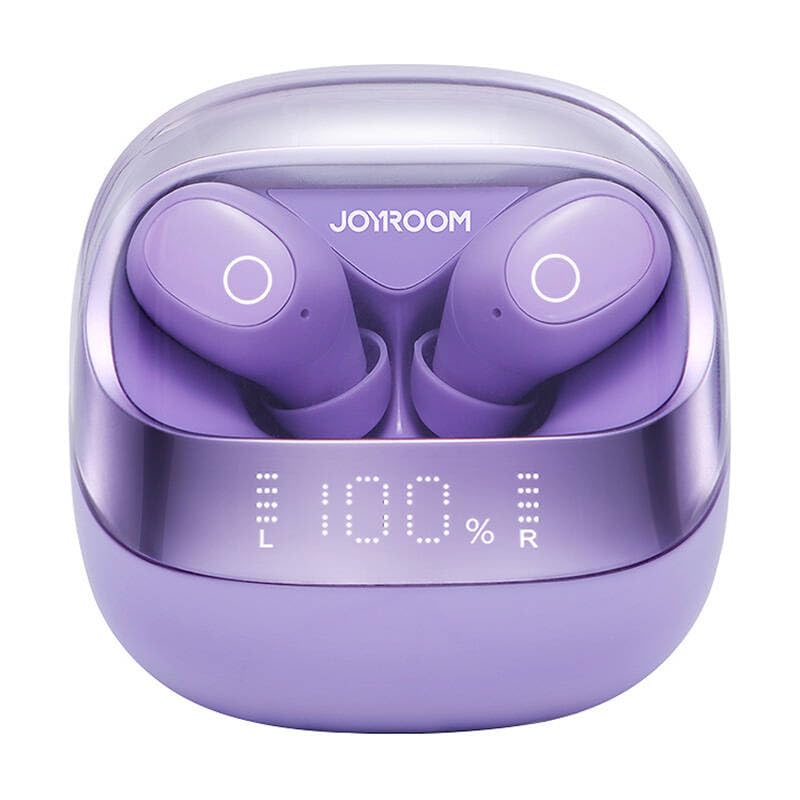
Image 1: Front view of the Joyroom JR-DB2 TWS Earbuds placed inside their charging case. The image displays the compact design of the case and the ergonomic shape of the earbuds, highlighting the overall product aesthetics.
- Earbuds: Left (L) and Right (R) earbuds with touch control areas and charging contacts.
- Charging Case: Houses the earbuds for charging and storage, features a charging port and LED indicator.
Setup
1. Charging the Earbuds and Case
Before first use, fully charge the earbuds and the charging case.
- Place the earbuds into the charging case. Ensure the charging contacts align.
- Connect the USB charging cable to the charging port on the case and to a power source (e.g., USB wall adapter, computer USB port).
- The LED indicator on the charging case will show the charging status. A full charge is indicated when the LED stops blinking or turns solid.
- Charging time for the case is approximately 1.5-2 hours. Earbuds charge automatically when placed in the case.
Image 2: Close-up view of the Joyroom JR-DB2 charging case with a USB-C cable connected to its charging port. The image illustrates the correct way to connect the charging cable to power the case.
2. Pairing with Your Device
The earbuds will automatically enter pairing mode when taken out of the charging case.
- Open the charging case and remove both earbuds. They will automatically power on and attempt to pair with each other.
- On your smartphone or Bluetooth-enabled device, go to the Bluetooth settings.
- Search for available devices and select "JR-DB2" from the list.
- Once connected, you will hear a confirmation sound, and the earbuds' indicator lights will turn off or blink slowly.
- If pairing fails, place the earbuds back into the case, close the lid, wait a few seconds, and then repeat the steps.
Operating Instructions
Wearing the Earbuds
For optimal sound quality and comfort, ensure the earbuds are worn correctly.
- Identify the Left (L) and Right (R) earbuds.
- Gently insert each earbud into the corresponding ear canal.
- Rotate the earbud slightly until it fits snugly and comfortably.
Image 3: A person demonstrating how to properly wear the Joyroom JR-DB2 TWS Earbuds. The image shows an earbud securely placed in the ear, highlighting its ergonomic fit.
Touch Controls
The JR-DB2 earbuds feature intuitive touch controls on each earbud.
| Action | Function |
|---|---|
| Single Tap (L/R) | Play/Pause music, Answer/End call |
| Double Tap (Right) | Next track |
| Double Tap (Left) | Previous track |
| Triple Tap (Right) | Volume Up |
| Triple Tap (Left) | Volume Down |
| Long Press (2s, L/R) | Reject call, Activate Voice Assistant |
Maintenance
Cleaning
- Regularly clean the earbuds and charging case to prevent dirt buildup.
- Use a soft, dry, lint-free cloth to wipe the surfaces.
- For stubborn dirt, slightly dampen the cloth with water, then wipe dry immediately.
- Do not use harsh chemicals, aerosols, or abrasive cleaners.
- Ensure charging contacts on both earbuds and case are clean and dry.
Storage
- When not in use, store the earbuds in their charging case to protect them and keep them charged.
- Store the device in a cool, dry place, away from direct sunlight and extreme temperatures.
Troubleshooting
If you encounter issues, try the following solutions:
| Problem | Solution |
|---|---|
| Earbuds not pairing with device |
|
| Only one earbud working |
|
| No sound |
|
| Charging case not charging |
|
Specifications
| Feature | Detail |
|---|---|
| Model Number | JR-DB2 |
| Brand | JOYROOM |
| Connectivity | Wireless (Bluetooth) |
| Color | Black (Note: Product may be available in other colors) |
| Material | Acrylic |
| Compatible Devices | Bluetooth-enabled devices (e.g., smartphones, tablets, laptops) |
| UPC/EAN | 6941237112057 |
Warranty and Support
Joyroom products are designed with quality and reliability in mind. For warranty information, please refer to the warranty card included in your product packaging or visit the official Joyroom website. For technical support or further assistance, please contact Joyroom customer service through their official channels.
You can often find support contact details on the manufacturer's website: www.joyroom.com


