
HUANANZHI X99-F8D Plus
HUANANZHI X99-F8D PLUS Motherboard User Manual
Model: X99-F8D Plus
1. Introduction
This manual provides comprehensive instructions for the installation, operation, and maintenance of the HUANANZHI X99-F8D PLUS Motherboard. Designed for high-performance computing, this motherboard supports Intel LGA2011-3 platform processors and DDR4 memory, offering robust features for professional and enthusiast builds.
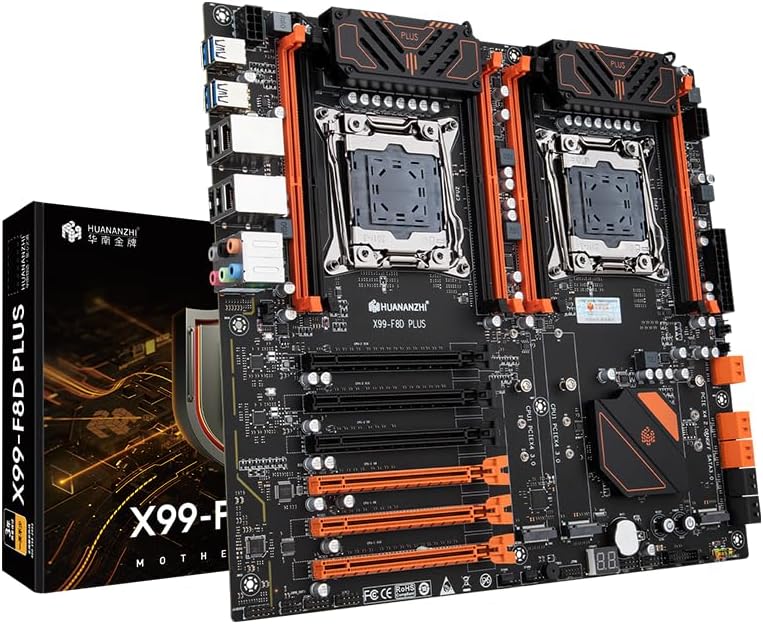
Image: The HUANANZHI X99-F8D PLUS Motherboard shown alongside its product packaging, highlighting its design and branding.
2. Safety Information
Please read the following safety guidelines carefully before installing or operating the motherboard:
- Always disconnect the power supply from the wall outlet before touching any components inside the computer case.
- Wear an anti-static wrist strap or frequently touch a grounded metal object (like the computer case) to discharge static electricity before handling the motherboard or other components.
- Handle the motherboard by its edges to avoid damaging sensitive components.
- Ensure proper ventilation within the computer case to prevent overheating.
- Keep the motherboard away from moisture and extreme temperatures.
3. Package Contents
Verify that all items are present in the package:
- 1 x HUANANZHI X99-F8D PLUS Motherboard
- 2 x SATA data cables
- 1 x Warranty card
- 1 x I/O shield backplate
4. Setup and Installation
4.1 Motherboard Layout

Image: A top-down view of the HUANANZHI X99-F8D PLUS Motherboard, showing the dual CPU sockets, eight DDR4 memory slots, and various expansion slots.
Familiarize yourself with the layout of the motherboard before proceeding with installation.
4.2 Component Installation
- CPU Installation: Carefully open the LGA2011-3 CPU sockets. Align the triangular mark on the CPU with the mark on the socket and gently place the CPU into the socket. Close the retention levers to secure the CPU.
- Memory (RAM) Installation: Open the clips on both ends of the DDR4 memory slots. Align the notch on the memory module with the key in the slot and press down firmly until the clips snap into place. This motherboard supports up to 512GB of server memory across 8 slots.
- Storage Device Installation:
- SATA Drives: Connect your SATA 3.0 6Gbps drives to the 6 available SATA ports using the provided SATA data cables.
- NVMe M.2 Drives: Install M.2 NVMe SSDs into the 2 x M.2 22110 NVME PCIE X4 3.0 slots or the 1 x M.2 2280 NVME PCIE X4 2.0 slot. Secure with the provided screw.
- Expansion Card Installation: Insert your PCI Express 3.0 x16 or x8 expansion cards (e.g., graphics cards) into the corresponding slots. Ensure they are fully seated and secured with the case screw.
- Power Supply Connection: Connect the 24-pin ATX power connector, and the two 8-pin CPU power connectors from your power supply to the motherboard.
4.3 Connecting Peripherals
Connect your peripherals to the rear I/O panel and front panel headers.

Image: A close-up view of the rear I/O panel of the HUANANZHI X99-F8D PLUS Motherboard, showing USB ports, dual LAN ports, and audio jacks.
- Rear Panel Interface:
- 4 x USB 2.0 Interface
- 4 x USB 3.0 Interface
- 2 x Network card interface (Realtek RTL8125BG 2.5Gbps LAN)
- 1 x 3-hole audio interface (7.1 sound card)
- Front Panel Interface: Connect your case's front panel cables to the corresponding headers:
- 2 x USB 2.0 PIN
- 1 x USB 3.0 PIN
- 1 x Front audio pin
- 1 x COM PIN
- 1 x Power-on pin
- 1 x 14PIN TPM
- 1 x Main board buzzer
- 1 x Diagnostic card
- 1 x Start/restart button
5. Operating Instructions
5.1 BIOS/UEFI Configuration
The motherboard features an AMI UEFI BIOS. To enter the BIOS setup utility, press the DEL or F2 key during system startup. Here you can configure boot order, system time, hardware settings, and more.
5.2 Operating System Installation
This motherboard supports Windows 7, Windows 10, and Windows 11. Insert your operating system installation media (USB drive or DVD) and follow the on-screen prompts to install the OS.
5.3 Driver Installation
After installing the operating system, install the necessary drivers for the motherboard components. These typically include chipset drivers, LAN drivers, audio drivers, and any specific drivers for your installed expansion cards (e.g., graphics card drivers). Drivers can usually be found on the manufacturer's website or an included driver disc.
6. Maintenance
- Cleaning: Regularly clean dust from the motherboard and other components using compressed air. Ensure the system is powered off and unplugged before cleaning.
- BIOS Updates: Periodically check the HUANANZHI website for updated BIOS versions. Updating the BIOS can improve stability, compatibility, and performance. Follow the specific instructions provided by HUANANZHI for BIOS updates to avoid system damage.
- Driver Updates: Keep your drivers updated to ensure optimal performance and compatibility with new software and hardware.
7. Troubleshooting
This section addresses common issues you might encounter:
- No Power:
- Check all power connections (24-pin ATX, 8-pin CPU power) to the motherboard and ensure the power supply is switched on.
- Verify the power button cable is correctly connected to the front panel header.
- No Display:
- Ensure the graphics card is properly seated in its PCIe slot and connected to power (if required).
- Check the monitor cable connection to the graphics card.
- Try reseating RAM modules.
- System Instability/Crashes:
- Check CPU and RAM for proper seating.
- Ensure adequate cooling for CPU and other components.
- Run memory diagnostic tools to check for faulty RAM.
- Update drivers and BIOS to the latest versions.
- No Network Connection:
- Verify the Ethernet cable is securely connected to the LAN port.
- Install or update the Realtek LAN drivers.
- Check network settings in your operating system.
For further assistance, refer to the support section or contact HUANANZHI customer service.
8. Specifications
| Feature | Specification |
|---|---|
| Model | HUANANZHI X99-F8D PLUS Motherboard |
| Main Chipset | Intel C612 |
| CPU Socket | Intel LGA2011-3 platform processor |
| Memory Slots | 8 x DDR4 memory slot (supports server memory) |
| Memory Standard | DDR4 2400/2133/1866MHz (four channels), Max 512GB |
| Storage Interface | 6 x SATA 3.0 6Gbps |
| Expansion Slots | 3 x PCI Express 3.0 x16, 3 x PCI Express 3.0 x8 |
| Expansion Interface | 2 x M.2 22110 NVME PCIE X4 3.0, 1 x M.2 2280 NVME PCIE X4 2.0 (@NGFF SSATA 3.0 6Gb/s) |
| Sound Card | 7.1 sound card |
| Network Card | 2 x Realtek RTL8125BG 2.5Gbps LAN |
| Power Interface | 24PIN+8PIN+8PIN |
| FAN PIN | 2xCPU_FAN PIN, 4xSYS_FAN PIN |
| Power Supply | 8+8-phase power supply |
| PCB Layers | 12-layer PCB |
| Dimension | 305*330MM E-ATX |
| Rear Panel Interface | 4xUSB2.0, 4xUSB3.0, 2x Network, 1x3-hole audio |
| Front Panel Interface | 2xUSB2.0 PIN, 1xUSB3.0 PIN, 1xFront audio pin, 1xCOM PIN, 1xPower-on pin, 1x14PIN TPM, 1xMain board buzzer, 1xDiagnostic card, 1xStart/restart button |
| Supported Systems | Windows 7, Windows 10, Windows 11 |
| BIOS | AMI UEFI BIOS |
9. Warranty and Support
9.1 Warranty Information
The HUANANZHI X99-F8D PLUS Motherboard comes with a warranty card included in the package. Please refer to the warranty card for specific terms and conditions regarding warranty coverage and duration.
9.2 Customer Support
For technical support, troubleshooting assistance, or warranty claims, please contact HUANANZHI customer service. Visit the official HUANANZHI website for contact information and additional resources.
You can visit the HUANANZHI Store on Amazon for more product information and support.
Related Documents - X99-F8D Plus
 |
HUANANZHI X99-F8D Dual Motherboard User Manual Comprehensive user manual for the HUANANZHI X99-F8D Dual Motherboard, covering safety precautions, package contents, motherboard layout, installation, driver installation, and BIOS settings. |
 |
HUANANZHI X99-F8D PLUS Motherboard User Manual User manual for the HUANANZHI X99-F8D PLUS motherboard, detailing its specifications, interfaces, and system compatibility for PC builders and enthusiasts. |
 |
HUANANZHI X99-F8D PLUS V1.2 Motherboard User Manual This manual provides detailed instructions for the installation, setup, and operation of the HUANANZHIX99-F8D PLUS V1.2 motherboard, including safety precautions, component identification, driver installation, and BIOS settings. |
 |
HUANANZHI X99-8D Motherboard User Manual User manual for the HUANANZHI X99-8D motherboard, detailing specifications such as socket type, RAM capacity, storage ports (SATA, M.2 NVME), USB ports, PCIe slots, Ethernet, and dimensions. |
 |
HUANANZHI X99-4MF Motherboard User Manual This user manual provides comprehensive instructions for the HUANANZHI X99-4MF motherboard, covering safety precautions, package contents, installation, driver setup, and BIOS settings. It details the motherboard's features, layout, and operational guidance for optimal performance. |
 |
HUANANZHI X99-CH8 Motherboard User Manual Comprehensive user manual for the HUANANZHI X99-CH8 motherboard, detailing safety precautions, packing, features, motherboard layout, rear I/O, installation and settings, driver installation, and BIOS configuration. |
Ask a question about this manual
Ask about setup, troubleshooting, compatibility, parts, safety, or missing instructions. Manuals+ will review the question and use this page’s manual context to help answer it.