1. Introduction
This manual provides comprehensive instructions for the safe and efficient operation, installation, and maintenance of your JFA 200a Storm Lite Power Supply. Designed for automotive amplifier applications, this unit offers advanced features for charging, powering, and monitoring automotive batteries. Please read this manual thoroughly before using the product to ensure proper functionality and to prevent damage.
2. Safety Information
Always observe the following safety precautions to prevent injury or damage to the device and connected equipment:
- Electrical Hazard: Do not open the casing. Refer all servicing to qualified personnel.
- Ventilation: Ensure adequate ventilation around the unit. Do not block air vents.
- Moisture: Keep the device away from water, rain, and excessive humidity.
- Temperature: Operate the device within specified temperature ranges. Avoid direct sunlight or extreme heat.
- Connections: Ensure all connections are secure and correctly polarized before powering on. Incorrect connections can cause damage.
- Battery Handling: When connecting to batteries, wear appropriate personal protective equipment (PPE) such as eye protection and gloves. Batteries can produce explosive gases.
- Power Source: Connect the unit only to a power source that matches the specified voltage (110/220Vac Bivolt).
3. Product Overview
The JFA 200a Storm Lite is an intelligent power supply and charger designed for high-performance automotive audio systems. It integrates advanced technologies for optimal battery management and amplifier performance.
Key Features:
- Storm Function: Temporarily raises output voltage to 15V for maximum amplifier performance.
- Intelligent Charging System (SCI): Optimizes battery charging with a three-phase slow charging system (Elevation, Absorption, Equalization).
- Battery Diagnostic: Exclusive function to diagnose battery health in 10 seconds, including CCA meter and real analysis of charge accumulation capacity.
- Smart Cooler: Intelligent ventilation system with dynamic PWM control for efficient cooling.
- Compact Design: Smaller and harmonically designed for versatile installation.
- Automatic Bivolt: Compatible with 110V and 220V AC mains input.
- Output Voltage Selection: Adjustable output voltage settings (12.6V, 13.0V, 13.4V, 13.8V, 14.0V, 14.4V).
- Protections: Built-in safeguards against overload, output short circuits, and over-temperature.
Components and Controls:
Refer to the images below for a visual guide to the JFA 200a Storm Lite's components and control panel.

Figure 1: Front View of the JFA 200a Storm Lite Power Supply. This image displays the front panel of the power supply, featuring the JFA Eletrônicos logo, "STORM Lite" branding, and the control panel. The control panel includes indicators for power (LIGADO), output voltage settings (12V, 13V, 14V, 15V), and an output adjustment knob (AJUSTE DE SAÍDA) with a fine-tune control (-0.5V / +0.5V). Below the main branding, icons represent versatility (voltage indicator, adjustable output), comfort (Smart Cooler, Slim design), and the 200A output capacity, noting it maintains up to 10,000W RMS of sound.
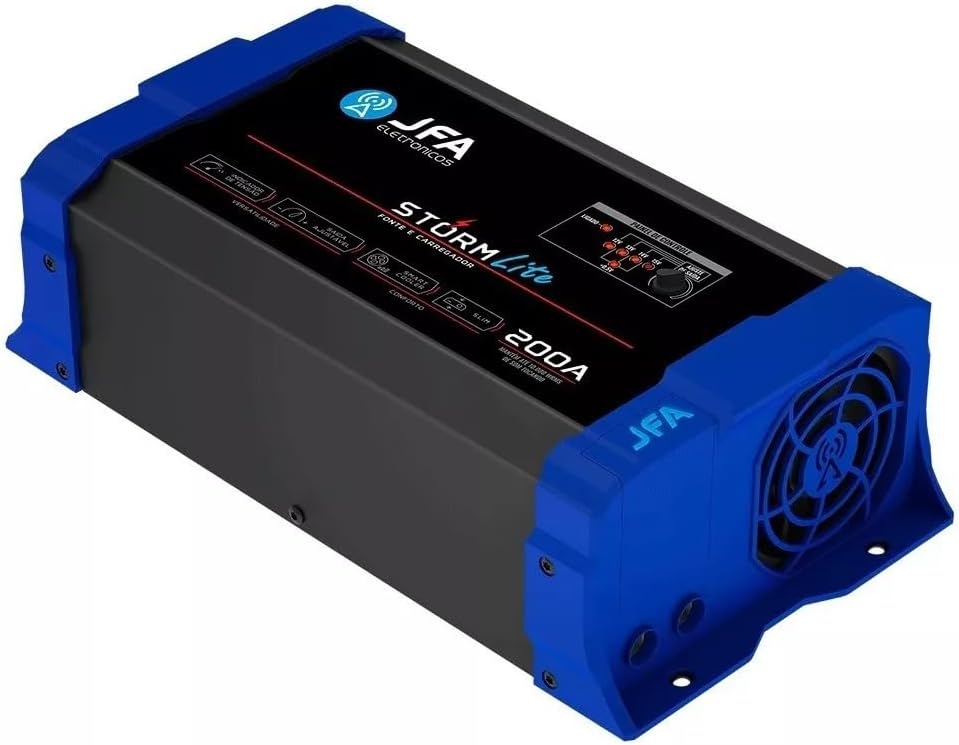
Figure 2: Angled View of the JFA 200a Storm Lite Power Supply. This perspective highlights the compact design and the integrated cooling fan on the side of the unit. The blue end caps and black main body are visible, along with the JFA logo on the side. This view emphasizes the "Smart Cooler" feature, which ensures efficient heat dissipation during operation.
4. Setup
Proper setup is crucial for the performance and longevity of your JFA 200a Storm Lite Power Supply.
4.1. Unpacking and Inspection
- Carefully remove the unit from its packaging.
- Inspect the unit for any signs of physical damage. If damage is found, do not proceed with installation and contact your dealer.
- Ensure all accessories (if any) are present.
4.2. Mounting Location
- Choose a dry, well-ventilated location, away from direct sunlight, heat sources, and moisture.
- Ensure there is sufficient space around the unit for proper airflow, especially around the cooling fan.
- Mount the unit securely to prevent movement or vibration.
4.3. Electrical Connections
WARNING: Disconnect the vehicle's battery negative terminal before making any electrical connections to prevent short circuits.
- AC Input Connection: Connect the power supply to a suitable AC mains outlet (90 to 140Vac or 170 to 240Vac). The unit features automatic bivolt detection.
- DC Output Connection:
- Connect the positive (+) output terminal of the JFA Storm Lite to the positive (+) terminal of your automotive amplifier or battery.
- Connect the negative (-) output terminal of the JFA Storm Lite to the negative (-) terminal of your automotive amplifier or battery, or to a good chassis ground point.
- Use appropriate gauge wiring for the current draw to prevent overheating and voltage drop.
- Remote Turn-On (if applicable): If your amplifier requires a remote turn-on signal, ensure it is connected correctly.
5. Operating Instructions
Follow these steps to operate your JFA 200a Storm Lite Power Supply.
5.1. Powering On/Off
- Ensure all connections are secure.
- Connect the AC power cord to the mains outlet. The "LIGADO" (ON) indicator on the control panel should illuminate.
- To power off, disconnect the AC power cord.
5.2. Selecting Output Voltage
The JFA Storm Lite allows selection of various output voltages to suit different applications:
- Use the "AJUSTE DE SAÍDA" (Output Adjustment) knob on the control panel to select the desired base voltage: 12.6V, 13.0V, 13.4V, 13.8V, 14.0V, or 14.4V.
- The corresponding LED indicator will light up.
- For fine-tuning, use the +/- 0.5V adjustment to slightly increase or decrease the selected voltage.
5.3. Intelligent Charging System (SCI)
The SCI function automatically manages battery charging in three phases: Elevation, Absorption, and Equalization. This ensures optimal battery health and longevity. When connected to a battery, the unit will detect its charge level and apply the appropriate charging phase.
5.4. Storm Function Activation
The Storm function provides a temporary boost to 15V output for maximum amplifier performance during peak demand. Consult your amplifier's specifications to ensure it can safely handle 15V. The method of activating the Storm function is typically via a dedicated button or switch on the unit or a remote accessory.
5.5. Battery Diagnostic Function
To perform a battery diagnostic:
- Ensure the battery is connected to the JFA Storm Lite.
- Activate the diagnostic function (specific activation method not detailed, assume a button or menu option).
- The unit will analyze the battery's CCA (Cold Cranking Amps) and charge accumulation capacity within approximately 10 seconds.
- Battery level indicators and full charge LEDs will provide feedback on the battery status.
5.6. Monitoring Voltage and Current
The display on the unit allows you to monitor the output voltage or current. Cycle through the display modes to view the desired parameter. The ammeter accuracy is approximately 96%.
6. Maintenance
Regular maintenance ensures the optimal performance and extends the lifespan of your JFA 200a Storm Lite Power Supply.
- Cleaning: Disconnect the unit from all power sources before cleaning. Use a soft, dry cloth to wipe the exterior. Do not use liquid cleaners or solvents.
- Ventilation: Periodically check the cooling fan and vents for dust accumulation. Use compressed air to gently clear any obstructions. Ensure the fan is operating freely.
- Connections: Periodically inspect all electrical connections for tightness and corrosion. Re-tighten if necessary.
- Storage: If storing the unit for an extended period, disconnect it from power and store it in a cool, dry place.
7. Troubleshooting
This section addresses common issues you might encounter with your JFA 200a Storm Lite Power Supply.
| Problem | Possible Cause | Solution |
|---|---|---|
| Unit does not power on. | No AC power; faulty power cord; internal fuse blown. | Check AC power connection and outlet. Inspect power cord. If problem persists, contact support. |
| No output voltage. | Output short circuit; overload protection activated; incorrect voltage selection. | Check DC output connections for shorts. Reduce load. Verify voltage setting. Unit may automatically reset after protection event. |
| Unit overheats and shuts down. | Blocked ventilation; excessive load; high ambient temperature. | Ensure vents are clear. Reduce load. Move unit to a cooler environment. Allow unit to cool down before restarting. |
| Battery not charging or charging slowly. | Incorrect voltage setting; faulty battery; poor connections. | Verify voltage setting is appropriate for battery type. Check battery health using diagnostic function. Ensure all connections are secure. |
If the problem persists after attempting these solutions, please contact JFA Eletrônicos customer support or your dealer for assistance.
8. Specifications
Technical specifications for the JFA 200a Storm Lite Power Supply (Model: JS200A):
- Model: JS200A
- Brand: JFA Eletrônicos
- Maximum Load Consumption: 3,000W
- Sound System Support: Maintains up to 10,000W RMS of sound
- AC Input: Automatic Bivolt (110/220Vac)
- Mains Input Range: 90 to 140Vac / 170 to 240Vac (selectable)
- Selectable Output Voltage: 12.6V / 13.0V / 13.4V / 13.8V / 14.0V / 14.4V
- Intelligent Charging System (SCI): 13.8V / 14.4V Cyclic
- Output Current: 200 Amps
- Ammeter Accuracy: 96%
- Slow Charge System: 3 phases (Elevation / Absorption / Equalization)
- Protections: Overload, Output Short, Temperature
- Cooling: Smart Cooler (Intelligent Ventilation Control: Dynamic by PWM)
- Topology: Half Bridge
- Weight: 2.650 Kg
- Approximate Measurements (WxH): 31.7cm x 17cm
9. Warranty and Support
For warranty information, please refer to the warranty card included with your product or contact your authorized JFA Eletrônicos dealer or the manufacturer directly. Warranty terms and conditions may vary by region and retailer.
For technical support or service inquiries, please visit the official JFA Eletrônicos website or contact their customer service department.


