
1. Introduction
Thank you for purchasing the HYUDJ 200W LED Strobe Bar Light. This professional-grade lighting fixture is designed to create dynamic and vibrant effects for various events, including live shows, weddings, DJ sets, clubs, and more. Featuring RGBW 4-in-1 LEDs and 48-partition control, it offers extensive customization and powerful illumination. This manual provides essential information for safe operation, setup, and maintenance of your device.

Figure 1: HYUDJ 200W LED Strobe Bar Light
2. Safety Information
- Always connect the device to a grounded power outlet.
- Ensure the voltage matches the device's requirements (AC90V-240V, 50-60Hz).
- Do not open the housing. There are no user-serviceable parts inside. Refer all servicing to qualified personnel.
- Avoid direct eye exposure to the light source, as it can cause eye damage.
- Keep the device away from water, moisture, and extreme temperatures.
- Ensure proper ventilation to prevent overheating. Do not block ventilation openings.
- Mount the device securely using the provided brackets and screws.
3. Product Overview
3.1 Key Features
- LED Light Source: Equipped with 768pcs SMD5050 RGB 3IN1 0.2W LEDs and 96pcs White 1W LEDs for powerful and versatile lighting.
- Control Modes: Supports Auto mode, Sound activation, DMX512, and Master/Slave operation.
- DMX Channels: Offers 4/6/12/144/154 DMX channels for comprehensive control.
- Strobe Effects: Variable strobe speeds for dynamic lighting.
- Wide Application: Ideal for various events including weddings, DJ performances, clubs, KTV, concerts, bars, banquets, and parties.
- Durable Construction: Made of high-quality engineering plastic with a honeycomb structure for a robust and elegant design.
3.2 Components
The product package includes the following items:
- One (1) HYUDJ 200W LED Strobe Bar Light unit
- One (1) User Manual
- One (1) Bow Mount and two (2) Screws for mounting
- One (1) 1.2m US standard plug power cable
- One (1) 1m DMX cable

Figure 2: Package Contents
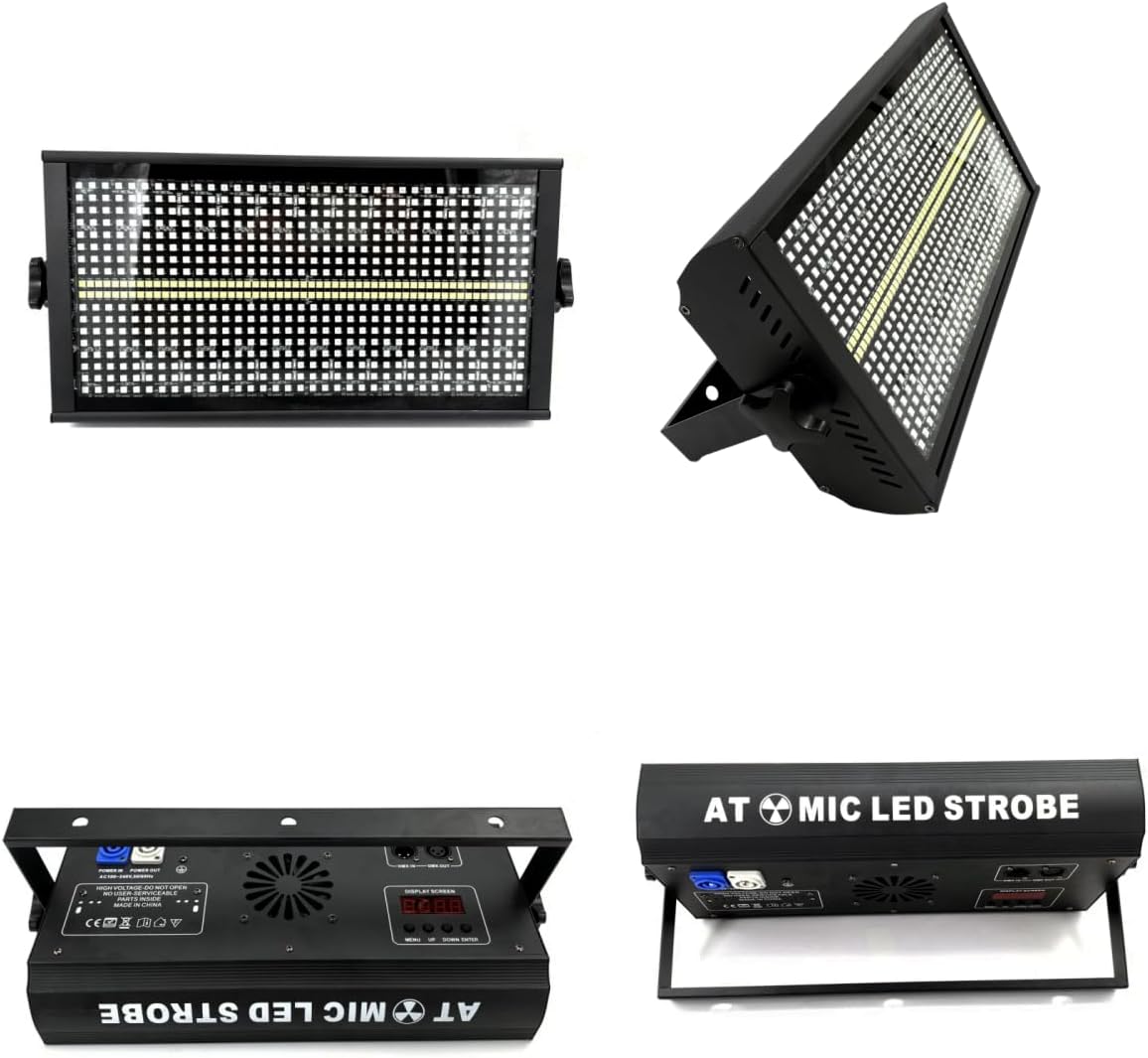
Figure 3: Product Views

Figure 4: 200W LED Strobe Light Overview

Figure 5: LED Configuration Details
4. Specifications
| Attribute | Value |
|---|---|
| Model Number | 200W-Strobe |
| Brand | HYUDJ |
| Voltage | AC90V-240V |
| Frequency | 50-60Hz |
| Power Consumption | 250W |
| Light Source | 768pcs SMD5050 RGB 3IN1 0.2W LED + 96pcs White 1W LED |
| Beam Angle | 40 degrees |
| Control Modes | DMX512, Master/Slave, Sound Active, Auto |
| DMX Channels | 4/6/12/144/154 Channel |
| Strobe Speed | Variable (1-25 FPS) |
| Dimmer | 0-100% smooth dimming |
| Housing Material | Aluminum |
| Finish Type | Powder Coated |
| Product Dimensions (L x W x H) | 11.22" x 5.9" x 4.72" (28.5cm x 15cm x 12cm) |
| Item Weight | 7.6 Pounds (3.45 kg) |
| UPC | 768447249580 |

Figure 6: Product Dimensions
5. Setup
5.1 Mounting
The strobe bar light comes with a stable bracket and screws for mounting. Ensure the mounting surface is secure and can support the weight of the fixture. The light can be wall-mounted or placed on a flat surface. Always ensure adequate space around the fixture for ventilation.
5.2 Power Connection
Connect the provided 1.2m US standard plug cable to the power input on the back of the unit and then to a suitable grounded power outlet (AC90V-240V, 50-60Hz).
5.3 DMX Connection (Optional)
For DMX control, connect a DMX controller to the DMX IN port using a 3-pin XLR cable. For daisy-chaining multiple units, connect the DMX OUT of the first unit to the DMX IN of the next unit. Ensure the last unit in the chain has a DMX terminator (not included) for stable signal transmission.

Figure 7: DMX Connection Ports
6. Operating Modes
The HYUDJ 200W LED Strobe Bar Light offers several operating modes, which can be selected via the display screen and buttons on the back of the unit.

Figure 8: Available Operating Modes
6.1 Auto Mode
In Auto mode, the light cycles through pre-programmed lighting effects automatically. This mode is suitable for quick setup and continuous operation without external control.
6.2 Sound Active Mode
The Sound Active mode allows the light to react to ambient sound or music. An internal microphone detects sound, and the lighting effects change dynamically with the beat. Adjust sensitivity as needed.
6.3 DMX512 Mode
DMX512 mode provides professional control over all aspects of the light's performance, including color, dimming, strobe speed, and individual partition control. Refer to the DMX channel chart (typically found in a separate DMX manual or detailed specification sheet) for specific channel assignments and values. Use the display and buttons to set the DMX address.
6.4 Master/Slave Mode
In Master/Slave mode, one unit acts as the 'Master' and controls other 'Slave' units. Connect the DMX OUT of the Master unit to the DMX IN of the first Slave unit, and continue daisy-chaining. Set the Master unit to a desired operating mode (e.g., Auto or Sound Active), and set all Slave units to Slave mode. The Slave units will then mirror the Master's effects.
6.5 Digital Display and Buttons
The digital display on the back of the unit shows the current mode or DMX address. Use the 'UP', 'DOWN', 'ENTER', and 'MENU' buttons to navigate through settings, select modes, and adjust parameters. Press 'ENTER' twice to save your last action without needing to reset.
Video 1: Demonstration of 200W LED RGBW 4in1 48 Partition White 8000K Strobe Stage DJ Light effects and features.
7. Maintenance
7.1 Cleaning
Regularly clean the light's exterior with a soft, dry cloth. For stubborn dirt, use a slightly damp cloth. Do not use abrasive cleaners or solvents. Ensure the ventilation openings are free from dust and debris.
7.2 Storage
When not in use, store the light in a cool, dry place, away from direct sunlight and extreme temperatures. If possible, use the original packaging for protection during storage and transport.
8. Troubleshooting
- No Power: Check the power cable connection to the unit and the outlet. Ensure the outlet is live.
- No Light Output: Verify the selected operating mode. If in DMX mode, ensure the DMX signal is present and the address is correctly set. Check dimmer settings.
- Incorrect DMX Behavior: Confirm DMX cable connections are secure. Check DMX address settings on all units. Ensure a DMX terminator is used on the last unit in the chain.
- Sound Active Mode Not Responding: Check the microphone sensitivity setting. Ensure there is sufficient sound for the light to react.
- Overheating: Ensure the light has adequate ventilation. Do not block air vents. Operate within specified temperature ranges.
9. Warranty and Support
For warranty information, technical support, or service inquiries, please refer to the contact information provided by your retailer or visit the official HYUDJ website. Keep your purchase receipt as proof of purchase for warranty claims.