
Introduction
The WeeFancy 10000mAh Power Bank is a compact and powerful portable charger designed for convenience and efficiency. It features integrated Lightning and USB-C cables, along with additional USB-C input/output and USB-A output ports, eliminating the need for extra cables. With a 10,000 mAh capacity and 22.5W fast charging (PD 3.0 & QC 3.0), it provides rapid power delivery to a wide range of devices, including smartphones, tablets, cameras, and more. Its exclusive technology includes multi-protection safety features against overcurrent, overheating, and overcharging, ensuring comprehensive safety for your devices.

Image: WeeFancy 10000mAh Power Bank VT103C in white, showcasing its compact design and LED display.
Setup
Initial Charging
Before first use, fully charge your WeeFancy Power Bank. Connect a compatible USB-C charger to the power bank's USB-C input/output port. The LED display will show the charging progress. Ensure the power bank is fully charged to 100% for optimal performance.

Image: Close-up of the LED display showing battery percentage indicators (100%, 75%, 50%, 25%).
Operating Instructions
Charging Your Devices
- Using Integrated Cables: Connect your device directly using the built-in Lightning or USB-C cable.
- Using External Cables: For other devices, connect your own USB-A or USB-C cable to the corresponding output ports on the power bank and then to your device.
- The power bank will automatically begin charging your device.

Image: Integrated Lightning and USB-C cables for direct device connection.
Recharging the Power Bank
To recharge the power bank, connect a compatible USB-C charger to the USB-C input/output port. The LED display will indicate the charging status.
LED Display Indicator
The digital LED display shows the remaining battery percentage of the power bank (e.g., 100%, 75%, 50%, 25%). This allows you to monitor the power bank's charge level at a glance.
Automatic Shutdown
The power bank is equipped with an automatic shutdown feature to conserve energy. It will turn off automatically when charging is complete or when no device is connected for a period of time.
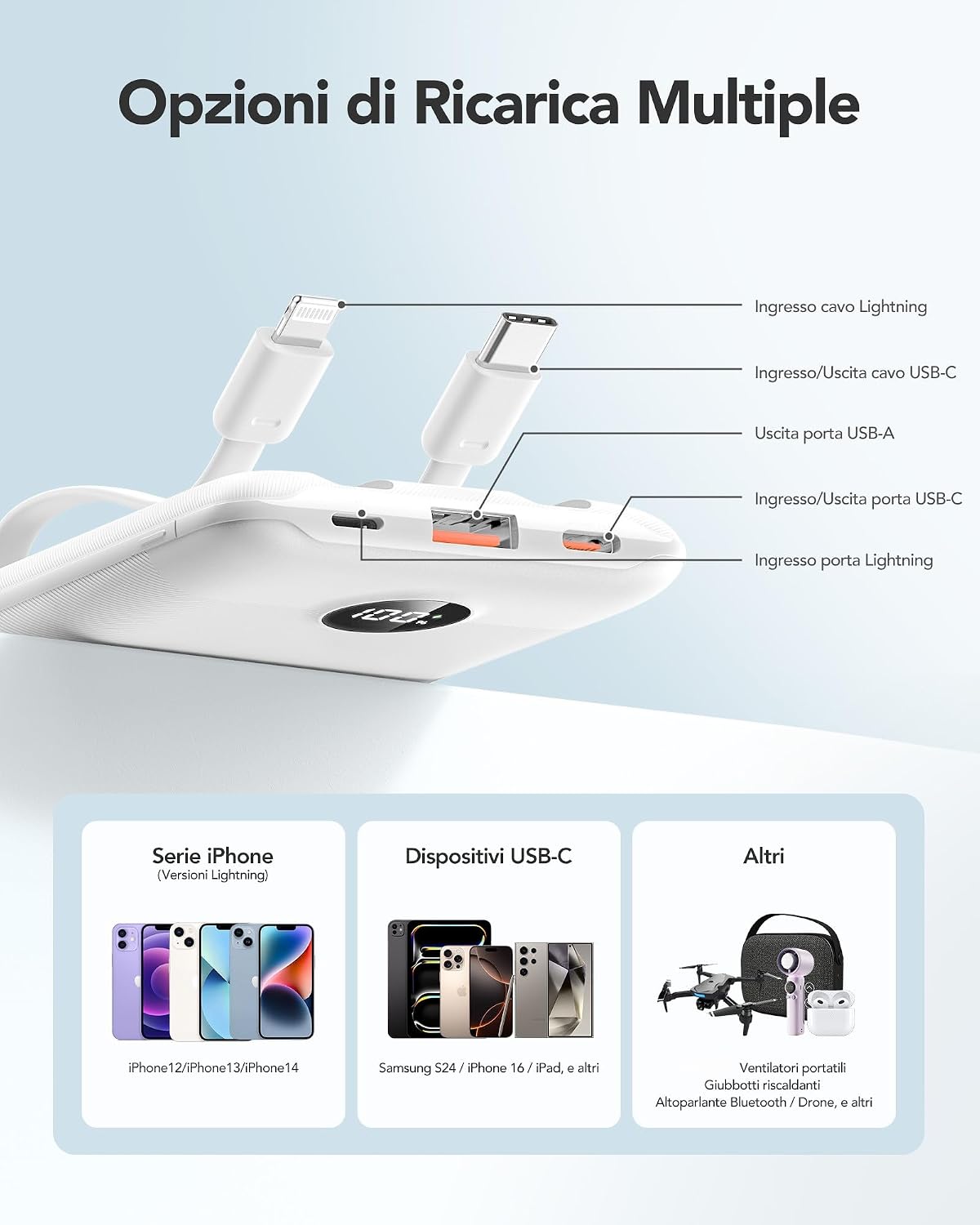
Image: Diagram illustrating the various input and output ports: integrated Lightning cable, integrated USB-C cable, USB-A output port, USB-C input/output port, and Lightning input port.
Maintenance
- Cleaning: Wipe the power bank with a soft, dry cloth. Avoid using liquid cleaners or abrasive materials.
- Storage: Store the power bank in a cool, dry place, away from direct sunlight, high temperatures, and humidity.
- Battery Care: To maintain optimal battery health and prolong its lifespan, recharge the power bank at least once every three months if it is not in regular use.
- Avoid Drops: Protect the device from drops and impacts, which can damage internal components.
Troubleshooting
- Device Not Charging:
- Ensure the power bank has sufficient charge. Check the LED display.
- Verify that the charging cable (integrated or external) is securely connected to both the power bank and your device.
- Try using a different integrated cable or an external cable with a different port on the power bank.
- Confirm your device is compatible with the power bank's output specifications.
- Slow Charging:
- Ensure your device supports fast charging and that you are using a compatible cable capable of fast charging.
- Check if the power bank itself is fully charged, as performance may decrease at very low battery levels.
- Power Bank Not Recharging:
- Ensure the charging cable and wall adapter you are using are functioning correctly and are compatible.
- Verify the USB-C input port on the power bank is clean and free of any debris that might obstruct the connection.
Specifications
| Feature | Specification |
|---|---|
| Model Number | VT103C |
| Battery Capacity | 10000 mAh |
| Max Output Power | 22.5W |
| Input Ports | USB Type C (integrated cable), Lightning (integrated cable), USB Type C (port) |
| Output Ports | USB Type C (integrated cable), Lightning (integrated cable), USB Type A (port), USB Type C (port) |
| Dimensions (L x W x H) | 10.97 x 6.86 x 1.58 cm |
| Weight | 168 Grams |
| Battery Type | Lithium-Polymer |
| Special Features | Fast Charging, Automatic Shutdown, Lightweight, Short-circuit Protection, Slim Design |
| Compatible Devices | iPhone 15/14/13/12/11/X/8/7/6/5; Galaxy S23/S22/S21/S10/S9/S8/Note 10; LG G8/G7/X4/Q60/K40/Q7; Google Pixel/Pixel XL/Pixel 2/Pixel 2 XL/Pixel 3/Pixel 3 XL/Pixel 4/Pixel 4 XL and more Tablet, Camera, Headphones, Kindle, Drone, Nintendo Switch, USB Light, USB Fan, Heated Vest, Heated Jacket, Electric Lighter and more. |

Image: Visual representation of the 10000mAh capacity, indicating approximate charge cycles for various devices.
Warranty and Support
Warranty Information
The WeeFancy 10000mAh Power Bank VT103C is covered by a 1-year limited warranty from the date of purchase. This warranty covers manufacturing defects under normal use. Please retain your proof of purchase for warranty claims.
Customer Support
For technical assistance, troubleshooting, or to make a warranty claim, please contact WeeFancy customer service. You can typically find contact information on the official WeeFancy website or through the retailer where you purchased the product.
