Introduction
This manual provides essential instructions for the proper setup, operation, and maintenance of your Timberland TDWGF0029003 Men's Quartz Analog Watch. Please read this manual thoroughly to ensure optimal performance and longevity of your timepiece.
The Timberland TDWGF0029003 features a durable stainless steel case, a blue dial with silver hands, and a comfortable leather strap. It is designed for daily wear with a water resistance rating of 5 ATM.
Setup and Initial Use
Setting the Time
- Pull out the crown: Gently pull the crown (the knob on the side of the watch) out to the first or second click position. For most quartz watches, pulling it out to the first click allows date adjustment, and the second click allows time adjustment. Refer to the specific movement instructions if available.
- Rotate the crown: Turn the crown clockwise or counter-clockwise to move the hour and minute hands to the correct time.
- Push in the crown: Once the time is set, push the crown back into its normal operating position.
Setting the Date (if applicable)
If your watch has a date function, pull the crown out to the first click. Rotate the crown to adjust the date. Avoid setting the date between 9 PM and 3 AM, as this can interfere with the automatic date change mechanism. After setting, push the crown back in.

Image: Front view of the Timberland TDWGF0029003 watch. This image displays the watch face, showing the blue dial, silver hands, and the three sub-dials. The black leather strap with the Timberland logo is also visible.
Operation
Water Resistance
Your Timberland TDWGF0029003 watch has a water resistance rating of 5 ATM (50 meters/165 feet). This means it is suitable for daily use, including showering, bathing, and washing hands. It is not suitable for swimming, diving, or prolonged submersion in water. Do not operate the crown or pushers while the watch is wet or submerged.
Chronograph Function (if applicable)
If your watch features chronograph sub-dials, these typically operate as follows:
- Start/Stop: Press the top pusher to start and stop the chronograph.
- Reset: Press the bottom pusher to reset the chronograph hands to zero.

Image: Angled view of the Timberland TDWGF0029003 watch. This perspective highlights the watch's side profile, showing the crown and the two pushers used for setting and chronograph functions. The texture of the leather strap is also visible.
Maintenance
Cleaning Your Watch
- Case and Crystal: Wipe the watch case and crystal with a soft, dry, lint-free cloth. For stubborn dirt, a slightly damp cloth can be used, followed by immediate drying.
- Leather Strap: Avoid prolonged exposure of the leather strap to water, direct sunlight, and harsh chemicals. Clean with a soft, dry cloth. If it gets wet, allow it to air dry naturally, away from direct heat.
Battery Replacement
This watch is powered by a standard watch battery. When the battery runs low, the watch hands may stop or move erratically. Battery replacement should be performed by a qualified watch technician to ensure proper sealing and maintain water resistance. Attempting to replace the battery yourself may void the warranty and compromise the watch's integrity.

Image: Side view of the Timberland TDWGF0029003 watch. This image provides a profile view, showcasing the watch's thickness, the design of the lugs, and how the leather strap attaches to the case.
Troubleshooting
- Watch Not Running:
- Check if the crown is fully pushed in.
- The battery may need replacement. Consult a professional watch technician.
- Incorrect Time/Date:
- Refer to the "Setting the Time" and "Setting the Date" sections.
- Ensure the crown is fully pushed in after setting.
- Condensation Under Crystal:
- This may indicate a loss of water resistance. Avoid further contact with water and have the watch inspected by a professional immediately.
Specifications
| Model Number | TDWGF0029003 |
| Movement | Quartz Analog |
| Case Material | Stainless Steel |
| Case Diameter | 44 mm |
| Dial Color | Blue |
| Crystal | Mineral Glass |
| Strap Material | Leather |
| Water Resistance | 5 ATM (50 meters / 165 feet) |
| Battery | 1 Non-standard battery required |
| Package Dimensions | 11.2 x 9.4 x 9.2 cm; 204 grams |
| Country of Origin | China |
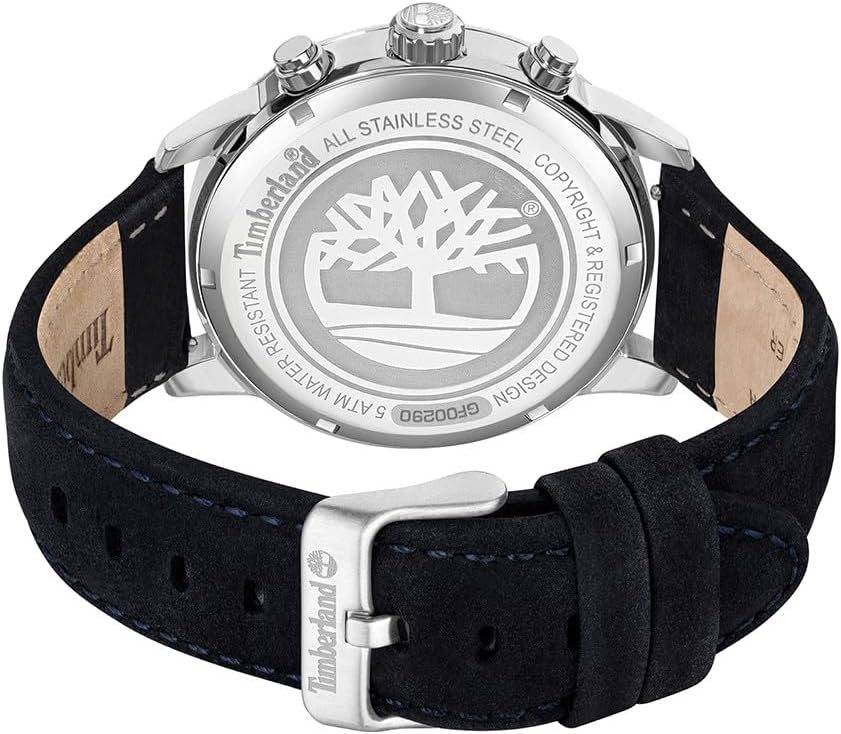
Image: Back view of the Timberland TDWGF0029003 watch. This image shows the stainless steel case back with its engraved Timberland tree logo and product information. The buckle of the leather strap is also clearly visible.
Warranty and Support
Your Timberland watch is covered by a manufacturer's warranty against defects in materials and workmanship. Please refer to the warranty card included with your purchase for specific terms and conditions, including warranty duration and claim procedures.
For technical support, service, or warranty claims, please contact Timberland customer service or an authorized service center. Contact information can typically be found on the official Timberland website or on your warranty documentation.


