
1. Introduction
Thank you for purchasing the MUSE M-1803 DJ Portable Sono-Speaker. This device is designed to provide high-quality audio and vibrant lighting for your gatherings. It features Bluetooth connectivity for wireless music streaming, multiple input options, and a long-lasting battery. Please read this manual carefully before using the product to ensure proper operation and to maximize its lifespan.

Figure 1.1: The MUSE M-1803 DJ Portable Sono-Speaker, showcasing its compact design and dynamic multi-colored lighting.
2. Product Features
The MUSE M-1803 DJ Portable Sono-Speaker comes equipped with a range of features designed for an immersive audio experience:
- Bluetooth Connectivity: Seamlessly stream music wirelessly from your smartphone, tablet, or laptop.
- High Output Power: Delivers 150 watts of audio power for clear and robust sound.
- Multi-colored Ambient Lighting: Enhance your atmosphere with dynamic, customizable LED lights.
- White LED Display: Provides clear information on current mode and settings.
- Long Battery Life: Built-in lithium battery offers up to 5 hours of continuous music playback.
- Dual Microphone Inputs: Connect two wired microphones for karaoke or duets.
- USB-C Port: For convenient charging of the speaker's internal battery.
- USB Playback: Play MP3 files directly from a USB drive.
- AUX Input: Connect external audio devices via a 3.5mm auxiliary cable.
- Adjustable Bass & Treble: Fine-tune your audio output to suit your preferences.

Figure 2.1: Key features of the M-1803 DJ speaker, including Bluetooth streaming, 5-hour music playtime, microphone connection, and multi-colored party lights.

Figure 2.2: Detailed overview of the speaker's functions, highlighting its lighting options, display, connectivity, audio adjustments, battery life, and power output.
3. Package Contents
Please check the package for the following items:
- MUSE M-1803 DJ Portable Sono-Speaker
- Wired Microphone
- USB-C Charging Cable
- User Manual (this document)

Figure 3.1: The speaker's accessories, including the USB-C charging cable and the wired microphone, alongside a view of the speaker's rear panel with various ports and a carry handle.
4. Safety Information
To ensure safe operation and prevent damage, please observe the following precautions:
- Do not expose the speaker to water or excessive moisture. This product is not waterproof.
- Do not disassemble, repair, or modify the unit. Refer all servicing to qualified personnel.
- Keep the speaker away from direct sunlight, heat sources, and open flames.
- Ensure proper ventilation around the speaker during use.
- Use only the provided charging cable or a certified USB-C cable for charging.
- Do not use abrasive cleaners or solvents on the speaker's surface.
- Keep out of reach of children.
- Avoid listening at excessively high volumes for prolonged periods to prevent hearing damage.
5. Setup
5.1 Charging the Speaker
Before first use, fully charge the speaker's internal battery. Connect the supplied USB-C charging cable to the USB-C port on the speaker and the other end to a compatible USB power adapter (not included) or a computer's USB port. The LED display will indicate charging status.
5.2 Powering On/Off
Press and hold the Power button (usually located on the top panel) for a few seconds to turn the speaker ON or OFF. The LED display will light up when the speaker is powered on.
5.3 Connecting the Microphone
Insert the plug of the wired microphone into one of the microphone input jacks on the speaker's rear panel. Ensure it is fully inserted for proper connection.
6. Operating Instructions
6.1 Bluetooth Pairing
- Turn on the MUSE M-1803 DJ speaker. The LED display will show "bt" (Bluetooth) and the speaker will enter pairing mode, indicated by a blinking Bluetooth icon or "bt" on the display.
- Enable Bluetooth on your audio device (smartphone, tablet, etc.).
- Search for "MUSE M-1803 DJ" in the list of available Bluetooth devices.
- Select "MUSE M-1803 DJ" to connect. Once paired, the speaker will emit a confirmation sound, and the "bt" indicator on the display will become solid.
- You can now stream audio wirelessly from your device to the speaker.
6.2 Playing Music from USB
Insert a USB flash drive containing MP3 audio files into the USB port on the speaker. The speaker will automatically switch to USB mode and begin playing the first compatible audio file. Use the playback controls (Play/Pause, Next/Previous Track) on the speaker to manage your music.
6.3 Using the AUX Input
Connect an external audio device (e.g., MP3 player, computer) to the AUX input jack on the speaker using a 3.5mm audio cable (not included). The speaker will automatically switch to AUX mode. Control playback and volume from your connected device.
6.4 Adjusting Volume and Audio Settings
Use the dedicated volume controls on the speaker's top panel to adjust the master volume. The speaker also features controls for adjusting Bass and Treble levels to customize your sound profile.
6.5 Controlling Ambient Lights
The speaker features multi-colored ambient lighting. Use the dedicated light control button (if available) to cycle through different light modes or turn the lights on/off. Refer to the control panel layout for specific button functions.
6.6 Using the Microphone for Karaoke
Once the wired microphone is connected, simply speak or sing into it. The microphone's audio will be mixed with the music playing through the speaker. Adjust microphone volume (if available) and echo effects (if applicable) using the controls on the speaker.
7. Maintenance
7.1 Cleaning
Wipe the speaker's surface with a soft, dry, lint-free cloth. Do not use liquid cleaners, aerosols, or solvents. Ensure no moisture enters the ports or openings.
7.2 Storage
When not in use for extended periods, store the speaker in a cool, dry place, away from direct sunlight and extreme temperatures. It is recommended to charge the battery periodically (e.g., every 3 months) to maintain its health.
8. Troubleshooting
| Problem | Possible Cause | Solution |
|---|---|---|
| Speaker does not turn on. | Battery is depleted. | Connect the speaker to a power source using the USB-C cable and charge it. |
| No sound from speaker. | Volume is too low; incorrect input mode; device not connected properly. | Increase speaker volume and source device volume. Ensure correct input mode (Bluetooth, USB, AUX) is selected. Reconnect the device. |
| Bluetooth pairing fails. | Speaker is not in pairing mode; device is too far; interference. | Ensure speaker is in pairing mode (blinking "bt"). Move device closer to speaker. Turn off other Bluetooth devices nearby. Forget "MUSE M-1803 DJ" on your device and try pairing again. |
| Microphone not working. | Microphone not fully inserted; microphone volume too low. | Ensure the microphone plug is fully inserted into the jack. Increase microphone volume on the speaker. |
9. Specifications
| Model Number: | M-1803D |
| Brand: | MUSE |
| Output Power: | 150 Watts (Max) |
| Connectivity: | Bluetooth, USB, AUX (3.5mm) |
| Battery: | 1 Lithium Ion battery required |
| Playtime: | Up to 5 hours |
| Dimensions (L x W x H): | 24.2 x 24.6 x 30.3 cm |
| Weight: | 3.4 kg |
| Included Components: | Speaker, Wired Microphone, USB-C Charging Cable |
| Control Method: | App (as per specifications, though physical controls are primary) |
| Special Features: | Bluetooth, USB port, Multi-colored ambient light, White LED display, Adjustable Bass & Treble |
| Waterproof: | No |
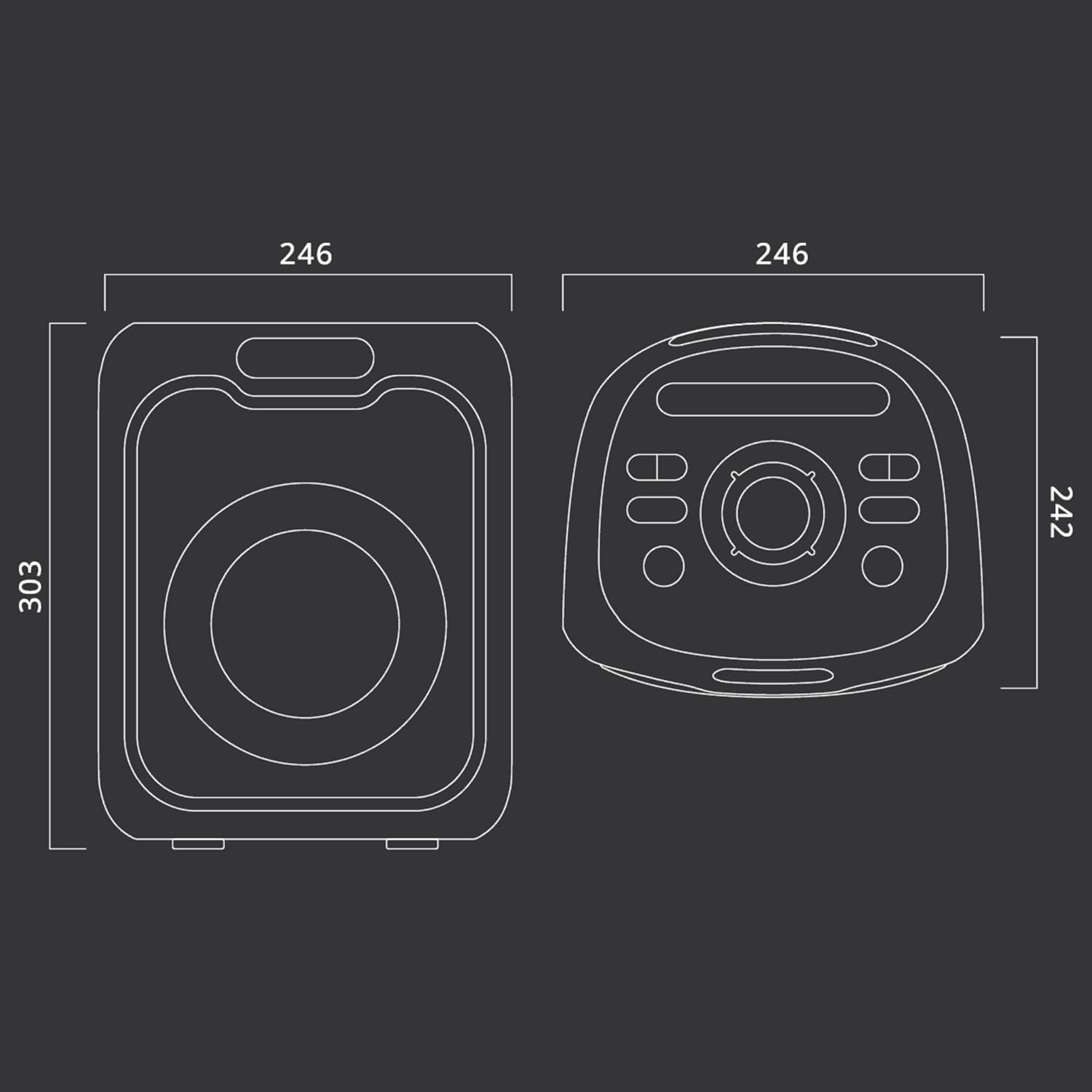
Figure 9.1: Dimensional drawing of the MUSE M-1803 DJ speaker, with measurements in millimeters (246mm width, 303mm height, 242mm depth).
10. Warranty and Support
This MUSE M-1803 DJ Portable Sono-Speaker comes with a Limited Warranty. For specific details regarding the warranty period and coverage, please refer to the warranty card included in your package or contact MUSE customer support.
Customer Support:
For technical assistance, troubleshooting, or warranty claims, please contact MUSE customer support through their official website or the contact information provided on your product packaging. Please have your model number (M-1803D) and purchase details ready when contacting support.