
Introduction
Thank you for choosing the UGREEN PowerRoam GS2200 Portable Powerstation. This manual provides essential information for the safe and efficient operation, maintenance, and troubleshooting of your device. Please read this manual thoroughly before using the product and retain it for future reference.
Safety Information
- Do not disassemble, repair, or modify the unit.
- Keep the device away from fire, water, and extreme temperatures.
- Ensure proper ventilation during use to prevent overheating.
- Use only UGREEN-approved accessories and charging cables.
- Keep out of reach of children and pets.
Product Overview
The UGREEN PowerRoam GS2200 is a high-capacity portable power station designed to provide reliable power for outdoor activities, emergencies, and various electrical devices. It features multiple output ports and supports solar charging.
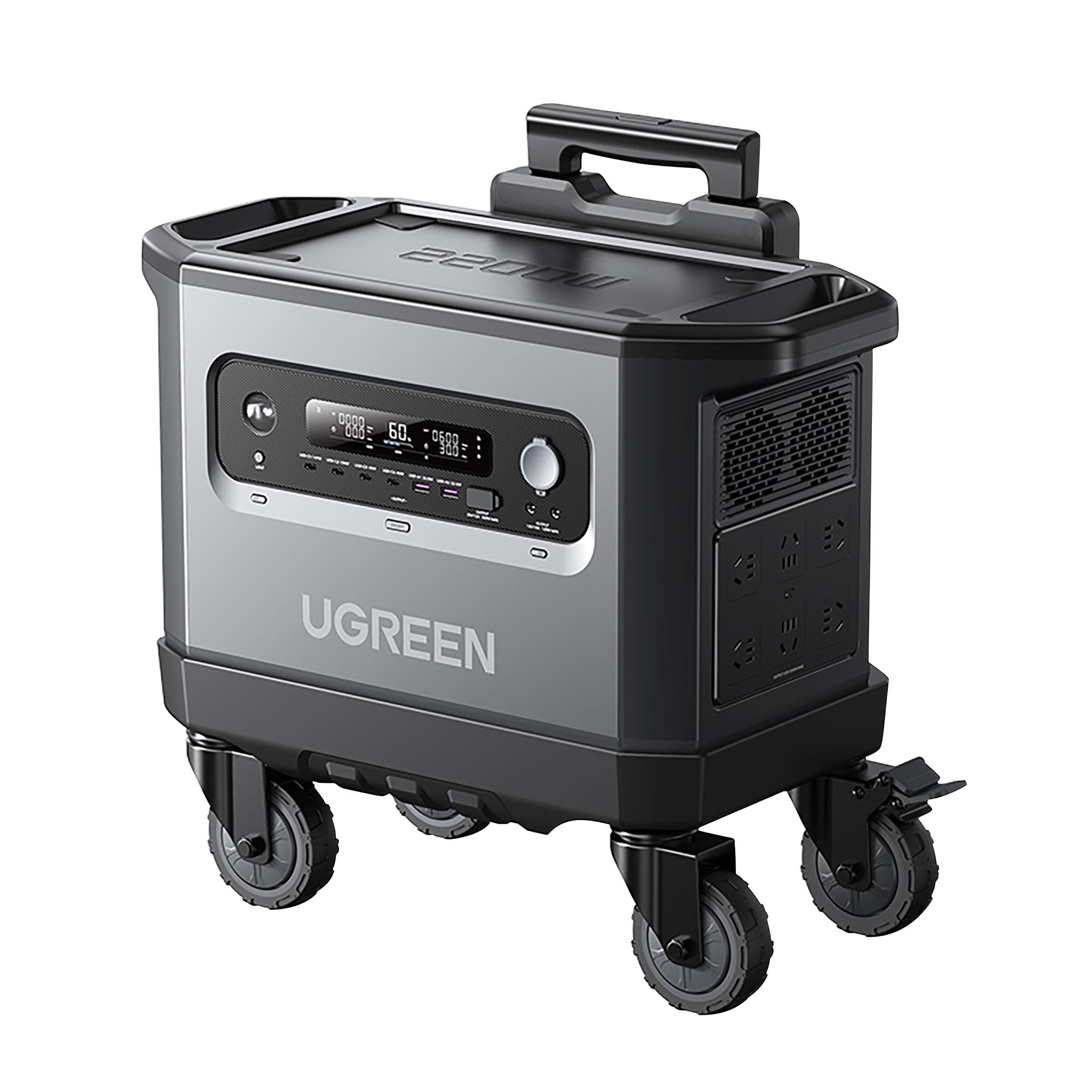
Figure 1: UGREEN PowerRoam GS2200 Portable Powerstation. This image shows the main unit with its various ports and display panel.
Key Components
- Main Unit: The portable power station itself.
- AC Output Ports: For household appliances.
- USB-A & USB-C Ports: For charging mobile devices.
- DC Output Ports: For specific DC-powered devices.
- Input Ports: For charging the power station (AC, Solar).
- LCD Display: Shows battery level, input/output power, and status indicators.
Setup
1. Initial Charging
Before first use, fully charge the PowerRoam GS2200. Connect the power station to a wall outlet using the provided AC charging cable. The LCD display will show the charging status and battery percentage. Charging time may vary.
2. Solar Charging (Optional)
The PowerRoam GS2200 supports solar charging. Connect compatible solar panels (sold separately or included in specific kits) to the solar input port on the power station. Ensure the solar panels are placed in direct sunlight for optimal charging efficiency. The LCD display will indicate solar input power.
Operating Instructions
1. Powering On/Off
Press and hold the main power button for 3 seconds to turn the power station on or off. The LCD display will illuminate upon activation.
2. Using AC Outputs
Press the AC power button to activate the AC outlets. Plug your AC-powered devices into the outlets. The LCD display will show the AC output power. Press the AC power button again to turn off the AC outputs when not in use.
3. Using USB Outputs
The USB-A and USB-C ports are typically active when the unit is on. Simply connect your USB devices to the appropriate ports for charging. The LCD display may show USB output status.
4. Using DC Outputs
Press the DC power button to activate the DC output ports. Connect your DC-powered devices. Press the DC power button again to turn off the DC outputs.
5. LCD Display Information
The LCD display provides real-time information:
- Battery Level: Current charge percentage.
- Input Power: Power being drawn during charging (e.g., from AC or solar).
- Output Power: Power being supplied to connected devices (AC, DC, USB).
- Remaining Run Time/Charge Time: Estimated time based on current power usage/input.
- Warning Indicators: Overload, temperature, or other error alerts.
Maintenance
1. Cleaning
Wipe the exterior of the power station with a dry, soft cloth. Do not use abrasive cleaners or immerse the unit in water.
2. Storage
If storing the power station for an extended period, ensure it is charged to approximately 50-80% and recharge it every 3-6 months to prolong battery life. Store in a cool, dry place away from direct sunlight and extreme temperatures.
3. Battery Care
To maximize battery lifespan, avoid fully discharging the unit frequently. Operate within recommended temperature ranges.
Troubleshooting
| Problem | Possible Cause | Solution |
|---|---|---|
| Unit does not turn on. | Battery is fully discharged. | Connect to an AC outlet and charge for at least 30 minutes. |
| AC output not working. | AC output not activated; device draws too much power. | Press the AC power button; check device wattage and ensure it's within the power station's limits (2300W). |
| Slow charging via solar. | Insufficient sunlight; incorrect panel angle; dirty panels. | Ensure panels are in direct sunlight, adjust angle, clean panels. |
| Overload warning. | Connected devices exceed the power station's output capacity. | Disconnect some devices to reduce the load. |
If the problem persists after trying these solutions, please contact UGREEN customer support.
Specifications
| Model Name | UGREEN PowerRoam GS2200 Portable Powerstation |
| Model Number | 839904 |
| Brand | UGREEN |
| Rated Output Power | 2300 Watts |
| Battery Capacity | 2048Wh |
| Dimensions (L x W x H) | 45 x 24 x 24 cm |
| Weight | 800 grams |
| Power Source | Solar Powered |
| Recommended Use | Outdoor activities and events |
| Components Included | Power Station, Solar Panels (may vary by kit), User Manual |
Warranty and Support
UGREEN products are designed and manufactured to the highest quality standards. For detailed warranty information, please refer to the warranty card included with your product or visit the official UGREEN website.
If you encounter any issues or have questions regarding your PowerRoam GS2200, please contact UGREEN customer support:
- Website: www.ugreen.com
- Email: Refer to your product packaging or website for specific contact details.
Please have your model number (GS2200) and serial number ready when contacting support.