Product Overview
The Realme 11X 5G RMX3785 is a powerful smartphone designed for seamless communication and entertainment. This manual provides essential information to help you get started and make the most of your device.
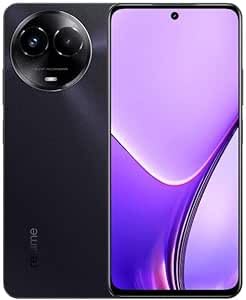
Figure 1: Realme 11X 5G RMX3785 smartphone. This image displays the front of the device, highlighting its display and sleek design.
1. Setup Guide
1.1 Unboxing and Package Contents
Upon opening your Realme 11X 5G package, ensure all components are present:
- Realme 11X 5G RMX3785 Smartphone
- USB Type-C Cable
- Power Adapter
- SIM Ejector Tool
- Quick Start Guide and Warranty Card
1.2 SIM Card Installation
Your Realme 11X 5G supports dual SIM cards. Follow these steps to install your SIM card(s):
- Locate the SIM card tray on the side of your device.
- Insert the SIM ejector tool into the small hole next to the tray and press gently until the tray pops out.
- Place your Nano-SIM card(s) into the designated slots on the tray. Ensure the gold contacts face downwards.
- Carefully reinsert the SIM tray into the phone until it clicks into place.
Image of SIM card tray and installation process would be placed here if available. This image would show the correct orientation for inserting SIM cards into the tray.
1.3 Initial Power On and Setup
To power on your device for the first time:
- Press and hold the Power button (located on the right side) until the Realme logo appears.
- Follow the on-screen instructions to complete the initial setup, including language selection, Wi-Fi connection, Google account setup, and security settings.
1.4 Charging the Device
Before first use, it is recommended to fully charge your device.
- Connect the USB Type-C cable to the charging port at the bottom of the phone.
- Connect the other end of the cable to the power adapter, then plug the adapter into a power outlet.
- The charging indicator will appear on the screen.
Image of phone connected to charger would be placed here if available. This image would illustrate the correct way to connect the charging cable to the device and power adapter.
2. Operating Your Device
2.1 Basic Navigation
Your Realme 11X 5G uses a touchscreen for navigation:
- Tap: Select an item or open an app.
- Swipe: Scroll through screens or lists.
- Pinch: Zoom in or out on photos and web pages.
- Long Press: Access contextual menus or move icons.
2.2 Power On, Off, and Restart
- Power On: Press and hold the Power button until the Realme logo appears.
- Power Off/Restart: Press and hold the Power button for a few seconds. A menu will appear with options to 'Power off' or 'Restart'. Tap your desired option.
2.3 Screen Lock and Unlock
- Lock: Press the Power button once. The screen will turn off.
- Unlock: Press the Power button once to wake the screen, then swipe up or enter your PIN/pattern/password/fingerprint.
2.4 Making Calls
To make a call:
- Open the 'Phone' app.
- Enter the phone number using the dial pad or select a contact from your address book.
- Tap the call icon to initiate the call.
2.5 Sending Messages
To send a text message:
- Open the 'Messages' app.
- Tap the 'Start chat' or '+' icon to compose a new message.
- Enter the recipient's number or select from contacts.
- Type your message in the text field and tap the send icon.
2.6 Connecting to Wi-Fi
To connect to a Wi-Fi network:
- Go to 'Settings' > 'Wi-Fi'.
- Toggle Wi-Fi on.
- Select your desired network from the list.
- Enter the password if prompted and tap 'Connect'.
2.7 Using the Camera
Your Realme 11X 5G features a rear camera for capturing photos and videos.
- Open the 'Camera' app.
- Frame your shot using the screen as a viewfinder.
- Tap the shutter button to take a photo or the record button to start/stop video recording.
- Explore different modes like Portrait, Night, or Pro mode for enhanced photography.
Image of camera interface would be placed here if available. This image would show the layout of the camera app with its various controls and modes.
3. Maintenance
3.1 Cleaning Your Device
To keep your phone in optimal condition:
- Use a soft, lint-free cloth to wipe the screen and back panel.
- Avoid using harsh chemicals, abrasive materials, or aerosol sprays.
- Do not expose the device to excessive moisture.
3.2 Software Updates
Regular software updates provide new features, security enhancements, and bug fixes.
- Go to 'Settings' > 'About phone' > 'Software update'.
- Check for available updates and follow the on-screen instructions to install them. Ensure your device has sufficient battery and a stable internet connection.
3.3 Battery Care
The Realme 11X 5G uses a Lithium Ion battery. To prolong its lifespan:
- Avoid extreme temperatures.
- Do not let the battery completely drain frequently.
- Use the original charger and cable provided with the device.
3.4 Storage Management
Your device comes with 128GB of internal storage. To manage storage effectively:
- Regularly delete unnecessary files, photos, and videos.
- Uninstall unused applications.
- Clear cache data for apps in 'Settings' > 'Apps' > [App Name] > 'Storage' > 'Clear cache'.
4. Troubleshooting
4.1 Common Issues and Solutions
| Issue | Solution |
|---|---|
| Device not turning on | Ensure the battery is charged. Press and hold the Power button for at least 10 seconds to force restart. |
| Apps crashing or freezing | Close the app and reopen it. Clear the app's cache in Settings. Restart the device. |
| Poor network signal | Check SIM card installation. Try moving to an area with better coverage. Restart the device. |
| Wi-Fi connection issues | Restart your router and phone. Forget the network in Wi-Fi settings and reconnect. |
4.2 Factory Reset
A factory reset will erase all data from your phone and restore it to its original factory settings. Back up important data before proceeding.
- Go to 'Settings' > 'System' > 'Reset options'.
- Tap 'Erase all data (factory reset)'.
- Confirm your decision and enter your PIN/pattern/password if prompted.
- The device will restart and begin the reset process.
5. Specifications
| Feature | Detail |
|---|---|
| Brand | realme |
| Model | 11X 5G (RMX3785) |
| Display | 6.72-inch IPS LCD, 1080 x 2400 pixels resolution |
| Processor | Qualcomm Snapdragon |
| RAM | 8 GB |
| Internal Storage | 128 GB |
| Rear Camera | Dual Camera System |
| Battery | Lithium Ion |
| Connectivity | 5G Cellular, Wi-Fi, Bluetooth |
| SIM Support | Dual SIM |
6. Warranty and Support
Your Realme 11X 5G RMX3785 comes with a limited manufacturer's warranty. Please refer to the warranty card included in your package for specific terms and conditions, including coverage period and service procedures.
For technical support, service inquiries, or to find authorized service centers, please visit the official Realme support website or contact their customer service. Contact details can typically be found on the Realme official website or in the warranty documentation.
Official Realme Support Website: realme.com/global/support


