Important Safety Information
Please read all safety instructions carefully before using the camera. Keep this manual for future reference.
- Do not expose the camera to water or moisture.
- Avoid direct sunlight or high temperatures.
- Use only specified batteries and chargers.
- Do not attempt to disassemble or modify the camera.
- Keep out of reach of children.
Package Contents
Verify that all items are present in the package:
- Panasonic LUMIX G100 Camera Body
- 12-32mm Kit Lens
- Battery Pack
- AC Adapter
- USB Connection Cable
- Shoulder Strap
- Lens Cap
- Body Cap
Camera Overview
Familiarize yourself with the camera's physical components.
Front View

The front view shows the lens, lens release button, and the LUMIX branding.
Rear View

The rear view highlights the vari-angle LCD touchscreen, electronic viewfinder (EVF), and various control buttons.
Top View

The top view displays the mode dial, shutter button, video record button, and hot shoe for external accessories.
Product Overview Video
This video provides a quick overview of the Panasonic LUMIX G100 camera and its key features.
Setup
Attaching the Lens
- Remove the body cap from the camera and the rear lens cap from the lens.
- Align the white index mark on the lens with the white index mark on the camera body.
- Rotate the lens clockwise until it clicks into place.
Inserting Battery and SD Card
- Open the battery/SD card compartment cover on the bottom of the camera.
- Insert the battery with the correct orientation until it locks.
- Insert an SD, SDHC, or SDXC memory card (UHS-I U3 V30 recommended) into the slot until it clicks.
- Close the compartment cover securely.
Charging the Battery
- Ensure the camera is powered off.
- Connect the USB cable to the camera's USB-C port and the AC adapter.
- Plug the AC adapter into a power outlet. The charging indicator will illuminate.
- Charging is complete when the indicator turns off.
Operating the Camera
Basic Photography Modes
Turn the mode dial to select your desired shooting mode:
- iA (Intelligent Auto): Camera automatically optimizes settings for the scene.
- P (Program AE): Camera sets aperture and shutter speed, but you can adjust other settings.
- A (Aperture Priority AE): You set the aperture, camera sets shutter speed. Ideal for controlling depth of field.
- S (Shutter Priority AE): You set the shutter speed, camera sets aperture. Ideal for controlling motion blur.
- M (Manual Exposure): You control both aperture and shutter speed.
Video Recording
The LUMIX G100 supports high-resolution video recording:
- 4K Video: Record in 4K 24p/30p for detailed footage.
- FHD Video: Record in Full HD (1080p) at 60p for smoother motion.
- V-Log L Recording: For advanced videographers, V-Log L provides a flat color profile for greater flexibility in post-production color grading.
Audio Recording
The camera features OZO Audio by Nokia with a high-performance built-in microphone system:
- Three internal microphones (Surround, Front, Back) for spatial audio.
- Tracking function automatically adjusts microphone direction for clear audio.
Image Stabilization
The 5-Axis Hybrid I.S. (Image Stabilizer) helps to reduce camera shake for both photos and videos, especially useful when shooting handheld.
Connectivity
The camera offers various connectivity options:
- Bluetooth & Wi-Fi: Seamlessly transfer images and videos to a smartphone or tablet using the LUMIX Sync app.
- USB-C: For charging and data transfer.
- HDMI (Type D Micro HDMI): For video output to external monitors or TVs.
Webcam Functionality
The LUMIX G100 can be used as a high-quality webcam for live streaming or video calls.
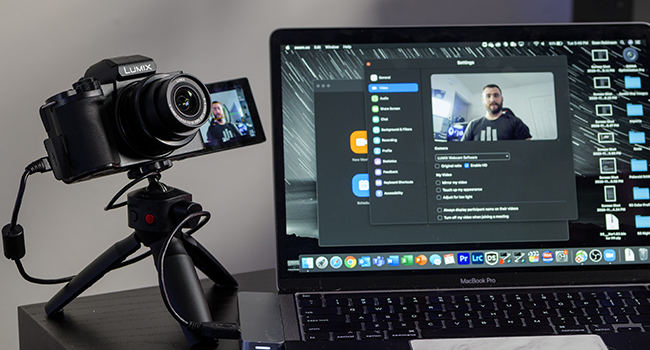
Connect the camera to your computer via USB and select it as your webcam source in your video conferencing software.
Maintenance
- Cleaning the Lens: Use a soft, lint-free cloth and lens cleaning solution. Avoid touching the lens surface with your fingers.
- Cleaning the Camera Body: Wipe with a dry, soft cloth. For stubborn dirt, use a slightly damp cloth and then dry thoroughly.
- Storage: Store the camera in a cool, dry place away from direct sunlight and extreme temperatures. Remove the battery if storing for extended periods.
- Firmware Updates: Periodically check the Panasonic support website for firmware updates to ensure optimal performance and new features.
Troubleshooting
| Problem | Solution |
|---|---|
| Camera does not power on. | Ensure the battery is charged and correctly inserted. Try charging the battery. |
| Images are blurry. | Check focus settings. Ensure lens is clean. Use a faster shutter speed or enable image stabilization. |
| Cannot record video in 4K. | Ensure you are using a compatible SD card (UHS-I Speed Class 3 / V30 or higher). Check available storage space. |
| No audio recorded. | Check audio recording settings. Ensure microphone is not obstructed. |
| Wi-Fi/Bluetooth connection fails. | Restart both the camera and the connected device. Ensure the LUMIX Sync app is updated. |
Specifications
| Feature | Detail |
|---|---|
| Model Name | DC-G100 |
| Sensor Type | CMOS |
| Photo Sensor Resolution | 20.3 MP |
| Compatible Mountings | Micro Four Thirds |
| Lens Type | 12-32mm Wide Angle Lens (Kit) |
| Image Stabilization | 5-Axis Hybrid I.S. (Digital) |
| Video Resolution | 2160p (4K) |
| Screen Size | 3 Inches |
| Display Type | Articulating LCD Touch Screen |
| Viewfinder | Electronic (OLED EVF) |
| Connectivity | Bluetooth, USB-C, Wi-Fi, HDMI |
| Item Weight | 14.88 ounces |
| Supported File Format | JPEG |
| Flash Memory Type | SD, SDHC, or SDXC (UHS-I U3 V30) |
Warranty and Support
This Panasonic LUMIX G100 camera comes with a 1-year manufacturer's warranty.
For technical support, service, or warranty claims, please visit the official Panasonic support website or contact their customer service.
Online Support: https://www.panasonic.com/us/support.html


