
1. Important Safety Instructions
Read all safety warnings and instructions before operating this hedge trimmer. Failure to follow the warnings and instructions may result in electric shock, fire, and/or serious injury. Save all warnings and instructions for future reference.
General Power Tool Safety
- Work Area Safety: Keep the work area clean and well-lit. Cluttered or dark areas invite accidents. Do not operate power tools in explosive atmospheres, such as in the presence of flammable liquids, gases, or dust.
- Electrical Safety: Avoid body contact with earthed or grounded surfaces such as pipes, radiators, ranges, and refrigerators. There is an increased risk of electric shock if your body is earthed or grounded.
- Personal Safety: Always wear eye protection and hearing protection. Use personal protective equipment such as dust masks, non-skid safety shoes, hard hats, or hearing protection for appropriate conditions. Dress properly. Do not wear loose clothing or jewelry. Keep your hair and clothing away from moving parts.
Hedge Trimmer Specific Safety
- Keep all parts of the body away from the cutter blade. Do not remove cut material or hold material to be cut when blades are moving. Make sure the switch is off when clearing jammed material.
- Carry the hedge trimmer by the handle with the cutter blade stopped and taking care not to operate any power switch.
- Hold the power tool by insulated gripping surfaces only, because the cutter blade may contact hidden wiring or its own cord.
- Before use, inspect the hedge for foreign objects such as wires or other hidden obstacles.
- Always use both hands to operate the hedge trimmer.
Battery Tool Use and Care
- Recharge only with the charger specified by the manufacturer.
- Use power tools only with specifically designated battery packs.
- When the battery pack is not in use, keep it away from other metal objects.
- Under abusive conditions, liquid may be ejected from the battery; avoid contact. If contact accidentally occurs, flush with water. If liquid contacts eyes, additionally seek medical help.
2. Product Overview
The Conentool 21V Cordless Hedge Trimmer is designed for efficient and convenient hedge maintenance. It features a powerful motor and a durable blade for effective cutting.

Image: Product diagram showing key components. This image illustrates the main parts of the hedge trimmer, including the rear handle, front handle, on/off switch, hand guard, safety switch, battery pack, and laser-cut blade made from SK5 steel.
Key Components:
- Rear Handle: Main gripping area for control.
- Front Handle: Provides additional grip and control during operation.
- On/Off Switch: Activates and deactivates the trimmer.
- Hand Guard: Protects the user's hand from debris and the blade.
- Safety Switch: A dual-action switch mechanism that prevents accidental starting. Both the main trigger and the safety switch must be engaged to operate the trimmer.
- Battery Pack: Removable 21V 4.0Ah Lithium Battery, providing up to 100 minutes of working time.
- Laser-Cut Blade: 22-inch (56cm) blade made from SK5 steel for precise and efficient cutting.

Image: The hedge trimmer in action, highlighting its 56cm (22-inch) cutting length for efficient trimming.
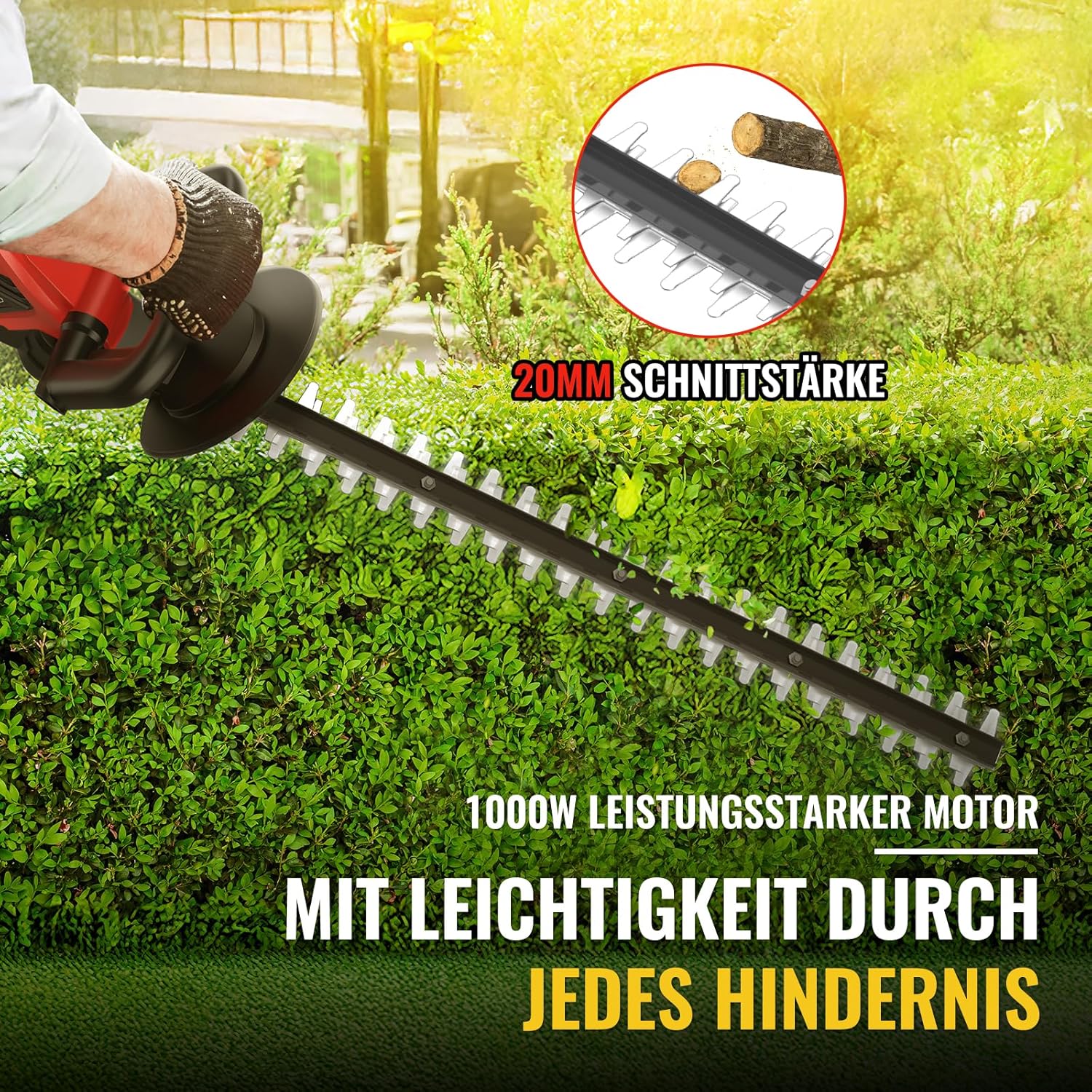
Image: Close-up of the blade demonstrating a 20mm cutting thickness capacity, powered by a 1000W motor for cutting through various branches.

Image: An illustration of the hedge trimmer's internal motor, indicating an 850W power output and 1500 RPM high speed for effective performance.

Image: Details of the 21V 4.0Ah Lithium battery, highlighting its capacity and approximately 100 minutes of working time on a full charge.
3. Setup
Charging the Battery
- Ensure the battery charger is connected to a standard power outlet.
- Insert the battery pack into the charger. The indicator light on the charger will show the charging status.
- Allow the battery to fully charge before first use. A full charge typically takes [X hours - *information not provided, user to consult charger manual*].
- Once charged, remove the battery from the charger.
Installing the Battery
- Align the charged battery pack with the battery slot on the hedge trimmer.
- Slide the battery pack firmly into place until it clicks, indicating it is securely locked.
- To remove the battery, press the release button (if present) and slide the battery out.
Blade Guard
The hedge trimmer comes with a blade guard for safe storage and transport. Always ensure the blade guard is in place when the tool is not in use.
- To remove: Gently slide the blade guard off the blade before operation.
- To install: Slide the blade guard over the blade when finished using the trimmer.
4. Operating Instructions
Before operating, ensure you have read and understood all safety instructions. Wear appropriate personal protective equipment, including eye protection, gloves, and sturdy footwear.
Starting and Stopping the Trimmer

Image: A user demonstrating the dual switch operation. Both the safety switch (on the handle) and the main on/off switch must be engaged simultaneously to start the trimmer, ensuring effortless safety.
- To Start: Hold the hedge trimmer firmly with both hands. Press and hold the safety switch (usually located on the front handle). Simultaneously, squeeze the main on/off switch (trigger) on the rear handle. The blades will begin to move.
- To Stop: Release the main on/off switch. The blades will stop. Always ensure the blades have come to a complete stop before setting the trimmer down.
Cutting Techniques
For best results and safety, use the following techniques:

Image: This image displays various trimming applications, including slanted cutting for shaping, flat cutting for even surfaces, and curved cutting for decorative hedges, demonstrating the versatility of the tool.
- General Trimming: Use a sweeping motion, moving the trimmer along the hedge. Cut small amounts at a time, especially when shaping.
- Horizontal Cuts: Hold the trimmer slightly tilted (5-10 degrees) to ensure a clean, even cut.
- Vertical Cuts: Move the trimmer in an arc, starting from the bottom and working upwards.
- Thick Branches: The trimmer can cut branches up to 20mm in thickness. For thicker branches, use pruning shears or a saw. Do not force the trimmer through thick material.
- Working Time: A fully charged 4.0Ah battery provides approximately 100 minutes of continuous operation, depending on the cutting load.
5. Maintenance
Regular maintenance ensures the longevity and optimal performance of your hedge trimmer. Always disconnect the battery pack before performing any maintenance.
Blade Care
- Cleaning: After each use, remove any sap, leaves, or debris from the blades using a stiff brush or cloth.
- Lubrication: Apply a light machine oil or blade lubricant along the cutting edge of the blades after cleaning to prevent rust and ensure smooth operation.
- Sharpening: If the blades become dull, they can be sharpened by a qualified service technician. Do not attempt to sharpen them yourself unless you have the proper tools and expertise.
General Cleaning and Storage
- Wipe down the exterior of the trimmer with a clean, damp cloth. Do not use harsh chemicals or abrasive cleaners.
- Store the hedge trimmer in a dry, secure place, out of reach of children.
- Always install the blade guard before storing or transporting the trimmer.
- Store the battery pack separately from the trimmer, in a cool, dry place, away from direct sunlight and extreme temperatures.
6. Troubleshooting
If you encounter issues with your hedge trimmer, refer to the following common problems and solutions:
| Problem | Possible Cause | Solution |
|---|---|---|
| Trimmer does not start | Battery not charged or improperly installed; Safety switch not engaged; On/off switch faulty. | Ensure battery is fully charged and correctly inserted. Press both the safety switch and on/off switch simultaneously. If problem persists, contact support. |
| Poor cutting performance | Dull or dirty blades; Overloading the trimmer; Incorrect cutting technique. | Clean and lubricate blades. Sharpen blades if necessary (professional service recommended). Do not force the trimmer through thick branches. Use proper cutting technique. |
| Battery drains quickly | Battery not fully charged; Old or damaged battery; Heavy cutting load. | Ensure battery is fully charged before use. Consider replacing an old battery. Avoid continuously cutting very thick material. |
| Excessive vibration or noise | Loose components; Damaged blade; Debris caught in mechanism. | Stop the trimmer immediately. Disconnect battery. Inspect for loose screws or damaged parts. Clear any debris. If vibration persists, discontinue use and contact support. |
7. Specifications
Technical specifications for the Conentool 21V Cordless Hedge Trimmer LLZ003:
| Feature | Specification |
|---|---|
| Brand | Conentool |
| Model Number | LLZ003 |
| Power Source | Battery Powered (21V) |
| Battery Type | 1 x 4.0Ah Lithium Battery (included) |
| Blade Length | 22 Inches (56 cm) |
| Cutting Width | 22 Inches (56 cm) |
| Blade Material | SK5 Metal |
| Max. Cutting Thickness | 20 mm |
| Motor Power | 850W / 1000W (peak) |
| No-load Speed | 1500 RPM |
| Approx. Working Time | 100 minutes (with 4.0Ah battery) |
| Product Dimensions (L x W x H) | 88 x 18.5 x 20.5 cm |
| Item Weight | 3 Kilograms |
| Color | Red |
8. Warranty and Support
Conentool products are manufactured to high-quality standards and are warranted against defects in materials and workmanship. Please retain your proof of purchase for warranty claims.
Warranty Information
This product typically comes with a standard manufacturer's warranty. The duration and terms of the warranty may vary by region and retailer. Please refer to the warranty card included with your product or contact your point of purchase for specific details.
Customer Support
For technical assistance, troubleshooting not covered in this manual, or warranty inquiries, please contact Conentool customer support:
- Website: www.conentool.com (placeholder)
- Email: support@conentool.com (placeholder)
- Phone: [Customer Service Phone Number] (placeholder)
When contacting support, please have your product model number (LLZ003) and purchase date available.