
Douk Audio EQ5 Tone Upgraded Version
Douk Audio EQ5 Tone Upgraded Version User Manual
Model: EQ5 Tone Upgraded Version | Brand: Douk Audio
1. Introduction
The Douk Audio EQ5 Tone Upgraded Version is a versatile 5-band equalizer and preamp designed to enhance your audio experience. It features independent op-amp processing for each frequency band, Bluetooth 5.0 connectivity for wireless streaming, and dual large VU meters for real-time audio monitoring. This manual provides detailed instructions for setup, operation, and maintenance of your device.

Figure 1.1: Douk Audio EQ5 Tone Upgraded Version
2. Safety Information
Please read all safety instructions carefully before using this product. Keep this manual for future reference.
- Do not expose the device to water or excessive moisture.
- Avoid placing the device near heat sources or in direct sunlight.
- Use only the provided power adapter (DC 5V) to prevent damage.
- Do not attempt to disassemble or repair the device yourself. Refer all servicing to qualified personnel.
- Ensure proper ventilation around the unit during operation.
3. Package Contents
Verify that all items are present in the package:
- 1x EQ5-PRO Equalizer
- 1x USB Cable (Type-C)
- 1x Bluetooth Antenna
- 1x Screwdriver
- 1x User Manual (this document)

Figure 3.1: Contents included in the package.
4. Product Overview
Familiarize yourself with the controls and connections of your Douk Audio EQ5 Tone Upgraded Version.
4.1 Front Panel

Figure 4.1: Front Panel Layout
- VU Meters (L/R): Display real-time audio signal levels for left and right channels.
- Volume Knob: Adjusts the overall output volume.
- 75Hz, 400Hz, 800Hz, 4KHz, 10KHz Knobs: 5-band equalizer adjustment knobs for precise frequency tuning.
- Balance Knob: Adjusts the balance between left and right audio channels.
- AUX / BT Input Select Switch: Toggles between AUX (RCA/3.5mm) and Bluetooth input.
- EQ / Bypass Select Switch: Toggles between EQ processing mode and Bypass mode (audio signal passes directly without EQ).
- ON / OFF Switch: Power switch for the unit.
4.2 Rear Panel
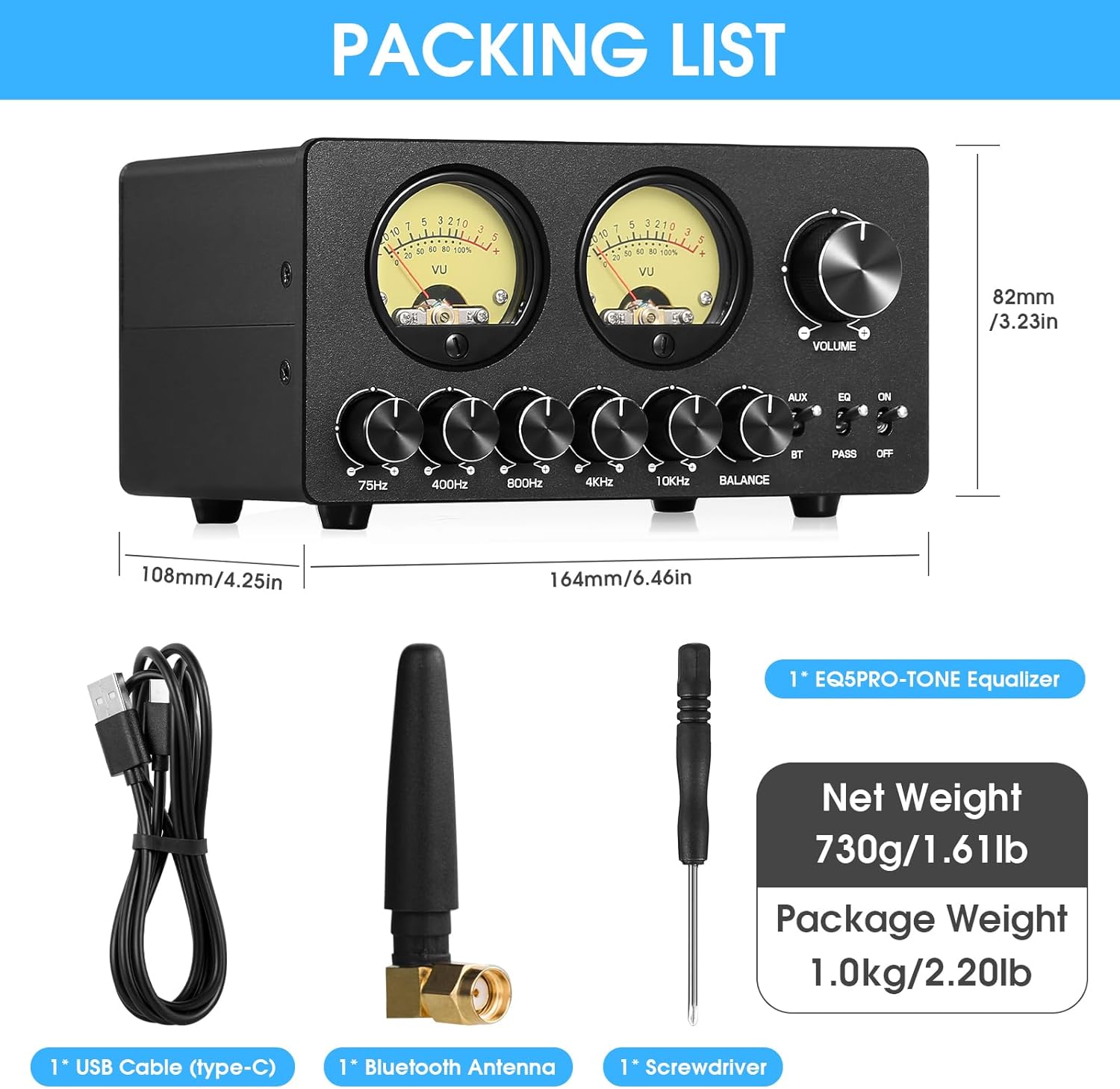
Figure 4.2: Rear Panel Layout
- ANT: Connection point for the Bluetooth antenna.
- OUTPUT (RCA / 3.5mm AUX): Audio output connections to an amplifier, headphone amplifier, or active speakers.
- INPUT (RCA / 3.5mm AUX): Audio input connections from your source device (e.g., CD player, computer, phone).
- LIGHT, SPEED, GAIN: Adjustment controls for the VU meters (background light, pointer speed, and gain).
- DC 5V IN: Power input port (Type-C USB).
5. Setup
Follow these steps to set up your Douk Audio EQ5 Tone Upgraded Version:
- Connect Bluetooth Antenna: Screw the provided Bluetooth antenna into the "ANT" connector on the rear panel.
- Connect Audio Input:
- For wired connection: Connect your audio source (e.g., CD player, computer) to the "INPUT" RCA or 3.5mm AUX ports on the rear panel using appropriate cables.
- For Bluetooth: Ensure no wired input is connected and the input select switch is set to BT.
- Connect Audio Output: Connect the "OUTPUT" RCA or 3.5mm AUX ports on the rear panel to your amplifier, headphone amplifier, or active speakers.
- Connect Power: Connect the provided USB Type-C cable to the "DC 5V IN" port on the rear panel and plug the other end into a suitable 5V power adapter (not included, typically a phone charger or computer USB port).
- Power On: Flip the "ON/OFF" switch on the front panel to the "ON" position.

Figure 5.1: Rear panel connections for input and output.
6. Operating Instructions
This section details the general operation of the EQ5 Tone Upgraded Version.
6.1 Input Selection
Use the "AUX / BT" switch on the front panel to select your desired audio input source:
- AUX: For wired connections (RCA or 3.5mm AUX).
- BT: For Bluetooth wireless connection.
6.2 Volume Control
Adjust the large "VOLUME" knob on the front panel to control the overall output level of the audio.
6.3 Equalizer Adjustment
The EQ5 Tone features five independent frequency band controls:
- 75Hz: Controls the very low bass frequencies.
- 400Hz: Controls the mid-bass frequencies.
- 800Hz: Controls the lower midrange frequencies.
- 4KHz: Controls the upper midrange/lower treble frequencies.
- 10KHz: Controls the high treble frequencies.
Rotate the corresponding knobs to boost or cut the gain for each frequency band, tailoring the sound to your preference and acoustic environment.

Figure 6.1: 5-band EQ adjustment knobs.
7. Bluetooth Connectivity
To connect your device via Bluetooth:
- Ensure the "AUX / BT" switch is set to "BT".
- On your Bluetooth-enabled device (smartphone, tablet, computer), search for available Bluetooth devices.
- Select "Douk Audio EQ5 Tone" from the list to pair.
- Once paired, audio from your device will be streamed wirelessly to the EQ5 Tone.

Figure 7.1: Bluetooth connectivity feature.
8. VU Meter Adjustment
The dual VU meters provide a visual representation of the audio signal level. You can adjust their behavior using the controls on the rear panel:
- LIGHT: Adjusts the brightness of the VU meter backlight.
- SPEED: Controls the response speed of the VU meter needles.
- GAIN: Adjusts the sensitivity of the VU meters to match different audio input levels.

Figure 8.1: Detailed view of the VU meters.
9. Bypass and Balance Controls
- EQ / Bypass Switch:
When set to "EQ", the 5-band equalizer is active, allowing you to shape the sound. When set to "PASS" (Bypass), the audio signal bypasses the equalizer circuitry and passes directly from input to output without any processing. This is useful for comparing the sound with and without EQ.
- Balance Knob:
This knob allows you to adjust the relative volume between the left and right audio channels. Use it to compensate for any imbalances in your audio setup or listening environment, ensuring the sound field remains centered.

Figure 9.1: Bypass and Balance controls.
10. Maintenance
To ensure the longevity and optimal performance of your EQ5 Tone Upgraded Version:
- Clean the unit with a soft, dry cloth. Do not use liquid cleaners or aerosols.
- Keep the device free from dust and debris.
- Store in a cool, dry place when not in use for extended periods.
11. Troubleshooting
If you encounter issues with your device, refer to the following common problems and solutions:
| Problem | Possible Cause | Solution |
|---|---|---|
| No sound output. | Incorrect input/output connections, wrong input selected, low volume. | Check all cable connections. Ensure the "AUX / BT" switch is set correctly. Increase the volume on the EQ5 Tone and connected devices. |
| Bluetooth not connecting. | Device not in pairing mode, out of range, interference. | Ensure the "AUX / BT" switch is set to "BT". Move your Bluetooth device closer to the EQ5 Tone. Turn off and on Bluetooth on your device. |
| VU meters not moving. | No audio signal, GAIN setting too low. | Verify audio is playing and connected correctly. Adjust the "GAIN" knob on the rear panel. |
| Distorted sound. | Volume too high, incorrect EQ settings. | Reduce the volume. Adjust EQ knobs to neutral or experiment with different settings. |
12. Specifications
| Feature | Detail |
|---|---|
| Item Weight | 2.09 pounds (0.95 kg) |
| Package Dimensions | 8.43 x 7.36 x 4.02 inches (21.4 x 18.7 x 10.2 cm) |
| Power Requirement | DC 5V |
| Equalizer Bands | 75Hz, 400Hz, 800Hz, 4KHz, 10KHz |
| Bluetooth Version | 5.0 |
| Inputs | Bluetooth, RCA, 3.5mm AUX |
| Outputs | RCA, 3.5mm AUX |
| Manufacturer | Douk Audio |
13. Official Product Video
Watch the official product video for a visual guide on the Douk Audio EQ5 Tone Upgraded Version's features and operation.
Video 13.1: Upgraded EQ5 Tone 5-Band Bluetooth EQ Equalizer with VU Meter overview.
14. Warranty and Support
Your Douk Audio EQ5 Tone Upgraded Version comes with an 18-Month Limited Warranty.
For technical support, troubleshooting assistance, or warranty claims, please visit the official Douk Audio store or contact their customer service through the platform where you purchased the product.
Official Brand Store: Douk Audio Store on Amazon
Ask a question about this manual
Ask about setup, troubleshooting, compatibility, parts, safety, or missing instructions. Manuals+ will review the question and use this page’s manual context to help answer it.