
1. Introduction
Thank you for choosing the Yuwei Wireless Backup Camera. This manual provides essential information for the proper installation, operation, and maintenance of your new backup camera system. Please read this manual thoroughly before using the product to ensure safe and optimal performance. This camera is designed to assist drivers in safely backing up vehicles by providing a clear view of the area behind the vehicle.
2. Safety Information
- Always drive safely: The backup camera is an aid and does not replace the driver's responsibility to operate the vehicle safely. Always check your surroundings directly before backing up.
- Power supply: Ensure the camera is connected to a stable 12-volt DC power supply. Incorrect voltage can damage the device.
- Wiring: All wiring should be done by a qualified professional to prevent electrical shorts or damage to the vehicle's electrical system.
- Environmental conditions: While the camera is designed for harsh environments (IP69 waterproof, heat/cold resistant), extreme conditions can still affect performance. Avoid submerging the camera in water for extended periods.
- Cleaning: Use a soft, damp cloth for cleaning. Avoid abrasive cleaners or solvents that could damage the lens or housing.
3. Package Contents
Please check the package contents carefully. If any items are missing or damaged, contact your retailer.
- Wireless Backup Camera (YW-17211 / YW-77211)
- Mounting Bracket(s)
- Power Cable
- Screws and Adhesives for Installation
- User Manual
4. Specifications
| Feature | Detail |
|---|---|
| Product Dimensions | 3 x 1.3 x 1.4 inches (7.62 x 3.3 x 3.56 cm) |
| Item Weight | 1.4 pounds (0.64 kg) |
| Brand | Yuwei |
| Compatible Devices | Monitor (Wireless connection) |
| Installation Type | Surface Mount |
| Voltage | 12 Volts |
| Optical Sensor Technology | CCD CMOS |
| Lens Type | Wide Angle, Fixed |
| Connector Type | RCA (for wired connection, if applicable, though product is wireless) |
| Waterproof Rating | IP69 |
| Temperature Resistance | Heat resistant up to 158°F (70°C), Cold resistant down to -4°F (-20°C) |
| Night Vision Distance | Up to 20 feet |
Note: Specifications are subject to change without prior notice.
5. Setup & Installation
Before installation, ensure your vehicle's power is off. It is recommended to have the installation performed by a professional.
5.1 Product Dimensions
Familiarize yourself with the camera's dimensions to choose an appropriate mounting location.
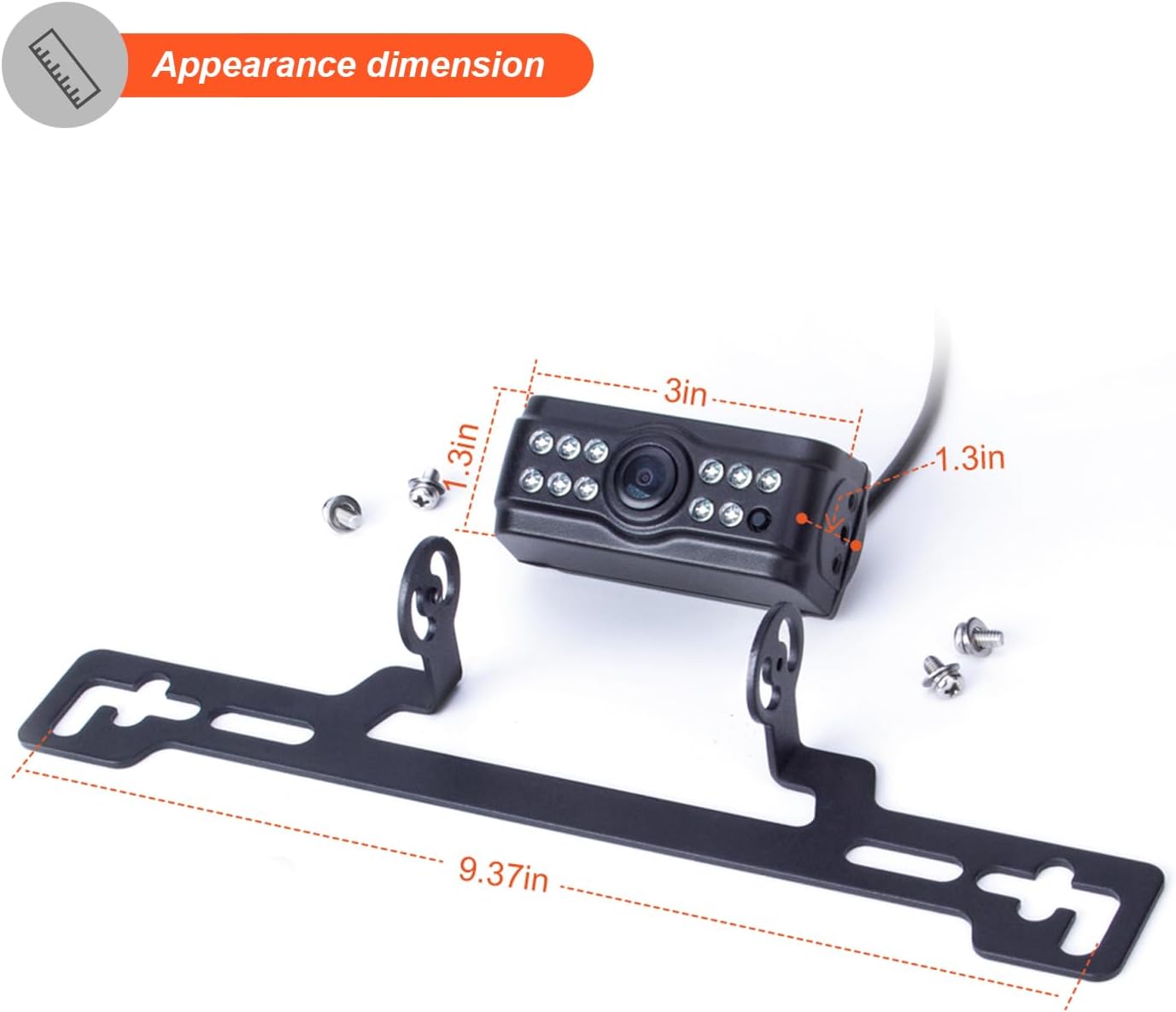
Image 1: Appearance dimensions of the Yuwei Wireless Backup Camera, indicating its compact size and the length of the mounting bracket.
5.2 Installation Methods
The Yuwei Wireless Backup Camera offers versatile installation options to suit various vehicle types and preferences. Choose the method that best fits your vehicle and provides the clearest view.

Image 2: Depicts three common installation methods for the camera, including mounting on a flat surface, using adhesive, and integrating with a license plate frame.
- Surface Mount: Attach the camera directly to a flat surface on your vehicle using screws. This method is ideal for trucks, vans, or other vehicles with suitable mounting areas.
- Adhesive Mount: For a less invasive installation, use the provided adhesive pad to secure the camera. Ensure the surface is clean and dry before applying. This is often suitable for mounting on the rear bumper or tailgate.
- License Plate Frame Mount: Integrate the camera into your vehicle's license plate frame. This provides a discreet and common mounting solution for many passenger cars.
5.3 Power Connection
Connect the camera's power cable to a 12-volt DC power source. Typically, this is connected to the vehicle's reverse light circuit, so the camera activates automatically when the vehicle is put into reverse. Ensure all connections are secure and properly insulated.
6. Operation
6.1 Wireless Connection
The Yuwei Wireless Backup Camera transmits video signals wirelessly to a compatible monitor (not included). Once the camera is powered on (e.g., by engaging reverse gear), it will automatically pair with your monitor. Refer to your monitor's manual for specific pairing instructions if needed.
6.2 Viewing the Feed
When the camera is active, the video feed will display on your connected monitor. The camera provides a wide-angle view, enhancing your visibility behind the vehicle. The AHD 1080P resolution ensures a clear and detailed image.

Image 3: Illustrates the high-definition AHD 1080P output of the camera, showing a clear view of the road.
6.3 Night Vision
The camera is equipped with infrared LEDs for enhanced night vision, allowing for clear visibility up to 20 feet in low-light conditions. This feature activates automatically when ambient light is insufficient.
6.4 Environmental Adaptability
The Yuwei camera is built with a zinc metal material, offering anti-vibration and anti-corrosion properties. Its IP69 waterproof rating ensures reliable operation in various weather conditions, including heavy rain and snow. It is also designed to withstand extreme temperatures, from 158°F (70°C) down to -4°F (-20°C).

Image 4: Shows the camera's robust design, capable of adapting to harsh environments such as water, dust, and extreme temperatures.
7. Maintenance
- Cleaning the Lens: Regularly clean the camera lens with a soft, lint-free cloth and a mild glass cleaner to ensure a clear image. Avoid scratching the lens.
- Checking Connections: Periodically inspect all wiring connections to ensure they are secure and free from corrosion or damage.
- Housing Inspection: Check the camera housing for any signs of damage or wear, especially after exposure to harsh conditions.
8. Troubleshooting
| Problem | Possible Cause | Solution |
|---|---|---|
| No image on monitor | No power to camera or monitor; Loose connection; Camera or monitor malfunction. | Check power connections to both camera and monitor. Ensure vehicle is in reverse if wired to reverse lights. Check all cables for secure fit. Test with another monitor if possible. |
| Flickering or distorted image | Interference; Weak signal; Loose connection; Damaged cable. | Ensure no strong electromagnetic interference sources nearby. Check wireless signal strength. Secure all connections. Inspect cables for damage. |
| Image is blurry or unclear | Dirty lens; Condensation on lens; Incorrect focus (unlikely for fixed lens). | Clean the camera lens with a soft cloth. Allow time for condensation to dissipate. |
| Night vision not working | Infrared LEDs obstructed or damaged; Insufficient power. | Check if anything is blocking the IR LEDs. Ensure stable power supply. |
9. Warranty & Support
Specific warranty information for the Yuwei Wireless Backup Camera (models YW-17211, YW-77211) is typically provided at the point of purchase or included with your product packaging. Please refer to the documentation provided by your retailer or contact Yuwei customer support for detailed warranty terms and conditions.
For technical support, troubleshooting assistance, or inquiries regarding parts and service, please contact Yuwei customer service through their official website or the contact information provided with your purchase.