
1. Introduction
Thank you for choosing the VEVOR SK-68IHB4S7 4-burner built-in induction cooktop. This appliance is designed to provide efficient and precise cooking with its 9 heat levels and a total power output of 6800W. It features a sensitive touch control panel, multiple safety functions, and is compatible with various high-temperature cookware. Please read this manual thoroughly before installation and operation to ensure safe and optimal performance.

Image 1: VEVOR 6800W 4-Burner Built-in Induction Cooktop. This image shows the sleek black glass surface of the induction cooktop, highlighting its modern design and four cooking zones.
2. Important Safety Instructions
To reduce the risk of fire, electric shock, injury to persons, or damage when using the appliance, follow basic safety precautions, including the following:
- Read all instructions before using the appliance.
- Ensure the electrical installation is correctly grounded and meets local codes.
- Do not touch hot surfaces. Use handles or knobs.
- Close supervision is necessary when any appliance is used by or near children.
- Do not operate any appliance with a damaged cord or plug, or after the appliance malfunctions or has been damaged in any manner.
- Do not immerse cord or plug in water or other liquid.
- Use only cookware compatible with induction heating (magnetic base).
- Keep flammable materials away from the cooktop.
- The appliance is equipped with a child lock function. Activate it to prevent accidental operation.
- Be aware of residual heat after use; the surface remains hot for a period.

Image 2: VEVOR Induction Cooktop 5 Major Smart Modes. This graphic illustrates the five key safety features: Residual Heat Display Function, Spill-Proof Function, Child Lock, High/Low Voltage Protection, and 2-Hour Auto Shutdown.
3. Product Overview
3.1 Features
- High Power Output: 6800W total power for rapid heating and efficient cooking.
- Four Cooking Zones: Allows simultaneous cooking with independent control.
- 9 Heat Levels: Precise temperature adjustment for various cooking needs (simmering, frying, boiling, grilling).
- Sensitive Touch Control Panel: Easy and intuitive operation.
- Integrated Timer: Adjustable from 1 to 99 minutes for each zone.
- Pause Function: Temporarily stops cooking and resumes with previous settings.
- Safety Functions: Automatic shut-off, anti-overflow, child lock, residual heat indicator, high/low voltage protection.
- Compatible Cookware: Works with cast iron, enamel, and stainless steel pots and pans.
3.2 Components
The VEVOR induction cooktop consists of a durable vitroceramic surface with four distinct cooking zones and an integrated touch control panel.
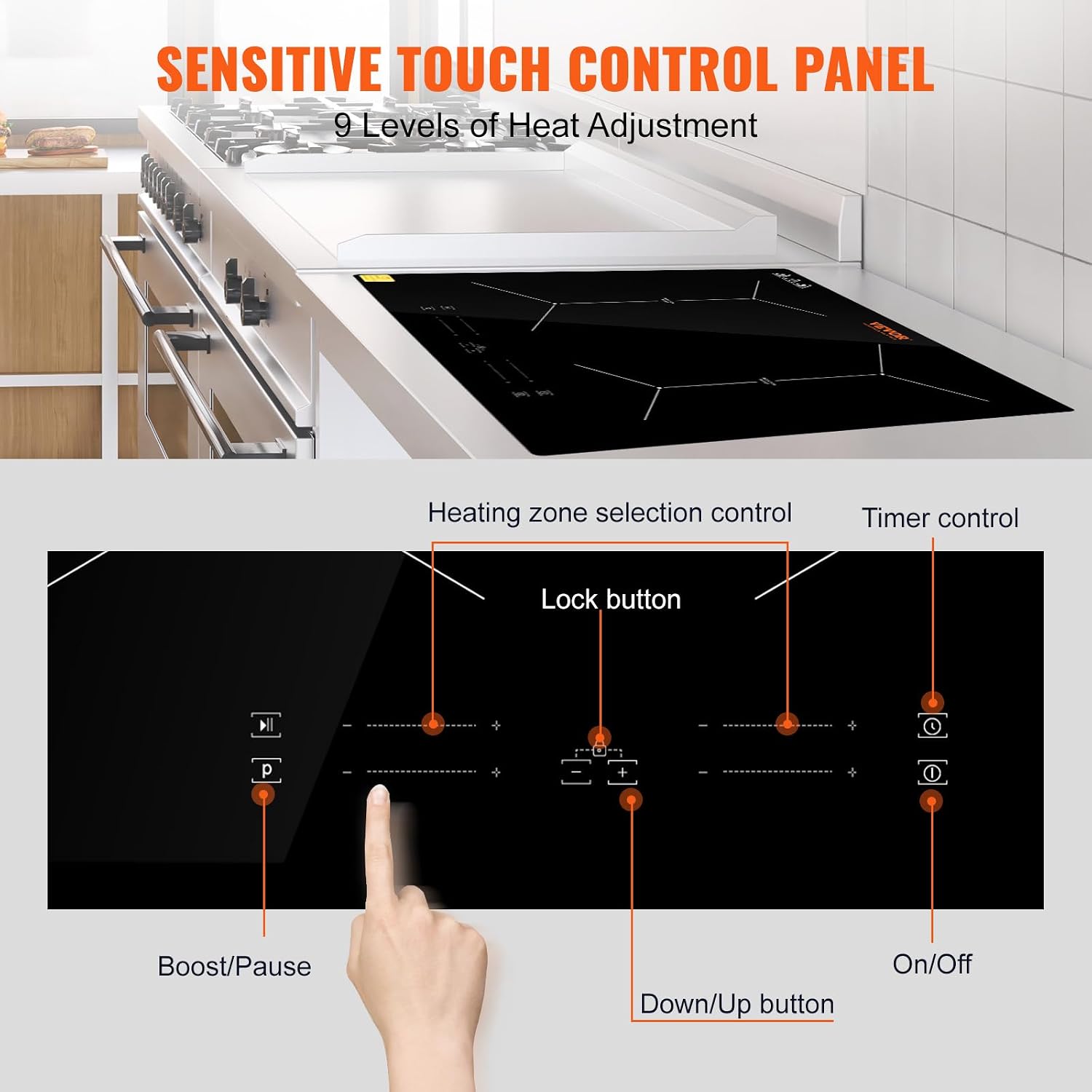
Image 3: VEVOR Induction Cooktop High Power 6800W. This image highlights the power distribution across the four cooking zones, indicating 1800W (boost 2000W) for two zones and 1600W (boost 1800W) for the other two, totaling 6800W.

Image 4: VEVOR Built-in Electric Stove Top Features. This image summarizes the key features: 6800W High Power, 99-minute timer, 9 adjustable levels, zone control, and 4 burners.

Image 5: VEVOR Induction Cooktop 4 Independent Burners. This image shows the layout of the four independent cooking zones with their respective dimensions (165mm/6.5", 190mm/7.5", 260mm/10.2"). It also illustrates compatible cookware sizes.
4. Installation Instructions
The VEVOR induction cooktop is designed for built-in installation. Proper installation is crucial for safety and performance. It is recommended that installation be performed by a qualified electrician or technician.
4.1 Pre-Installation Checks
- Verify that the countertop material can withstand temperatures up to 100°C.
- Ensure adequate ventilation space around and below the cooktop.
- Check that the electrical supply matches the cooktop's requirements (AC 220-240V, 50Hz).
4.2 Countertop Cut-out Dimensions
The required cut-out dimensions for installation are approximately 565 mm (width) x 495 mm (depth).
4.3 Electrical Connection
The cooktop requires a dedicated electrical circuit. Connect the appliance to the main power supply according to the wiring diagram provided and local electrical regulations. Ensure a double pole breaker is used.

Image 6: VEVOR Induction Cooktop Built-in Installation Diagram. This image provides detailed dimensions for the cooktop (590mm x 520mm x 56mm) and the required cut-out for built-in installation (565mm x 495mm). It also includes wiring diagrams for 240V 60Hz and a Double Pole Breaker setup.
5. Operating Instructions
The VEVOR induction cooktop features a user-friendly touch control panel.
5.1 Control Panel Layout

Image 7: VEVOR Induction Cooktop Sensitive Touch Control Panel. This image labels the various controls on the cooktop: Boost/Pause, Lock button, Heating zone selection control, Down/Up button, Timer control, and On/Off button.
5.2 Power On/Off
- To turn on: Touch the On/Off button. The indicator lights will illuminate.
- To turn off: Touch the On/Off button again.
5.3 Selecting a Cooking Zone and Adjusting Heat
- Place suitable cookware on the desired cooking zone.
- Touch the Heating zone selection control for the desired zone.
- Use the Down/Up buttons (+ or -) to select a heat level from 1 to 9.
5.4 Using the Timer
- After selecting a cooking zone and setting the heat level, touch the Timer control button.
- Use the Down/Up buttons to set the desired cooking time (1-99 minutes).
- The timer will count down and automatically turn off the selected cooking zone when finished.
5.5 Pause Function
- Touch the Boost/Pause button (labeled 'p') to temporarily pause all active cooking zones.
- Touch it again to resume cooking with the previous settings.
5.6 Child Lock
- To activate: With the cooktop on but no cooking zones active, touch and hold the Lock button for a few seconds. An indicator will light up.
- To deactivate: Touch and hold the Lock button again for a few seconds.
5.7 Compatible Cookware
Induction cooktops require cookware with a magnetic base. Compatible materials include:
- Cast iron pots and skillets
- Enamel pots
- Stainless steel pots and skillets (ensure they are induction-compatible)
To check compatibility, place a magnet on the bottom of your cookware. If it sticks, the cookware is suitable for induction.

Image 8: VEVOR Induction Cooktop Compatible Cookware. This image displays various types of cookware compatible with the induction cooktop, including cast iron pots, enamel pots, cast iron skillets, and stainless steel pots/skillets.
6. Maintenance and Cleaning
Regular cleaning and maintenance will ensure the longevity and optimal performance of your induction cooktop.
- Always ensure the cooktop is turned off and cool before cleaning.
- For light spills and daily cleaning, wipe the vitroceramic surface with a soft cloth and mild detergent.
- For stubborn stains or burnt-on food, use a ceramic hob scraper and a specialized ceramic hob cleaner. Follow the product instructions for the cleaner.
- Avoid using abrasive sponges, scouring pads, or harsh chemical cleaners, as these can scratch or damage the surface.
- Wipe the control panel gently with a damp cloth. Do not allow water to seep into the controls.
- Ensure the ventilation openings are clear of dust and debris to maintain proper airflow.
7. Troubleshooting
If you encounter issues with your induction cooktop, refer to the following common problems and solutions:
| Problem | Possible Cause | Solution |
|---|---|---|
| Cooktop does not turn on. | No power supply; Child lock activated; Faulty connection. | Check power outlet and circuit breaker. Deactivate child lock. Consult a qualified electrician. |
| Cooking zone not heating. | Incompatible cookware; Cookware not centered; Zone not selected. | Use induction-compatible cookware. Center cookware on the zone. Select the correct cooking zone. |
| Display shows an error code (e.g., E0, E1). | Internal fault; Overheating; Voltage issue. | Turn off the cooktop, wait a few minutes, then restart. If the error persists, contact customer support. |
| Unusual noise during operation. | Normal fan operation; Cookware vibration. | A slight humming or fan noise is normal for induction cooktops as the cooling fan operates. Some cookware may vibrate slightly. |
| Cooktop automatically shuts off. | Overheating; Long period of inactivity; Spill-over detected. | Allow the cooktop to cool. Ensure proper ventilation. Clean any spills. |
If the problem persists after attempting these solutions, please contact VEVOR customer support for assistance.
8. Specifications
| Specification | Detail |
|---|---|
| Model Number | SK-68IHB4S7 |
| Brand | VEVOR |
| Voltage/Frequency | AC 220-240 V 50 Hz |
| Total Power | 6800 W |
| Net Weight | 8.32 kg (18.3 lbs) |
| Material | Vitroceramic surface, ABS plastic casing |
| Product Dimensions (D x W x H) | 52 cm x 56 cm x 5.6 cm (20.5" x 22" x 2.2") |
| Number of Burners | 4 |
| Heat Levels | 9 |
| Timer Range | 1-99 minutes |
| Control Type | Touch Control |
| Installation Type | Built-in |
| Compatible Cookware | Cast Iron, Enamel, Stainless Steel |
| Safety Features | Auto Shut-off, Anti-overflow, Child Lock, Residual Heat Indicator, High/Low Voltage Protection |

Image 9: VEVOR Induction Cooktop Model SK-68IHB4S7 Specifications. This image provides a visual representation of the cooktop with its dimensions and lists key specifications such as model, voltage, power, net weight, material, and compatible cookware.
9. Warranty and Support
For warranty information and terms, please refer to the documentation included with your purchase or visit the official VEVOR website. Keep your proof of purchase for any warranty claims.
If you require technical assistance, have questions about installation, operation, or maintenance, please contact VEVOR customer support. Contact details can typically be found on the VEVOR website or in your product packaging.