
Sudio B2BLK
Sudio B2 Wireless Earphones User Manual
Model: B2BLK
Introduction
The Sudio B2 Bone Conduction Headphones are designed for an active lifestyle, offering a lightweight and durable audio solution. These open-ear headphones utilize cutting-edge bone conduction technology to transmit sound directly to your temples, ensuring you remain aware of your surroundings while enjoying your audio.
Key features include Bluetooth 5.3 connectivity, IPX5 water and sweat resistance, and a comfortable, flexible design. The Sudio B2 is ideal for urban multitaskers, gym-goers, and cyclists who prioritize both sound quality and environmental awareness.
What's in the Box
- Sudio B2 Wireless Earphones
- USB-C Charging Cable
- User Manual
Product Overview
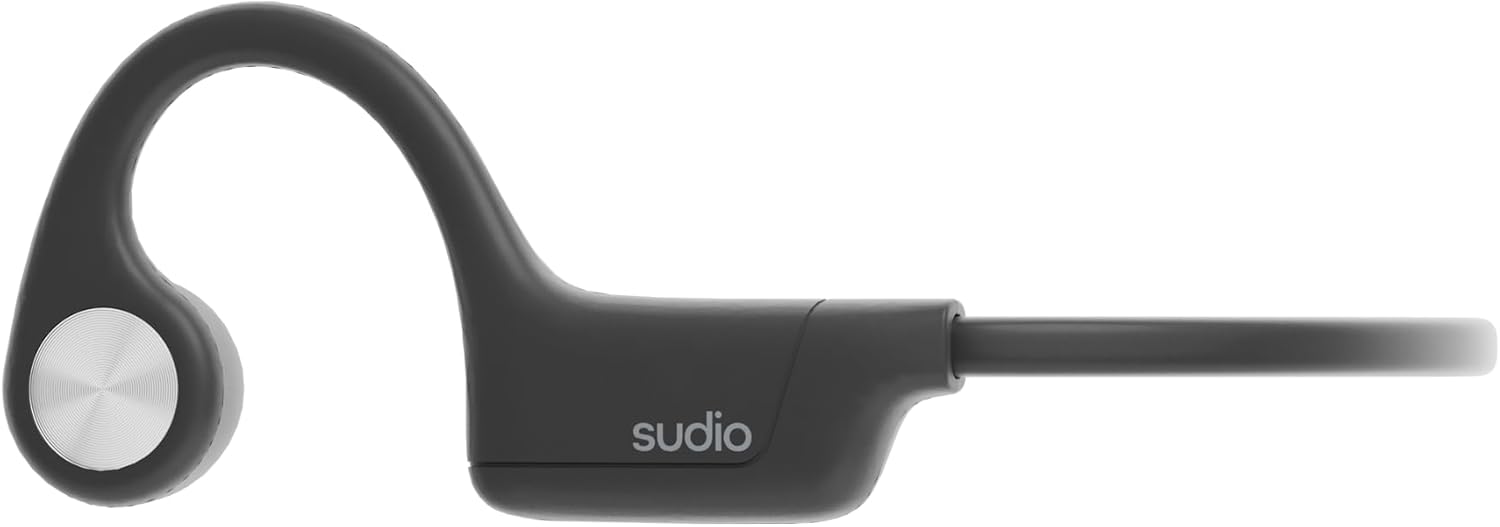
Figure 1: Sudio B2 Wireless Earphones, showcasing the sleek, lightweight design from a side perspective.

Figure 2: Angled view of the Sudio B2, highlighting the integrated control buttons located on the side of the earphone.

Figure 3: A person wearing the Sudio B2 earphones, demonstrating their comfortable and secure fit around the ear and temple area.
Video 1: Official product video demonstrating the Sudio B2 Bone Conduction Wireless Earphones in use, highlighting key features and design.
Design and Comfort
The Sudio B2 features a lightweight design, weighing only 29 grams, ensuring comfort during extended wear. Its dimensions are 145x105x48mm. The flexible headband is engineered with balanced tension to provide a snug yet comfortable fit around your head, making it suitable for various activities.
The open-ear design allows you to remain aware of your surroundings, which is crucial for outdoor activities like cycling or running, enhancing safety without compromising your audio experience.
Bone Conduction Technology
Unlike traditional headphones, the Sudio B2 uses bone conduction technology to deliver sound directly to your temples, bypassing the eardrums. This allows your ears to remain open to ambient sounds, providing a unique blend of immersive audio and environmental awareness. The omnidirectional microphones are designed to pick up sound from multiple directions, ensuring clear communication.
Connectivity and Durability
Equipped with Bluetooth 5.3, the Sudio B2 offers stable and efficient wireless connectivity. It boasts an IPX5 water resistance rating, making it resistant to rain and sweat, perfect for workouts and outdoor adventures.
Battery Life
Enjoy up to 7.5 hours of playtime at 50% volume. The earphones support quick charging via USB-C, reaching full charge in approximately 1.5 hours.
Setup
Charging the Earphones
- Locate the USB-C charging port on the earphones.
- Connect the provided USB-C cable to the charging port and the other end to a compatible USB power source (e.g., computer USB port, wall adapter).
- The LED indicator will show charging status. A full charge takes approximately 1.5 hours.
Pairing with a Device
- Ensure the Sudio B2 earphones are charged and powered off.
- Press and hold the power button (usually the main function button) until the LED indicator flashes, indicating pairing mode.
- On your device (smartphone, tablet, laptop), go to Bluetooth settings and turn Bluetooth on.
- Search for "Sudio B2" in the list of available devices and select it to pair.
- Once paired, the LED indicator on the earphones will change, and you will hear an audio confirmation.
Operating Instructions
Power On/Off
- To Power On: Press and hold the power button for a few seconds until the LED indicator lights up.
- To Power Off: Press and hold the power button for a few seconds until the LED indicator turns off.
Music Playback
- Play/Pause: Press the main function button (in front of the ear) once.
- Next Track: Double-press the main function button.
- Previous Track: Triple-press the main function button.
Volume Control
- Increase Volume: Press the '+' button (secondary function button behind the ear).
- Decrease Volume: Press the '-' button (secondary function button behind the ear).
Call Management
- Answer/End Call: Press the main function button once.
- Reject Call: Press and hold the main function button for 2 seconds.
Maintenance
Cleaning
- Wipe the earphones with a soft, dry cloth.
- For stubborn dirt, use a slightly damp cloth with mild soap, then wipe dry immediately.
- Do not use abrasive cleaners or immerse the earphones in water.
Storage
- Store the earphones in a cool, dry place away from direct sunlight and extreme temperatures.
- Avoid placing heavy objects on top of the earphones.
Battery Care
- Charge the earphones regularly, even if not in frequent use, to maintain battery health.
- Avoid fully depleting the battery frequently.
Troubleshooting
| Problem | Possible Cause | Solution |
|---|---|---|
| Earphones do not power on. | Low battery; Power button not pressed long enough. | Charge the earphones fully. Press and hold the power button for 3-5 seconds. |
| Cannot pair with device. | Earphones not in pairing mode; Device Bluetooth off; Too far from device. | Ensure earphones are in pairing mode (flashing LED). Turn device Bluetooth on/off. Move earphones closer to device. |
| No sound or low volume. | Volume too low on earphones/device; Not properly connected; Incorrect ear placement. | Increase volume on both earphones and device. Re-pair the earphones. Ensure the transducers are positioned correctly on your temples. |
| Sound quality is poor. | Interference; Low battery; Improper fit. | Move away from other wireless devices. Charge the earphones. Adjust the fit of the earphones on your temples. |
| Earphones not charging. | Faulty cable/charger; Charging port obstruction. | Try a different USB-C cable and power source. Check the charging port for debris. |
If the issue persists after trying these solutions, please contact Sudio customer support for further assistance.
Specifications
| Feature | Detail |
|---|---|
| Model Name | Sudio B2 Black |
| Connectivity Technology | Wireless (Bluetooth 5.3) |
| Ear Placement | Open Ear (Bone Conduction) |
| Water Resistance Level | IPX5 (Water Resistant) |
| Item Weight | 29 Grams (1.02 ounces) |
| Product Dimensions | 4.13 x 5.71 x 1.89 inches (145x105x48mm) |
| Playtime | Up to 7.5 hours (at 50% volume) |
| Charging Time | 1.5 Hours (USB-C) |
| Frequency Range | 20Hz - 20kHz |
| Impedance | 8 Ohm |
| Included Components | Cable, User Manual |
Warranty and Support
Sudio products are manufactured to the highest quality standards. For information regarding warranty coverage, technical support, or service inquiries, please refer to the official Sudio website or contact their customer service directly.
You can find more information and support resources by visiting the Sudio Store on Amazon or the official Sudio support page.
Related documentsB2BLK


Ask a question about this manual
Ask about setup, troubleshooting, compatibility, parts, safety, or missing instructions. Manuals+ will review the question and use this page’s manual context to help answer it.