1. Introduction and Overview
The Peavey FX 24 II is a professional 24-channel audio mixer console designed for live sound, studio recording, and various audio applications. It features a high-power dual DSP engine for enhanced digital effects, USB connectivity for recording and playback, 48V phantom power for condenser microphones, and comprehensive routing options including 6 auxiliary sends and 4 subgroups. This manual provides essential information for the safe and effective operation of your mixer.

Figure 1.1: Front view of the Peavey FX 24 II mixer, highlighting 20 microphone inputs and 48V phantom power capability.
2. Safety Information
Please read and understand all safety instructions before operating the Peavey FX 24 II mixer. Retain this manual for future reference.
- Power Source: Connect the unit only to the power supply type indicated on the unit. Ensure the power cord is not damaged or pinched.
- Ventilation: Do not block any ventilation openings. Ensure adequate airflow around the unit to prevent overheating.
- Water and Moisture: Do not expose the unit to rain or moisture. Do not place objects filled with liquids on the unit.
- Servicing: Do not attempt to service this unit yourself. Refer all servicing to qualified service personnel.
- Cleaning: Clean only with a dry cloth. Avoid using liquid cleaners.
3. Package Contents
Verify that all items are present in the package:
- Peavey FX 24 II 24-Channel Professional Audio Mixer Console
- Power Cord
- User Manual (this document)
4. Setup
4.1 Power Connection
- Ensure the mixer's power switch is in the OFF position.
- Connect the provided power cord to the AC inlet on the rear panel of the mixer.
- Plug the other end of the power cord into a suitable AC power outlet.
4.2 Audio Input Connections
The FX 24 II offers 24 XLR microphone inputs and line inputs for various audio sources.
- Microphones: Connect dynamic or condenser microphones to the XLR inputs (1-24). For condenser microphones, activate 48V phantom power as described in Section 5.2.
- Line-Level Devices: Connect instruments, keyboards, or other line-level devices to the 1/4-inch TRS/TS inputs. The mixer also features 2 stereo channels with dual mic/line inputs.
4.3 Audio Output Connections
Connect your main speakers, monitors, or recording devices to the mixer's outputs.
- Main Outputs: Use the XLR or 1/4-inch outputs for connecting to your main PA system or powered speakers.
- Auxiliary Sends: Connect monitor speakers or external effects processors to the 6 Aux Send outputs.
- Subgroup Outputs: Utilize the 4 subgroup outputs for routing groups of channels to external devices or for sub-mixing.

Figure 4.1: Rear panel connections of the Peavey FX 24 II mixer.
4.4 USB Connection for Recording/Playback
The mixer supports USB 2.0 connectivity for digital audio streaming and recording.
- USB 2.0 "A" Port: Connect a memory stick (not included) to record directly or play back audio files.
- USB 2.0 "B" Port: Connect to your computer for streaming digital audio out or for multi-track recording.

Figure 4.2: USB and computer connectivity for the Peavey FX 24 II mixer.
5. Operating Instructions
5.1 Channel Controls
Each input channel features the following controls:
- GAIN: Adjusts the input sensitivity for the connected microphone or line-level device.
- EQ (Equalizer): 3-band EQ with sweepable mid-frequency allows for precise tonal shaping.
- AUX Sends: Controls the amount of signal sent to each of the 6 auxiliary outputs.
- PAN: Positions the channel's signal within the stereo field.
- MUTE: Silences the channel.
- FADER: 100mm fader controls the channel's output level to the main mix and subgroups.
5.2 Phantom Power Activation
To power condenser microphones, activate the 48V phantom power:
- Ensure all channel faders are at their minimum position.
- Connect condenser microphones to the XLR inputs.
- Locate the 48V PHANTOM POWER switch (usually a global switch or per-channel, refer to the mixer's panel for exact location).
- Engage the switch. An indicator light will illuminate.
- Gradually raise the channel faders to the desired level.
Caution: Do not activate phantom power when dynamic microphones or non-phantom powered devices are connected, as this may cause damage.
5.3 Effects Processor Usage
The FX 24 II features a dual DSP engine with improved digital effects.
- Use the dedicated controls in the effects section to select and adjust various effects such as reverb, delay, chorus, etc.
- Apply effects to individual channels using the channel's FX send controls.

Figure 5.1: Top view of the mixer, highlighting the effect program list and key features.
5.4 USB Recording and Playback
- Recording to Memory Stick: Insert a USB memory stick into the USB 2.0 "A" port. Use the mixer's USB controls to initiate and manage recording.
- Playback from Memory Stick: Insert a USB memory stick with audio files. Use the mixer's USB controls to select and play back tracks.
- Computer Streaming/Recording: Connect the USB 2.0 "B" port to your computer. The mixer will function as an audio interface, allowing you to stream digital audio or record multiple tracks into your Digital Audio Workstation (DAW).
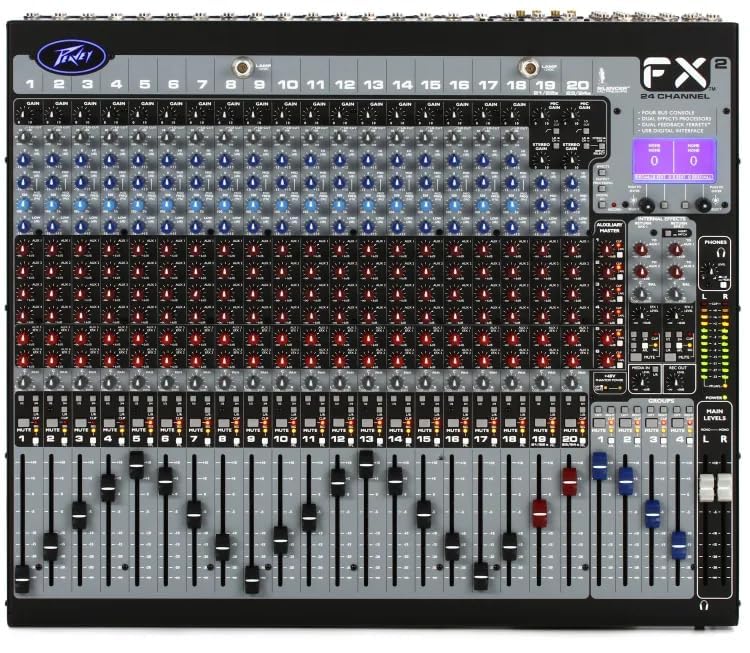
Figure 5.2: Detailed view of the mixer's control surface.
6. Maintenance
Proper maintenance ensures the longevity and optimal performance of your Peavey FX 24 II mixer.
- Cleaning: Regularly wipe the mixer's surface with a soft, dry, lint-free cloth. Do not use abrasive cleaners, solvents, or waxes.
- Dust Protection: When not in use, cover the mixer with a dust cover to prevent dust and debris from entering the controls and faders.
- Storage: Store the mixer in a cool, dry place away from direct sunlight and extreme temperatures.
- Cable Management: Ensure all cables are neatly organized and not under tension to prevent damage to connectors and ports.
7. Troubleshooting
If you encounter issues with your Peavey FX 24 II mixer, refer to the following common problems and solutions:
| Problem | Possible Cause | Solution |
|---|---|---|
| No sound output | Power not connected; Master fader down; Channel fader down; Mute engaged; Incorrect output connection. | Check power, raise master and channel faders, disengage mute, verify output cables. |
| Distorted sound | Input gain too high; Output level too high; Damaged cable. | Reduce input gain and output levels, try a different cable. |
| Condenser mic not working | 48V phantom power not engaged; Faulty microphone or cable. | Engage 48V phantom power, test with another condenser mic or cable. |
| USB recording/playback issues | Incorrect USB port used; USB drive not formatted correctly; Driver issues (for computer connection). | Ensure correct USB port (A for stick, B for computer), format USB drive to FAT32, install necessary drivers for computer. |
If the problem persists after attempting these solutions, please contact customer support.
8. Specifications
| Feature | Detail |
|---|---|
| Model Number | Peavey FX 24 II |
| Number of Channels | 24 |
| Microphone Inputs | 24 XLR inputs |
| Phantom Power | 48V (for each channel input) |
| Aux Sends | 6 |
| Stereo Inputs | 2 (with dual mic/line inputs) |
| Subgroups | 4 |
| Faders | 100mm |
| DSP Engine | High-power dual DSP with improved digital effects |
| EQ | 3-band with sweepable mid-frequency and variable low cut filters; 28-band GEQ/5-band PEQ (output processing) |
| USB Connectivity | USB 2.0 "A" (record/playback from memory stick), USB 2.0 "B" (streaming digital out & computer recording) |
| Power Source | Corded Electric |
| Package Dimensions | 54 x 52 x 29 cm |
| Item Weight | 9.9 kg |
| Manufacturer | Peavey Electronics Corporation |
| Country of Origin | USA |
9. Warranty and Support
Peavey products are designed for reliability and performance. For specific warranty information, please refer to the warranty card included with your product or visit the official Peavey website.
Customer Support:
For technical assistance, service, or parts, please contact:
- Manufacturer: Peavey Electronics Corporation
- Indian Distributor/Service Partner: MX-MDR TECHNOLOGIES LIMITED
- Address: Plot 101, Sector 1, Gauraipada, Vasai (East), Palghar - 401208, Mumbai, INDIA.
- Email: info@mdrelectronics.com / dipesh@mdrelectronics.com
- Contact No.: 9552529345 / 8805029016
- Website: www.mdrelectronics.com


