
Introduction
The Sofirn SC13 is a powerful, ultra-compact LED flashlight designed for everyday carry. Measuring just 2.54 inches and weighing 1.41 ounces, it delivers up to 1300 lumens and reaches a distance of up to 217 meters. Its robust AL6061-T6 aluminum alloy construction ensures durability, with IP68 water resistance and 1-meter impact resistance. Featuring convenient USB Type-C recharging and a lockout function, the SC13 is an ideal companion for various activities including camping, hiking, and general daily use.

Image: The Sofirn SC13 flashlight is shown held between two fingers, highlighting its extremely compact and portable design.
Package Contents
Verify all items are present in the package:
- 1x Sofirn SC13 Flashlight
- 1x 18350 Lithium Polymer Battery (included inside the flashlight)
- 1x USB Type-C Charging Cable
- 1x Lanyard
- 2x Spare O-rings
- 1x User Manual

Image: The Sofirn SC13 flashlight is displayed alongside its accessories, including the USB-C charging cable, lanyard, and spare O-rings.
Specifications
| Feature | Detail |
|---|---|
| Brand | sofirn |
| Model | SC13 (SOFIRNSC13) |
| Light Source | LED (SST40, 6000-6500K) |
| Max Brightness | 1300 Lumens |
| Max Beam Distance | 217 Meters |
| Power Source | 1x 18350 Lithium Polymer Battery (1100mAh) |
| Charging | USB Type-C |
| Material | AL6061-T6 Aluminum Alloy |
| Dimensions | 0.89"D x 2.4"W x 0.89"H (2.54 inches length, 1.12 inches diameter) |
| Weight | 1.41 Ounces (excluding battery) |
| Water Resistance | IP68 (not for diving) |
| Impact Resistance | 1 Meter |

Image: A visual representation of the Sofirn SC13's various lighting modes, including Moonlight (1 lumen), Low (10 lumens), Medium (150 lumens), High (500 lumens), Turbo (1300 lumens), and Strobe (1300 lumens).
Setup
- Battery Installation: The 18350 Lithium Polymer battery is pre-installed. Before first use, ensure the head and tail caps of the flashlight are fully tightened to establish electrical contact and ensure proper function.
- Initial Charge: It is recommended to fully charge the flashlight before its first use. Refer to the "Charging" section for detailed instructions.

Image: The Sofirn SC13 flashlight is shown with arrows pointing to its head and tail caps, emphasizing the importance of tightening them fully before operation.
Operating Instructions
Basic Operation
- ON/OFF: Single-click the side switch to turn the flashlight ON or OFF.
- Output Selection: When the flashlight is ON, long-press the side switch to cycle through brightness levels: Low → Medium → High. Release the switch to select the desired output. The flashlight has memory function and will turn on in the last used mode (except Moonlight, Turbo, and Strobe).
- Direct Access to Moonlight Mode: When the flashlight is OFF, long-press the side switch for 1 second to activate Moonlight mode (1 lumen).
Advanced Modes
- Turbo Mode: In any mode (not in lockout mode), fast double-click the side switch to activate Turbo (1300 lumens). Double-click again to switch between Turbo and Strobe. Single-click to return to the last used mode.
- Strobe Mode: From Turbo mode, double-click the side switch to activate Strobe (1300 lumens). Double-click again to switch between Turbo and Strobe. Single-click to return to the last used mode.
- Lockout Function: To prevent accidental activation, press the side switch 3 times quickly when the flashlight is OFF. The flashlight will flash once to indicate it is locked. To unlock, press the side switch 3 times quickly again. The flashlight will flash once and then turn on in the last used mode.

Image: The Sofirn SC13 flashlight is shown in use outdoors at night, projecting a bright beam that reaches up to 217 meters, highlighting its impressive illumination capabilities.
Video: This video demonstrates the Sofirn SC13 Mini Flashlight, showcasing its compact size and various lighting modes, including the powerful output.
Charging
The Sofirn SC13 features a convenient USB Type-C charging port.
- Locate the USB Type-C port on the side of the flashlight, usually covered by a rubber flap.
- Gently lift the rubber flap to expose the charging port.
- Connect the provided USB Type-C cable to the flashlight's port and the other end to a compatible USB power source (e.g., wall adapter, power bank, computer USB port).
- The side switch LED indicator will show the charging status:
- Green: 70%-100% charged
- Red: 30%-70% charged
- Red Flashes: 0%-30% charged
- Once fully charged, the indicator will remain solid green. Disconnect the cable and securely close the rubber flap to maintain water resistance.

Image: The Sofirn SC13 flashlight is shown connected to a power bank for USB-C charging, with the LED indicator displaying the battery status.
Maintenance
- Cleaning: Clean the flashlight body with a soft, damp cloth. Avoid using harsh chemicals or abrasive materials.
- Lubrication: Apply a thin layer of silicone grease to the O-rings periodically to maintain water resistance and prevent wear.
- Battery Care: Store the flashlight with a partially charged battery if not used for extended periods. Avoid fully discharging the battery to prolong its lifespan.
- Tightness: Ensure all parts, especially the head and tail caps, are securely tightened to maintain proper function and water resistance.

Image: The Sofirn SC13 flashlight is shown utilizing its magnetic tail cap to attach to a metal surface, illustrating its hands-free operation capability.
Troubleshooting
Flashlight does not turn on:
- Check Battery: Ensure the battery is properly inserted with the correct polarity.
- Tighten Caps: Fully tighten the head and tail caps. Loose connections can prevent the flashlight from working.
- Battery Charge: The battery might be depleted. Connect the flashlight to a USB-C charger and check the indicator light.
- Lockout Mode: The flashlight might be in lockout mode. Triple-click the side switch quickly to unlock it.
Light output is weak or flickering:
- Low Battery: The battery charge may be low. Recharge the flashlight.
- Dirty Contacts: Clean the battery contacts and the flashlight's internal contacts with a clean cloth.
Flashlight gets hot quickly:
- Turbo Mode: High brightness modes like Turbo generate significant heat. This is normal. The flashlight has built-in temperature regulation to prevent overheating. If it becomes too hot, it will automatically step down the brightness.
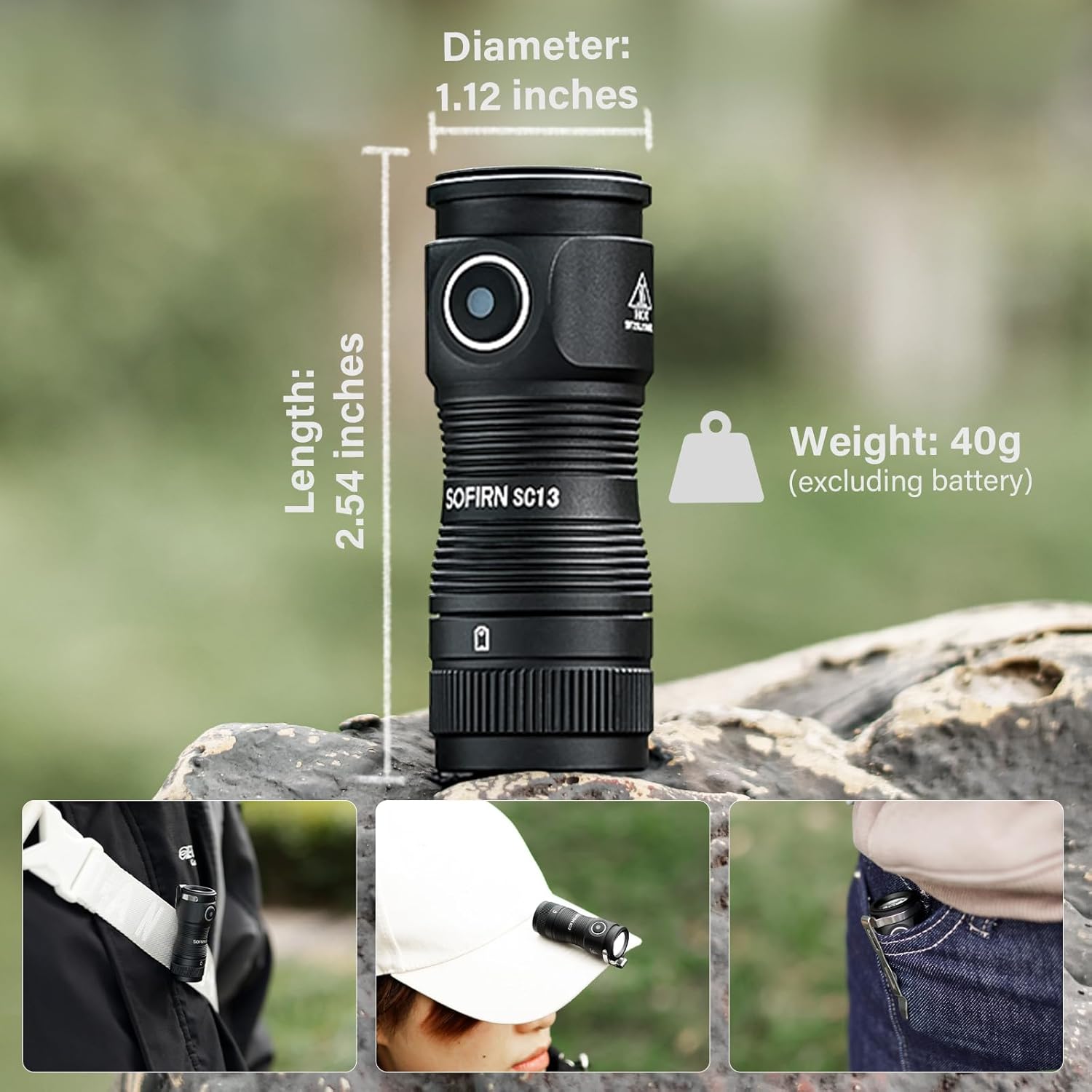
Image: The Sofirn SC13 flashlight illustrates its lockout mode, which is activated by three quick clicks of the button to prevent unintended power-on.
Warranty and Support
Sofirn products typically come with a manufacturer's warranty. Please refer to the official Sofirn website or your purchase documentation for specific warranty terms and conditions.
For technical support, troubleshooting assistance, or warranty claims, please contact Sofirn customer service directly.
You can often find support contact information on the product packaging, the official Sofirn website, or by emailing sofirnlight@gmail.com.