
DCCStands VEGA3000
Castles VEGA3000 PIN Pad Swivel and Tilt Terminal Stand User Manual
Brand: DCCStands | Model: VEGA3000 Compatible Stand
1. Introduction and Overview
This manual provides comprehensive instructions for the installation, operation, and maintenance of your DCCStands Swivel and Tilt Terminal Stand, designed specifically for the Castles VEGA3000 PIN Pad. This stand is engineered from sturdy steel with a durable powder-coated finish, ensuring longevity and security for your point-of-sale (POS) terminal.
The stand is designed to enhance customer experience and streamline payment transactions by allowing the terminal to tilt up to 60 degrees and swivel a full 190 degrees. This flexibility facilitates easy movement of the device between merchant and customer, improving accessibility and convenience. Additionally, the integrated security tether lock provides robust protection against theft and accidental damage.

Figure 1.1: Overview of the Castles VEGA3000 PIN Pad Swivel and Tilt Terminal Stand, showing the stand, security tether, and two keys.
2. Product Features
- Durable Construction: Manufactured from sturdy steel with a durable powder-coated finish for long-lasting performance and protection.
- Enhanced Customer Interaction: Allows the POS terminal to tilt up to 60 degrees and swivel a full 190 degrees, making it easy to present the device to customers.
- Seamless Transactions: Improves the flow of payment transactions by bringing the terminal closer to the customer.
- Field Upgradeable: Designed for future compatibility, the stand can be upgraded in the field with a simple top plate swap.
- Universal Compatibility (Base): Compatible with any round or square Discount Credit Card Supply freestanding plate.
- Integrated Security: Includes a device-to-stand security tether lock with two keys to minimize chances of damage and theft.
- Wire Management: Features a flange cover to neatly hide wires, contributing to a clean and secure setup.
- Simple Installation: Supplied fully built with two easy installation methods: screws or an adhesive pad.
3. Setup and Installation
The DCCStands Swivel and Tilt Terminal Stand is supplied fully assembled, simplifying the installation process. The terminal itself is not included with the stand.
3.1 Choosing an Installation Method
There are two primary methods for securing the stand to your counter or surface:
- Screw Mounting: For a permanent and highly secure installation, use the provided screws to fasten the stand to your surface. Ensure the surface material is suitable for screw installation.
- Adhesive Pad Mounting: For a less permanent or drill-free installation, use the provided adhesive pad. Clean the surface thoroughly before applying the pad to ensure maximum adhesion.
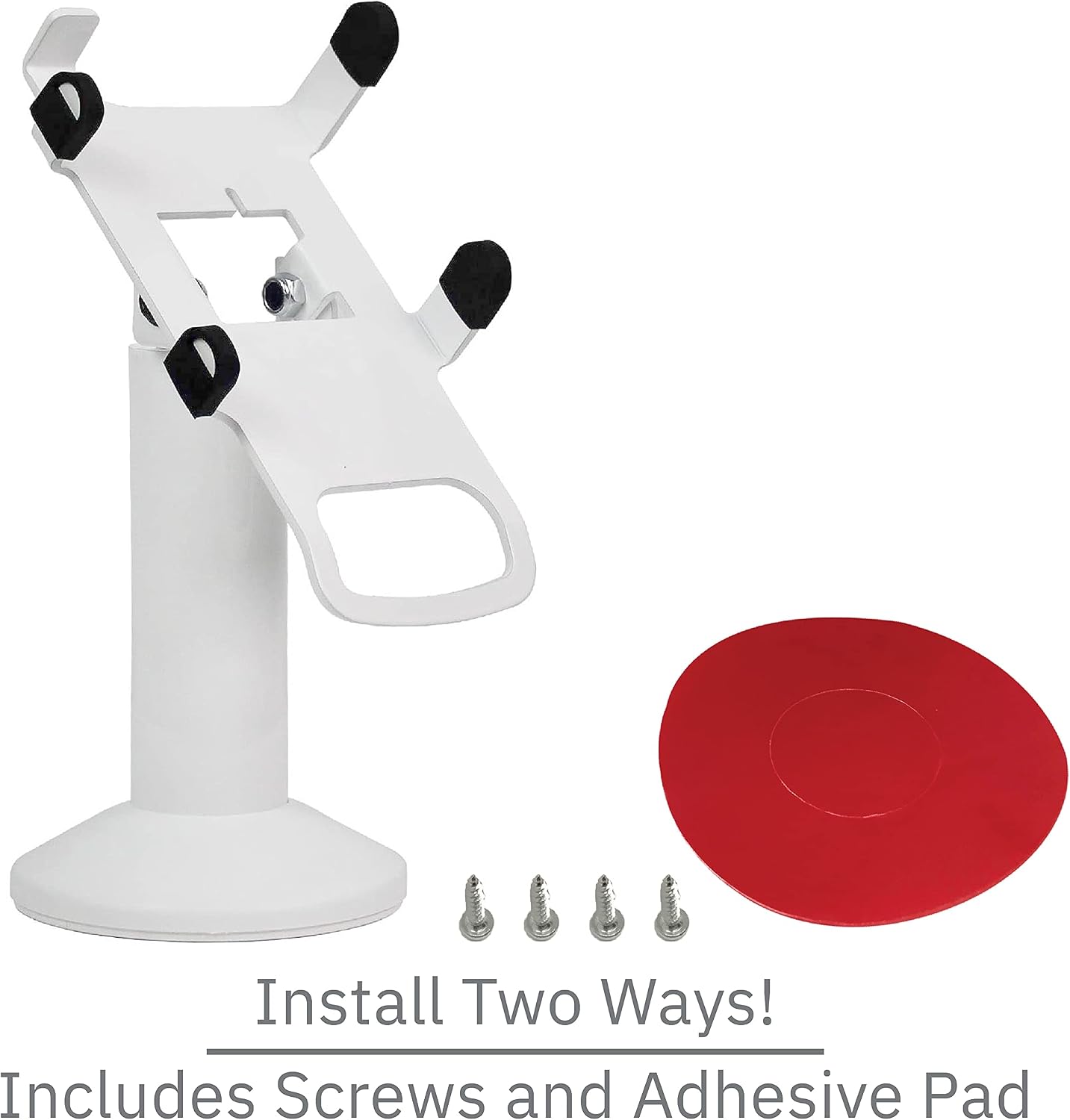
Figure 3.1: The stand showing the two installation options: screws and adhesive pad.
3.2 Attaching the Castles VEGA3000 PIN Pad
Carefully align your Castles VEGA3000 PIN Pad with the mounting plate on the stand. Secure the PIN Pad to the stand according to the specific instructions provided with your Castles VEGA3000 device. The stand is designed to perfectly fit this model.
3.3 Installing the Security Tether Lock
The security tether lock provides an additional layer of protection against theft. Follow these steps to install it:
- Locate the security tether cable and the two keys provided.
- Attach one end of the tether cable to the designated security slot on your Castles VEGA3000 PIN Pad.
- Secure the other end of the tether cable to the integrated lock mechanism on the DCCStands pole.
- Use one of the provided keys to lock the tether in place. Keep the spare key in a secure location.

Figure 3.2: The security tether lock mechanism, showing how it secures the device to the stand, and the two included keys.

Figure 3.3: A detailed view of the heavy-duty cam lock and the 8-inch strong and durable steel cable, which has a pull strength of 154 lbs.
4. Operation
Once installed, the DCCStands Swivel and Tilt Terminal Stand offers flexible positioning for optimal user and customer interaction.
- Swivel Function: The stand can swivel a full 190 degrees. Gently rotate the terminal to face the customer for payment, then rotate it back towards the merchant for transaction processing.
- Tilt Function: The terminal can be tilted up to 60 degrees. Adjust the tilt angle to reduce glare or provide a more comfortable viewing angle for both the merchant and the customer.
These movements are designed to be smooth and effortless, facilitating frictionless transactions and improving the overall payment experience.

Figure 4.1: The terminal stand with a payment device attached, demonstrating its tilt capability for ease of use and customer interaction.
5. Maintenance
The DCCStands Swivel and Tilt Terminal Stand is constructed from durable materials and features a powder-coated finish, requiring minimal maintenance.
- Cleaning: To clean the stand, wipe it with a soft, damp cloth. Avoid using abrasive cleaners or solvents, as these may damage the finish.
- Inspection: Periodically inspect the stand for any signs of wear or damage, particularly the security tether and its locking mechanism. Ensure all connections remain secure.
6. Troubleshooting
The DCCStands Swivel and Tilt Terminal Stand is designed for reliable performance. Should you encounter any issues, consider the following:
- Stand Instability: If the stand feels wobbly, ensure it is securely fastened to the surface using either the screws or the adhesive pad as per the installation instructions. Verify that the surface is flat and stable.
- Difficulty Swiveling/Tilting: The swivel and tilt mechanisms are designed for smooth operation. If movement is stiff, check for any obstructions or debris. Do not force the movement.
- Security Tether Issues: Ensure the tether is correctly inserted and locked with the key. If the key is lost, contact DCCStands support for assistance.
For issues not resolved by these steps, please refer to the support information in Section 8.
7. Specifications
| Attribute | Detail |
|---|---|
| Brand | DCCStands |
| Compatible Terminal | Castles VEGA3000 PIN Pad |
| Material | Stainless Steel |
| Finish Type | Powder Coated |
| Color | White |
| Product Dimensions (L x W x H) | 8 x 8 x 7 inches |
| Item Weight | 3 Pounds |
| Assembly Required | No (Supplied fully built) |
| Tilt Angle | Up to 60 degrees |
| Swivel Angle | Full 190 degrees |
| Pole Height | 5.5 inches |
| Security Tether Pull Strength | 154 lbs |
| Country of Origin | USA |
| UPC | 667758702343 |
8. Warranty and Support
For specific warranty information regarding your DCCStands Swivel and Tilt Terminal Stand, please refer to the documentation provided at the time of purchase or contact DCCStands directly. Warranty terms may vary.
If you require technical assistance, have questions about installation, or need to report an issue, please contact DCCStands customer support through their official website or the retailer from whom you purchased the product.
Ask a question about this manual
Ask about setup, troubleshooting, compatibility, parts, safety, or missing instructions. Manuals+ will review the question and use this page’s manual context to help answer it.