
Fockety SM8 WLTE
Fockety SM8 WLTE 4G 8CH Smart Relay Switch User Manual
Model: SM8 WLTE (Focketydm2t6qscge)
Introduction
This user manual provides comprehensive instructions for the installation, operation, and maintenance of the Fockety SM8 WLTE 4G 8CH Smart Relay Switch. This device is designed for precise control and monitoring of various applications, offering advanced features such as temperature and humidity detection, power failure alerts, and remote control capabilities via 4G network, SMS, and dedicated mobile application.

Image: The Fockety SM8 WLTE 4G 8CH Smart Relay Switch, showcasing its compact design and various connection ports.
Product Overview and Features
The Fockety SM8 WLTE is a robust and versatile smart relay switch built with high-quality components to ensure reliable performance across diverse environments.
- Durable Construction: Manufactured from durable aluminum, ensuring long-lasting and reliable performance.
- Precise Monitoring: Equipped with integrated sensor ports for accurate, real-time detection of temperature and humidity.
- Convenient Connectivity: Features a standard SIM card slot and antenna interface for quick and easy installation and use.
- Multifunctional Design: Supports 4G network connectivity, WEB APP temperature and humidity linking, and SMS power failure alarm functions to meet various control and monitoring needs.
- Wide Application Range: Ideal for controlling relay switches and particularly suited for industrial control applications, home appliance control, base station monitoring, and more.

Image: Various application scenarios for the smart relay switch, including agriculture, home appliance control, industrial applications, base station control, solar energy projects, and door openers.
Setup
Package Contents
Before proceeding with installation, ensure all components are present in the package:
- 1 x GSM Opener (Main Unit)
- 1 x Control Board
- 1 x Power Plug (EU Plug 100-240V)
- 1 x User Manual (This document)
- 3 x Accessories (Antenna, Sensor Cable, etc.)
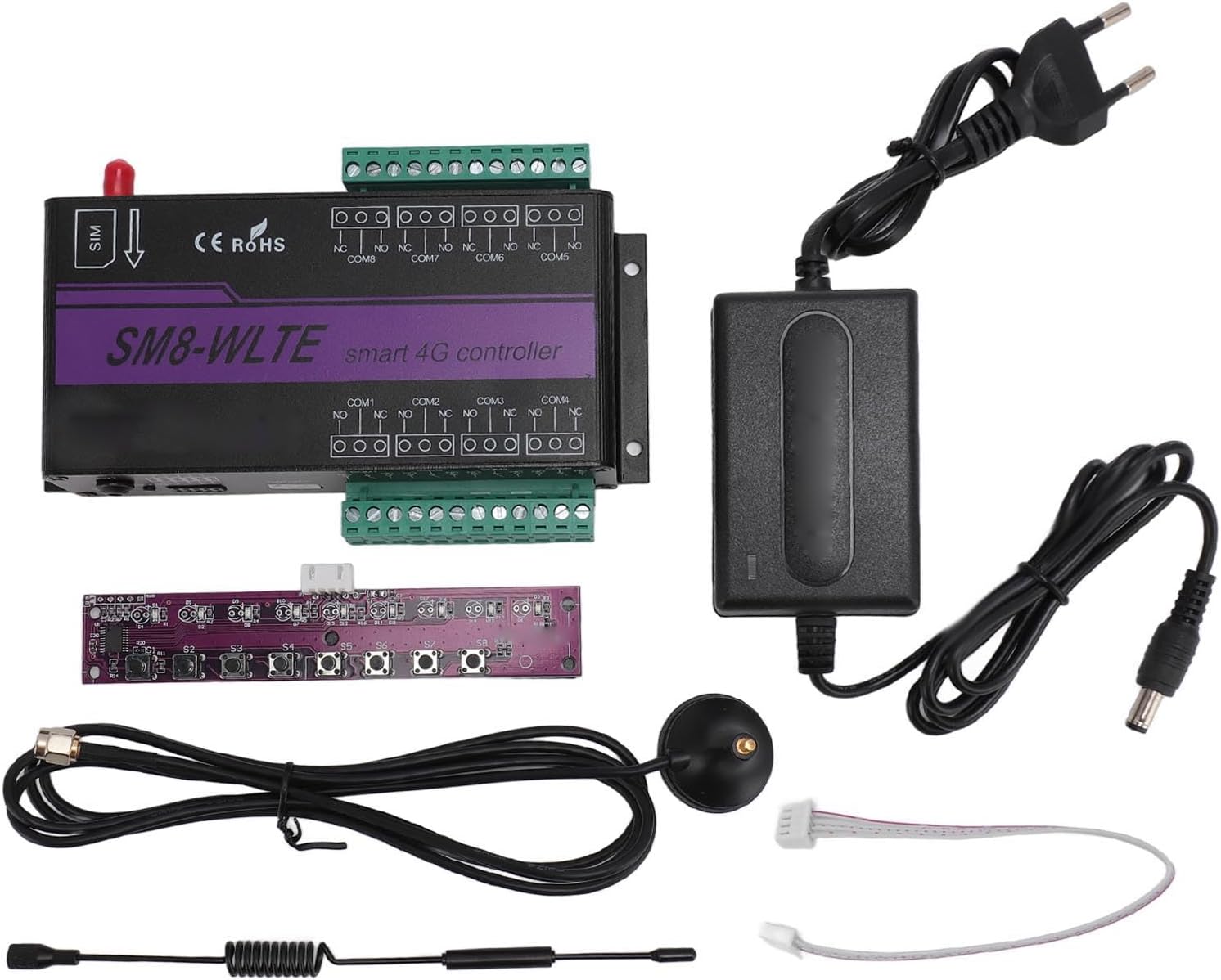
Image: All components included in the package: the main smart relay unit, power adapter, antenna, sensor cable, and control board.
Physical Installation
- Insert SIM Card: Locate the standard SIM card slot on the device and insert a valid 4G SIM card. Ensure it is properly seated.
- Attach Antenna: Connect the provided antenna to the standard SMA antenna interface on the device. Ensure a secure connection for optimal signal reception.
- Connect Sensors: If using temperature and humidity monitoring, connect the sensor cable to the designated sensor port.
- Connect Relays: Connect your devices or circuits to the 8 relay output channels (10A 250VAC, 15A 125VAC) as required. Refer to the wiring diagram for Normally Open (NO) and Normally Closed (NC) configurations.
- Power On: Connect the power adapter to the device and plug it into a 100-240V AC power outlet.
Mode Configuration (SMS Mode vs. Network Mode)
The device supports two operational modes: SMS Mode (default) and Network Mode. You can switch between these modes using the SET button.

Image: Diagram illustrating the mode switch process between SMS mode and Network mode, showing the device and its indicator lights.
SMS Mode (Default)
After the Controller is powered on, the SIG indicator blinks twice. This indicates the current mode is SMS mode.
To switch to SMS mode from Network mode: Press and hold the SET button before power on, wait for the SIG light to blink twice, then release your finger.
Network Mode
After the Controller is powered on, the SIG indicator blinks four times. This indicates the current mode is Network mode.
To switch to Network mode from SMS mode: Press and hold the SET button before power on, wait for the SIG light to flash four times, then release your finger. Note: Before entering network mode, APN must be set up via SMS.
Operating Instructions
Mobile APP Control
The Fockety SM8 WLTE can be controlled and monitored via a dedicated mobile application. Download the APP from your device's app store (search for "SM8 WLTE" or refer to the QR code in the included quick start guide if available).
Function 1: Temperature Control
The APP allows you to set temperature thresholds. When the detected temperature reaches the preset value, the device can trigger the relay to operate and send an alarm message.

Image: Screenshots of the mobile APP demonstrating temperature control, showing settings for triggering actions when temperature goes above or below a set value, and receiving notifications.
Function 2: Timing Control (Up to 24 Groups)
Schedule relay operations based on specific times. You can set daily or single-day schedules for various devices.
- Example: Turn on a kettle at 8:00 every morning.
- Example: Turn on a water purifier at 11:30 every day.
- Example: Turn on a water heater every Monday, Tuesday, and Wednesday at 18:00 PM.

Image: Screenshot of the mobile APP illustrating the timing control interface, showing options to set daily or specific day schedules for automated actions.
Function 3: Power Failure Alert (Specific Models Only)
For models like SM2 WLTE EC, the device can send SMS, APP, or Email alerts upon power failure or power restoration.

Image: Screenshots of the mobile APP showing power failure and power restoration alerts, indicating that this feature is available on specific models like SM2 WLTE EC.
Function 4: Email Pushing
Receive notification emails when the temperature reaches a preset value or other configured events occur.

Image: Illustration of the email pushing feature, showing an email notification received on a laptop and the corresponding setting in the mobile APP.
SMS/GSM Control
In SMS mode, the device can be controlled by sending specific SMS commands to the SIM card number inserted in the device. Refer to the detailed SMS command list in the supplementary documentation or the APP for specific commands to control relays, query status, or configure settings.
Maintenance
To ensure the longevity and optimal performance of your Fockety SM8 WLTE Smart Relay Switch, follow these maintenance guidelines:
- Cleaning: Regularly wipe the device with a soft, dry cloth. Do not use liquid cleaners or abrasive materials.
- Environment: Operate the device within its specified temperature and humidity ranges. Avoid exposure to extreme temperatures, direct sunlight, moisture, or corrosive substances.
- Connections: Periodically check all cable connections (power, antenna, sensors, relays) to ensure they are secure and free from damage.
- Software Updates: Check for firmware or APP updates periodically to benefit from new features and performance improvements.
Troubleshooting
This section addresses common issues you might encounter with the Fockety SM8 WLTE Smart Relay Switch.
| Problem | Possible Cause | Solution |
|---|---|---|
| Device not powering on. | No power supply; faulty adapter; loose connection. | Check power outlet; ensure adapter is securely connected; try a different power outlet. |
| No network signal (SIG light not blinking correctly). | SIM card not inserted correctly; no signal in area; incorrect APN settings (Network Mode). | Reinsert SIM card; check signal strength in your location; configure APN settings via SMS if in Network Mode. |
| Relays not responding to commands. | Incorrect command format (SMS); APP not connected; device in wrong mode. | Verify SMS command syntax; ensure APP is connected to the device; check if device is in the correct operating mode (SMS/Network). |
| Temperature/Humidity readings are inaccurate or missing. | Sensor not connected; faulty sensor; sensor placed in unsuitable environment. | Ensure sensor is securely connected; replace sensor if faulty; place sensor in an appropriate environment away from direct heat/cold sources. |
Specifications
Detailed technical specifications for the Fockety SM8 WLTE Smart Relay Switch:
| Parameter | Value |
|---|---|
| Product Model | SM8 WLTE EA (Focketydm2t6qscge) |
| Material | Aluminum |
| Power Consumption | Standby 12V 50mA, Maximum 12V 200mA |
| 4G Frequency (LTE-FDD) | B1 B3 B5 B7 B8 B20 |
| GSM Frequency | 900 MHz 1800 MHz |
| SIM Interface | Standard SIM Card |
| Antenna Interface | Standard SMA Interface |
| Temperature and Humidity Interface | 1 Sensor Port |
| Temperature Detection Range | -40-125 ℃ |
| Humidity Detection Range | 0-100 % |
| Relay Output | 8 Channels, 10A 250VAC, 15A 125VAC |
| Output Logic | Normally Open and Normally Closed |
| Dimensions (Package) | 20 x 12 x 5 cm |
| Weight (Package) | 541 grams |
Warranty and Support
Fockety products are designed for reliability and performance. For warranty information and technical support, please refer to the warranty card included with your product or visit the official Fockety website. Keep your purchase receipt as proof of purchase for any warranty claims.
For further assistance, you may contact customer support through the contact information provided on the product packaging or the official brand website.
Ask a question about this manual
Ask about setup, troubleshooting, compatibility, parts, safety, or missing instructions. Manuals+ will review the question and use this page’s manual context to help answer it.