
1. Introduction
This manual provides instructions for the Jolly Line JL1719/COMP Universal TV Remote Control, designed for compatibility with Philips televisions. This remote is ready to use without requiring any programming.
Key features include:
- Universal replacement remote control for Philips TV.
- Ready to use; no programming required.
- Ergonomic design for comfortable handling.
2. Setup
2.1 Battery Installation
The remote control requires two (2) AAA 1.5V batteries (not included). Follow these steps to install them:
- Locate the battery compartment cover on the back of the remote control.
- Slide the cover downwards or press the latch to open it.
- Insert two AAA batteries, ensuring the positive (+) and negative (-) terminals match the markings inside the compartment.
- Replace the battery compartment cover, sliding it back into place until it clicks securely.
Important: Ensure correct battery polarity. Do not mix old and new batteries, or different types of batteries.
2.2 Initial Use
This Jolly Line remote control is pre-programmed for Philips TVs and does not require any configuration. Once batteries are installed, it is ready for immediate use with your compatible Philips television.
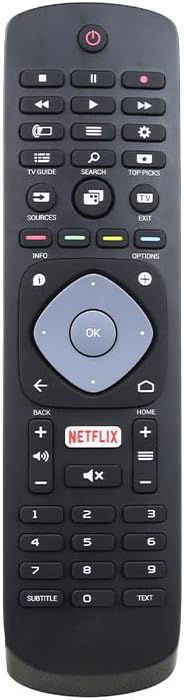
Figure 1: Front view of the Jolly Line JL1719/COMP Universal TV Remote Control, showing all buttons and their layout.
3. Operating Instructions
Point the remote control directly at your Philips TV's infrared sensor. Ensure there are no obstructions between the remote and the TV.
3.1 Common Button Functions
- Power (⏻): Turns the TV on or off.
- Number Buttons (0-9): Selects channels directly.
- Channel Up/Down (▲/▼): Changes channels sequentially.
- Volume Up/Down (+/-): Adjusts the TV volume.
- Mute (🔇): Mutes or unmutes the TV sound.
- Source/Input: Selects different input sources (HDMI, AV, etc.).
- Navigation Buttons (Up, Down, Left, Right): Navigates menus and on-screen options.
- OK/Enter: Confirms selections in menus.
- Back/Return: Returns to the previous screen or menu.
- Home (⌂): Accesses the TV's main menu or smart TV interface.
- Netflix: Direct access button for the Netflix application.
- Info: Displays information about the current program or input.
- Options: Accesses context-sensitive options for the current screen.
- TV Guide: Opens the electronic program guide.
- Search: Initiates a search function on the TV.
- Top Picks: Accesses recommended content or features.
- Exit: Exits the current menu or application.
- Play/Pause, Stop, Rewind, Fast Forward: Controls media playback.
- Subtitle: Toggles subtitles on/off.
- Text: Accesses teletext or similar text-based services.
Note: Specific button functionalities may vary slightly depending on your Philips TV model.
4. Maintenance
4.1 Cleaning the Remote Control
To clean your remote control, use a soft, dry cloth. For stubborn dirt, slightly dampen the cloth with water or a mild, non-abrasive cleaner. Avoid using harsh chemicals or abrasive materials, as these can damage the remote's surface or internal components.
4.2 Battery Replacement
Replace batteries when the remote control's response becomes sluggish or stops working. Refer to Section 2.1 for battery installation instructions. Always dispose of used batteries responsibly according to local regulations.
5. Troubleshooting
If you experience issues with your remote control, try the following troubleshooting steps:
- Remote not responding:
- Check if the batteries are inserted correctly with the correct polarity.
- Replace the batteries with new AAA batteries.
- Ensure there are no obstructions between the remote control and the TV's infrared sensor.
- Make sure you are within the effective range of the TV's sensor.
- Some buttons not working:
- This remote is designed for Philips TVs. Ensure your TV is a Philips model.
- Clean the remote control, especially around the unresponsive buttons, to remove any dirt or debris.
- Some advanced functions might not be supported by all Philips TV models.
- TV responds intermittently:
- This could indicate low battery power. Replace the batteries.
- Ensure a clear line of sight to the TV.
If the problem persists after trying these steps, please refer to the support information in Section 7.
6. Specifications
| Feature | Detail |
|---|---|
| Model Number | JL1719/COMP (Manufacturer Part Number), 33-03-0034 (Item Model Number) |
| Brand | GBC (Jolly Line Compatible Series) |
| Compatibility | Philips TV |
| Batteries Required | 2 x AAA 1.5V (not included) |
| Product Dimensions | 7.09 x 1.97 x 0.79 inches (1.5 x 5.3 x 20 cm) |
| Item Weight | 3.52 ounces |
| Color | Black |
| Special Feature | Ergonomic, Pre-Programmed |
| Max Supported Devices | 1 (Television) |

Figure 2: The Jolly Line JL1719/COMP Universal TV Remote Control shown within its retail packaging.
7. Warranty and Support
7.1 Warranty Information
Specific warranty details for the Jolly Line JL1719/COMP remote control are typically provided at the point of purchase or within the product packaging. Please retain your proof of purchase for any warranty claims. For detailed warranty terms, contact the seller or manufacturer directly.
7.2 Customer Support
For further assistance, technical support, or inquiries regarding your Jolly Line JL1719/COMP Universal TV Remote Control, please contact the retailer from whom you purchased the product or the manufacturer, GBC. Contact information can usually be found on the product packaging or the seller's website.