
Fafeicy M113
Fafeicy M113 Digital Multimeter Instruction Manual
Model: M113
Introduction
This manual provides detailed instructions for the safe and effective use of the Fafeicy M113 Digital Multimeter. Please read this manual thoroughly before operation and retain it for future reference. The M113 is designed for automatic recognition and measurement of various electrical parameters, making it suitable for a wide range of electrical testing tasks.
Safety Information
WARNING: To avoid electrical shock, remove test leads before opening the casing or battery cover. Fuse: F10A/250V. Meets IEC 61010-1, 600V CAT III. Pollution Degree 2.
- Always ensure the multimeter is in the correct measurement mode before connecting test leads to a circuit.
- Do not attempt to measure voltages or currents exceeding the specified maximum limits.
- Exercise extreme caution when working with live circuits.
- Replace batteries promptly when the low battery indicator appears to ensure accurate readings.
- Do not use the multimeter if it appears damaged or is not operating correctly.
Product Overview
The Fafeicy M113 is a compact digital multimeter designed for automatic recognition and measurement of various electrical parameters. It features a clear digital display and intuitive controls.

Image: Front view of the Fafeicy M113 Digital Multimeter, highlighting its display and controls. The display shows "AUTO" indicating automatic recognition mode.
Components:
- Display: Digital screen showing measurement readings and indicators.
- NCV Button: Activates Non-Contact Voltage detection.
- Power Button: Turns the device on/off.
- Hold Button: Freezes the current reading on the display.
- Input Jacks: For connecting test leads (COM, INPUT).
Setup
Battery Installation
- Ensure the multimeter is powered off and disconnect any test leads.
- Locate the battery compartment on the back of the device.
- Use a screwdriver to open the battery compartment cover.
- Insert three AAA batteries (not included) according to the polarity markings inside the compartment.
- Replace the battery compartment cover and secure it with the screw.

Image: Rear view of the M113 multimeter, displaying the battery compartment cover and safety warnings regarding fuse and battery type.
Connecting Test Leads
- Insert the black test lead into the "COM" (Common) input jack.
- Insert the red test lead into the "INPUT" jack for most measurements (voltage, resistance, capacitance, frequency, current).
Operating Instructions
The M113 multimeter features automatic recognition, simplifying operation for common measurements.
Automatic Recognition Mode
When powered on, the multimeter defaults to automatic recognition mode. In this mode, it can automatically identify and measure:
- AC Voltage
- DC Voltage
- Resistance
- Continuity (Line On/Off)
Measuring AC/DC Voltage
- Turn on the multimeter. It will enter automatic recognition mode.
- Connect the test leads to the circuit or component you wish to measure.
- The display will show the voltage reading (AC or DC) automatically.

Image: The M113 multimeter displaying an AC voltage reading (235V) while test leads are connected to a circuit breaker panel.
Line On/Off (Continuity) Detection
- Turn on the multimeter.
- Connect the test probes to both ends of the wire or component.
- If a beep sound is heard, the wire is connected (continuous).
- If no beep sound is heard, the wire is disconnected (open circuit).

Image: The M113 multimeter showing "000" on the display during a continuity test, with test leads connected to a bare wire.
NCV (Non-Contact Voltage) Detection
- Press the "NCV" button to activate the non-contact voltage detection function.
- Move the top of the multimeter near the wire or electrical outlet.
- When AC voltage is detected, the screen index will rise by three bars, and an alarm beep will be issued.
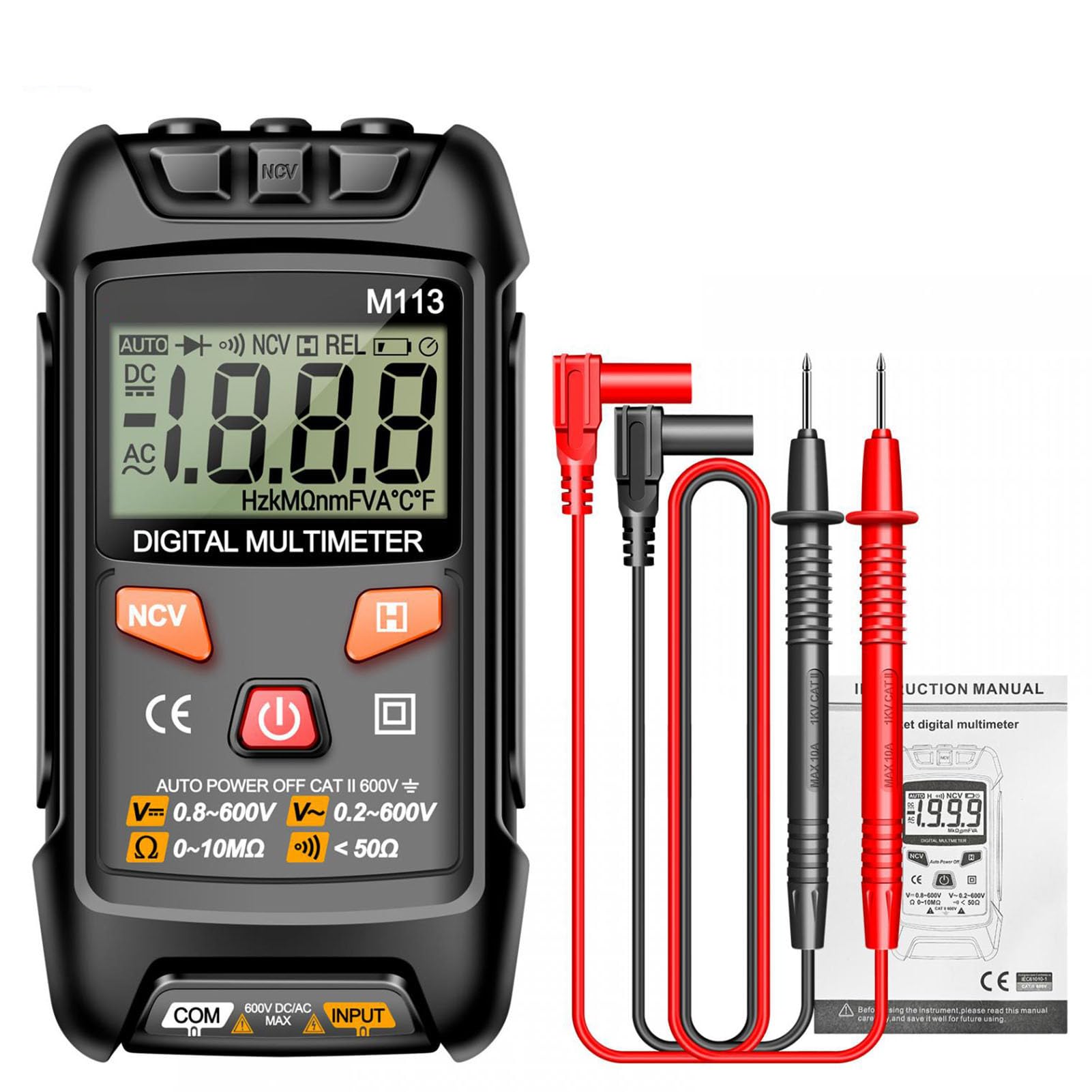
Image: The M113 multimeter held near an electrical outlet, demonstrating NCV detection. The display shows an NCV indicator and signal strength bars.
Data Hold Function
Press the "H" (Hold) button to freeze the current reading on the display. Press it again to release the hold function.
Maintenance
- Cleaning: Use a soft, damp cloth to clean the multimeter casing. Do not use abrasive cleaners or solvents.
- Battery Replacement: Replace batteries when the low battery indicator appears. Refer to the "Battery Installation" section for instructions.
- Storage: Store the multimeter in a cool, dry place away from direct sunlight and extreme temperatures. Remove batteries if storing for extended periods.
- Fuse Replacement: If the fuse blows, replace it with a fuse of the specified rating (F10A/250V). This procedure should only be performed by qualified personnel.
Troubleshooting
| Problem | Possible Cause | Solution |
|---|---|---|
| Multimeter does not power on. | Dead or incorrectly installed batteries. | Check battery polarity and replace batteries if necessary. |
| No reading or "OL" displayed. | Open circuit, out of range, or incorrect lead connection. | Ensure test leads are properly connected. Check if the circuit is open. Verify the measurement is within the multimeter's range. |
| Inaccurate readings. | Low battery, dirty test leads, or environmental interference. | Replace batteries. Clean test leads. Move away from strong electromagnetic fields. |
| No beep during continuity test. | Wire is disconnected or broken. | Inspect the wire for breaks or poor connections. |
Specifications
| Parameter | Range | Precision / Resolution |
|---|---|---|
| DC Voltage | 0-600 V | 1 mV - 1 V, +(0.8% Read) |
| DC Current | 0-600 mA | 10 mA - 1 A, +(3.0% Read) |
| Resistance | 0-10 MΩ | < 50Ω (Continuity) |
| Temperature | -20°C to 1000°C | +(2.0% + 2°C) |
| Power Source | Battery Powered | 3 x AAA batteries (not included) |
| NCV Detection | Supported | Non-contact voltage detection |
| Diode Test | Supported | |
| Data Hold | Supported | |
| Safety Rating | IEC 61010-1, 600V CAT III | Pollution Degree 2 |
Warranty and Support
For warranty information and technical support, please refer to the documentation provided with your purchase or contact Fafeicy customer service.
Manufacturer: Fafeicy
Model: M113 (Fafeicy1veco0wd9k)
Ask a question about this manual
Ask about setup, troubleshooting, compatibility, parts, safety, or missing instructions. Manuals+ will review the question and use this page’s manual context to help answer it.