
1. Introduction
Thank you for choosing the Hbada E3 Air Ergonomic Office Chair. This manual provides detailed instructions for assembly, operation, maintenance, and troubleshooting to ensure you get the most comfortable and healthy experience from your new chair. The Hbada E3 Air combines advanced ergonomic technologies to support a comfortable posture and promote a healthy lifestyle during long periods of sitting.

This chair features elastic lumbar support, 3D adjustable headrest and armrests, durable and breathable mesh material, 140-degree reclining capability, adjustable seat depth, and a gravity-sensing chassis for lasting comfort.
2. Product Features
The Hbada E3 Air Ergonomic Office Chair is designed with several innovative features to enhance your sitting experience:
2.1 T-Shape Support System
The unique T-Shape Support System, developed by Hbada, addresses discomfort from prolonged sitting by providing comprehensive support to the neck, waist, and shoulders. The liftable backrest offers nine-position adjustment, allowing for 2.76 inches of vertical movement to accommodate various user heights. When adjusted to the highest position, it automatically returns to the lowest level for reset. This cycle gear adjustment also applies to the headrest and lumbar support.

2.2 Three-Zone Elastic Lumbar Support
The lumbar support system provides an 8-way adjustable wrap around the waist. The left and right floating wings can rotate 40 degrees internally and externally, adjust front and back by 1 inch, and up and down by 1.6 inches with a 14-degree dynamic support. This ensures optimal lumbar comfort during extended sitting. To readjust, pull the lumbar support to the top or front end to automatically unlock, then push it back to the initial position.

2.3 3D Biaxial Adjustable Headrest
The headrest features a dual-axis 70-degree rotation and can be adjusted up and down by 1.8 inches, allowing for precise neck support tailored to your needs.

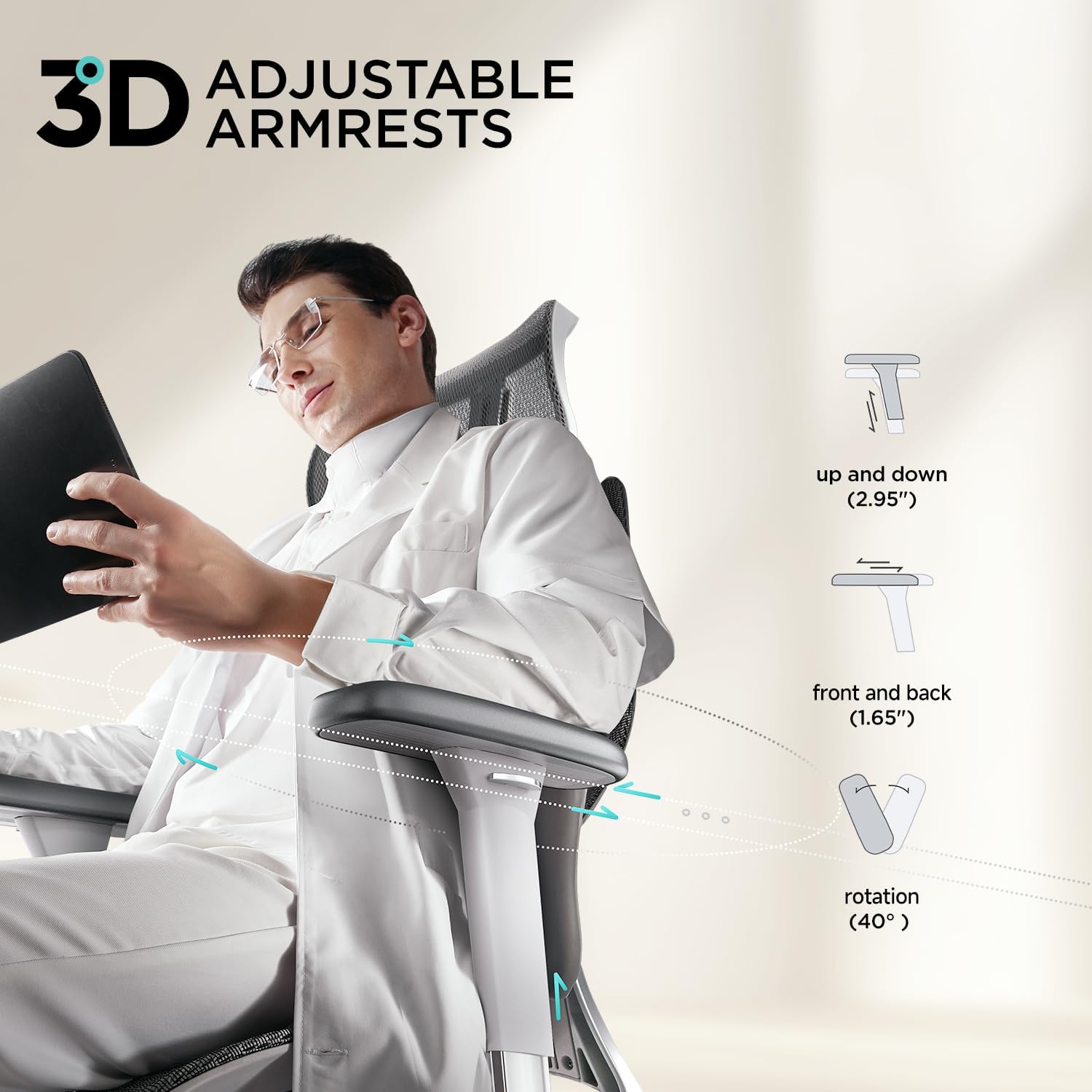
2.4 3D Adjustable Armrests
The armrests offer multi-directional adjustment: front and back by 1.97 inches, up and down by 2.8 inches, and left and right by 40 degrees. This flexibility ensures comfortable arm support in various scenarios.
2.5 Breathable Mesh and Adjustable Seating Depth
The chair features a fully breathable and durable mesh design to keep you cool. The seating depth is adjustable by 1.97 inches, providing precise support for users of different heights and postures.

2.6 140-Degree Comfortable Reclining with Gravity-Sensing Chassis
When you need to relax, the chair offers a comfortable 140-degree reclining function with a gravity-sensing chassis. To recline, lean the backrest backward and simultaneously pull out the operating lever. Insert the operating lever to fix the desired angle.

Video 1: Demonstration of the Hbada E3's Reclining Function. This video shows how to adjust the chair for reclining and how the gravity-sensing chassis works.
3. Setup and Assembly
The Hbada E3 Air Ergonomic Office Chair is designed for straightforward assembly. All necessary tools are typically included in the packaging. Please refer to the separate assembly guide provided with your product for detailed step-by-step instructions and diagrams. Ensure all components are present before beginning assembly.
4. Operating Instructions
Familiarize yourself with the various adjustment mechanisms to optimize your comfort and support:
- Lumbar Support Adjustment: The lumbar support has 7 gears (including the initial gear). Pulling up 6 gears will produce a gear sound, indicating adjustment. Pulling down 7 gears will unlock the gear, allowing you to pull it to the bottom to readjust the position. Similarly, pulling it to the front end will automatically unlock, allowing you to push it back to the initial position for readjustment.
- Backrest Height Adjustment: The liftable backrest offers a nine-position adjustment, providing 2.76 inches of up and down movement. This allows the backrest to be positioned optimally for users of varying heights. When adjusted to the highest position, it automatically returns to the lowest level for reset.
- Headrest Adjustment: The 3D Biaxial Adjustable Headrest can be adjusted up and down by 1.8 inches and features a dual-axis 70-degree rotation for precise neck support.
- Armrest Adjustment: The 3D Adjustable Armrests can be moved front and back by 1.97 inches, up and down by 2.8 inches, and rotated left and right by 40 degrees.
- Seat Depth Adjustment: The seat depth can be adjusted by 1.97 inches to accommodate different body types and sitting preferences.
- Reclining Function: To recline the chair, lean the backrest backward and simultaneously pull out the operating lever located at the rear end of the chassis. To lock the back angle, insert the operating lever back into its position.


Video 2: Overview of the Hbada E3 Ergonomic Office Chair features and adjustments.
5. Maintenance
To ensure the longevity and optimal performance of your Hbada E3 Air Ergonomic Office Chair, follow these maintenance guidelines:
- Cleaning: Use a soft, damp cloth with mild soap to clean the mesh and plastic surfaces. Avoid abrasive cleaners or harsh chemicals that could damage the materials.
- Mesh Care: Regularly vacuum the mesh to remove dust and debris. For spills, blot immediately with a clean cloth.
- Moving Parts: Periodically check all screws and bolts to ensure they are tight. Lubricate moving parts if necessary to maintain smooth operation.
- Avoid Overloading: Do not exceed the recommended weight capacity of the chair.
6. Troubleshooting
If you encounter any issues with your Hbada E3 Air Ergonomic Office Chair, please refer to the following common troubleshooting tips:
- Chair Squeaks: Check for loose screws and tighten them. Apply a small amount of lubricant to moving parts, especially around the gas lift and tilt mechanism.
- Gas Lift Not Functioning: Ensure the gas lift lever is fully engaged or disengaged. If the issue persists, the gas lift cylinder may need replacement.
- Lumbar Support Not Holding Position: As mentioned in operating instructions, pull the lumbar support to its highest or furthest forward position to reset the locking mechanism, then re-adjust. If it still doesn't hold, contact customer support.
- Chair Wobbles: Verify that all screws and connections are securely tightened. Ensure the chair is on a flat, even surface.
For issues not covered here, or if troubleshooting steps do not resolve the problem, please contact Hbada customer support.
7. Specifications
| Brand | Hbada |
| Model Name | Hbada E3 Air |
| Item Model Number | E301 |
| Color | Grey |
| Product Dimensions | 27.56"D x 27.56"W x 47.64"H |
| Item Weight | 57.2 pounds |
| Material | Mesh |
| Special Feature | Ergonomic, 3-Zone Dynamic Lumbar Support, 3D Adjustable Headrest, 3D Adjustable Armrests, 140° Reclining, Adjustable Seat Depth, Gravity-Sensing Chassis |
| Recommended Uses | Office |
| Back Style | Solid Back (Mesh) |
| Tilting | Yes |

8. Warranty and Support
Hbada is committed to providing a satisfactory shopping experience. Your Hbada E3 Air Ergonomic Office Chair comes with the following:
- 3-Year Free Warranty: Enjoy peace of mind with a comprehensive 3-year warranty covering manufacturing defects and functional issues.
- 30-Day No-Questions-Asked Returns: If the chair does not meet your requirements within 30 days of purchase, you can contact us for a return or exchange.
- 15-Day Price Reimbursement: If the price of your purchased item is reduced within 15 days of your purchase, we promise to reimburse you the difference.
For any inquiries, support, or warranty claims, please visit the official Hbada website or contact their customer service directly. Contact information can typically be found on the product packaging or the brand's official online store.


