
1. Introduction
Thank you for purchasing the LED's light Ceiling Fan with Light. This product combines efficient lighting with a powerful, quiet fan, designed to enhance comfort in your living space. Please read this manual carefully before installation and operation to ensure safe and correct use.
Safety Instructions
- Always disconnect power before installation, cleaning, or maintenance.
- Installation must be performed by a qualified electrician.
- Ensure the mounting surface can support the weight of the fan.
- Do not insert objects into the fan blades while in operation.
- The fan must be installed at a minimum height of 2.3 meters from the floor.
- This product is for indoor use only.
2. Package Contents
Carefully unpack the box and ensure all items are present and undamaged. If any parts are missing or damaged, please contact your retailer.
- Ceiling Fan with Integrated Light
- Remote Control
- Mounting Hardware (dowels/screws)
- User Manual

Image: Product packaging and included items.
3. Product Overview
The LED's light ceiling fan features a compact design with integrated LED lighting and a quiet fan motor. Its modern aesthetic blends seamlessly with various interior styles.

Image: Front view of the ceiling fan with light and remote control.

Image: Side profile of the ceiling fan.

Image: Bottom view of the ceiling fan, showing the fan grille.
4. Setup and Installation
Follow these steps for safe and proper installation of your ceiling fan. It is recommended to have a qualified electrician perform the installation.
- Preparation: Turn off power at the main circuit breaker. Ensure the mounting location is structurally sound and can support the fan's weight.
- Mounting Bracket Installation: Secure the mounting bracket to the ceiling joist or a suitable electrical box using the provided screws and dowels.
- Wiring: Connect the fan's electrical wires to your household wiring according to local electrical codes. Ensure all connections are secure.
- Fan Assembly: Attach the fan unit to the mounting bracket. Ensure it is securely fastened.
- Final Checks: Double-check all connections and ensure the fan is stable. Restore power.
Important Note: The fan must be installed at a minimum height of 2.3 meters (approximately 7.5 feet) from the floor to ensure safety and optimal performance.
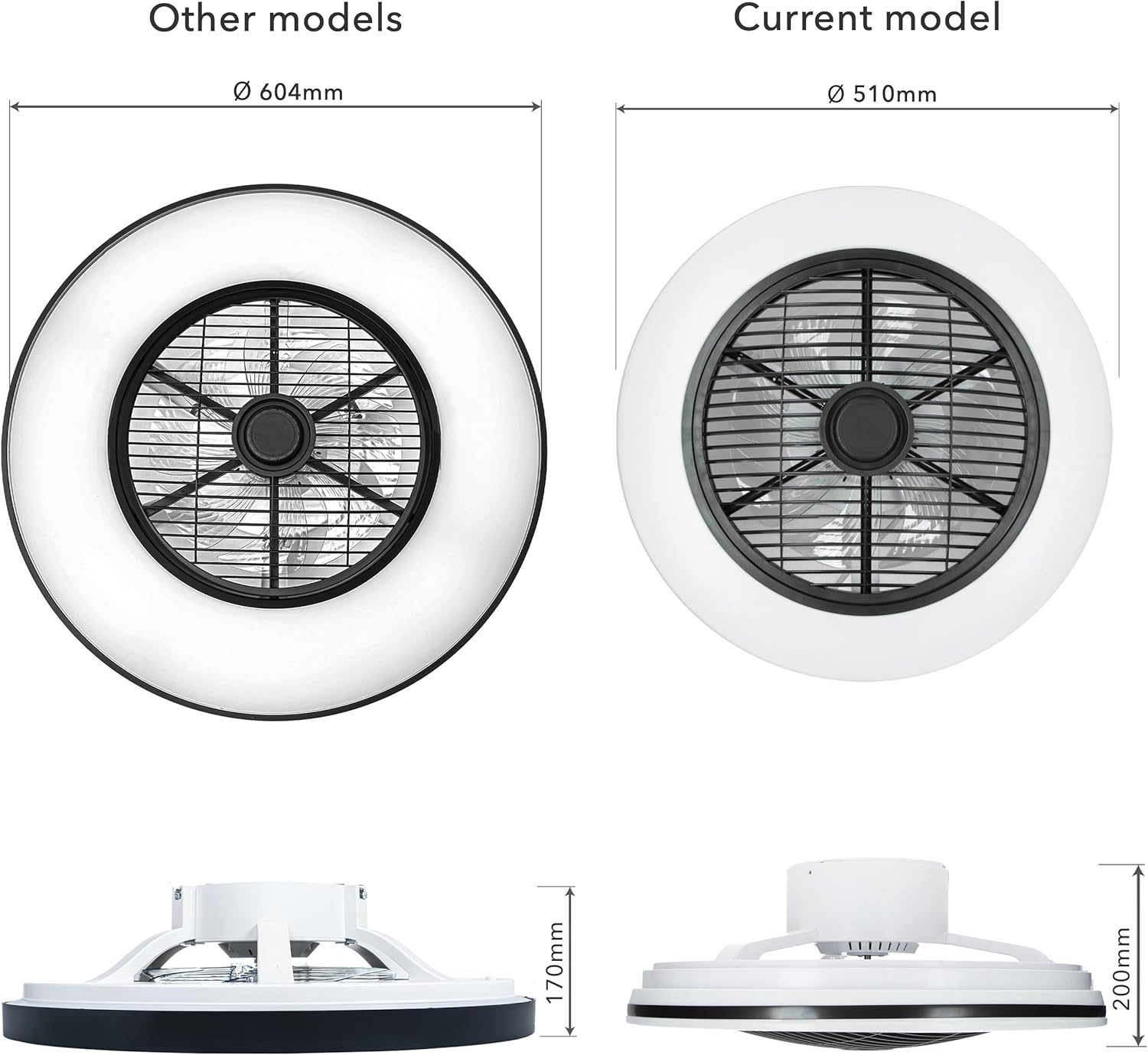
Image: Product dimensions for installation planning.
5. Operating Instructions
Your LED's light ceiling fan is controlled by the included remote control, offering convenience and versatility.
Remote Control Functions
- Power On/Off: Press the power button to turn the fan and light on or off.
- Fan Speed: Adjust fan speed using the dedicated fan speed buttons.
- Light On/Off: Control the light independently from the fan.
- Brightness Adjustment: Use the dimmer buttons to increase or decrease the light brightness continuously.
- Color Temperature Adjustment: Change the light color temperature from neutral white to extra-warm white to suit your preference.
- Fan Rotation Direction (Winter Mode): Change the fan's rotation direction to optimize air circulation for different seasons. In winter mode, the fan helps distribute warm air more evenly, improving energy efficiency.

Image: Demonstrating adjustable light color temperature.
6. Maintenance
Regular maintenance ensures the longevity and optimal performance of your ceiling fan with light.
Cleaning
- Always turn off power before cleaning.
- Wipe the fan and light fixture with a soft, damp cloth. Do not use abrasive cleaners or solvents.
- For detailed information on cleaning light bulbs, refer to general guidelines on cleaning lighting fixtures.
General Care
- Periodically check all screws and connections to ensure they are secure.
- No lubrication is required for the motor.
7. Troubleshooting
If you encounter issues with your ceiling fan, refer to the following common problems and solutions:
| Problem | Possible Cause | Solution |
|---|---|---|
| Fan does not operate | No power supply; Loose wiring; Remote control battery low/dead. | Check circuit breaker; Verify wiring connections; Replace remote control battery. |
| Light does not turn on | No power supply; Loose wiring; LED module failure. | Check circuit breaker; Verify wiring connections; Contact customer support if LED module is faulty. |
| Fan makes unusual noise | Loose screws; Improper installation. | Tighten all mounting screws; Re-check installation steps. |
| Remote control not working | Battery low/dead; Obstruction between remote and receiver. | Replace battery; Ensure clear line of sight to fan. |
If the problem persists after attempting these solutions, please contact customer support.
8. Specifications
Detailed technical specifications for the LED's light Ceiling Fan with Light.
| Feature | Specification |
|---|---|
| Brand | LED's light |
| Model Number | 8720604305234 |
| Dimensions (L x W x H) | 51 x 51 x 20 cm (Diameter: 510 mm) |
| Weight | 2.35 Kilograms |
| Power (Light) | 45 Watts |
| Luminous Flux | 2800 lm |
| Color Rendering Index (CRI) | 80.00 |
| Light Type | LED |
| Control Method | Remote Control |
| Material (Shade) | Acrylonitrile Butadiene Styrene (ABS) |
| IP Rating | IP20 |
| Power Source | Electric Cable |
| Room Type | Bedroom, Living Room, Dining Room |
Energy Efficiency
This product has an energy efficiency rating of F.

9. Warranty and Support
This product comes with a standard manufacturer's warranty. Please retain your proof of purchase for warranty claims.
Customer Support
For technical assistance, troubleshooting beyond this manual, or warranty inquiries, please contact your retailer or the manufacturer's customer service department.
Recycling Information
Please dispose of this product responsibly at the end of its life cycle. For information on how to recycle your light bulbs and electronic components, consult local recycling guidelines or visit relevant recycling information websites.


