
1. Introduction and Overview
This manual provides detailed instructions for the installation, operation, and maintenance of your Sofucor Smart Ceiling Fan. Please read this manual thoroughly before installation and use to ensure safe and efficient operation. This 52-inch smart ceiling fan features a quiet DC motor, 5 solid wood blades, integrated LED lighting, and multiple control options.

Figure 1: Sofucor 52-inch Smart Ceiling Fan in a living room setting.
2. Safety Information
- Always disconnect power at the circuit breaker before installation or servicing.
- Ensure the mounting structure can support the weight of the fan (approximately 15.71 lbs).
- All wiring must be in accordance with national and local electrical codes. If you are unfamiliar with wiring, consult a qualified electrician.
- Do not bend blade holders during installation, balancing, or cleaning.
- Ensure blades are at least 7 feet (2.13 meters) from the floor.
- Do not operate the fan if any part is damaged.
3. Package Contents
Verify that all components are present before beginning installation:
- 1 × DC Motor
- 1 × LED Light Kit
- 1 × Remote Control
- 5 × Solid Wood Blades
- 3 × Downrods (5", 10", and 24")
- Mounting Hardware (screws, wire nuts, etc.)

Figure 2: Unboxed components of the ceiling fan.
Video 1: Unboxing and Initial Assembly
4. Specifications
| Feature | Detail |
|---|---|
| Brand | Sofucor |
| Model Name | 52K085 |
| Size | 52 inch |
| Color | White |
| Number of Blades | 5 (Solid Wood) |
| Motor Type | DC Motor |
| Noise Level | Under 35dB |
| Speed Settings | 6 Speeds |
| Light Type | Integrated LED |
| Light Color Temperatures | 3 (Adjustable) |
| Control Method | Remote, App, Voice (Alexa/Google Assistant) |
| Timer Function | 2-hour, 4-hour auto-off |
| Reversible Function | Yes (Summer/Winter mode) |
| Included Downrods | 5", 10", 24" |
| Installation Type | Ceiling Mount (Flat or Sloped) |
| Indoor/Outdoor Usage | Indoor, Outdoor (Covered Patio) |
| Item Weight | 15.71 Pounds |
| Air Flow Capacity | 4500 Cubic Feet Per Minute |

Figure 3: Fan Dimensions and Recommended Room Size.
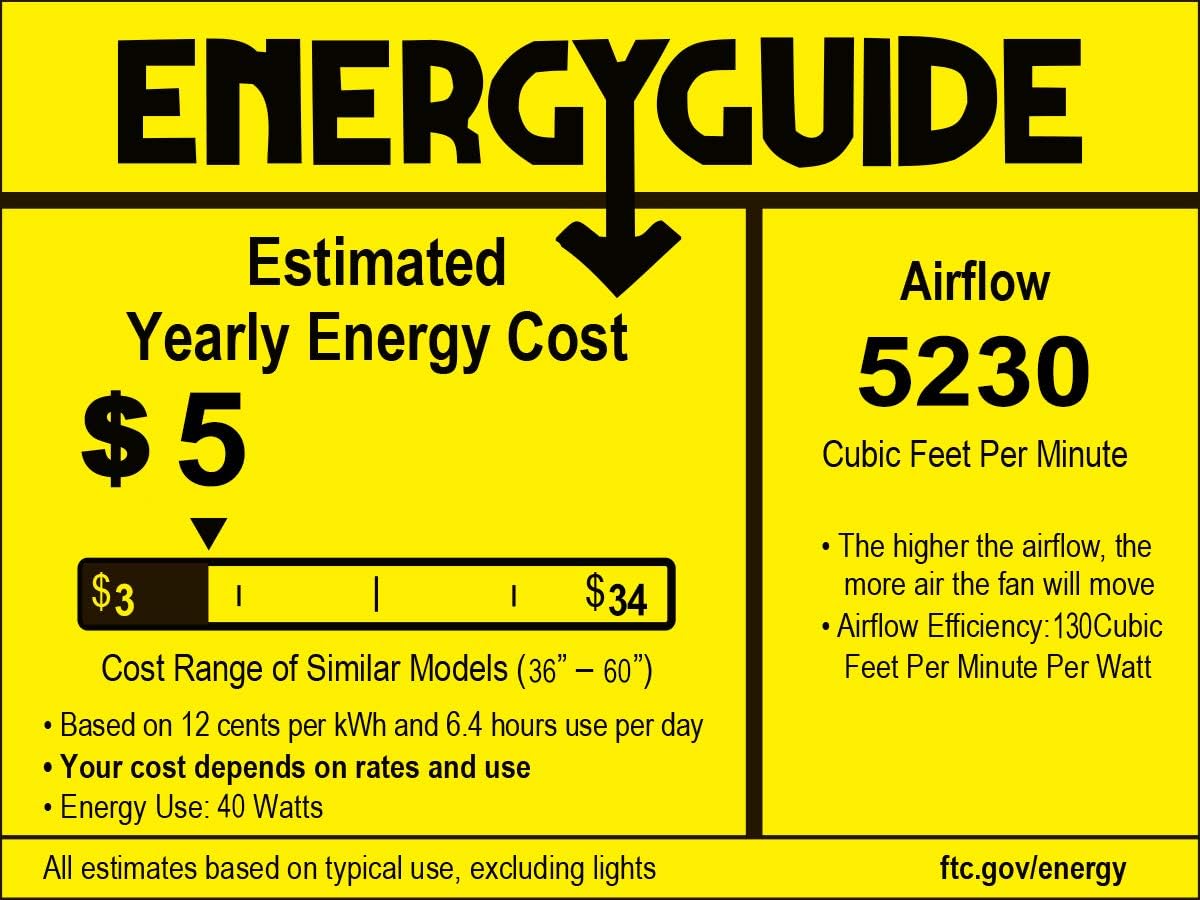
Figure 4: Energy Guide for the Sofucor 52-inch Smart Ceiling Fan.
5. Setup and Installation
The Sofucor Smart Ceiling Fan is designed for flexible installation on both flat and sloped ceilings. Three downrod options (5", 10", and 24") are included to accommodate various ceiling heights.
5.1 Mounting the Fan
Ensure the electrical box is securely mounted and capable of supporting the fan's weight. Attach the mounting bracket to the electrical box. For sloped ceilings, ensure the bracket is oriented correctly to allow the downrod to hang straight.

Figure 5: Flexible Installation Options with various downrods and ceiling types.
5.2 Wiring Connections
Connect the fan's electrical wires to the household wiring according to the provided wiring diagram in the manual. Use the included wire nuts to secure connections. Ensure all connections are tight and properly insulated.
5.3 Blade Attachment
Attach the 5 solid wood blades to the motor housing using the provided screws. Ensure all screws are tightened securely to prevent wobbling during operation.
Video 2: Easy Installation Overview
6. Operating Instructions
Your Sofucor Smart Ceiling Fan offers multiple convenient control methods.
6.1 Remote Control
The included remote control allows you to adjust fan speed, light settings, and activate special functions. It features dedicated buttons for fan ON/OFF, light ON/OFF, speed adjustment (6 levels), light color temperature change, dimming, timer settings (2H/4H), and reverse function.

Figure 6: Remote Control Functions for Light and Fan.
6.2 App and Voice Control
The fan is compatible with Alexa and Google Assistant, and can be controlled via a dedicated mobile app. This allows for remote adjustments of speed, light modes, and voice commands.

Figure 7: Voice Control with Alexa and Google Assistant.
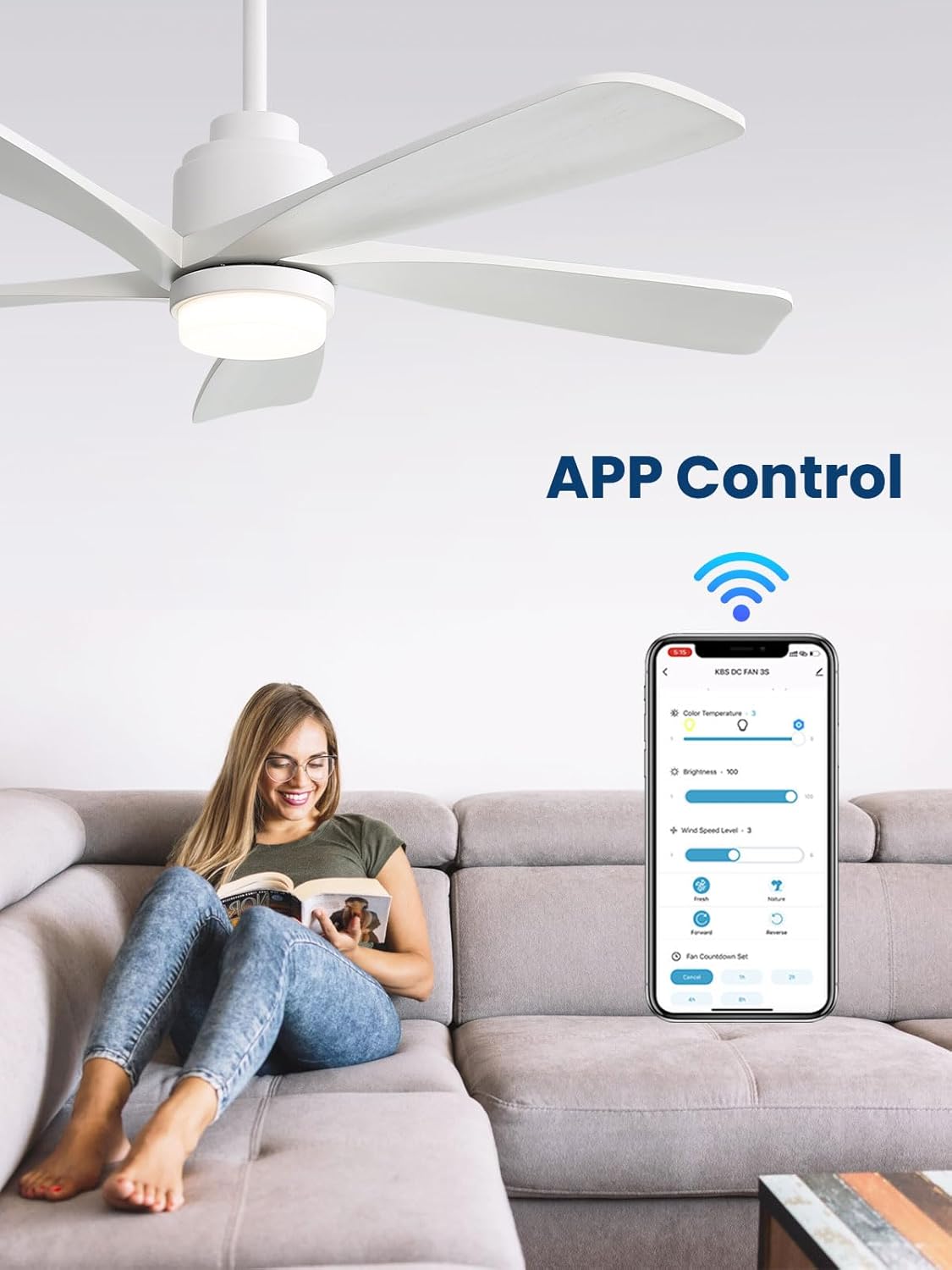
Figure 8: Mobile App Control Interface.
6.3 Adjustable Lighting and Memory Function
Customize your ambiance with three color temperatures (warm, natural, white light) and seamless dimming. The built-in memory function recalls your last light setting, so you always start with your preferred brightness and tone.
6.4 Reversible Function (Summer/Winter)
The fan features a reversible function to optimize air circulation for different seasons. In summer, the fan operates in downdraft mode to create a cooling breeze. In winter, it switches to updraft mode to circulate warm air evenly throughout the room.

Figure 9: Summer (Downdraft) and Winter (Updraft) Modes.
6.5 Timer Settings
Utilize the 2-hour or 4-hour auto-off timer function for convenience, especially during sleep.

Figure 10: Timer Function for convenience.
7. Maintenance
- Cleaning: To clean the fan, wipe with a soft, damp cloth. Do not use abrasive cleaners or solvents.
- Blade Care: Periodically check blade screws for tightness. Loose screws can cause wobbling and noise.
- Light Source: The integrated LED light source is designed for long-term use and typically does not require replacement.
8. Troubleshooting
| Problem | Possible Cause | Solution |
|---|---|---|
| Fan does not start | Loose wire connections, no power, remote battery low. | Check circuit breaker, ensure all wiring is secure, replace remote battery. |
| Fan wobbles | Loose blade screws, unbalanced blades, improper mounting. | Tighten all blade screws, ensure blades are balanced, re-check mounting bracket. |
| Light does not work | Loose wire connection, light kit failure. | Check light kit wiring, contact customer support if light kit is faulty. |
| Remote not responding | Low battery, interference, remote not paired. | Replace remote battery, ensure no obstructions, re-pair remote according to manual. |
9. Warranty and Support
Sofucor offers a lifetime warranty for the motor and a 3-year warranty for parts. If the motor does not work, it can be replaced for free for life. Other parts are covered for 3 years. For any after-sales or installation questions, our 24-hour customer service team is available to assist you.
Contact information for support can be found on the Sofucor official website or your purchase documentation.


