
Introduction
This manual provides comprehensive instructions for the GRV S1A Pedometer Watch. This device is designed as a standalone activity tracker, operating independently without the need for Bluetooth connectivity or a smartphone application. It accurately records steps, calories burned, distance traveled, and sleep patterns to help users maintain an active and healthy lifestyle.
The GRV S1A is user-friendly, featuring simple setup and operation via a touch button. Its integrated USB charging design ensures convenience, eliminating the need for external cables.

Figure 1: GRV S1A Pedometer Watch, highlighting its independence from apps and Bluetooth.
Key Features
- No Bluetooth, No App Required: Operates independently without smartphone connection.
- Activity Tracking: Accurately records steps, calories burned, and distance.
- Sleep Monitoring: Tracks sleep duration and patterns.
- Easy Setup: Simple configuration of time, date, personal data (height, weight, age).
- Integrated USB Charging: Direct USB plug-in for convenient charging.
- Long Battery Life: Up to 5-7 days of use on a 2-3 hour charge.
- IP67 Waterproof: Resistant to splashes and brief immersion.
Setup Instructions
Before first use, ensure the device is fully charged.
- Initial Charge: Refer to the "Charging the Device" section for instructions.
- Power On: The device typically powers on automatically after charging or by pressing and holding the touch button.
- Set Time and Date:
- Press the touch button to cycle through display modes until you reach the time setting interface.
- Long-press the touch button to enter setting mode.
- Use short presses to adjust values (e.g., hour, minute, month, day, year).
- Long-press to confirm each setting and move to the next.
- Enter Personal Information:
Navigate to the personal settings menu (often indicated by a gear icon or similar). You will need to input:
- Height
- Weight
- Age
- Gender (if applicable)
These parameters are crucial for accurate calculation of calories burned and distance.

Figure 2: Watch display showing icons for easy operation and setup of personal data.
Operating Instructions
The GRV S1A Pedometer Watch is operated primarily through its single touch button.
- Short Press: A short press on the touch button will cycle through different display modes, such as:
- Time and Date
- Step Count
- Distance Traveled
- Calories Burned
- Sleep Duration
- Long Press: A long press (hold for 2-3 seconds) is used to:
- Enter setting modes (e.g., time, date, personal data).
- Confirm selections within setting modes.
- Reset daily activity data (refer to "Resetting Data" below).
Resetting Daily Activity Data
To reset your daily step count, distance, and calorie data, navigate to the step count display. Long-press the touch button until the data resets to zero. This action typically resets only the daily activity data, not personal settings or time.
Charging the Device
The GRV S1A Pedometer Watch features a built-in USB charging port. No separate charging cable is required.
- Remove Watch Body: Gently pull the watch body out of the wristband. It is designed to detach from one end of the strap.
- Locate USB Connector: Identify the metal USB connector on the end of the watch body.
- Plug into USB Port: Insert the USB connector into any standard USB port (e.g., computer, wall adapter, power bank).
- Charging Indicator: The watch display will show a charging icon or battery level indicator.
- Charging Time: A full charge typically takes 2 to 3 hours.
- Battery Life: A full charge provides approximately 5 to 7 days of use.
Important: Charge the watch before the battery is completely depleted. If the battery runs out entirely, you may need to re-set the time and date after recharging.
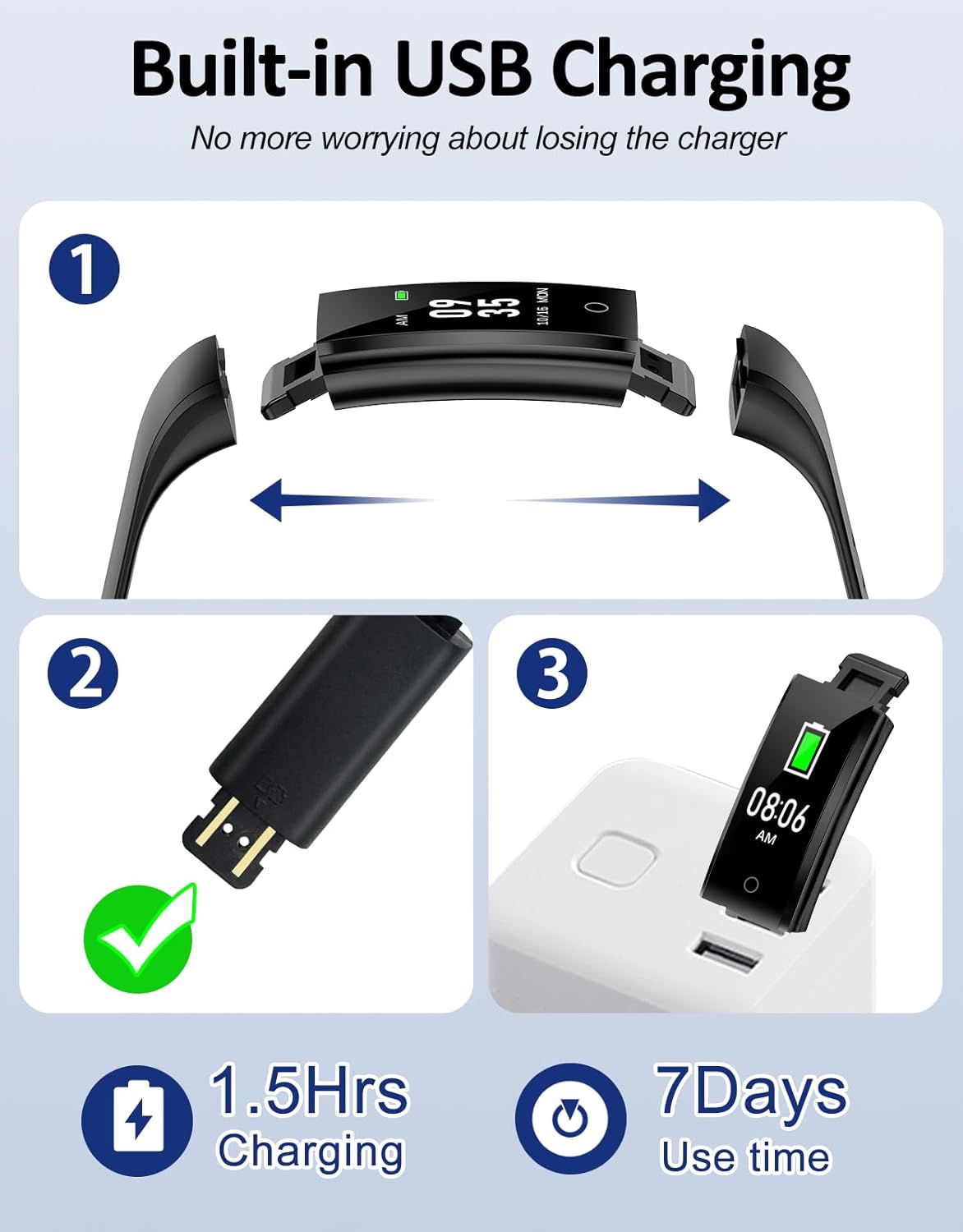
Figure 3: Step-by-step guide for charging the GRV S1A Pedometer Watch via its integrated USB port.
Activity Tracking
The GRV S1A Pedometer Watch automatically tracks your daily physical activity.
- Steps: The watch uses an internal sensor to count your steps throughout the day.
- Distance: Based on your step count and the height information entered during setup, the watch estimates the distance you have walked or run.
- Calories Burned: Using your personal data (age, height, weight) and activity level, the watch calculates an estimate of calories burned.
To view your activity data, short-press the touch button to cycle through the display modes until you see the desired metric (steps, distance, or calories).
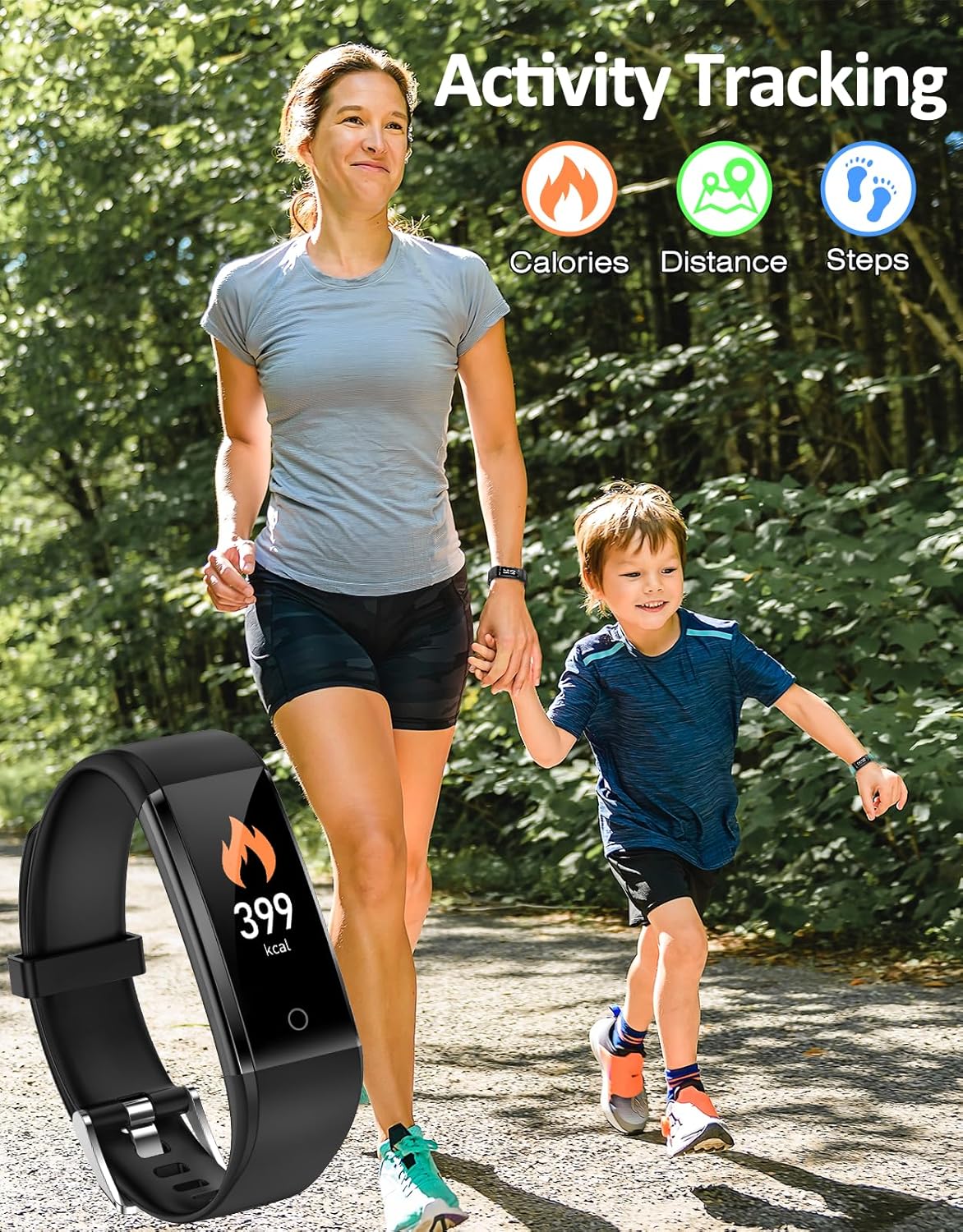
Figure 4: The watch tracking activity, showing calories, distance, and steps.
Sleep Monitoring
The GRV S1A Pedometer Watch can monitor your sleep patterns automatically.
- Automatic Detection: The watch automatically detects when you fall asleep and wake up.
- Sleep Data: It records your total sleep duration.
To view your sleep data, short-press the touch button to cycle through the display modes until you reach the sleep monitoring interface.

Figure 5: The watch's sleep monitoring feature, showing sleep duration.
Waterproof Information
The GRV S1A Pedometer Watch is rated IP67 waterproof.
- This means it is protected from dust and can withstand immersion in water up to 1 meter (3.3 feet) for up to 30 minutes.
- It is suitable for daily use, such as washing hands, rain, and splashes.
- Caution: It is not recommended for swimming, showering with hot water, diving, or prolonged immersion. Exposure to hot water or steam may damage the device.

Figure 6: The watch demonstrating its IP67 waterproof capability.
Specifications
| Feature | Detail |
|---|---|
| Model Number | S1A |
| Brand | GRV |
| Dimensions (L x W x H) | 16 x 8 x 1.7 cm (Watch body: 41mm x 18mm) |
| Weight | 60 grams |
| Material | Metal (watch body) |
| Color | Black |
| Battery Type | 1 Lithium-polymer (included) |
| Charging Time | 2-3 hours |
| Battery Life | 5-7 days (average use) |
| Waterproof Rating | IP67 |
| Sensor Type | Pedometer |
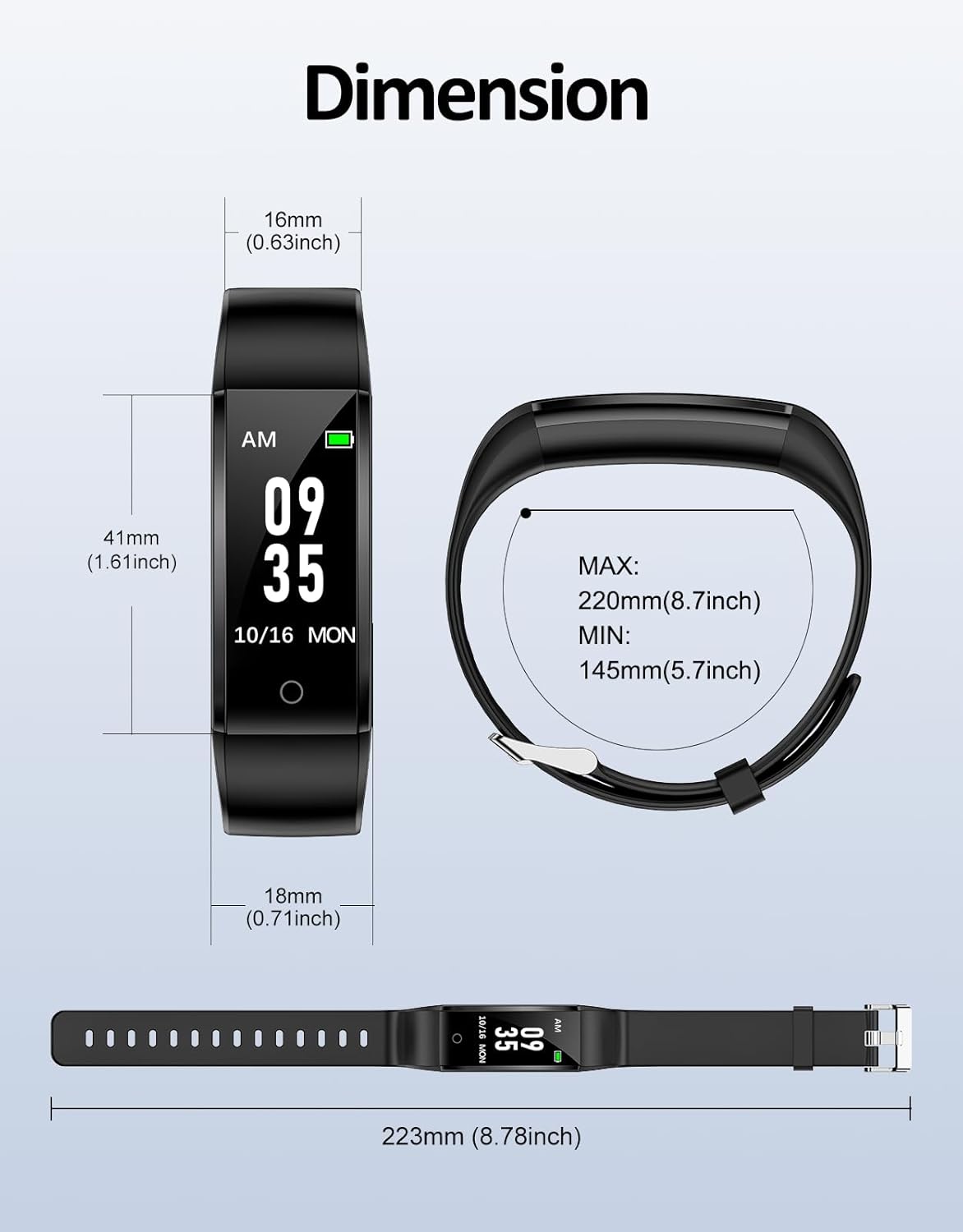
Figure 7: Detailed dimensions of the GRV S1A Pedometer Watch.
Troubleshooting
- Device not turning on:
- Ensure the device is fully charged. Connect it to a USB power source for at least 30 minutes.
- Verify the USB connection is secure and the charging port is clean.
- Incorrect time/date:
- If the battery was completely depleted, the time and date settings might reset. Follow the "Set Time and Date" instructions in the Setup section to correct it.
- Ensure you are long-pressing to confirm each setting during the setup process.
- Inaccurate step count/calories:
- Verify that your personal information (height, weight, age) is correctly entered in the device settings. Inaccurate data can lead to incorrect calculations.
- Ensure the watch is worn securely on your wrist. Loose fit can affect accuracy.
- Short battery life:
- Ensure the device is fully charged (2-3 hours).
- Battery life can vary based on usage patterns and environmental factors.
- Over time, all rechargeable batteries degrade. If battery life significantly decreases, it may indicate battery wear.
- Display not responding to touch:
- Ensure your finger is dry and clean.
- If the device is unresponsive, try charging it to see if it's a low battery issue.
- A soft reset (if available, often by holding the button for an extended period or letting the battery drain and recharge) might resolve temporary software glitches.
Maintenance and Care
- Cleaning: Wipe the watch body and strap regularly with a soft, damp cloth. Avoid harsh chemicals or abrasive cleaners.
- Storage: Store the device in a cool, dry place when not in use. Avoid extreme temperatures.
- Battery Care: To prolong battery life, avoid fully discharging the battery frequently. Charge it when the low battery indicator appears.
- Water Exposure: While IP67 rated, avoid unnecessary exposure to water, especially hot water or steam. Dry the device thoroughly if it gets wet.
Safety Information
- Do not attempt to disassemble or modify the device. This can void the warranty and pose safety risks.
- Keep the device away from strong magnetic fields, which can interfere with its operation.
- Dispose of the device and its battery according to local regulations. Do not dispose of in household waste.
- Consult a medical professional before starting any new exercise regimen, especially if you have pre-existing health conditions.
Warranty and Support
For warranty information and customer support, please refer to the documentation included with your purchase or visit the official GRV website.
If you encounter issues not covered in this manual, please contact GRV customer service for assistance.


