
1. Introduction
This manual provides comprehensive instructions for the installation, operation, and maintenance of your XTRONS 12.3 Inch Android 14 Car Stereo. Please read this manual thoroughly before using the product to ensure proper function and safety.
1.1 Applicable Models & Years
This unit is designed for the following BMW 3 Series models with a CIC System:
- BMW E90 (2009-2012)
- BMW E91 (2009-2012)
- BMW E92 (2009-2012)
- BMW E93 (2009-2012)
- BMW M3 (2009-2012)
Important: This unit ONLY works with the original 3 Series E90/E91/E92/E93/M3 CIC system.
1.2 Main Features
- Operating System: Latest Android 14
- Processor: Octa-core
- Memory: 4GB DDR4 RAM, 64GB Solid State ROM
- Display: 12.3-inch IPS Touch Screen, 1920x720 resolution, 178° Viewing Angle
- Connectivity: Global 4G LTE (Micro-SIM required, not included), Dual Wi-Fi Band (2.4GHz/5GHz), Bluetooth 5.0, USB Tethering
- Smartphone Integration: Wireless Car Play, Wireless/Wired Android Auto, Screen Mirroring
- Display Features: Multi-task Display, Picture-in-Picture (PIP)
- Audio: Built-in DSP (Digital Sound Processor)
- Compatibility: Retains original fiber optic sound system, original radio, original CD player, and original car information display (speed, fuel level, safety warnings).
2. Safety Information
To ensure safe operation and prevent damage, please observe the following safety guidelines:
- Do not operate the device in a manner that distracts you from driving. Always prioritize road safety.
- Ensure all wiring is correctly connected and secured to prevent short circuits or electrical hazards.
- Avoid exposing the unit to extreme temperatures, direct sunlight for prolonged periods, or excessive moisture.
- Do not attempt to disassemble or repair the unit yourself. Refer to qualified service personnel for any repairs.
- Keep the screen clean using a soft, dry cloth. Avoid abrasive cleaners.
3. Package Contents
Verify that all items listed below are included in your package:
- 1 x ISO Wiring Harness
- 1 x Audio Cable
- 1 x GPS Antenna
- 1 x Tweezers
- 1 x 4G Antenna
- 1 x USB Cable
- 1 x Fix Mount
- 3 x Screws
- 1 x Installation Instruction
- 1 x User Manual (this document)

Figure 3.1: Included Accessories. This image displays all components provided with the XTRONS 12.3 Inch Android 14 Car Stereo, including various cables, antennas, mounting hardware, and documentation.
4. Product Overview
Familiarize yourself with the main components and features of your new car stereo.

Figure 4.1: XTRONS 12.3 Inch Car Stereo Front View. This image shows the front of the car stereo, highlighting its 12.3-inch HD IPS screen, 1920x720 resolution, Global 4G LTE capability, Android OS, 2K video support, Octa Core processor, 4GB RAM, and 64GB ROM.
4.1 Core Specifications and Display
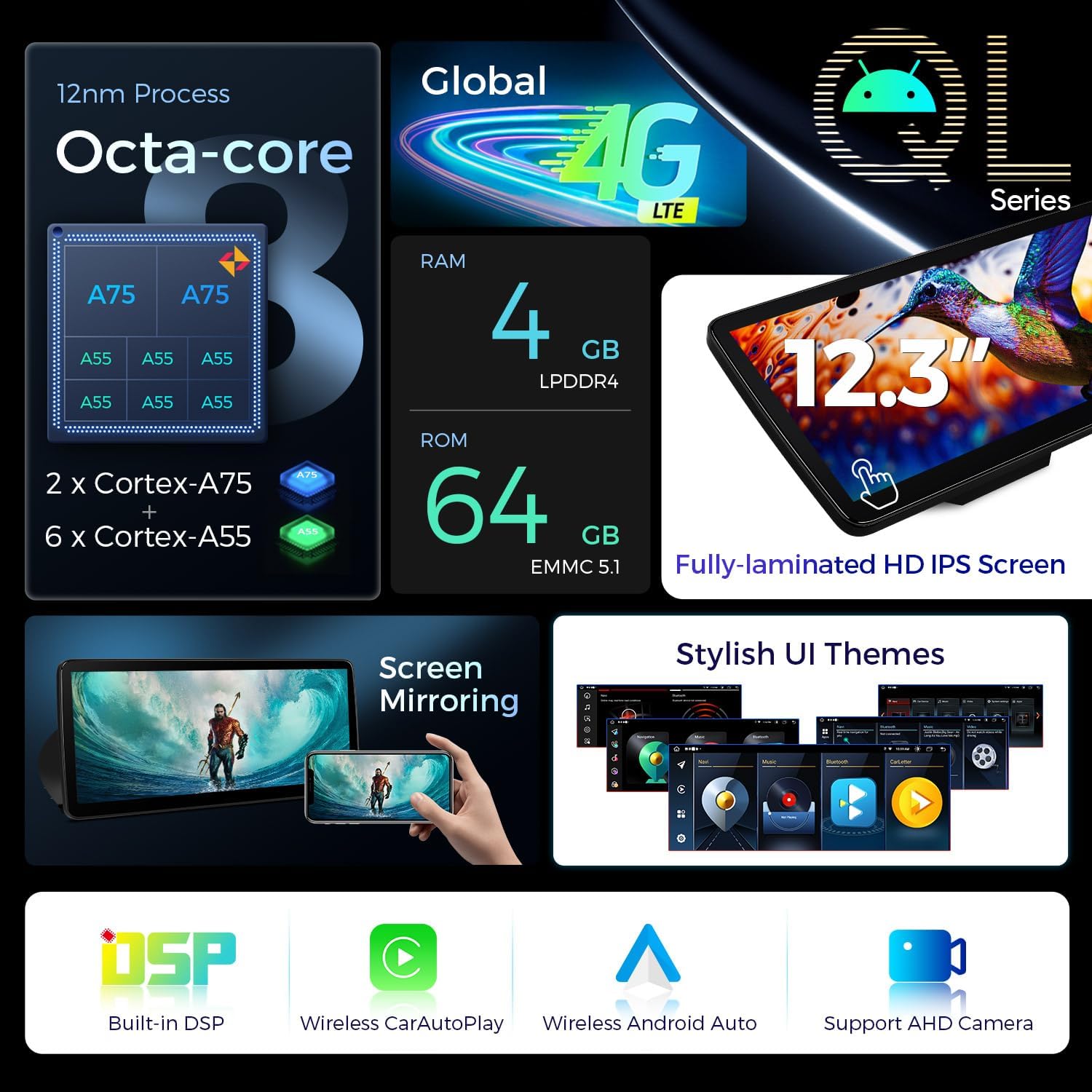
Figure 4.2: Internal Architecture and Display. This diagram details the 12nm Octa-core processor (2x Cortex-A75, 6x Cortex-A55), 4GB LPDDR4 RAM, 64GB EMMC 5.1 ROM, Global 4G LTE, fully-laminated HD IPS screen, built-in DSP, Wireless CarPlay, Wireless Android Auto, and AHD camera support.
- Display Size: 12.3 Inches
- Resolution: 1920x720 HD IPS display
- Processor: Octa-core (2x Cortex-A75, 6x Cortex-A55)
- RAM: 4GB LPDDR4
- ROM: 64GB EMMC 5.1
- Viewing Angle: 178° IPS Panel
4.2 User Interface and Connectivity Features

Figure 4.3: Display and Interface Features. This image illustrates the 12.3-inch display size comparison, multi-task display, picture-in-picture (PIP) functionality, the responsive IPS touch screen, and the two built-in USB input ports.
- Multi-task Display: Run two applications simultaneously (e.g., navigation and music).
- Picture-in-Picture (PIP): View videos while using other apps.
- IPS Touch Screen: Responsive and clear touch interface.
- USB Ports: Two built-in USB ports for connectivity.
4.3 Physical Dimensions
Figure 4.4: Unit Dimensions. The diagram indicates the unit's width as 312mm and height as 135mm.
- Width: 312mm
- Height: 135mm
5. Installation Guide
This section provides general guidance for installing your XTRONS car stereo. For detailed, step-by-step instructions, please refer to the dedicated Installation Instruction manual included in your package.
5.1 Compatibility Check

Figure 5.1: Compatibility and Before/After Installation. This image demonstrates the appearance of the BMW dashboard before and after the XTRONS unit installation, emphasizing the requirement for an original CIC system, identifiable by the 4-pin LVDS port, CD button, and BMW 'Car Information Computer' Interface.
- Ensure your BMW 3 Series (E90/E91/E92/E93/M3, 2009-2012) is equipped with the original CIC System. This is crucial for compatibility.
- Verify the presence of a 4-pin LVDS port at the rear of your original unit.
- If your car comes with NO audio AUX input, you may need to order an FM transmitter (e.g., XTRONS CA/ITR/FM02 or CA/ITR/FM03) to assist with the installation and audio output.
5.2 Wiring Harness Diagram
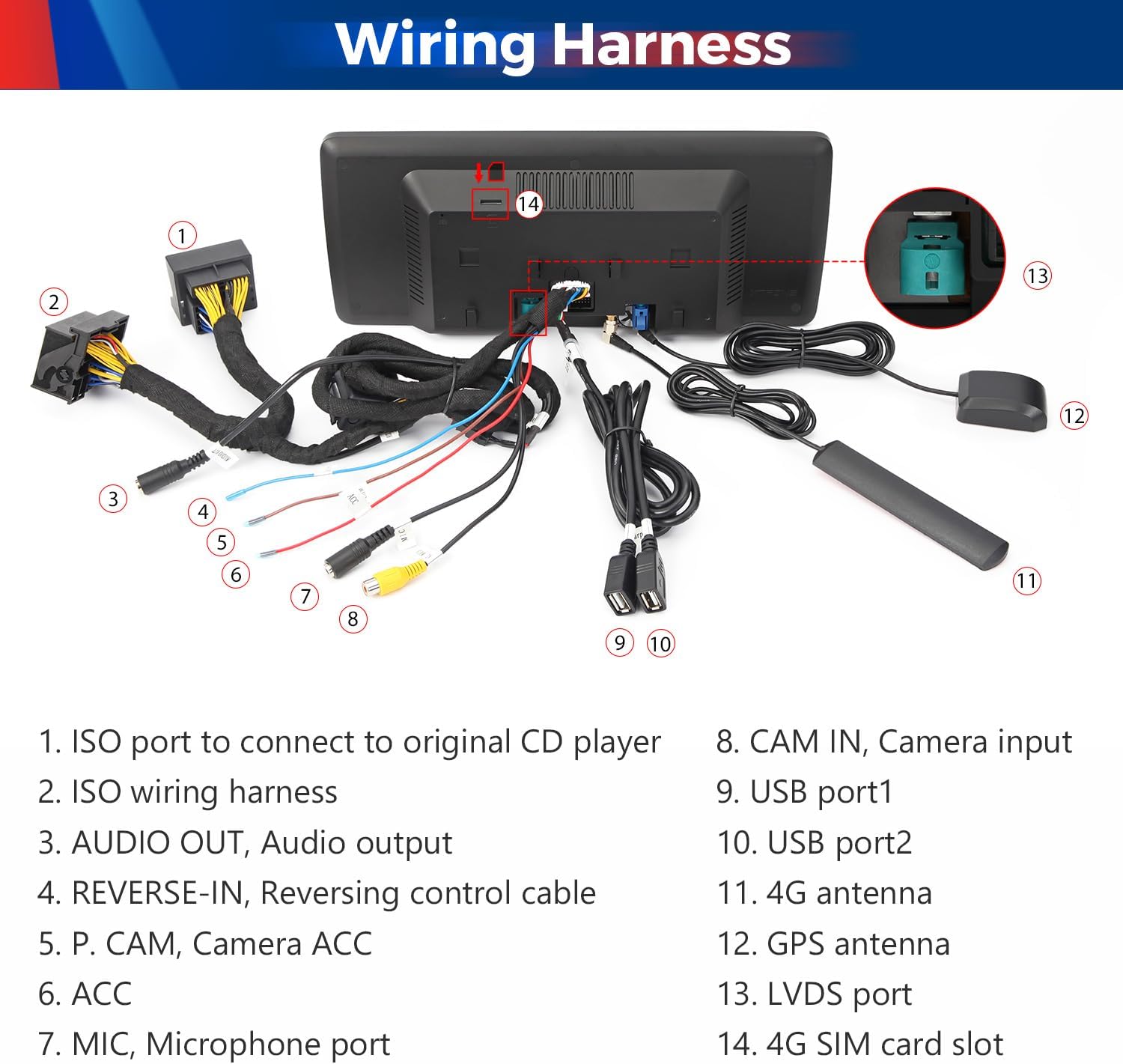
Figure 5.2: Wiring Harness Connections. This diagram labels the various ports and cables on the XTRONS unit, including ISO ports, audio output, reverse-in, camera ACC, ACC, microphone port, CAM IN, USB ports, 4G antenna, GPS antenna, LVDS port, and 4G SIM card slot.
Refer to the diagram above for proper connection of the included wiring harness and accessories. Key connections include:
- ISO port to connect to original CD player
- ISO wiring harness
- AUDIO OUT, Audio output
- REVERSE-IN, Reversing control cable
- P. CAM, Camera ACC
- ACC
- MIC, Microphone port
- CAM IN, Camera input
- USB port1
- USB port2
- 4G antenna
- GPS antenna
- LVDS port
- 4G SIM card slot
6. Operating Instructions
This section covers the basic operation and advanced features of your XTRONS car stereo.
6.1 Power On/Off and Basic Navigation
- The unit typically powers on automatically with your vehicle's ignition.
- Use the touch screen to navigate through menus and applications.
- Volume control can be managed via the original car controls or on-screen interface.
6.2 Smartphone Integration (CarPlay, Android Auto, Screen Mirroring)
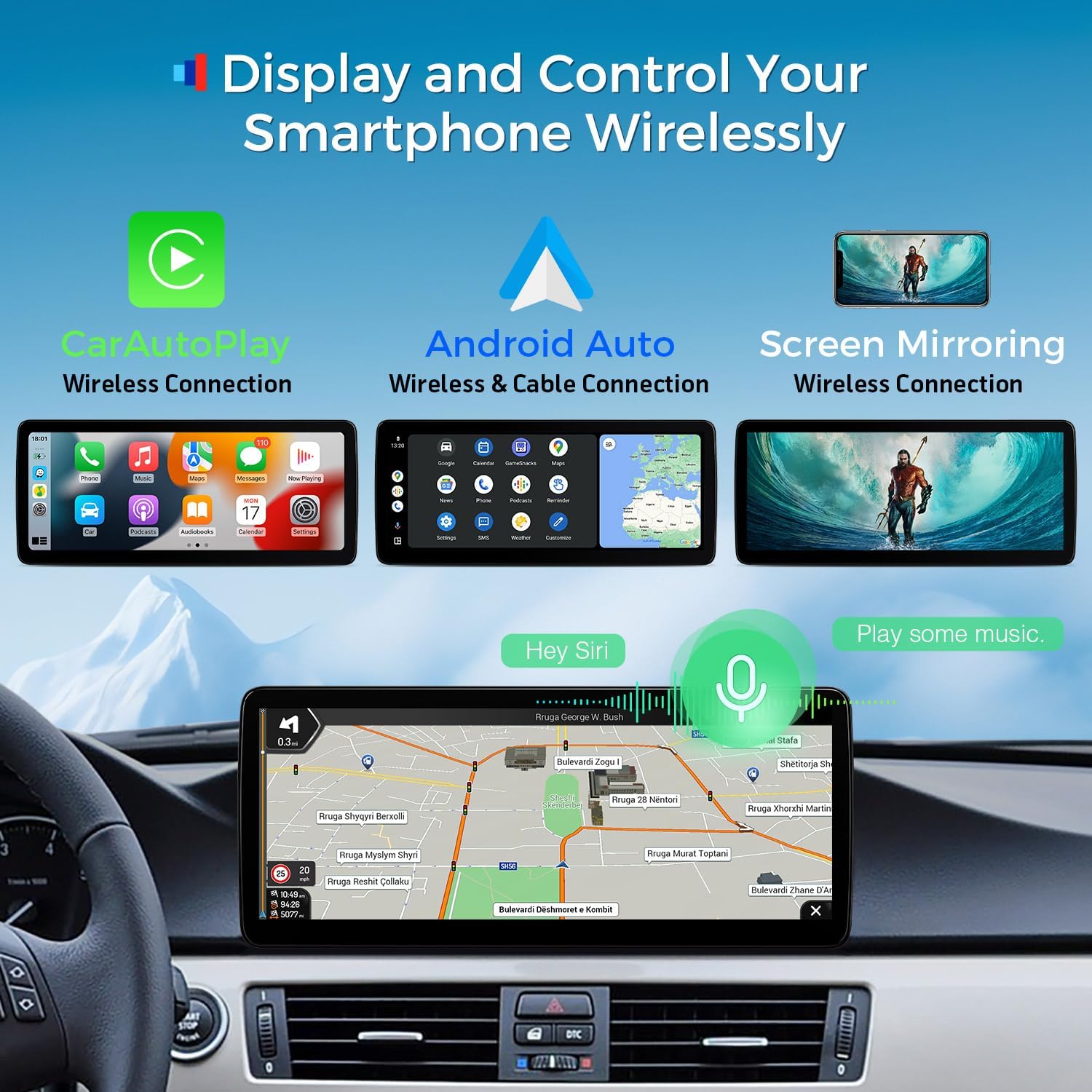
Figure 6.1: Smartphone Integration. This image displays the interfaces for Wireless CarPlay, Wireless & Cable Android Auto, and Wireless Screen Mirroring, showing how smartphone content can be displayed and controlled on the car stereo screen.
- Wireless Car Play: Connect your iPhone via Bluetooth for wireless access to compatible apps, navigation, calls, and music.
- Wireless/Wired Android Auto: Connect your Android phone via Bluetooth wirelessly or with a USB cable for access to GPS, calls, music, and Google Assistant.
- Screen Mirroring: Wirelessly display your smartphone's screen content directly onto the car stereo.
6.3 Global 4G LTE Connectivity

Figure 6.2: Internet Access Options. This image highlights the Global 4G LTE capability (up to 300Mbps download speed, supporting 99% of carriers worldwide) and dual-band Wi-Fi (2.4GHz and 5GHz). It also shows how to connect a phone for USB tethering.
- Micro-SIM Card: Insert a Micro-SIM card (not included) into the designated slot (refer to Figure 5.2, item 14) for 4G mobile broadband connection. Note: This supports internet SIM data only, not phone calls.
- USB Tethering: Connect your smartphone via USB and configure your phone's settings to share its internet connection with the unit.
- Wi-Fi: Connect to available Wi-Fi networks using either 2.4GHz or 5GHz bands for faster speeds.
6.4 Multi-tasking and Original Car Information Display
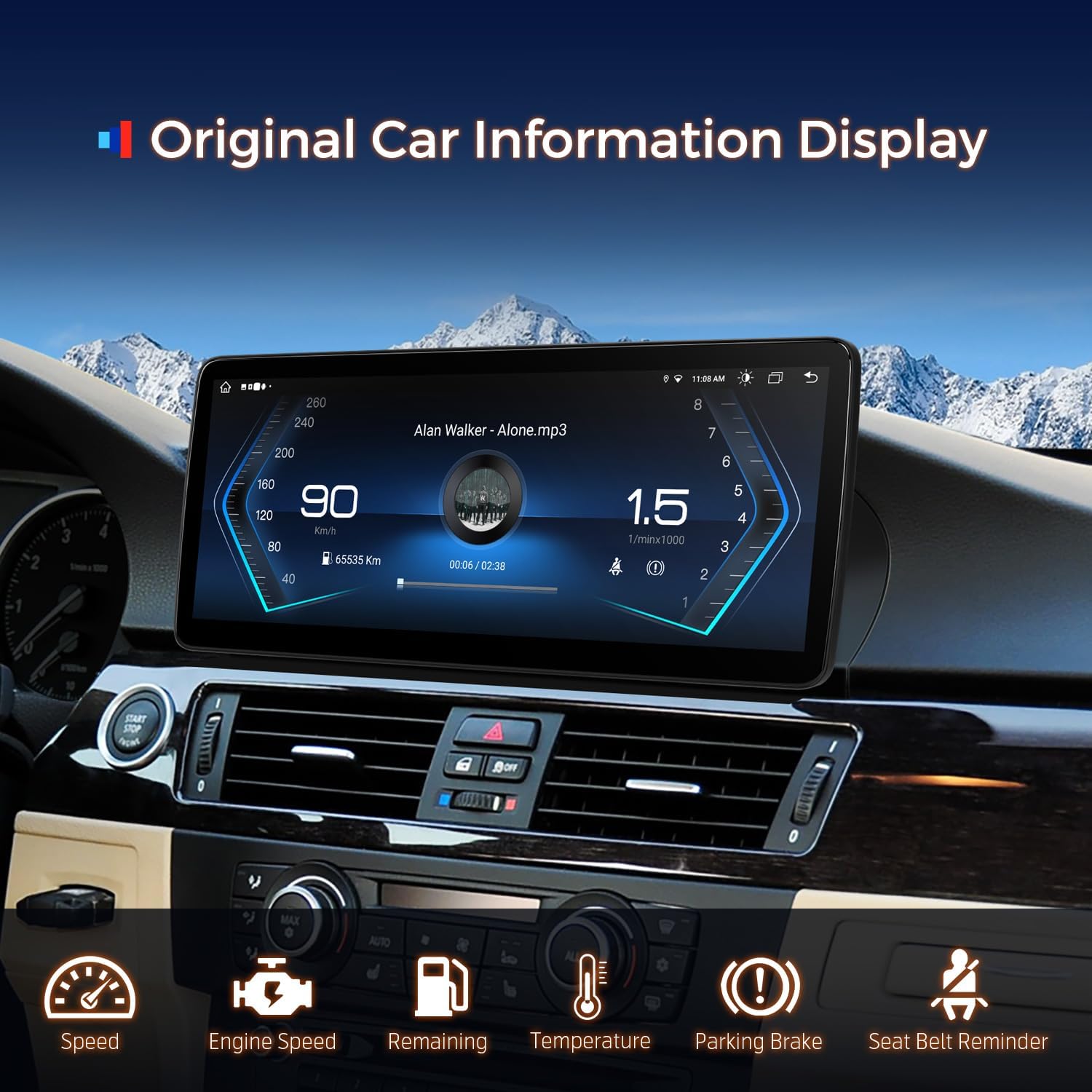
Figure 6.3: Original Car Information Display. This image shows the XTRONS unit displaying various OEM car-centric functions such as speed, engine speed, remaining fuel, temperature, parking brake status, and seat belt reminder.
- Multi-task Display: Utilize the large 12.3-inch screen to run two applications side-by-side, such as navigation and a media player.
- Picture-in-Picture (PIP): Keep a video playing in a small window while interacting with other applications.
- Original Car Information: The unit seamlessly integrates and displays your vehicle's original data, including speed, engine speed, fuel level, temperature, parking brake status, and seat belt reminders.
7. Maintenance and Care
Proper care will extend the life and performance of your car stereo.
- Screen Cleaning: Use a soft, lint-free cloth to gently wipe the screen. For stubborn smudges, slightly dampen the cloth with water or a screen-safe cleaner. Avoid harsh chemicals or abrasive materials.
- General Cleaning: Keep the unit free from dust and debris. Use a soft brush or compressed air to clean vents and ports.
- Software Updates: Periodically check the XTRONS official website or contact customer support for available software updates to ensure optimal performance and access to new features.
- Temperature: Avoid leaving the vehicle in extreme temperatures for extended periods, as this can affect the unit's electronics.
8. Troubleshooting
If you encounter issues with your XTRONS car stereo, refer to the following common problems and solutions:
| Problem | Possible Cause | Solution |
|---|---|---|
| Unit does not power on. | Incorrect wiring; Blown fuse; Power supply issue. | Check all power connections according to the wiring diagram. Inspect vehicle fuses and the unit's fuse. Consult a professional if issues persist. |
| No sound output. | Audio cable disconnected; Volume too low; Incorrect audio source selected; Compatibility issue with AUX input. | Ensure audio cables are securely connected. Increase volume. Select the correct audio source. If no AUX input, consider an FM transmitter. |
| GPS signal weak or lost. | GPS antenna not properly installed or obstructed. | Ensure the GPS antenna is installed in a clear location with an unobstructed view of the sky. Check antenna connection. |
| CarPlay/Android Auto not connecting. | Bluetooth/USB connection issue; Phone settings. | Ensure Bluetooth is enabled on both devices. For wired connection, try a different USB cable. Check phone settings for Android Auto/CarPlay permissions. Restart both devices. |
| 4G/Wi-Fi internet not working. | No SIM card; Incorrect APN settings; Weak signal; Wi-Fi password incorrect. | Ensure a valid Micro-SIM is inserted and activated. Verify APN settings for 4G. Check Wi-Fi password and signal strength. Try USB tethering as an alternative. |
If the problem persists after attempting these solutions, please contact XTRONS customer support for further assistance.
9. Specifications
| Feature | Detail |
|---|---|
| Model Number | QLB22CIB12E92 |
| Operating System | Android 14 |
| Processor | Octa Core |
| RAM | 4GB DDR4 |
| ROM | 64GB Solid State |
| Display Size | 12.3 Inches |
| Display Resolution | 1920x720 HD IPS |
| Connectivity | Global 4G LTE, Dual-band Wi-Fi (2.4GHz/5GHz), Bluetooth 5.0, USB |
| Map Type | North America (Pre-installed/Supported) |
| Audio Output Mode | Stereo |
| Mounting Type | Dashboard Mount |
| Vehicle Service Type | Car |
10. Warranty and Support
Your XTRONS 12.3 Inch Android 14 Car Stereo comes with a manufacturer's warranty.
- Warranty Period: 1 Year (as per product specifications).
- For Warranty Claims: Please retain your proof of purchase. Contact XTRONS customer support directly for warranty service or technical assistance.
- Seller Information: This product is sold by Xtrons.
- Online Support: Visit the official XTRONS website for FAQs, software updates, and additional support resources.


