
1. Introduction
This manual provides essential information for the safe and efficient operation of your AAOBOSI 43L Portable Electric Car Refrigerator, Model WD45. Please read these instructions carefully before use and retain them for future reference.
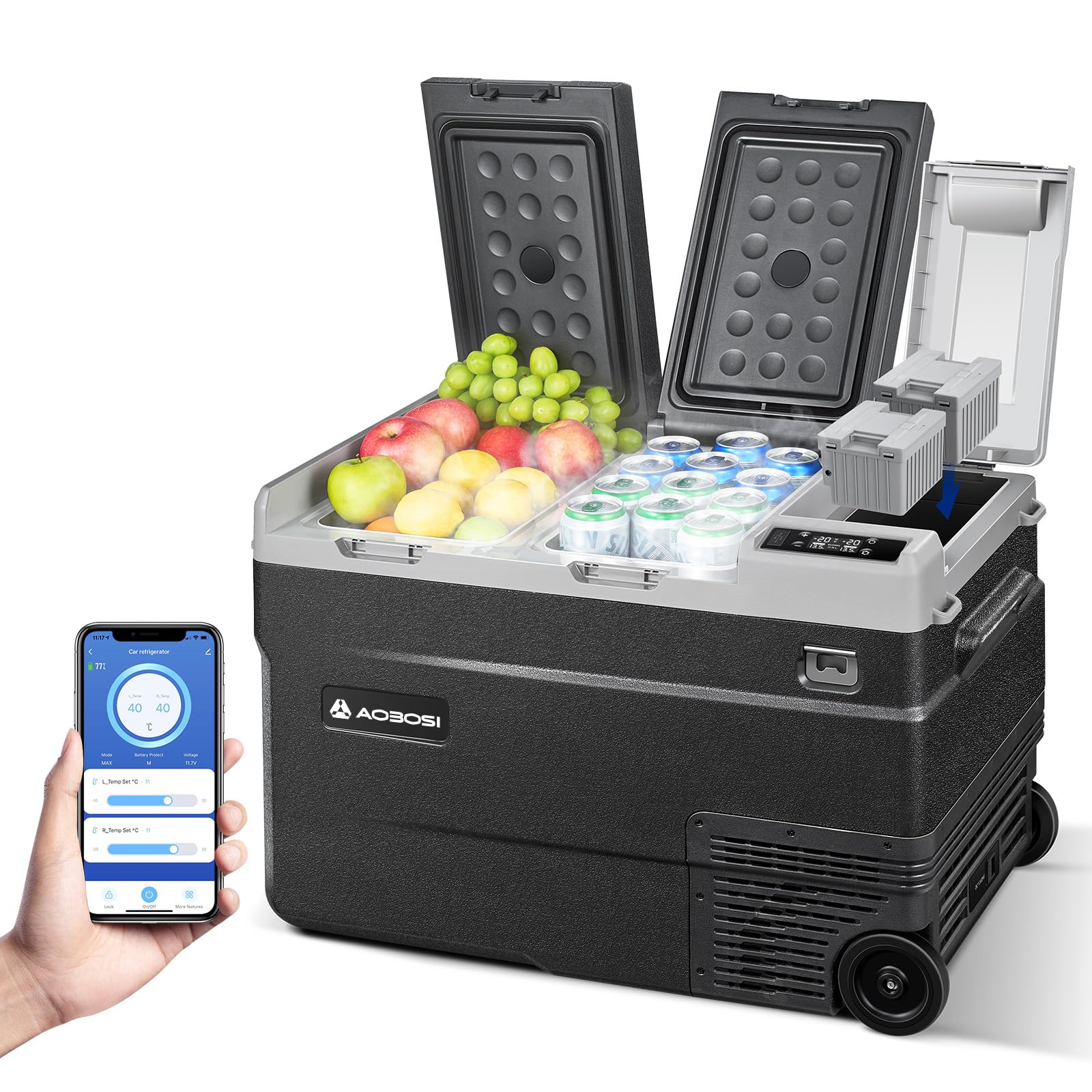
Image 1.1: The AAOBOSI 43L Portable Electric Car Refrigerator (Model WD45) with its control panel and mobile app interface.
2. Safety Instructions
To ensure safe operation and prevent damage, observe the following safety precautions:
- Do not operate the appliance if the power cord is damaged.
- Ensure the voltage matches the specifications before connecting.
- Keep the refrigerator away from heat sources and direct sunlight.
- Do not immerse the unit in water or expose it to heavy rain.
- Always disconnect power before cleaning or maintenance.
- This appliance is designed for cooling and freezing food and beverages. Do not use it for other purposes.
- When used in a vehicle, secure the refrigerator using the four fixing points to prevent movement during transit. Ropes for securing are not included.
- The unit is designed to be tilt-resistant and shock-resistant up to 45°.
3. Package Contents
Verify that all items are present in the package:
- AAOBOSI 43L Portable Electric Car Refrigerator (Model WD45)
- 100-240V AC Power Adapter
- 12/24V DC Car Power Cable
- Adapter for Bosch Tool Batteries (converter only, battery not included)
- User Manual
4. Product Features
The AAOBOSI WD45 refrigerator offers several key features:
- 43-Liter Capacity: Ample storage for food and beverages.
- Dual Zone Dual Temperature Control: Two independent compartments with separate temperature settings.
- Temperature Range: -20°C to 20°C (-4°F to 68°F) in normal mode.
- Ice System Mode: Dedicated mode for achieving temperatures down to -22°C (-7.6°F) in the right zone for ice preservation.
- Power Options: Operates on 12/24V DC (car) and 100-240V AC (home/workshop).
- Smart Control: APP+WIFI connectivity for Android and iOS devices, or manual control via the unit's panel.
- Separate Storage Compartment: A unique small compartment for storing cables, small keys, or an optional battery (sold separately).
- Bosch Tool Battery Compatibility: Includes an adapter for use with Bosch tool batteries (battery not included).
- Mobility: Equipped with robust wheels and a stable rolling handle for easy transport.
- Additional Features: LED interior light, USB charging port, bottle opener, three fan speeds (H/M/L) for low noise operation (45 dB).
5. Setup
Follow these steps to set up your portable refrigerator:
- Unpacking: Carefully remove the refrigerator from its packaging. Inspect for any shipping damage.
- Placement: Place the refrigerator on a flat, stable surface. Ensure adequate ventilation around the unit (at least 10 cm clearance on all sides).
- Power Connection:
- AC Power (Home/Workshop): Connect the 100-240V AC adapter to the refrigerator's AC input port, then plug it into a standard wall outlet.
- DC Power (Vehicle): Connect the 12/24V DC car power cable to the refrigerator's DC input port, then plug it into your vehicle's cigarette lighter socket.
- Battery Power (Optional): If using a Bosch tool battery, insert it into the dedicated battery compartment after connecting the provided adapter. Ensure the battery is charged.
- Initial Cleaning: Before first use, wipe the interior with a damp cloth and mild detergent. Dry thoroughly.
- Securing in Vehicle: If using in a moving vehicle, utilize the four fixing points on the sides of the refrigerator to secure it with a rope or strap (not supplied). This prevents shifting and potential damage.
Image 5.1: Top view of the AAOBOSI 43L Portable Electric Car Refrigerator, illustrating the dual compartments.
6. Operating Instructions
This section details how to operate your refrigerator.
6.1 Control Panel Overview
The control panel is located on the top of the unit. It typically includes a power button, temperature adjustment buttons (+/-), a mode button, and a display screen.

Image 6.1: Close-up of the refrigerator's control panel with display and buttons.
6.2 Powering On/Off
- Press the Power Button once to turn the unit on.
- Press and hold the Power Button for 3 seconds to turn the unit off.
6.3 Temperature Adjustment
- Press the + or - buttons to adjust the desired temperature for each zone. The display will show the set temperature.
- The temperature range for both zones in normal operation is -20°C to 20°C.
6.4 Dual Zone Control
The refrigerator features two independent zones. You can set different temperatures for each zone:
- Refrigerator/Freezer: One zone acts as a refrigerator (e.g., 0°C to 8°C), and the other as a freezer (e.g., -10°C to -20°C).
- Freezer/Freezer: Both zones operate as freezers.
- Refrigerator/Refrigerator: Both zones operate as refrigerators.
- Consult the display and mode button to switch between zones for temperature setting.
6.5 Ice System Mode
To activate the specialized ice system for colder temperatures:
- Long-press the - button for three seconds.
- In this mode, the right zone can reach a minimum temperature of -22°C, maintaining a constant range of -15°C to -22°C.
- The left zone can be adjusted from 0°C to 8°C for fresh food storage.
6.6 APP+WIFI Control
The refrigerator can be controlled remotely via a mobile application:
- Download the official AAOBOSI app from your device's app store (Android/iOS).
- Ensure your refrigerator is powered on and within range of your mobile device's Wi-Fi.
- Follow the in-app instructions to pair your device with the refrigerator.
- Once connected, you can monitor temperatures, adjust settings, and switch modes directly from your smartphone.
7. Maintenance
Regular maintenance ensures optimal performance and longevity of your refrigerator.
- Cleaning:
- Disconnect power before cleaning.
- Wipe interior and exterior surfaces with a damp cloth and mild detergent. Avoid abrasive cleaners.
- Ensure the unit is completely dry before reconnecting power.
- Ventilation: Regularly check that the ventilation openings are clear of dust and debris to ensure proper airflow.
- Storage: If storing the refrigerator for an extended period, ensure it is clean, dry, and unplugged. Store in a cool, dry place.
8. Troubleshooting
Refer to this section for common issues and their solutions.
| Problem | Possible Cause | Solution |
|---|---|---|
| Refrigerator does not turn on. | No power supply; faulty cable; power outlet issue. | Check power connections (AC/DC). Ensure the power outlet is functional. Try a different cable if available. |
| Unit not cooling effectively. | Blocked ventilation; door not sealed; ambient temperature too high; incorrect temperature setting. | Clear ventilation openings. Ensure the lid is closed tightly. Adjust temperature settings. Move to a cooler environment if possible. |
| Unusual noise during operation. | Unit not level; fan obstruction; normal compressor noise. | Ensure the unit is on a flat surface. Check for any obstructions near the fan. A slight humming from the compressor is normal. |
| App control not working. | No Wi-Fi connection; app not paired; outdated app version. | Ensure Wi-Fi is enabled on your phone and the refrigerator. Re-pair the device in the app. Update the app to the latest version. |
If the problem persists after attempting these solutions, please contact customer support.
9. Specifications
| Feature | Detail |
|---|---|
| Model Number | WD45 |
| Brand | AAOBOSI |
| Capacity | 43 Liters |
| Dimensions (L x W x H) | 73.2 x 42.8 x 48.7 cm |
| Weight | 21 Kilograms |
| Voltage | 12/24V DC, 100-240V AC |
| Temperature Range (Normal) | -20°C to 20°C (-4°F to 68°F) |
| Temperature Range (Ice System) | Right Zone: -15°C to -22°C (5°F to -7.6°F) |
| Noise Level | 45 dB (H/M/L speeds) |
| Control Options | Manual, APP+WIFI (Android/iOS) |
| Special Features | Dual Zone, Ice System, Separate Battery Compartment, USB Charging Port, LED Light, Bottle Opener, Robust Wheels, Rolling Handle |
| UPC | 762744513498 |
10. Warranty and Support
AAOBOSI provides the following warranty for this product:
- Compressor: 5-year warranty.
- Other Parts: 1-year warranty.
For any questions, technical assistance, or warranty claims, please contact AAOBOSI customer support through Amazon. We aim to respond to all inquiries within 24 hours.


