1. Introduction
The Naturewater NW-4-75RODT is a 4-stage reverse osmosis system designed to transform tap water into pure, great-tasting drinking water. This system effectively removes up to 99% of various pollutants, including heavy metals, bacteria, viruses, chlorine, fluoride, and nitrates, ensuring optimal water quality. This manual provides essential information for the proper installation, operation, and maintenance of your water filter system.
2. Product Overview
The NW-4-75RODT system features an intelligent display for easy monitoring and filter change reminders. Its compact design includes an integrated 12-liter tank and an automatic flushing system for enhanced performance and longevity.
2.1 Key Features
- 4-Stage Filtration System: Provides comprehensive water purification.
- Smart Screen: Displays system status and filter change indicators.
- High Capacity: Produces up to 285 liters of filtered water per day.
- Integrated 12-Liter Tank: Ensures a continuous supply of purified water.
- Automatic Flushing System: Maintains membrane efficiency.
- Dust-Proof Design: Protects internal components.
- Innovative Bayonet System: Allows for quick and easy filter replacement.
2.2 Filtration Stages
- Sediment Filter (PP): Removes coarse particles such as sand, rust, and mud.
- Activated Carbon Filter (CTO): Eliminates organic impurities, chlorine, and odors.
- Reverse Osmosis Membrane (RO): Filters out the finest pollutants, allowing only pure water to pass.
- Post-Activated Carbon Filter (T33): Further purifies the water and enhances taste.

Figure 1: Front view of the Naturewater NW-4-75RODT system, showcasing the smart screen and four filter cartridges.

Figure 2: The Naturewater NW-4-75RODT main unit alongside its external reverse osmosis storage tank.
3. Setup and Installation
The Naturewater NW-4-75RODT system is designed for under-sink installation and connects directly to your cold water line. A separate faucet is included for dispensing purified water.
3.1 General Installation Guidelines
- Ensure adequate space under the sink for the main unit and the 12-liter storage tank.
- Connect the system to the cold water supply using the provided fittings.
- Install the dedicated faucet on your sink or countertop.
- Connect the system's output to the storage tank and the tank to the faucet.
- Refer to the detailed installation instructions provided in the physical manual for specific plumbing and electrical connections.

Figure 3: Rear view of the main unit, illustrating the mounting points for secure under-sink installation.
4. Operating Instructions
Once installed, the Naturewater NW-4-75RODT system operates largely automatically. The intelligent screen provides real-time feedback on the system's status.
4.1 Initial Startup
- After installation, slowly open the cold water supply valve to the system.
- Allow the system to fill the storage tank. This may take several hours for the first fill.
- Flush the system by dispensing and discarding the first two full tanks of water to remove any manufacturing residues.
4.2 Smart Screen Functions
- The screen displays the operational status, including water production and flushing cycles.
- Filter life indicators will show the remaining lifespan of each filter cartridge (PP, CTO, RO, T33).
- A reminder will appear when a filter change is due.
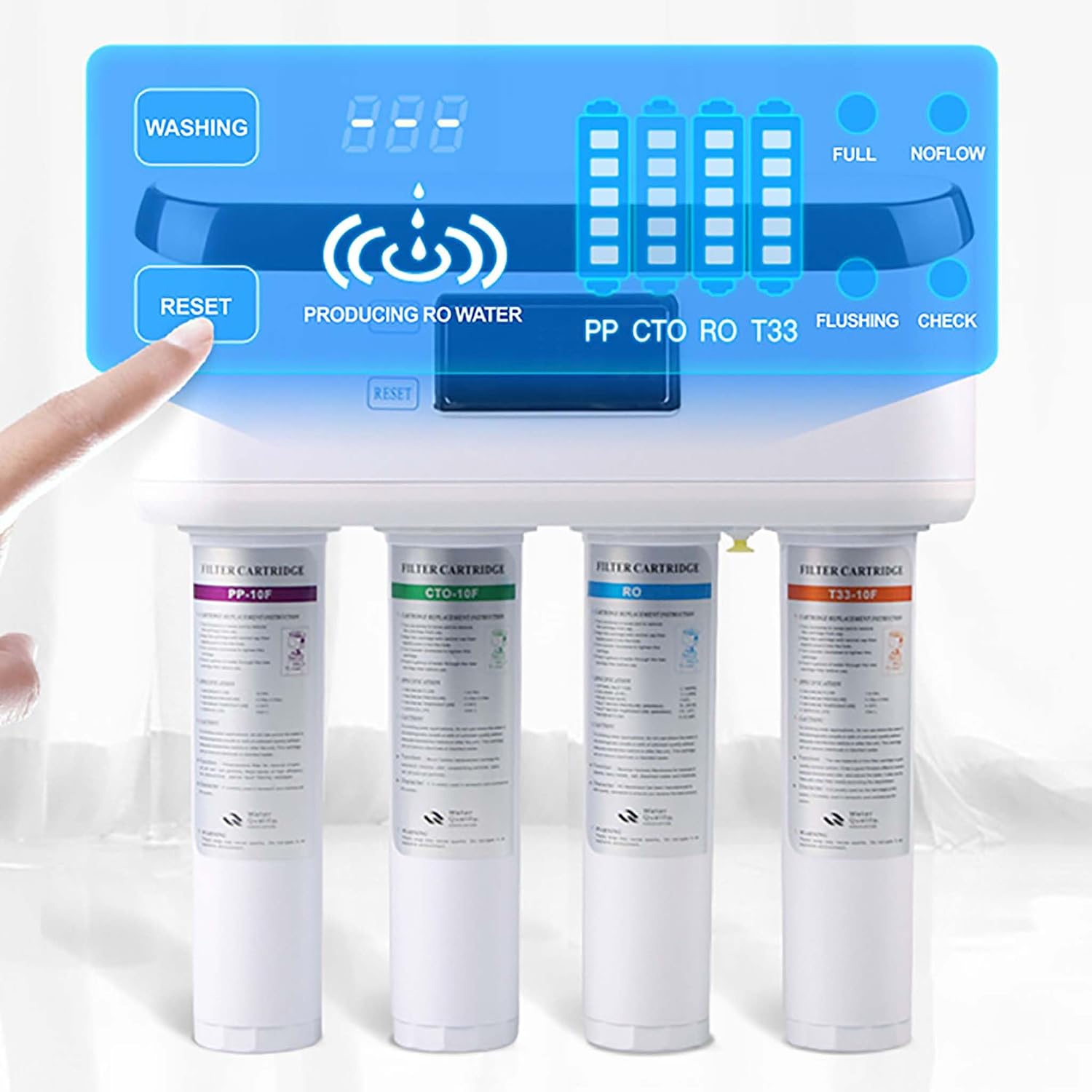
Figure 4: Detailed view of the smart screen, showing filter status indicators and operational modes.
5. Maintenance
Regular maintenance, particularly filter replacement, is crucial for the optimal performance and longevity of your Naturewater NW-4-75RODT system.
5.1 Filter Replacement
- The smart screen will indicate when a filter needs to be replaced.
- The system features an innovative bayonet design for quick and tool-free filter changes.
- To replace a filter, simply twist the old cartridge to unlock and remove it, then insert and twist the new cartridge to lock it in place.
- Always use genuine Naturewater replacement filters to ensure compatibility and performance.

Figure 5: Illustration of the bayonet filter replacement system, showing how a filter cartridge is inserted and locked.
5.2 Cleaning
- Periodically wipe the exterior of the unit with a soft, damp cloth.
- Do not use abrasive cleaners or solvents.
6. Troubleshooting
If you encounter any issues with your Naturewater NW-4-75RODT system, please refer to the following general advice. For more specific problems, consult the comprehensive troubleshooting guide in your product's original manual or contact customer support.
- No Water Flow: Check water supply, ensure all valves are open, and verify filter installation.
- Low Water Pressure: May indicate clogged filters or low incoming water pressure. Check filter status on the smart screen.
- Unusual Taste/Odor: Could be a sign that filters need replacement, especially the activated carbon filters.
- Leaks: Immediately shut off the water supply. Check all connections and ensure they are properly tightened.
7. Specifications
| Feature | Specification |
|---|---|
| Model Number | 64426 |
| Dimensions (L x W x H) | 38 x 16 x 40 cm |
| Weight | 7.94 Kilograms |
| Material | Polypropylene |
| Purification Method | Reverse Osmosis |
| Capacity (Tank) | 12 Liters |
| Filtered Water Production | 285 Liters per day |
| Installation Type | Under Sink |
| Minimum Rated Temperature | 4 Degrees Celsius |
| Included Components | 12-liter tank, separate faucet, filters, user manual |
8. Warranty and Support
For information regarding product warranty, spare parts availability, or technical support, please refer to the documentation included with your purchase or contact Naturewater customer service directly. Specific warranty terms and conditions may vary by region.


