
1. Introduction and Overview
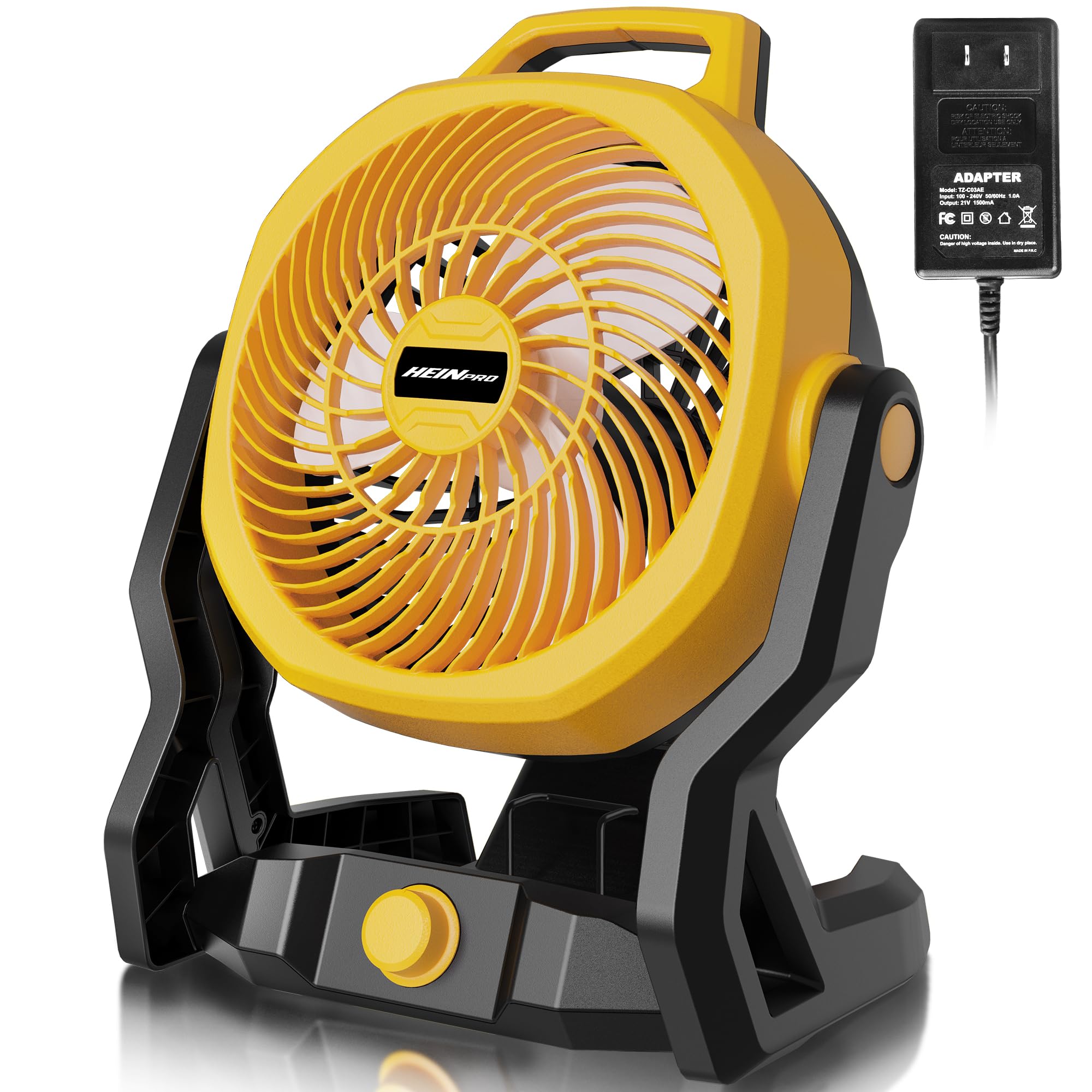
Thank you for choosing the HEINPRO HP-EF-DW-Y Battery Powered Jobsite Fan. This versatile fan is designed to provide powerful and quiet airflow in various environments, from jobsites and workshops to camping trips and home use. It offers the flexibility of dual power options, operating with compatible Dewalt 20V Max batteries or via an AC adapter. Its robust construction, variable speed control, and multi-angle adjustment make it an essential tool for personal comfort and air circulation.
2. Safety Instructions
Please read and understand all safety instructions before operating this fan. Failure to follow these instructions may result in electric shock, fire, or serious personal injury.
- Always disconnect the fan from the power source (battery or AC adapter) before cleaning or performing any maintenance.
- Do not operate the fan with a damaged cord or plug. If the cord or plug is damaged, contact customer support for replacement.
- Do not immerse the fan, cord, or plug in water or other liquids.
- Keep fingers, hair, and loose clothing away from the fan blades during operation.
- Do not use the fan in areas where flammable liquids or gases are stored.
- Ensure the fan is placed on a stable, level surface to prevent tipping.
- This fan is designed for indoor and outdoor use, but avoid direct exposure to heavy rain or extreme weather conditions.
- Use only compatible Dewalt 20V Max batteries or the provided AC adapter.
- Keep out of reach of children.
3. What's in the Box
| Item | Quantity |
|---|---|
| Jobsite Fan | 1 |
| AC Adapter | 1 |
| User Manual | 1 |
Note: Battery and charger are not included and must be purchased separately.
4. Setup
4.1 Battery Installation
- Ensure the fan is turned off.
- Align a compatible Dewalt 20V Max battery (e.g., DCB200, DCB201, DCB203, DCB204, DCB205, DCB206, DCB207, DCB208, DCB210, DCB230, DCB240) with the battery slot on the back of the fan base.
- Slide the battery into the slot until it clicks securely into place.
4.2 AC Adapter Connection
- Ensure the fan is turned off.
- Locate the AC input port on the side of the fan base.
- Insert the provided AC adapter plug into the AC input port.
- Plug the AC adapter into a standard wall outlet.

4.3 Adjusting Fan Angle and Hanging
- The fan head can be manually adjusted up to 180 degrees to direct airflow as needed. Simply tilt the fan head to your desired angle.
- For elevated placement, locate the hidden hanging hook on the top of the fan. Pull it out to hang the fan from a suitable support.


5. Operating Instructions
5.1 Powering On/Off and Speed Control
- To turn the fan on, rotate the variable speed knob located on the front of the fan base clockwise.
- Continue rotating the knob clockwise to increase the fan speed. The fan features infinitely variable speed settings, allowing precise control over airflow up to 650 CFM.
- To decrease the fan speed, rotate the knob counter-clockwise.
- To turn the fan off, rotate the knob counter-clockwise until it clicks into the "OFF" position.

5.2 Dual Power Source Operation
- When both a battery and the AC adapter are connected, the fan will prioritize AC power.
- If AC power is disconnected while the fan is running, it will automatically switch to battery power (if a charged battery is installed).
- The fan operates with low noise levels (below 30dB), ensuring minimal disturbance during use.
6. Maintenance
Regular maintenance ensures optimal performance and longevity of your fan.
- Cleaning: Use a soft, damp cloth to wipe down the exterior of the fan. Do not use harsh chemicals or abrasive cleaners. For dust accumulation on the fan blades, use a vacuum cleaner with a brush attachment or compressed air. Ensure the fan is unplugged and the battery is removed before cleaning.
- Storage: When not in use, store the fan in a cool, dry place away from direct sunlight and extreme temperatures. If storing for an extended period, remove the battery.
- Inspection: Periodically inspect the power cord and fan for any signs of damage. Do not operate if any damage is found.
7. Troubleshooting
| Problem | Possible Cause | Solution |
|---|---|---|
| Fan does not turn on. | No power supply / Battery not installed or discharged / AC adapter not properly connected. | Ensure a charged battery is installed or the AC adapter is securely plugged into a working outlet. Check if the variable speed knob is in the "ON" position. |
| Low airflow. | Fan speed set too low / Obstruction in front or back of fan / Dirty fan blades. | Increase the fan speed using the variable speed knob. Remove any obstructions. Clean the fan blades as described in the Maintenance section. |
| Unusual noise during operation. | Loose parts / Obstruction hitting blades. | Turn off and unplug the fan. Inspect for any loose parts or foreign objects. Remove any obstructions. If noise persists, contact customer support. |
8. Specifications
| Feature | Detail |
|---|---|
| Brand | HEINPRO |
| Model Name | HP-EF-DW-Y |
| Power Source | Battery Powered or Corded (AC Adapter) |
| Battery Compatibility | Dewalt 18V and 20V Max batteries (not included) |
| Air Flow Capacity | Up to 650 Cubic Feet Per Minute (CFM) |
| Speed | Variable, up to 2500 RPM |
| Noise Level | <30 Decibels |
| Adjustable Tilt Angle | 180 degrees |
| Special Features | AC Adapter, Adjustable Tilt Angle, Hang Hook, Low Noise, Portable |
| Product Dimensions | 7.4"D x 10.6"W x 13.7"H |
| Item Weight | 3.5 Pounds |
| Material | Plastic |
9. Warranty and Support
HEINPRO provides a 365-day warranty service for this product, offering replacement instead of repair to ensure your satisfaction. If you encounter any questions or issues during use, please do not hesitate to contact our customer support team.
For support, please visit the HEINPRO Store on Amazon or refer to the contact information provided with your purchase.
