1. Introduction
Thank you for choosing the soaiy/SH39 HiFi Speaker. This USB-powered speaker is designed to deliver steady, lossless bass and stereo surround sound, enhancing your audio experience for desktop computers, laptops, TVs, smartphones, and tablets. This manual provides detailed instructions for setup, operation, maintenance, and troubleshooting to ensure optimal performance and longevity of your device.
The SH39 speaker features a 3600mAh rechargeable battery, Bluetooth 5.0 connectivity, multiple input options (AUX, TF card, USB), and a stylish design with colorful LED lights and a time display.
2. Package Contents
Please check the package carefully to ensure all items are present and in good condition:
- 1 x SH39 Speaker
- 1 x 3.5mm Audio Cable
- 1 x USB Charging Cable
- 1 x User Manual (this document)
3. Safety Information
To ensure safe and proper use of your speaker, please read and follow these guidelines:
- Do not expose the speaker to water, moisture, or extreme temperatures.
- Avoid dropping or subjecting the speaker to strong impacts.
- Do not attempt to disassemble, repair, or modify the speaker yourself. Refer all servicing to qualified personnel.
- Use only the provided USB cable for charging.
- Keep the speaker away from heat sources such as radiators, heat registers, stoves, or other apparatus (including amplifiers) that produce heat.
- Ensure proper ventilation around the speaker.
- Clean the speaker only with a dry, soft cloth.
4. Setup
4.1. Unboxing
Carefully remove the speaker and all accessories from the packaging. Retain the packaging for future storage or transport.
4.2. Placement
Place the SH39 speaker on a stable, flat surface, such as a desk or entertainment unit. For optimal stereo sound, ensure there are no obstructions between the speaker and your listening position. The speaker is designed to complement various setups, including those with a keyboard and mouse.

Figure 4.2.1: SH39 Speaker in a typical desktop setup.
4.3. Power Connection
The SH39 speaker is USB-powered and features a built-in 3600mAh rechargeable battery. To power the speaker or charge its battery:
- Connect the small end of the provided USB cable to the USB input port on the speaker.
- Connect the large end of the USB cable to a standard USB power adapter (DC 5V 1A recommended), a computer's USB port, or a power bank.
- The speaker will automatically power on or begin charging.
4.4. Audio Connection
The SH39 speaker supports multiple audio input methods:
- 3.5mm AUX Input: Use the provided 3.5mm audio cable to connect the speaker to devices with a 3.5mm audio output jack, such as PCs, laptops, smartphones, tablets, or TVs.
- Bluetooth: Wirelessly connect to Bluetooth-enabled devices like smartphones, tablets, and computers.
- TF Card: Insert a TF (MicroSD) card with audio files into the designated slot.
- USB Input: Connect a USB flash drive with audio files into the USB port.

Figure 4.4.1: SH39 Speaker connected to various devices.
5. Operating Instructions
5.1. Controls and Indicators
The SH39 speaker features intuitive buttons and a clear display for easy control:

Figure 5.1.1: SH39 Speaker overview with controls.
Refer to the speaker's top panel for the following buttons and their functions:
- Power Button: Press and hold to turn the speaker on/off.
- Mode Button (M): Press to cycle through input modes (Bluetooth, AUX, TF Card, USB).
- Play/Pause Button: Press to play or pause audio.
- Volume Up (+): Press to increase volume. Press and hold for next track.
- Volume Down (-): Press to decrease volume. Press and hold for previous track.
- Light Mode Button: Press to change LED lighting effects.
- Clock/Alarm Button: Press to view time, press and hold to set time/alarm.
5.2. Bluetooth Pairing
The SH39 speaker utilizes Bluetooth 5.0 technology for stable wireless connections.
- Turn on the speaker. It will automatically enter Bluetooth pairing mode if no other input is selected, or you can press the Mode (M) button until the Bluetooth indicator flashes.
- On your device (smartphone, tablet, PC), enable Bluetooth and search for available devices.
- Select "SH39" from the list of found devices.
- Once connected, the speaker will emit a confirmation sound, and the Bluetooth indicator will stop flashing.
The speaker is compatible with 99% of Bluetooth devices on the market, including Android, iOS, and PC systems, offering a barrier-free connection up to 10 meters.

Figure 5.2.1: Bluetooth 5.0 Technology Overview.
5.3. AUX Mode
To use the 3.5mm AUX input:
- Connect one end of the 3.5mm audio cable to the AUX port on the speaker.
- Connect the other end to the audio output jack of your device.
- Press the Mode (M) button until the speaker enters AUX mode.
- Play audio from your connected device.
5.4. TF Card Mode
To play audio from a TF (MicroSD) card:
- Insert a TF card (up to 32GB) with audio files into the TF card slot on the speaker.
- The speaker may automatically switch to TF card mode, or you can press the Mode (M) button to select it.
- The speaker will begin playing audio files from the card.
5.5. USB Mode
To play audio from a USB flash drive:
- Insert a USB flash drive (up to 32GB) with audio files into the USB port on the speaker.
- The speaker may automatically switch to USB mode, or you can press the Mode (M) button to select it.
- The speaker will begin playing audio files from the drive.
5.6. Setting the Clock/Time Display
The SH39 speaker features an 1800R curved screen that displays the time.

Figure 5.6.1: Curved Screen and Time Display Features.
To set the time:
- Press and hold the Clock/Alarm button until the time display starts flashing.
- Use the Volume Up (+) and Volume Down (-) buttons to adjust the hour.
- Press the Clock/Alarm button again to move to the minute setting.
- Use the Volume Up (+) and Volume Down (-) buttons to adjust the minutes.
- Press the Clock/Alarm button one more time to confirm and save the time.
5.7. LED Lighting Modes
The speaker features colorful spectrum lights. Press the Light Mode button to cycle through different lighting effects or to turn the lights off.
6. Maintenance
Proper maintenance ensures the longevity and performance of your SH39 speaker:
- Cleaning: Use a soft, dry, lint-free cloth to wipe the speaker's surface. Do not use abrasive cleaners, waxes, or solvents.
- Storage: When not in use for extended periods, store the speaker in a cool, dry place, away from direct sunlight and extreme temperatures.
- Battery Care: To preserve battery life, avoid fully discharging the battery frequently. Charge the speaker regularly, even if not in constant use.
7. Troubleshooting
If you encounter issues with your SH39 speaker, refer to the following table for common problems and solutions:
| Problem | Possible Cause | Solution |
|---|---|---|
| No power/Speaker won't turn on | Battery is depleted; USB cable not connected properly; Power adapter faulty. | Charge the speaker for at least 30 minutes. Ensure USB cable is securely connected to a working power source. Try a different USB port or power adapter. |
| No sound | Volume too low; Incorrect input mode selected; Audio cable not connected properly (AUX); Bluetooth not paired; Source device volume too low. | Increase speaker volume and source device volume. Press the Mode button to select the correct input. Reconnect the 3.5mm audio cable. Re-pair Bluetooth. |
| Bluetooth pairing fails | Speaker not in pairing mode; Device too far; Interference; Bluetooth list full on source device. | Ensure speaker is in Bluetooth pairing mode (flashing indicator). Move device closer to speaker (within 10m). Turn off other Bluetooth devices. Clear Bluetooth history on your device and try again. |
| Sound distortion | Volume too high; Audio source quality is poor; Speaker placed too close to interference. | Reduce volume on both speaker and source device. Try a different audio source. Move speaker away from other electronic devices. |
| TF card/USB not playing | Card/drive not inserted correctly; Incompatible file format; Card/drive corrupted; Capacity exceeds 32GB. | Ensure card/drive is fully inserted. Check if audio files are in a supported format (e.g., MP3). Try a different TF card/USB drive. Ensure capacity is 32GB or less. |
8. Specifications
Detailed technical specifications for the SH39 HiFi Speaker:
| Feature | Specification |
|---|---|
| Brand | ComeTX (soaiy) |
| Model | SH39 |
| Material | ABS (Acrylonitrile Butadiene Styrene) |
| Bluetooth Version | 5.0 |
| Speaker Power Output | 6W * 2 (Total 12W) |
| Power Supply | DC 5V 1A (USB Powered) |
| Battery Capacity | 3.7V 3600mAh |
| Input Interfaces | USB, AUX (3.5mm), TF Card, Bluetooth |
| Separation | ≥60dB |
| SNR (Signal-to-Noise Ratio) | ≥70dB |
| Frequency Response | 80Hz-20KHz |
| TF Card/USB Support | Up to 32GB |
| Audio Output Mode | Stereo |
| Color | Black |
| Item Dimensions (approx.) | 49 x 9 x 6 cm (19.29 x 3.54 x 2.36 inches) |
| Package Dimensions (approx.) | 53 x 13 x 9 cm (20.87 x 5.12 x 3.54 inches) |
| Package Weight (approx.) | 1312g (46.28oz) |
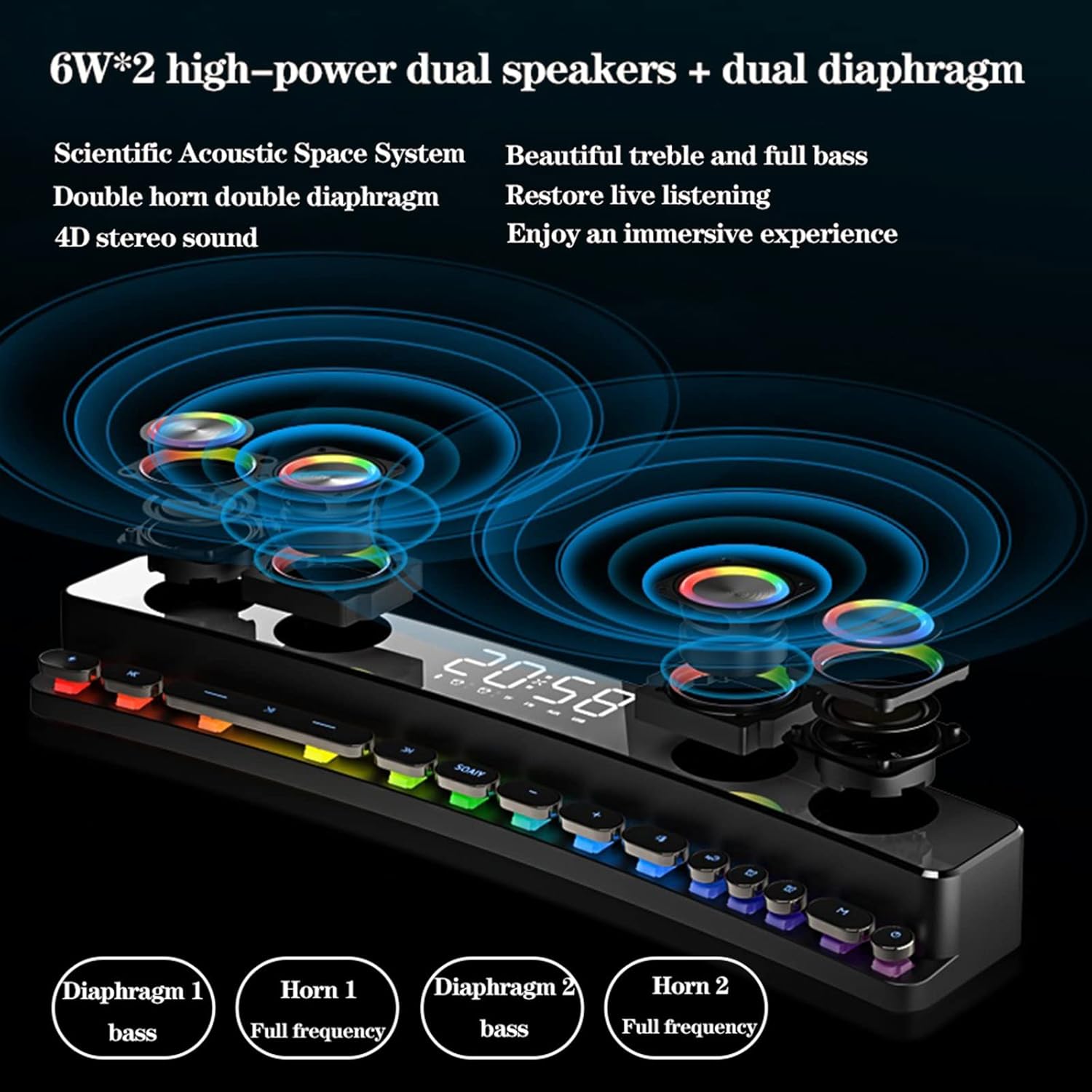
Figure 8.1: Internal Speaker Configuration.

Figure 8.2: HD Full-Range Speaker Component.
9. Warranty and Support
For warranty information and technical support, please refer to the purchase platform or contact the seller directly. Keep your purchase receipt as proof of purchase for any warranty claims.


