
YGS-Tech SMDL4
Contents
YGS-Tech 2.5 Inch LED Recessed Lighting with Night Light
Model: SMDL4
Brand: YGS-Tech
1. Introduction
This manual provides detailed instructions for the installation, operation, and maintenance of your YGS-Tech 2.5 Inch LED Recessed Lighting with Night Light. Please read this manual thoroughly before installation and keep it for future reference.
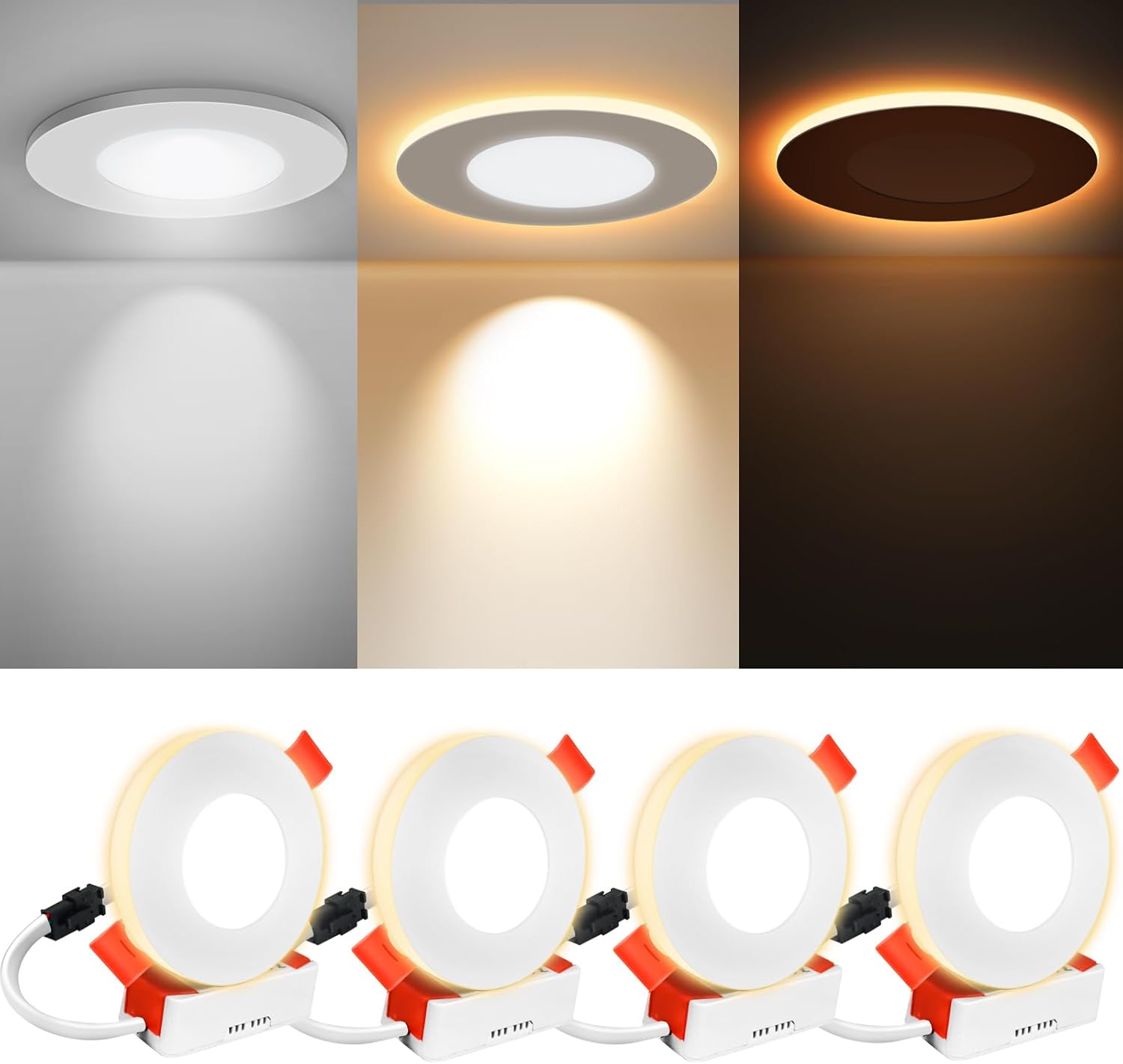
Image 1.1: Overview of the YGS-Tech 2.5 Inch LED Recessed Lights, illustrating the main downlight and night light modes, and the four-pack configuration.
2. Safety Information
Always follow basic safety precautions when installing or working with electrical products to reduce the risk of fire, electric shock, or injury to persons.
- Turn off power at the circuit breaker before installation or servicing.
- Consult a qualified electrician if you are unsure about the installation process.
- Do not modify the product in any way.
- Ensure all connections are secure and properly insulated.
- This product is designed for indoor use only.
3. Package Contents
Verify that all components are present before beginning installation:
- 4 x YGS-Tech 2.5 Inch LED Recessed Lights
- 4 x Integrated LED Drivers
4. Specifications
| Feature | Specification |
|---|---|
| Brand | YGS-Tech |
| Model Number | SMDL4 |
| Product Dimensions | 2.5"L x 2.5"W x 0.3"H |
| Material | Aluminum |
| Light Source Type | LED |
| Wattage | 6 Watts (3W+3W) |
| Brightness | 420 Lumens |
| Color Temperature | 3000K (Night Light), 6500K (Downlight), 4000K (Combined) |
| Voltage | 120 Volts |
| Mounting Type | Ceiling Mount |
| Control Method | Wall Switch (Push Button) |

Image 4.1: Detailed dimensions of the YGS-Tech 2.5 Inch LED Recessed Light, indicating a 65mm (2.55 inch) spring width and 10mm (0.39 inch) thickness.

Image 4.2: Key features of the light, including its aluminum casing for heat dissipation, spring clips for easy installation, and ultra-thin design. Electrical specifications are 3W+3W, 210-420 Lumens, AC110-265V input, and a 30,000-hour lifespan.
5. Installation
Follow these steps for proper installation of your recessed lighting. No extra recessed housing cans or accessories are required.
- Prepare the Opening: Using a suitable hole saw, dig a 2.5-inch (approximately 63.5mm) hole in the ceiling where you intend to install the light. Ensure the hole is clean and free of debris.
- Connect Wiring: Connect the brown wire (L) from the light's driver to the live wire from your electrical supply, and the blue wire (N) to the neutral wire. Ensure all connections are secure and comply with local electrical codes.
- Insert Light: Push the spring clips on the sides of the recessed light upwards. Carefully insert the light into the prepared hole in the ceiling.
- Secure Light: Once the light is in the hole, the spring clips will automatically snap down, securing the light firmly in place against the ceiling.

Image 5.1: Step-by-step visual guide for installing the recessed light, from cutting the hole to securing the fixture.
6. Operation
Your YGS-Tech recessed light features multiple lighting modes that can be switched using your standard wall switch.
Switching Modes:
To change the lighting mode, flip your wall switch ON-OFF-ON within 1 to 10 seconds. Each quick toggle will cycle through the available modes:
- Night Light Mode (3000K Warm Light): Provides a soft, ambient glow suitable for nighttime.
- Downlight Mode (6500K Daylight White): Offers bright, clear illumination for general lighting.
- Combined Mode (4000K): Activates both the downlight and night light for a balanced illumination.

Image 6.1: Visual representation of the mode switching process using a wall switch.

Image 6.2: Examples of the different color temperatures and lighting effects available.
Synchronized Reset Feature:
When you turn on the downlight, it will always default to the night light mode. If multiple lights are installed and they become out of sync, simply turn off the light for 10 seconds or more, then turn it back on. This will reset all lights to the night light mode, allowing them to synchronize.

Image 6.3: Illustration of the light distribution angles for Daylight (120°) and Nightlight (360°).

Image 6.4: Key operational characteristics: the lights are designed to be glare-free, noise-free, flicker-free, and are not dimmable.
7. Maintenance
The YGS-Tech LED Recessed Lighting requires minimal maintenance.
- Cleaning: Ensure the power is off before cleaning. Use a soft, dry cloth to wipe the surface of the light. Do not use abrasive cleaners or solvents.
- No User-Serviceable Parts: The LED components are integrated and not user-replaceable. Do not attempt to disassemble the fixture.
8. Troubleshooting
If you encounter issues with your YGS-Tech LED Recessed Lighting, refer to the following common problems and solutions:
| Problem | Possible Cause | Solution |
|---|---|---|
| Light does not turn on | No power supply; Loose wiring; Faulty light. | Check circuit breaker; Verify wiring connections; Test with another light if possible. |
| Lights are out of sync | Normal operation after power cycle. | Turn off the light for 10 seconds, then turn it back on to reset and synchronize. |
| Light flickers or dims | Incompatible dimmer switch; Loose connection. | This product is NOT dimmable. Ensure no dimmer switch is used. Check wiring connections. |
9. Warranty and Support
YGS-Tech provides a 2-year support period for this product. For any issues or inquiries not covered in this manual, please contact YGS-Tech customer support through the retailer's platform or the official YGS-Tech website.
Ask a question about this manual
Ask about setup, troubleshooting, compatibility, parts, safety, or missing instructions. Manuals+ will review the question and use this page’s manual context to help answer it.