
1. Introduction
Thank you for choosing the UTRAI JS-MINI Portable Car Jump Starter. This device is designed to provide a reliable solution for starting vehicles with dead batteries, and also functions as a portable power bank and LED flashlight. Please read this manual carefully before use to ensure safe and optimal performance.

Image 1.1: UTRAI JS-MINI Jump Starter and its applications for different vehicles.
2. Safety Information
Always observe the following safety precautions to prevent electric shock, explosion, fire, or injury.
- Do not disassemble the jump starter. Incorrect reassembly may result in fire or electric shock.
- Do not use this device to jump start vehicles with a voltage other than 12V.
- Do not use the jump starter if the smart clamp cable or the device itself is damaged.
- Do not connect the positive and negative clamps together.
- Keep out of reach of children.
- Store in a cool, dry place away from direct sunlight and high temperatures.
- The smart clamp cable features 8 protections: short circuit protection, reverse connection protection, low voltage protection, high voltage protection, overload protection, overheat protection, reverse charging protection, and reverse connection protection. If an error occurs, an audible alert will sound.

Image 2.1: Visual representation of the multiple safety protections integrated into the smart clamp.
3. Package Contents
Please check the package for the following items:
- 1 x UTRAI JS-MINI Portable Car Jump Starter
- 1 x Smart Jump Cable (with clamps)
- 1 x USB Type-C Charging Cable
- 1 x User Manual

Image 3.1: All items included in the UTRAI JS-MINI Jump Starter package.
4. Product Overview
The UTRAI JS-MINI is a compact and powerful jump starter. It features a 13000mAh battery capacity and a 1000A peak current, capable of starting 12V vehicles (up to 7.5L petrol or 5.5L diesel engines). It also includes two USB output ports for charging mobile devices and an integrated LED flashlight.
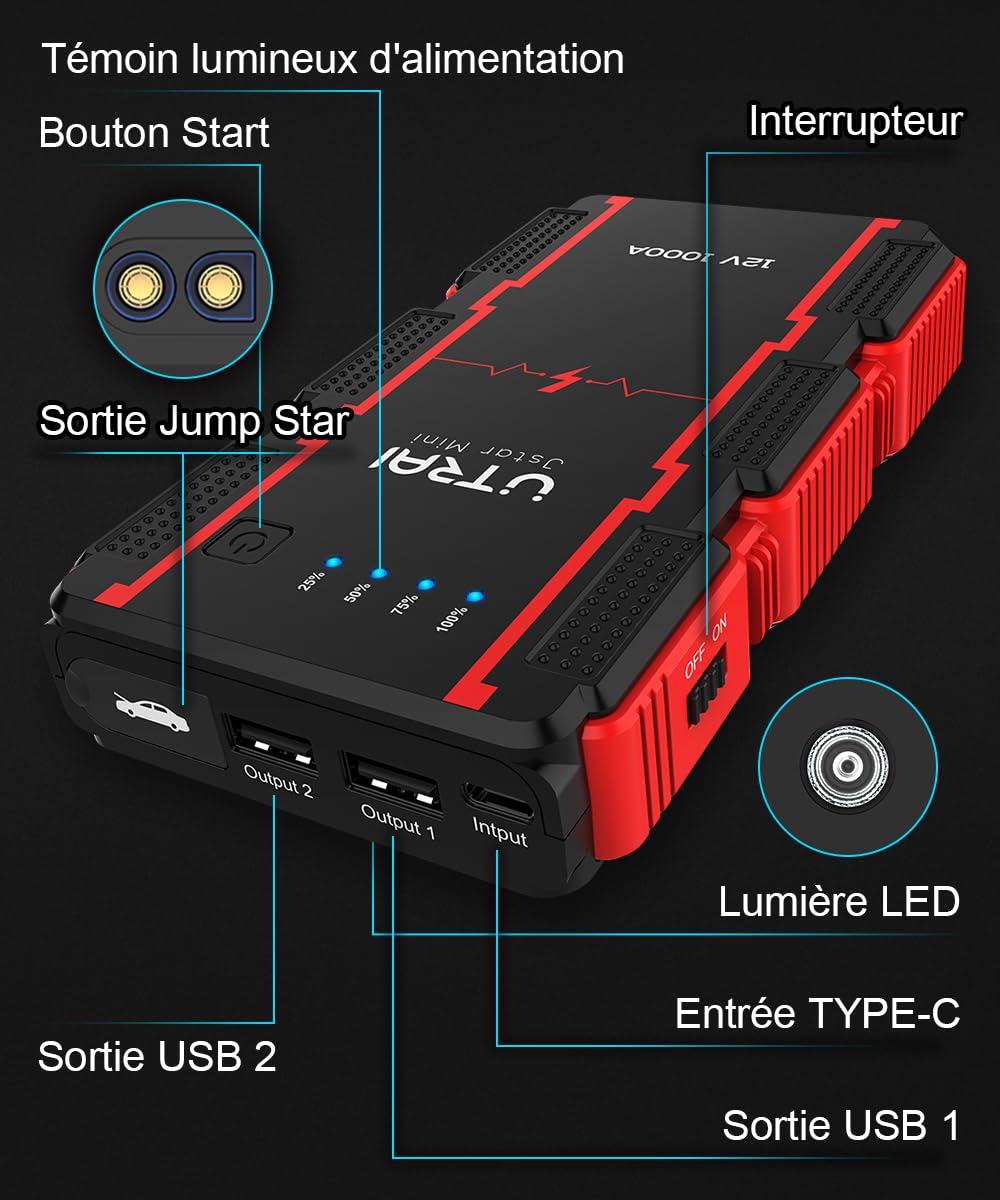
Image 4.1: Front and side view of the jump starter, highlighting the power button, LED indicators, USB outputs, and Type-C input.

Image 4.2: The compact size of the UTRAI JS-MINI, comparable to a smartphone.
5. Setup
5.1 Initial Charging
Before first use, fully charge the jump starter. Connect the provided USB Type-C charging cable to the jump starter's input port and a USB power adapter (not included). The LED indicators will show the charging progress. All four LEDs will be solid when fully charged.
6. Operating Instructions
6.1 Jump Starting a Vehicle
- Ensure the jump starter is at least 75% charged (three LED indicators lit).
- Insert the smart jump cable into the jump start output port of the device.
- Connect the red (+) clamp to the positive terminal of the car battery and the black (-) clamp to the negative terminal.
- Ensure the smart clamp indicator light is solid green, indicating a safe connection. If it flashes or beeps, check the connections.
- Start your vehicle's engine.
- Once the engine starts, immediately remove the smart clamps from the car battery, then disconnect the smart cable from the jump starter.

Image 6.1: Visual instructions for connecting the jump starter and starting a vehicle.

Image 6.2: The smart cable clamps feature an LED screen for precise operational feedback during jump starting.
6.2 Using as a Portable Power Bank
The UTRAI JS-MINI can charge your electronic devices via its two USB output ports (5V/3A and 5V/2.1A).
- Connect your device's USB charging cable to one of the jump starter's USB output ports.
- The jump starter will automatically begin charging your device.

Image 6.3: The jump starter functioning as a portable charger for multiple devices.
6.3 Using the LED Flashlight
The integrated LED flashlight has three modes: Flashlight, Strobe, and SOS.
- Press and hold the power button for 3 seconds to turn on the flashlight.
- Press the power button once to switch between Flashlight, Strobe, and SOS modes.
- Press and hold the power button again for 3 seconds to turn off the flashlight.

Image 6.4: The versatile 3-mode LED flashlight, useful for camping, emergencies, and road trips.
7. Maintenance
7.1 Charging
To maintain battery health, it is recommended to fully charge the jump starter every 3-6 months, even if not in use.
7.2 Storage
Store the device in a cool, dry environment, away from direct sunlight, moisture, and flammable materials. The ideal storage temperature is between 0°C and 40°C (32°F and 104°F).
8. Troubleshooting
- Device not turning on: Ensure the device is charged. If not, connect it to a charger.
- Vehicle not starting: Check that the smart clamps are correctly connected to the battery terminals (red to positive, black to negative). Ensure the smart clamp indicator is solid green. The vehicle battery might be severely discharged; try waiting a few minutes after connecting before attempting to start.
- Smart clamp beeping/flashing: This indicates an error (e.g., reverse polarity, short circuit). Disconnect the clamps and re-check connections according to the instructions.
- Charging slow or not at all: Ensure the charging cable and adapter are functioning correctly.
9. Specifications
| Brand | UTRAI |
| Model | JS-MINI |
| Peak Current | 1000A (Note: Product title states 1000A, feature bullets mention 2500A. Using 1000A as per title and other images.) |
| Battery Capacity | 13000mAh |
| Start Voltage | 12V |
| Applicable Engine Type | Up to 7.5L Petrol / 5.5L Diesel |
| USB Output 1 | 5V/3A |
| USB Output 2 | 5V/2.1A |
| Charging Input | USB Type-C |
| Product Dimensions | 8.4 x 15 x 2.8 cm |
| Item Weight | 331 g |
10. Warranty and Support
The UTRAI JS-MINI Portable Car Jump Starter comes with a 1-year warranty. For any questions, technical support, or warranty claims, please contact UTRAI customer service through your purchase platform or the contact information provided in the product packaging.


