
Barska AC11872
Barska Compact Rifle Scope 1-4x28 User Manual
Model: AC11872
Introduction
This manual provides detailed instructions for the proper setup, operation, maintenance, and troubleshooting of your Barska Compact Rifle Scope 1-4x28. Please read this manual thoroughly before using the product to ensure optimal performance and safety.
Product Overview

The Barska Compact Rifle Scope 1-4x28, featuring a sleek black finish and integrated cantilever mount.

Front view of the rifle scope, highlighting the objective lens and overall compact design.

Side profile of the scope, showing the main tube and mounting points.
Key Features:
- Precision Aiming: 1-4x magnification scope with 1/2 MOA adjustments and adjustable rheostat for efficient shooting.
- Quality Construction: Features fully multi-coated optics and an angled sun shade, providing impressive viewing clarity. Tube diameter is 30mm.
- Illuminated Reticle: Mil-dot glass-etched reticle with adjustable brightness, available in red or green, for range estimation and elevation.
- Robust Design: CO2 dry nitrogen purged and o-ring sealed, making it waterproof, fogproof, and shockproof.
- External Locking Knobs: Windage and elevation knobs are externally locking to prevent accidental adjustments.
Setup and Installation
Mounting the Scope:
- Ensure your firearm is unloaded and safe.
- Attach the integrated cantilever mount to your rifle's Picatinny or Weaver rail. Ensure the mount is securely fastened using the provided screws.
- Position the scope on the mount, ensuring proper eye relief for your shooting stance.
- Tighten the scope rings evenly to secure the scope without over-tightening. Use a torque wrench if available to prevent damage.
- Note: Applying a small amount of Loctite to the mounting screws is recommended to prevent loosening from recoil, as suggested by user reviews.

Detailed view of the scope highlighting key components like magnification ring, rheostat, sunshade, cantilever mount, external locking turrets, and objective lens.

An illustrative diagram showing the scope's features including 1/2 MOA click adjustments, glass etched reticle, windage/elevation adjustment, 30mm dual cantilever mount, Mil-Dot IR, and included accessories.
Operating Instructions
Adjusting Magnification:
Rotate the magnification ring located near the eyepiece to adjust between 1x and 4x magnification. This allows for quick target acquisition at 1x and precise aiming at higher magnifications.
Windage and Elevation Adjustments:
The scope features external locking windage and elevation turrets. To make adjustments, pull up on the turret knob to unlock it, make your 1/2 MOA click adjustments, and then push the knob down to lock it in place. This prevents accidental changes to your zero.

Side view of the scope, showing the windage and elevation turrets with their locking mechanism.

A hand demonstrating the adjustment of a scope turret, illustrating the pull-up to unlock and push-down to lock action.
Illuminated Reticle:
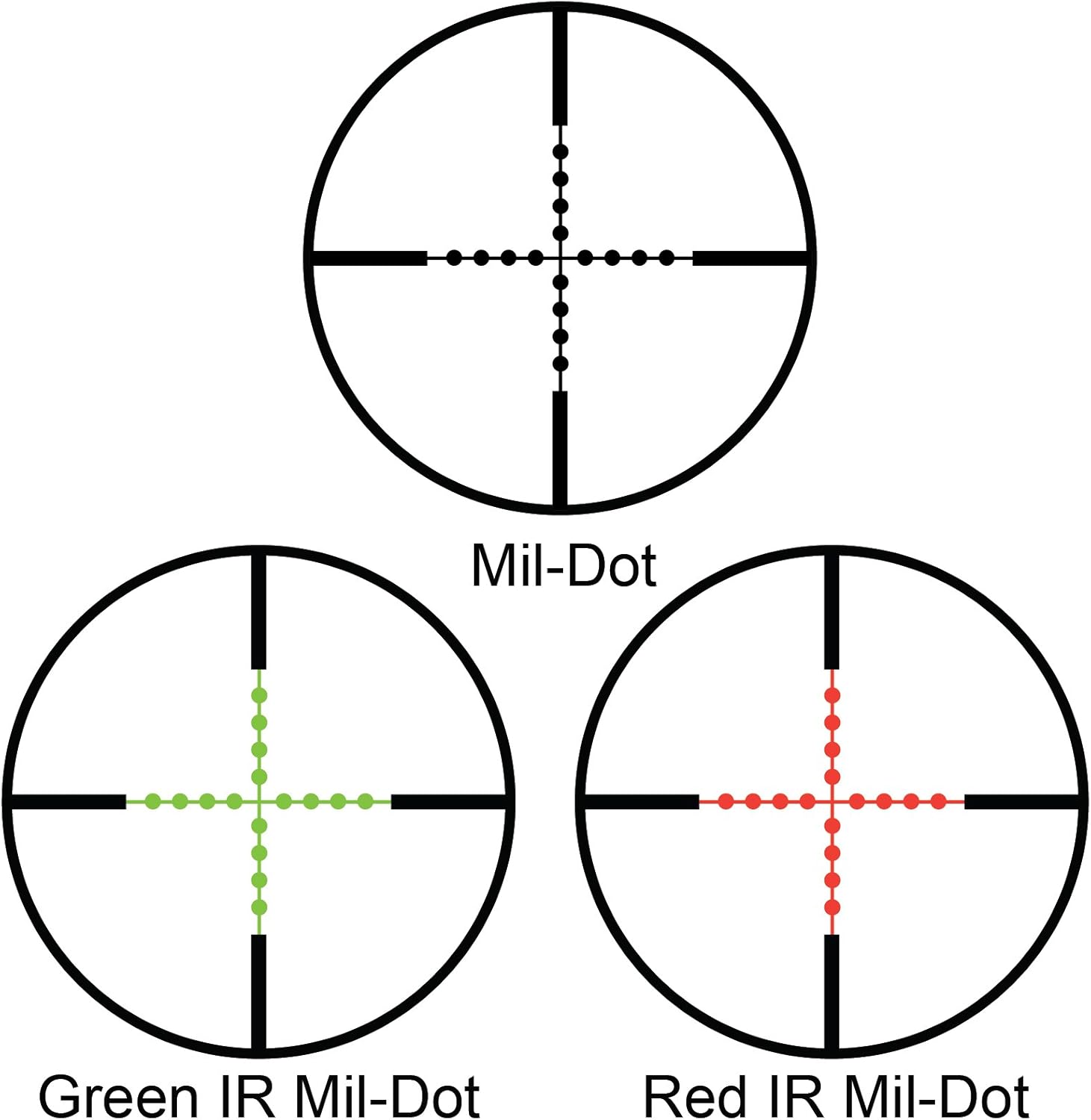
The mil-dot reticle can be illuminated in red or green. Use the adjustable rheostat dial on the side of the scope to select the desired color and brightness level. This feature is particularly useful in low-light conditions or against dark backgrounds.

Visual representation of the illuminated mil-dot reticle in both red and green options, demonstrating custom targeting possibilities.

Diagram illustrating the standard Mil-Dot reticle, Green IR Mil-Dot, and Red IR Mil-Dot patterns.
Maintenance
- Lens Cleaning: Use the included lens cloth or a soft, lint-free cloth to gently wipe the objective and ocular lenses. For stubborn smudges, use a lens cleaning solution specifically designed for optics. Avoid using abrasive materials or harsh chemicals.
- Body Cleaning: Wipe the scope body with a damp cloth to remove dirt and debris. Ensure all external surfaces are dry before storage.
- Storage: Store the scope in a cool, dry place, away from direct sunlight and extreme temperatures. Use the provided flip-up caps to protect the lenses when not in use.
- Waterproof/Fogproof: While the scope is designed to be waterproof and fogproof, avoid prolonged submersion or exposure to extreme conditions beyond its design limits.
The accessories included with the scope: a coin for battery compartment, flip-up lens caps, and a cleaning cloth, essential for maintenance.
Troubleshooting
| Problem | Possible Cause | Solution |
|---|---|---|
| Blurred Image | Diopter setting incorrect; dirty lenses. | Adjust diopter on eyepiece; clean lenses with a soft cloth. |
| Reticle not illuminating | Battery drained or incorrectly installed; rheostat off. | Replace battery; ensure correct polarity; turn rheostat dial to an illuminated setting. |
| Scope not holding zero | Mounting screws loose; scope damaged. | Check and tighten all mounting screws (consider Loctite); contact support if damage is suspected. |
| Fogging inside lens | Extreme temperature change; seal compromise. | Allow scope to acclimate to temperature; if persistent, contact support. |
Specifications
| Feature | Detail |
|---|---|
| Brand | Barska |
| Model Name | AC11872 |
| Style | 1-4x28 |
| Color | Black |
| Magnification | 1x - 4x |
| Objective Lens Diameter | 28 mm |
| Reticle Type | Illuminated Mil Dot (Red/Green) |
| Eye Relief | 4.5 Inches |
| Product Dimensions | 10"L x 2.5"W x 3"H |
| Item Weight | 16 Ounces |
| Material | Glass |
| Mounting Type | Cantilever Mount |
| Waterproof/Fogproof | Yes |
| Shockproof | Yes |
| UPC | 723719720204, 790272983865 |
Warranty and Support
Warranty Information:
The Barska Compact Rifle Scope 1-4x28 comes with a Limited Lifetime Warranty. This warranty covers defects in materials and workmanship under normal use. Please refer to the official Barska website or contact their customer service for full warranty terms and conditions.
Customer Support:
For technical assistance, warranty claims, or general inquiries, please visit the official Barska website or contact their customer support team. You can find contact information and frequently asked questions on their website:
Related documentsAC11872


Ask a question about this manual
Ask about setup, troubleshooting, compatibility, parts, safety, or missing instructions. Manuals+ will review the question and use this page’s manual context to help answer it.