
1. Introduction
Thank you for choosing the TIMEURE TU2211 Talking Watch. This watch is designed for ease of use, featuring jumbo numbers and clear voice announcements for time, date, and alarm. It automatically adjusts time overnight, ensuring precise timekeeping.

Image: Overview of TIMEURE Talking Watch features, including radio control, talking functions, 1-year battery life, and automatic summer/winter time adjustment.
2. Setup
2.1 Wake Up Your Watch
To activate the watch, hold the 2 o'clock button for 3 seconds. The watch hands will begin to run normally.
Video: Demonstrates how to wake up the watch by holding the 2 o'clock button for 3 seconds.
2.2 Set Time
The watch automatically adjusts itself overnight. You only need to set your accurate time zone using the provided instructions. Do not use the crown to set the time; use the designated buttons.
Video: Guide on setting the time using the watch buttons, emphasizing not to use the crown and to pay attention to AM/PM settings.
2.3 Set Calendar
Follow these steps to set the calendar (Year, Month, Day, Weekday) on your watch.
Video: Instructions for setting the calendar, including year, month, and day, using the watch buttons.
3. Operating Instructions
3.1 Announce Time and Date
Simply press the 2 o'clock button once, and the watch will announce the current time in a clear, amplified male voice. Press twice for the date and week.
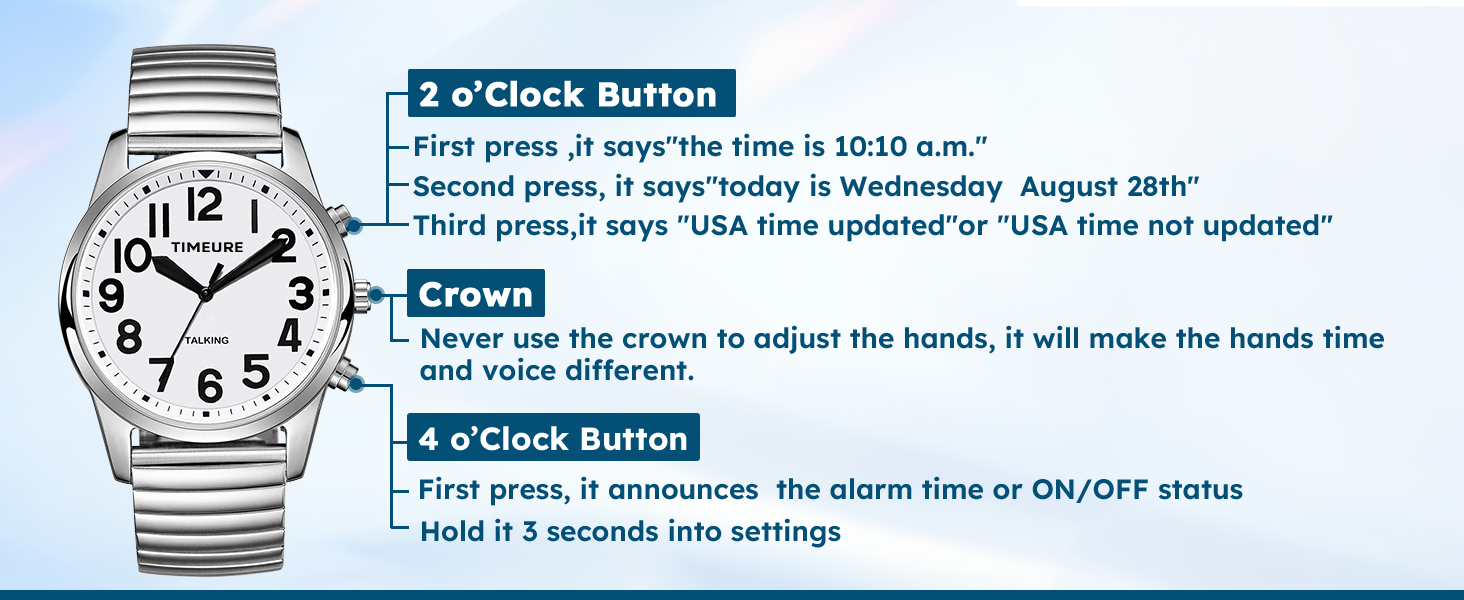
Image: Diagram illustrating the functions of the 2 o'clock button, crown, and 4 o'clock button.
3.2 Check Alarm Time
Press the 4 o'clock button once to check the alarm time and its ON/OFF status.
4. Maintenance
4.1 Battery Life
This talking watch has a battery life of 1 year, using 1 CR2032 battery (included). Frequent charging is not required.
4.2 Strap Replacement
The watch is designed with a comfortable leather strap. If you wish to replace it, ensure the new strap is compatible with the watch's lug width.

Image: A TIMEURE talking watch with a black leather strap on a wrist.
5. Troubleshooting
5.1 Hands Alignment
If the voice announcement and the analog hands do not match, or after a battery replacement, you may need to align the hands. Pull out the crown when the second hand is at 12 o'clock, then turn the crown to set the hour and minute hands to 12 o'clock. Push the crown back in and hold the 2 o'clock button for 5 seconds to synchronize.
Video: Detailed steps on how to align the watch hands if they do not match the spoken time or after a battery change.
5.2 Automatic Time Setting (DST)
Your watch syncs and sets itself (also to DST) every night. If there is an hour difference after the time zone setting, place the watch near a non-metallic window with the face upside down overnight to pick up the radio signal for an update. This could happen due to the currently switching of DST.
Video: Explains how to set the time zone and the automatic time adjustment feature, including troubleshooting for DST changes.
5.3 Alarm ON/OFF
An alarm is set to ON by itself once an alarm is being set. To toggle the alarm ON/OFF, press the 2 o'clock button once.
Video: Demonstrates how to set the alarm hour and minute, and how to toggle the alarm ON/OFF.
5.4 Chime ON/OFF (Hourly Time Announcement)
The watch can announce the time every hour when the chime is set to ON. You can change the Chime ON/OFF status by pressing the 2 o'clock button.
Video: Shows how to activate or deactivate the hourly chime function.
6. Specifications
- Package Dimensions: 3.78 x 2.72 x 2.64 inches; 1.12 Pounds
- Item Model Number: TU2211
- Department: Mens
- Batteries: 1 CR2032 batteries required (included)
- Date First Available: December 12, 2023
- Manufacturer: TIMEURE
- ASIN: B0CQ1XL1XD
- Clasp Type: Buckle
- Item Type Name: TALKING WATCH
7. Warranty and Support
This product includes a 1-YEAR after-sales service and a 30-day no-reason return policy. For any questions or assistance with setting your watch, please contact customer support.
Contact: support@timechant.com
Online customer service is available for 12 hours.

Image: Details of after-sales service, including warranty and return policy.