
1. Introduction
The PAJ GPS People Finder 4G is a compact and reliable GPS tracking device designed for the safety and monitoring of children, elderly individuals, and valuable assets. It provides real-time location tracking, geofence alerts, and a long battery life, ensuring peace of mind for users.

Image: The PAJ GPS People Finder 4G device shown alongside its product packaging.
2. What's in the Box
Upon opening your PAJ GPS People Finder 4G package, please ensure all the following components are present:
- PEOPLE Finder 4G Device
- SIM Card (pre-installed)
- USB Cable (for charging)
- User Manual (this document)

Image: The PAJ GPS tracker displayed with various compatible devices (PC, tablet, smartphone) and icons indicating multi-language support.
3. Setup Guide
3.1 Initial Charging
Before first use, fully charge your PAJ GPS People Finder 4G device. Connect the provided USB cable to the device's charging port and plug the other end into a standard USB power adapter (not included) or a computer's USB port. The device's indicator light will show charging status.
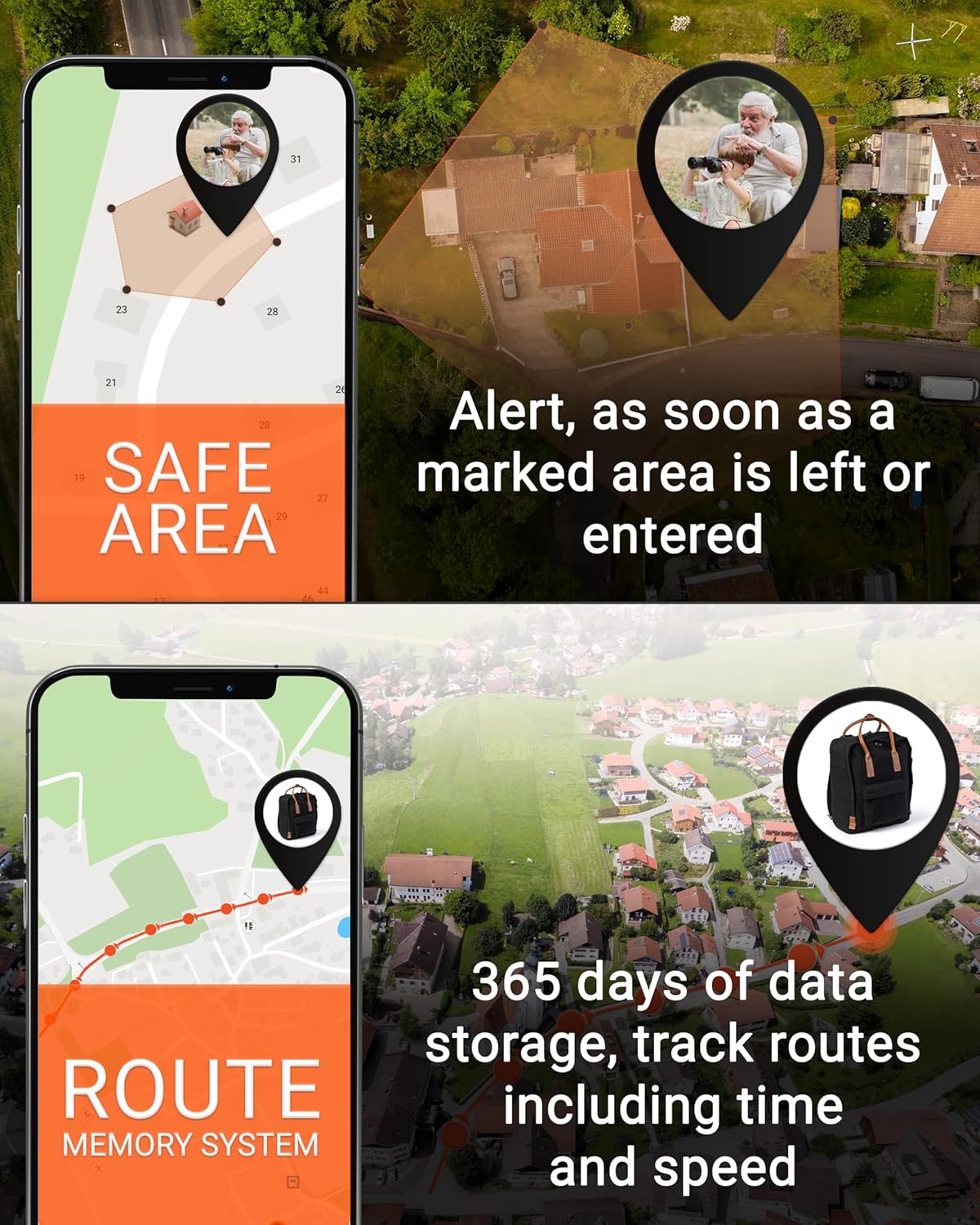
Image: Close-up of the PAJ GPS tracker showing the charging port and a connected USB cable.
3.2 Activating Your Subscription
The PAJ GPS People Finder 4G requires an active subscription plan for full functionality, which includes the pre-installed SIM card. Please refer to the subscription details provided in the product packaging or visit the official PAJ GPS website to choose and activate your preferred plan (Basic or Premium).

Image: A visual representation of the available Basic and Premium subscription plans, outlining features and pricing structures.
3.3 App Installation
To manage and track your device, download the free PAJ GPS app. It is compatible with both Android and iOS devices. Search for "PAJ GPS" in the Google Play Store or Apple App Store and follow the installation instructions.
4. Operating Instructions
4.1 Real-Time Tracking
Once your device is activated and connected, you can view its real-time location through the PAJ GPS app. The app displays the current position on a map, allowing you to monitor movement instantly.

Image: A smartphone screen showing a live tracking map with two distinct location markers, indicating the positions of an elderly person and a child.
4.2 Geo-Fence Alarms
Set up custom 'safe zones' or geofences within the app. You will receive an instant notification if the device enters or exits these predefined areas. This feature is ideal for monitoring boundaries for children or elderly individuals.
4.3 SOS Function
The device is equipped with an SOS button. In an emergency, pressing this button will send an immediate alarm notification to your designated contacts via the app, providing the device's current location.
4.4 Location History
The PAJ GPS app stores up to 365 days of track memory, allowing you to review past routes, including time and speed data. This feature provides a comprehensive overview of the device's movements over time.

Image: Two smartphone screens illustrating the app's capabilities: one showing a user-defined 'safe area' on a map, and the other displaying a detailed route history with associated time and speed information.
4.5 Official Product Video
Watch this official video from PAJ GPS for a visual overview of the People Finder 4G's features and how it can be used for tracking people.
Video: An official product video demonstrating the features and benefits of the PAJ GPS People Finder 4G tracker, including real-time tracking, geofencing, and SOS alerts.
5. Features Overview
- RELIABLE LIVE LOCATION: Accurate real-time global positioning with 365 days of track memory.
- SAFETY FIRST: Various alarms including 'safe zone' notifications when the device leaves a defined area.
- NO DISTANCE LIMIT: Track your loved ones regardless of distance.
- SMALL DEVICE - LONG BATTERY LIFE: Lightweight (41 grams) with approximately 5 days of battery life. Battery alarm notifies when low.
- SUBSCRIPTION: Includes SIM card, lifelong device replacement, and 24/7 customer support. Free app compatible with Android and iOS.
5.1 Connectivity and Durability
The People Finder 4G operates on 4G LTE for reliable and fast connection. It is designed to be practical, easy, and versatile, with an IP65 rating, making it excellent even in heavy rain.
Image: The PAJ GPS tracker with visual callouts for its 4G LTE connectivity, lightweight design (1.4 oz), IP65 water resistance, and precise dimensions (2.1 in height, 1.2 in width, 0.8 in depth).
6. Maintenance
6.1 Battery Life and Charging
The device has a battery life of approximately 5 days. To ensure continuous tracking, recharge the device promptly when the battery alarm notifies you of a low battery level. Use only the provided USB cable for charging.
6.2 Cleaning and Care
To maintain the device's performance and longevity, wipe it with a soft, dry cloth. Avoid using harsh chemicals or abrasive materials. While the device is water-resistant (IP65), do not submerge it in water.
7. Troubleshooting
| Problem | Possible Cause | Solution |
|---|---|---|
| Device not tracking location | No active subscription; poor GPS signal; low battery. | Verify subscription status; move to an open area; charge the device. |
| Battery drains quickly | Frequent location updates; old battery. | Adjust tracking frequency in app; contact support for battery issues. |
| No alarm notifications | App notifications disabled; incorrect geofence settings. | Enable notifications in phone settings and app; review geofence boundaries. |
| Device not turning on | Completely discharged battery; device malfunction. | Charge for several hours; if still unresponsive, contact customer support. |
8. Specifications
| Feature | Detail |
|---|---|
| Product Dimensions | 2.13 x 1.22 x 0.79 inches |
| Item Weight | 1.45 ounces (41 grams) |
| Connectivity Technology | Cellular (4G LTE) |
| Battery Type | 1 Lithium Ion battery (included) |
| Battery Life | Up to 5 days (approx.) |
| Water Resistance | IP65 |
| Supported Application | Alarm, Live Tracking, Geo-Fence, Location History |
| Manufacturer | PAJ GPS |
9. Warranty and Support
PAJ GPS offers a lifelong device replacement as long as your device is connected to an active subscription. For any inquiries, technical assistance, or support, PAJ GPS provides 24/7 customer support in multiple languages.
For additional information and resources, you can visit the official PAJ GPS store on Amazon: PAJ GPS Store.
A PDF version of the user manual is also available for download: Download User Manual (PDF).


