
1. Introduction
Thank you for choosing the HoneyGuaridan Automatic Pet Feeder. This device is designed to provide scheduled and portion-controlled meals for your cats and dogs, ensuring they maintain healthy eating habits even when you are away. Please read this manual thoroughly before operating the feeder to ensure proper setup and use.

Image 1: The HoneyGuaridan Automatic Pet Feeder, a dual-bowl system designed for convenient pet feeding.
2. Safety Information
- This appliance is for indoor use only.
- Do not immerse the main unit in water. Only removable parts are washable.
- Keep out of reach of children and pets to prevent tampering.
- Use only dry pet food with a diameter between 2-15mm.
- Ensure the power adapter cable is not damaged or chewed by pets.
- Always use both AC power and battery backup for optimal reliability.
3. Product Features
3.1 Timed and Measured Feeding
The HoneyGuaridan automatic feeder features soft silicone buttons for easy programming of up to 6 meals per day, with 0 to 24 portions per meal (1 portion equals 6g). This promotes healthy eating habits and helps prevent obesity in pets.
3.2 Even Dual-Bowl Distribution
Designed for two pets, this 5L automatic feeder utilizes advanced patented technology to ensure equal food distribution to both bowls, preventing food competition and creating a peaceful feeding environment. Ideal for multi-pet households.

Image 2: Illustrates the even food distribution feature of the HoneyGuaridan feeder compared to uneven distribution, which can lead to pet conflicts.
3.3 Slow Feeder Bowl Design
The slow feeder bowls feature a unique textured surface to extend meal times, reducing gulping, vomiting, and indigestion. Made from high-quality, BPA-free, and PVC-free PP material, ensuring safe and durable use. Optional stainless steel bowls are available for replacement.

Image 3: Detail of the slow feeder bowl, designed with ridges to encourage slower eating and improve digestion.
3.4 Multi-Seal Freshness System
Equipped with a rubber sealing ring and a desiccant bag, the feeder keeps food fresh and crisp. The unique internal sealed rotating door automatically closes after each feeding, preventing ants and insects from entering and clever pets from accessing extra food.
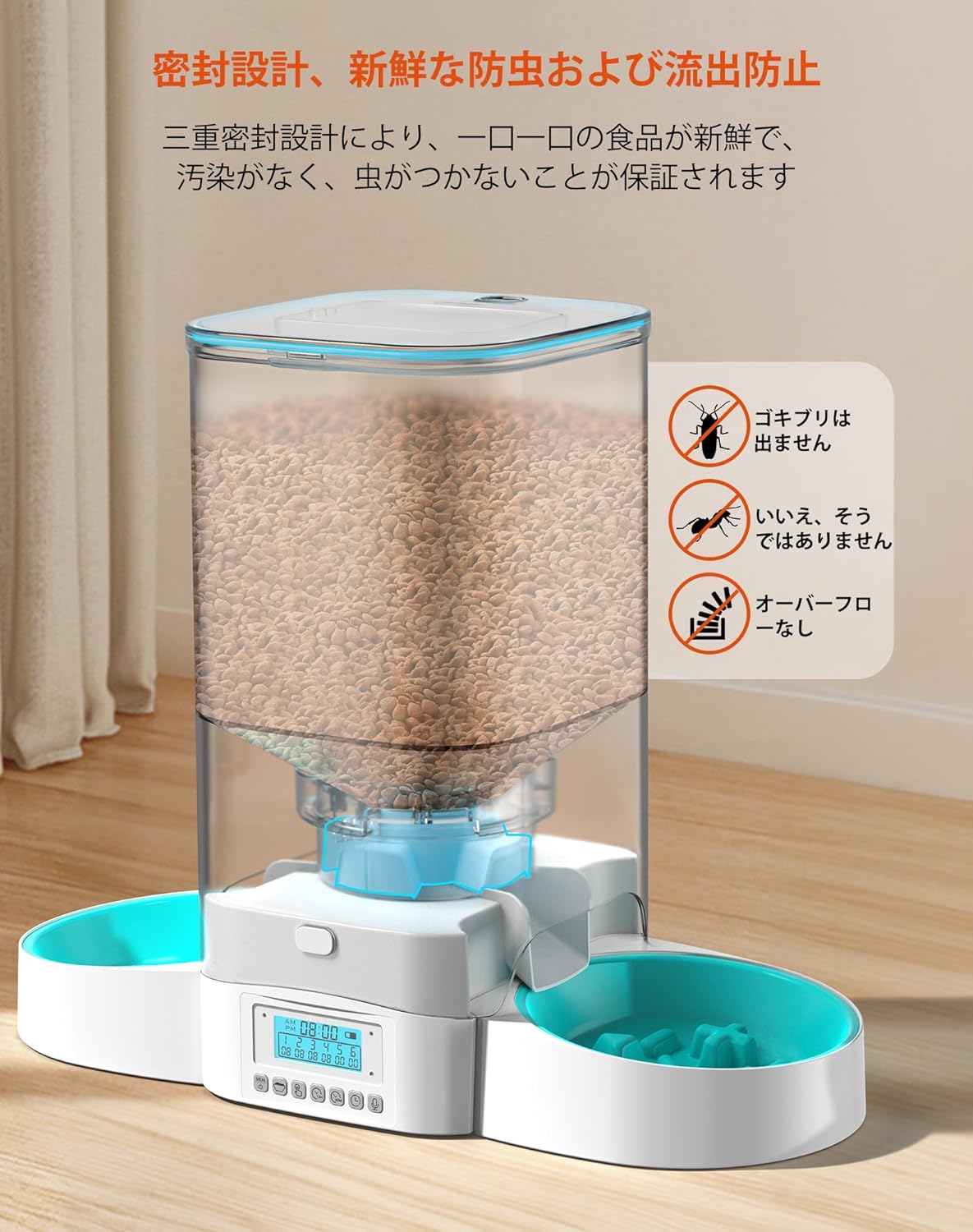
Image 4: Visual representation of the feeder's sealing mechanisms, including a desiccant compartment and a sealed rotating door, to maintain food freshness and prevent pest access.
3.5 Dual Power Supply
The feeder can be powered by the included AC adapter or by 3 D-cell alkaline batteries (not included) for backup. In case of a power outage, the battery backup ensures continuous operation. For optimal reliability, using both power sources simultaneously is recommended.
4. Setup
4.1 Unpacking and Assembly
- Carefully remove all components from the packaging.
- Ensure all parts are present: main unit, food tank, lid, two feeding bowls, AC adapter, and desiccant bag.
- Attach the food tank to the main unit by aligning the grooves and twisting until secure.
- Place the two feeding bowls onto the designated slots on either side of the main unit.
4.2 Power Connection
- Connect the AC adapter to the power port on the back of the feeder and plug it into a wall outlet.
- For battery backup, open the battery compartment on the bottom of the unit and insert 3 D-cell alkaline batteries (not included), ensuring correct polarity. Close the compartment securely.
4.3 Filling the Food Tank
- Open the lid of the food tank.
- Insert the desiccant bag into its designated holder on the underside of the lid to maintain food freshness.
- Pour dry pet food into the tank. The 5L capacity allows for a substantial supply.
- Close the lid securely to activate the multi-seal freshness system.
5. Operating Instructions
5.1 Control Panel Overview
The feeder features an intuitive LCD display and soft silicone buttons for programming. Familiarize yourself with the buttons: MEAL (power/meal setting), BOWL (portion setting), FINGER (manual feed), 12H (hour setting), 60M (minute setting), CLOCK (time setting), and MIC (voice recording).

Image 5: The feeder's LCD display showing a programmed feeding schedule, indicating meal times and corresponding portions.
5.2 Setting Current Time
- Press and hold the CLOCK button until the hour display flashes.
- Use the 12H button to adjust the hour.
- Use the 60M button to adjust the minutes.
- Press the CLOCK button again to save the time.
5.3 Programming Meal Times and Portions
- Press the MEAL button to cycle through Meal 1 to Meal 6.
- When the desired meal number is flashing, press the 12H and 60M buttons to set the feeding time for that meal.
- Press the BOWL button to set the portion size (0-24 portions) for the selected meal.
- Repeat for all desired meals. To disable a meal, set its portion to 0.
- Press the MEAL button again to save the settings and exit programming mode.
Video 1: Demonstrates how to set meal times and portion sizes using the control panel buttons.
5.4 Manual Feeding
Press the FINGER button once to dispense one portion of food immediately. Press multiple times for additional portions.
5.5 Voice Recording
- Press and hold the MIC button until the microphone icon appears on the display.
- Record your voice message (up to 10 seconds) to call your pets at meal times.
- Release the MIC button to save the recording. The recording will play 3 times before each scheduled meal.
6. Maintenance
6.1 Cleaning
Regular cleaning is essential for hygiene and proper functioning. The food tank, lid, and bowls are detachable and washable.
- Unplug the feeder and remove any remaining food.
- Remove the feeding bowls, food tank, and lid.
- Wash these removable parts with mild soap and water. Rinse thoroughly and dry completely before reassembling.
- Wipe the main unit with a damp cloth. Do not immerse the main unit in water.
- Reassemble all parts once dry.

Image 6: Shows the feeder disassembled into its main components, highlighting the ease of cleaning for hygiene.
6.2 Desiccant Replacement
Replace the desiccant bag every 1-2 months, or as needed, to ensure optimal food freshness. Replacement desiccant packs are available for purchase (ASIN: B0CHVSSQMQ).
7. Troubleshooting
| Problem | Possible Cause | Solution |
|---|---|---|
| Feeder not dispensing food | Food tank empty; food jammed; power issue; incorrect settings. | Refill food tank; clear any food blockages; check power connection/batteries; verify meal settings. |
| Uneven food distribution | Feeder not level; food type unsuitable. | Ensure feeder is on a flat surface; use dry food within recommended size (2-15mm). |
| Display not working | No power; batteries depleted. | Check AC adapter connection; replace batteries. |
| Voice recording not playing | No recording saved; volume too low. | Re-record voice message; ensure volume is set appropriately (if adjustable). |
8. Specifications
- Model Number: A23WB
- Food Tank Capacity: 5 Liters
- Unit Weight: 1.9 kg
- Dimensions: 36 x 19 x 18 cm
- Material: ABS (BPA-free, PVC-free PP for slow feeder bowls)
- Target Species: Cats, Dogs (all life stages)
- Care Instructions: Hand wash removable parts only
- Special Features: Timed feeding, portion control, washable components, voice recording, manual feeding, dual power supply, slow feeder bowls, multi-seal freshness
- Power Source: AC adapter (included), 3 x D-cell alkaline batteries (not included)
9. Warranty and Support
For warranty information, product support, or to purchase replacement parts (such as desiccant bags or stainless steel bowls), please visit the official HoneyGuaridan website or contact customer service. Keep your purchase receipt for warranty claims.
Contact Information: Please refer to the contact details provided on the product packaging or the official HoneyGuaridan website for customer support.