
PowerSmart CF080L1018E.001_39
PowerSmart 42V 2A Charger for 36V Batteries
Model: CF080L1018E.001_39
Introduction
Thank you for choosing the PowerSmart 42V 2A Charger. This manual provides essential information for the safe and efficient use of your charger. Please read it thoroughly before operation and retain it for future reference.
Safety Instructions
To prevent electric shock, fire, or injury, always follow these safety precautions:
- Do not short circuit the charger. This may cause electric shock.
- Do not disassemble the charger. Unauthorized modifications can lead to hazards.
- Do not throw, knock, shake, or strike the charger. Physical damage can impair functionality and safety.
- Use in dry locations only. Avoid exposure to moisture or liquids.
- See the instruction manual for proper selection of the power supply cord.
- This device complies with Part 15 of the FCC Rules. Operation is subject to the following two conditions: (1) This device may not cause harmful interference, and (2) This device must accept any interference received, including interference that may cause undesired operation.
- Only charge 37V Li-ion type rechargeable batteries.

Image: Product label displaying safety warnings, input/output specifications, and compliance information.
Package Contents
The package should contain the following items:
- PowerSmart 42V 2A Charger
- Power Cord (EU plug type, as seen in images)
Setup
Follow these steps to set up your charger:
- Inspect the Charger: Before use, visually inspect the charger and its cables for any signs of damage. Do not use if damaged.
- Connect the Power Cord: Plug the AC power cord into the charger's input port.
- Connect to Power Outlet: Plug the other end of the AC power cord into a standard 100V-240V wall outlet.
- Identify Battery DC Socket: Ensure your battery has a compatible DC socket (5.5mm / 2.1mm).
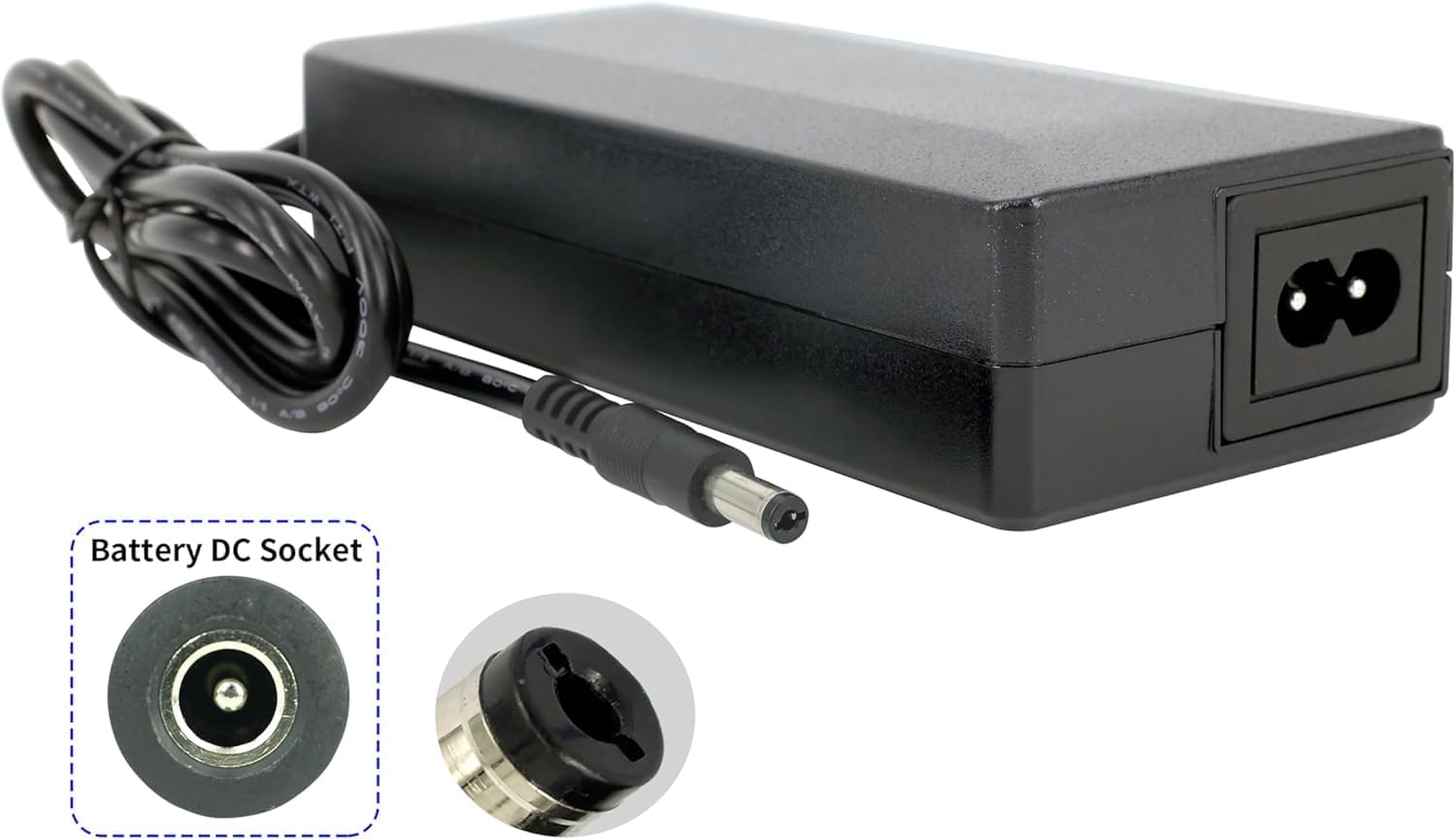
Image: The PowerSmart charger showing its DC output plug and a close-up of the compatible battery DC socket (5.5mm / 2.1mm).

Image: The charger connected to its power cord, illustrating the DC plug dimensions (5.5mm outer, 2.1mm inner diameter).
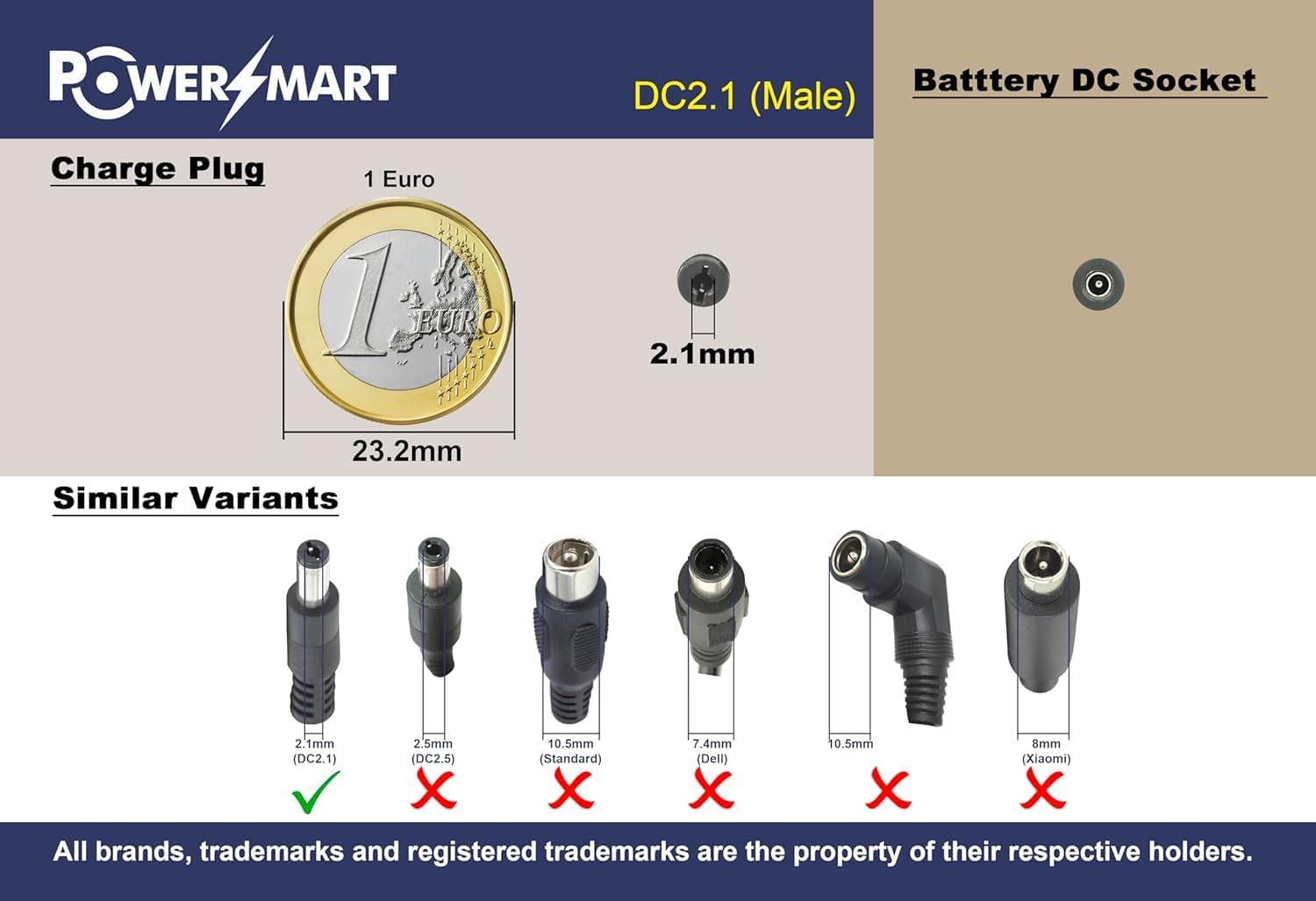
Image: A visual guide indicating the correct DC 2.1mm male charge plug and examples of incompatible plug types.
Operating Instructions
To charge your 36V Li-ion battery:
- Ensure the charger is properly connected to a power outlet as described in the Setup section.
- Connect the DC output plug of the charger to the DC input socket of your 36V Li-ion battery.
- The charger will begin charging the battery. Monitor the charging process if your battery or device has an indicator.
- Once the battery is fully charged, disconnect the charger from the battery, then unplug it from the wall outlet.
Note: This charger is specifically designed for 36V Li-ion batteries with a 5.5mm / 2.1mm DC plug. Using it with other battery types or incompatible connectors may cause damage to the battery or charger.
Maintenance
Proper maintenance ensures the longevity and safe operation of your charger:
- Cleaning: Disconnect the charger from all power sources before cleaning. Use a soft, dry cloth to wipe the exterior. Do not use liquid cleaners or solvents.
- Storage: Store the charger in a cool, dry place away from direct sunlight and extreme temperatures.
- Cable Care: Avoid bending or kinking the cables excessively. Do not place heavy objects on the cables.
- Inspection: Periodically inspect the charger and cables for any signs of wear or damage. If damage is found, discontinue use and replace the charger.
Troubleshooting
If you encounter issues with your charger, refer to the following common problems and solutions:
- Charger not working:
- Ensure the power cord is securely plugged into both the charger and a working wall outlet.
- Verify that the wall outlet is supplying power (test with another device).
- Check if the DC output plug is correctly and firmly connected to the battery.
- Confirm that the battery is a 36V Li-ion type and compatible with the 5.5mm / 2.1mm DC plug.
- Slow charging:
- Ensure the charger specifications (42V, 2A) match the battery's requirements.
- Avoid using extension cords if possible, or ensure they are rated for the charger's power requirements.
- Charger gets hot:
- It is normal for chargers to get warm during operation. However, if it becomes excessively hot, disconnect it immediately.
- Ensure adequate ventilation around the charger. Do not cover it during use.
If the problem persists after trying these steps, contact customer support.
Specifications
| Feature | Specification |
|---|---|
| Brand | PowerSmart |
| Model Number | CF080L1018E.001_39 |
| Input Voltage | 100V-240V |
| Output Voltage | 42V (DC) |
| Output Current | 2.0A |
| Power | 80W |
| Weight | 0.47 kg |
| Dimensions | 141.40 x 60.60 x 34.20 mm |
| Compatible Battery | 36V Li-ion (with 5.5mm / 2.1mm DC plug) |
| Connections | DC Barrel (5.5mm / 2.1mm) |
Warranty and Support
This product typically comes with a return policy of 30 days from the date of purchase. For specific warranty details, please refer to your purchase documentation or contact your retailer.
For technical support or inquiries, please contact PowerSmart customer service or your authorized dealer.
Related documentsCF080L1018E.001_39


Ask a question about this manual
Ask about setup, troubleshooting, compatibility, parts, safety, or missing instructions. Manuals+ will review the question and use this page’s manual context to help answer it.