
1. Introduction
This user manual provides essential information for the safe and efficient operation of your PowerSmart 42V 2A Battery Charger. This charger is specifically designed to provide reliable power for 36V Li-ion batteries, compatible with various Leader Fox electric bicycle models including Lotus, Holand, E-Grass, E-Cody, Inductor, and E-State. Please read this manual thoroughly before using the product.

Figure 1: PowerSmart 42V 2A Battery Charger
The image displays the PowerSmart 42V 2A battery charger, a rectangular black power brick with attached AC input and DC output cables. The AC cable has a European two-pin plug, and the DC cable terminates in a barrel connector.
2. Safety Instructions
Always adhere to the following safety guidelines to prevent injury or damage to the charger or battery:
- Do not short circuit the charger: This may cause electric shock or fire.
- Do not disassemble the charger: There are no user-serviceable parts inside. Disassembly voids the warranty and poses a risk of electric shock.
- Do not throw, knock, shake, or strike the charger: Rough handling can damage internal components.
- Use in dry locations only: This charger is not waterproof. Avoid exposure to moisture, rain, or damp environments.
- Power Supply Cord: Refer to this instruction manual for proper selection and use of the power supply cord. Ensure the cord is undamaged and correctly connected.
- FCC Compliance: This device complies with Part 15 of the FCC Rules. Operation is subject to the following two conditions: (1) this device may not cause harmful interference, and (2) this device must accept any interference received, including interference that may cause undesired operation.
- Ventilation: Ensure adequate ventilation around the charger during use. Do not cover the charger.
- Children and Pets: Keep the charger out of reach of children and pets.

Figure 2: Product Label with Warnings and Specifications
This image shows the product label on the charger, detailing the model number (CPF080L1002), input (100V-240V~ 50-60Hz 2.5A), output (42.0V 2.0A), and compatibility with 37V Li-ion rechargeable batteries. It also lists critical safety warnings regarding short-circuiting, disassembly, physical impact, and dry location use.
3. Product Components
The PowerSmart 42V 2A Battery Charger consists of the following main components:
- Charger Unit: The main power brick that converts AC to DC power.
- AC Input Cable: Connects the charger to a wall outlet.
- DC Output Cable with Plug: Connects the charger to the battery. This charger uses a DC plug with dimensions of 5.5mm outer diameter and 2.1mm inner diameter.
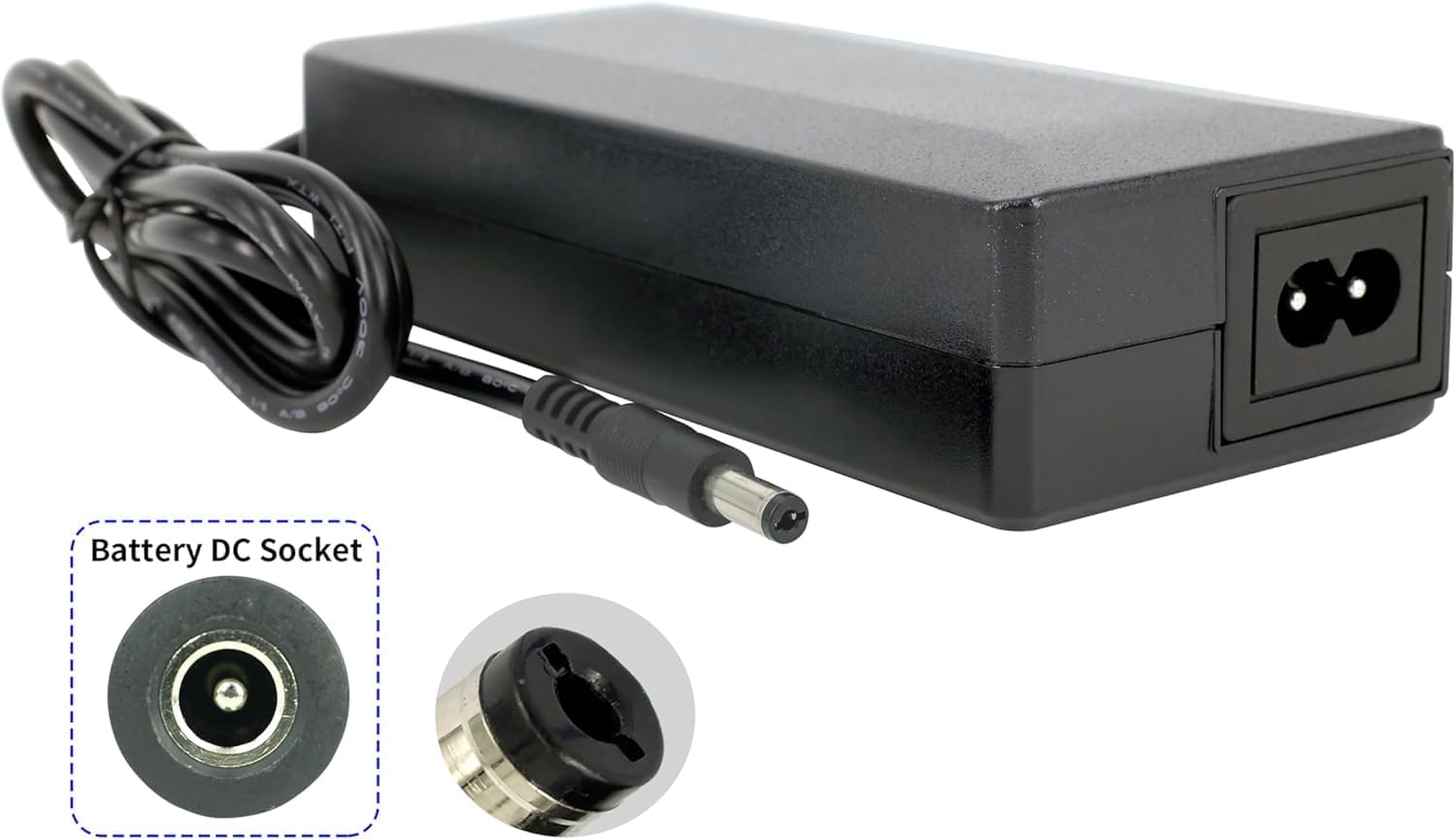
Figure 3: DC Plug and Socket Detail
This image provides a close-up view of the charger's DC output plug and an illustration of a compatible battery DC socket, highlighting the barrel connector type.

Figure 4: DC Plug Dimensions
The image shows the charger unit with an overlay illustrating the precise dimensions of the DC output plug: 5.5mm outer diameter and 2.1mm inner diameter, crucial for ensuring compatibility with your battery's charging port.
4. Setup
Follow these steps to set up your PowerSmart battery charger:
- Unpack: Carefully remove the charger from its packaging.
- Inspect: Check the charger and cables for any visible damage. Do not use if damaged.
- Connect to Battery: Ensure your 36V Li-ion battery is clean and dry. Insert the DC output plug (5.5mm/2.1mm) firmly into the charging port of your battery.
- Connect to Power Outlet: Plug the AC input cable into a standard 100V-240V wall outlet.
5. Operating Instructions
Once connected, the charger will begin the charging process. The charging status is typically indicated by an LED light on the charger (refer to your specific charger's LED indicator for details, as this manual does not specify LED behavior).
- Charging: The charger will automatically detect the battery's charge level and begin charging.
- Full Charge: The charger is designed to stop charging automatically once the battery reaches full capacity to prevent overcharging.
- Disconnecting: Once charging is complete, first unplug the AC input cable from the wall outlet, then disconnect the DC output plug from the battery.
Note: Charging times vary depending on the battery's capacity and its current charge level.
6. Maintenance
Proper maintenance ensures the longevity and performance of your charger:
- Cleaning: Disconnect the charger from both the power outlet and the battery before cleaning. Use a soft, dry cloth to wipe the exterior. Do not use liquid cleaners or solvents.
- Storage: Store the charger in a cool, dry place away from direct sunlight and extreme temperatures. Keep it away from moisture and corrosive materials.
- Cable Care: Avoid bending or crimping the cables excessively. Do not place heavy objects on the cables.
- Inspection: Periodically inspect the charger, cables, and plugs for any signs of wear, damage, or fraying. If any damage is found, discontinue use immediately and contact support.
7. Troubleshooting
If you encounter issues with your charger, try the following basic troubleshooting steps:
- Charger Not Powering On:
- Ensure the AC input cable is securely plugged into a working wall outlet.
- Check if the wall outlet has power by plugging in another device.
- Inspect the AC cable and DC cable for any damage.
- Battery Not Charging:
- Verify that the DC output plug is fully inserted into the battery's charging port.
- Confirm that the battery is a 36V Li-ion type and compatible with a 5.5mm/2.1mm DC plug.
- Ensure the battery itself is not faulty.
- Unusual Noises or Smells:
- Immediately unplug the charger from the wall and the battery.
- Do not attempt to use the charger again. Contact customer support.
If the problem persists after attempting these steps, please contact customer support.
8. Specifications
| Parameter | Value |
|---|---|
| Model | CPF080L1002 |
| Input Voltage | 100V-240V~ |
| Input Frequency | 50-60Hz |
| Input Current | 2.5A |
| Output Voltage | 42.0V |
| Output Current | 2.0A |
| Power Output | 80W |
| Weight | 0.47 kg |
| Dimensions (L x W x H) | 141.40 x 60.60 x 34.20 mm |
| Compatible Battery Type | 37V Li-ion rechargeable batteries |
| DC Plug Dimensions | 5.5mm (Outer) / 2.1mm (Inner) |
| Manufacturer | PowerSmart |
| Importer | Silver Centre GmbH, Immanuelkirchstr. 11, 12621 Berlin, Germany |
| Country of Origin | Made in China |
9. Warranty and Support
For warranty information and customer support, please refer to the documentation provided with your purchase or contact your retailer. For direct inquiries, you may reach out to the importer:
Silver Centre GmbH
Immanuelkirchstr. 11
12621 Berlin, Germany
Please have your model number (CPF080L1002) and purchase details ready when contacting support.