
Introduction
Welcome to the user manual for your new ORDRO M3 5K UHD Camera. This guide provides essential information for setting up, operating, and maintaining your camera to ensure optimal performance and help you capture stunning 5K UHD videos and high-quality photos.
What's in the Box
Upon unboxing your ORDRO M3 camera, please ensure all the following items are present:
- ORDRO M3 Camera Body
- Protective Camera Bag
- 64GB High-Speed Micro SD Card
- Charging Cable (USB)
- User Manual (this document)

Image: The ORDRO M3 camera, included 64GB Micro SD card, and its protective carrying bag.
Product Overview
The ORDRO M3 is a compact and versatile 5K UHD camera designed for high-quality video recording and photography, perfect for vlogging and everyday use.
Key Features:
- Pocket-sized Compact Design: Easy to carry and handle for on-the-go recording.
- 3.5-inch LCD Rotating Touch Screen: Provides intuitive control and flexible viewing angles.
- 180-Degree Rotatable Lens: Allows for versatile shooting, including front-facing vlogging and selfies.
- 120-Degree Wide Angle: Capture more scenery and broader perspectives.
- Digital Zoom: Get closer to your subject with enhanced detail.
- Image Stabilization: Reduces blur from camera shake for smoother footage.
- IR Night Vision Function: Record clear black-and-white videos in low-light or dark conditions.
- 3250mAh Large Capacity Battery: Offers extended recording times.
- Wi-Fi Connectivity with "OD Cam" App: View and transfer content in real-time to your smartphone.
- AE-Lock: Provides precise exposure control for various lighting scenarios.
- Horizontal and Vertical Recording Mode: Adapt your recording orientation to suit different platforms and content styles.
Product Components and Usage Scenarios:

Image: The ORDRO M3 camera is suitable for a wide range of scenarios, from casual vlogging to capturing special moments and professional content.
Setup
Charging the Battery
The ORDRO M3 camera is equipped with a 3250mAh Lithium Polymer battery for long endurance. A single full charge supports up to 6 hours of 4K recording.
- Connect the camera to a power source (e.g., wall adapter, power bank) using the provided USB charging cable.
- The camera can continue recording while charging, ensuring you don't miss any moments.

Image: The camera features a high-performance 3250mAh battery for extended use.
Inserting the Memory Card
The camera requires a Micro SD card for storing recordings. A 64GB high-speed Micro SD card is included with your purchase.
- Locate the memory card slot on the side of the camera.
- Gently insert the Micro SD card into the slot until it clicks into place. Ensure the card is oriented correctly.
- To remove, gently push the card in again until it springs out.
Video: This unboxing video demonstrates how to insert the SD card into the ORDRO M3 camera.
Powering On/Off
- To power on the camera, press and hold the power button located on the side until the screen illuminates.
- To power off, press and hold the power button again until the screen shuts down.
Operating Instructions
Basic Recording and Screen Rotation
The 3.5-inch LCD touch screen allows for easy framing and switching between horizontal and vertical recording modes.
- Use the touch screen to navigate menus and settings.
- To start or stop video recording, press the dedicated record button.
- Rotate the screen to seamlessly switch between horizontal (16:9) and vertical (9:16) shooting for various content needs.

Image: The 3.5-inch rotating screen offers flexibility for both horizontal and vertical shooting.
Using the 180-Degree Rotatable Lens
The camera's lens can rotate 180 degrees, making it ideal for vlogging and capturing selfies.
- Simply rotate the lens to face you for self-recording or to capture subjects from different angles without repositioning the camera body.
Video: This unboxing video demonstrates the 180-degree rotatable lens, showcasing its utility for selfies and vlogging.
Digital Zoom
The digital zoom feature allows you to magnify your subject, capturing details from a distance.
- Utilize the zoom controls on the camera to zoom in or out.

Image: The camera's digital zoom allows for sharper shots, whether near or far.
IR Night Vision Function
Capture clear footage even in challenging low-light or dark environments using the IR Night Vision feature.
- Activate IR Night Vision through the camera's settings. The camera will record in sharp black-and-white images using its 2 IR lamps.
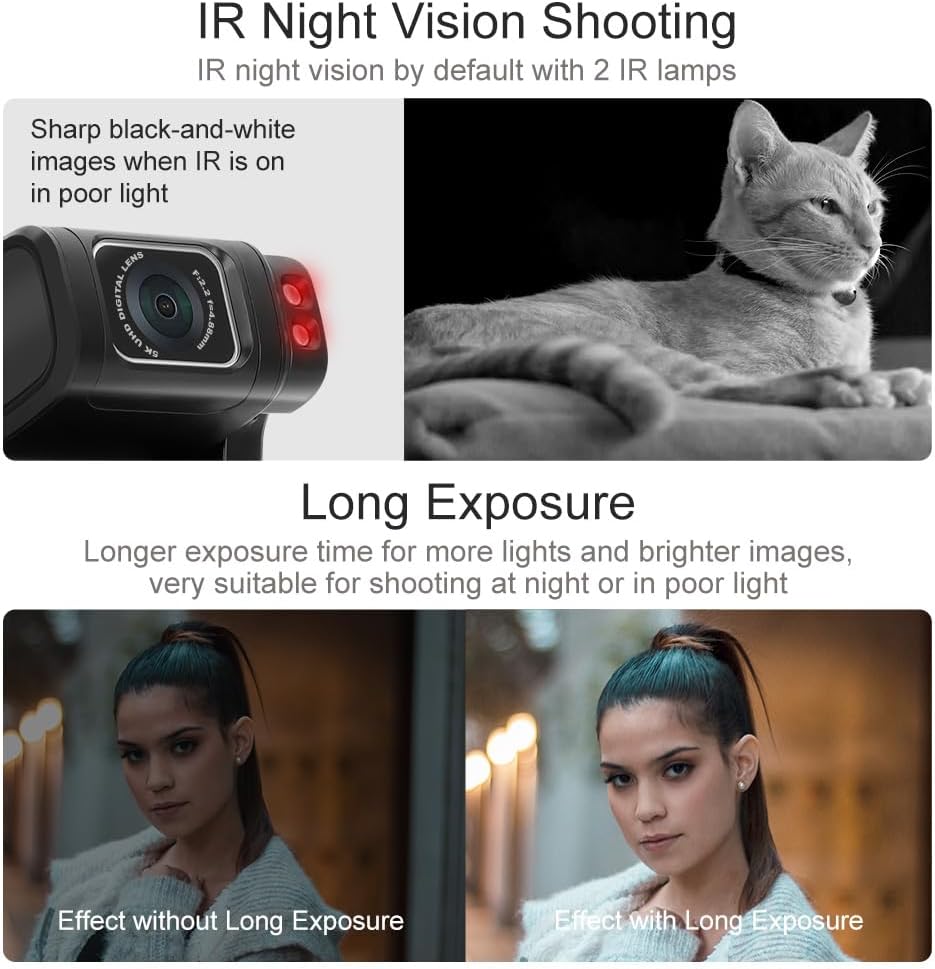
Image: IR Night Vision provides sharp black-and-white images in poor light conditions.
Wi-Fi Connectivity and "OD Cam" App
Connect your ORDRO M3 to your smartphone for real-time viewing and easy content transfer.
- Download and install the "OD Cam" app on your smartphone.
- Enable Wi-Fi on your camera and connect to it from your phone's Wi-Fi settings.
- Once connected, you can view live footage, control the camera, and transfer videos and photos directly to your phone.
Video: This unboxing video demonstrates connecting the camera to a smartphone via Wi-Fi for real-time viewing.
WDR Mode and AE-Lock
Enhance your video quality in challenging lighting conditions with these advanced features.
- WDR Mode: Activates Wide Dynamic Range to capture more light details in both highlights and shadows, preventing overexposed or underexposed areas.
- AE-Lock: Allows you to lock the exposure value, providing precise control for specific lighting effects, such as backlit scenes or silhouettes.

Image: WDR Mode and AE-Lock provide advanced exposure control for optimal image quality.
Maintenance
Proper maintenance will extend the life and performance of your ORDRO M3 camera.
- Cleaning the Lens: Use a soft, lint-free microfiber cloth specifically designed for camera lenses to gently wipe away dust or smudges. Avoid using abrasive materials or harsh chemicals.
- Storage: When not in use, store the camera in its protective camera bag in a cool, dry place away from direct sunlight and extreme temperatures.
- Battery Care: For long-term storage, ensure the battery is partially charged (around 50%) to maintain its health. Avoid fully discharging or overcharging the battery for extended periods.
- Avoid Moisture: The camera is not waterproof. Keep it away from water, rain, and high humidity to prevent damage.
Troubleshooting
If you encounter any issues with your ORDRO M3 camera, refer to the following common problems and their solutions:
| Issue | Solution |
|---|---|
| Camera not powering on | Ensure the battery is fully charged. Check if the battery is inserted correctly. Try connecting to a power source. |
| Cannot connect to Wi-Fi / App issues | Ensure the "OD Cam" app is installed and updated. Verify Wi-Fi is enabled on the camera and your smartphone. Restart both devices. |
| Blurry images or videos | Clean the camera lens. Ensure adequate lighting. Check if image stabilization is enabled. |
| Memory card error | Ensure the Micro SD card is inserted correctly. Try reformatting the card (this will erase all data). Use a compatible high-speed card. |
| Short battery life | Ensure the battery is fully charged before use. Reduce screen brightness or turn off Wi-Fi when not needed. |
Specifications
Detailed technical specifications for the ORDRO M3 5K UHD Camera:
| Feature | Detail |
|---|---|
| Brand | ORDRO |
| Model | M3 |
| Item Weight | 15.2 ounces |
| Package Dimensions | 6.5 x 4.33 x 3.27 inches |
| Batteries | 1 Lithium Polymer batteries required (included) |
| Special Features | Night Vision, Anti-Shake |
| Photo Sensor Technology | CMOS |
| Video Capture Resolution | 5K |
| Maximum Focal Length | 30 |
| Maximum Aperture | 2.2 f |
| Flash Memory Type | Micro SD |
| Video Capture Format | MP4 |
| Supported Audio Format | AAC |
| Screen Size | 3.5 Inches |
| Connectivity Technology | Wi-Fi |
Warranty and Support
For detailed warranty information, product registration, and technical support, please visit the official ORDRO website or contact their customer service department. Keep your purchase receipt as proof of purchase for any warranty claims.
Online Resources:
- Official ORDRO Store: https://www.amazon.com/stores/ORDRO/page/C70BF0D0-EB9D-4806-9138-4B4ECC70012F


