
1. Introduction
Thank you for choosing the MEIKEE SL-FL05 Solar Outdoor Spotlight. This manual provides essential information for the safe and efficient operation of your device. Please read it thoroughly before installation and use, and retain it for future reference.
The MEIKEE SL-FL05 is a versatile solar-powered LED spotlight designed for outdoor use. It features a high-efficiency monocrystalline silicon solar panel, a 5000mAh battery, and 78 bicolor SMD LEDs. The spotlight offers adjustable color temperature (2500K-6500K), three brightness levels (100LM/200LM/400LM), and dynamic lighting modes (FLASH and SMOOTH). It is controlled via an RF remote control with a 12-meter range and includes a timing function. With an IP66 waterproof rating, it is suitable for various weather conditions.
2. Safety Information
- Ensure all connections are secure and waterproof before exposing the product to outdoor elements.
- Do not attempt to disassemble or modify the product. This may void the warranty and pose safety risks.
- Keep the solar panel clean to ensure optimal charging efficiency.
- Avoid direct eye exposure to the LED light source, as it can be very bright.
- Dispose of batteries according to local regulations. Do not incinerate batteries.
- Install the solar panel in a location that receives maximum direct sunlight throughout the day.
3. Package Contents
Verify that all components are present in the package:
- 1 x MEIKEE SL-FL05 Solar Outdoor Spotlight
- 1 x Solar Panel with 5-meter DC cable
- 1 x RF Remote Control
- 2 x Ground Stakes
- Mounting Screws and Wall Plugs
- 1 x User Manual (this document)
4. Product Overview
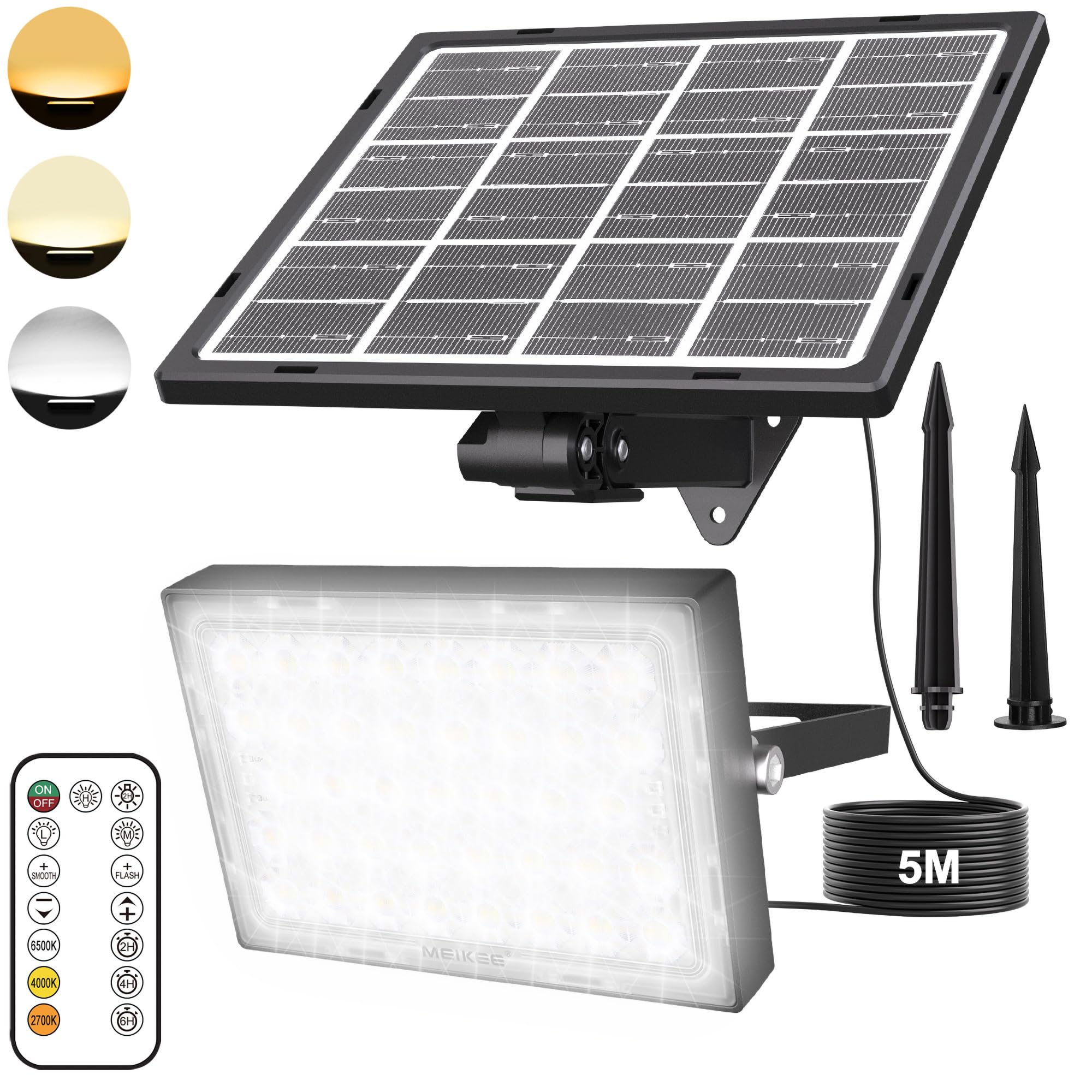

The MEIKEE SL-FL05 consists of two main units: the LED spotlight and the solar panel. These units are connected by a 5-meter waterproof DC cable, allowing flexible placement. The spotlight features an integrated 5000mAh lithium polymer battery and an ON/OFF button on its rear. The solar panel is designed for high-efficiency charging, converting sunlight into electrical energy to power the spotlight.
The included RF remote control allows for convenient adjustment of lighting modes, brightness, and color temperature from a distance of up to 12 meters, even without direct line of sight to the light or solar panel.
5. Setup & Installation
Follow these steps for proper installation:
- Choose a Location: Select an outdoor location for the solar panel that receives at least 6-8 hours of direct sunlight daily. The spotlight can be placed up to 5 meters away from the solar panel.
- Mount the Solar Panel:
- Ground Installation: Attach the solar panel to one of the provided ground stakes. Insert the stake firmly into the ground in your chosen sunny location. Adjust the panel angle for optimal sun exposure.
- Wall Installation: Use the provided screws and wall plugs to securely mount the solar panel to a wall or roof edge. Ensure the panel is angled to capture maximum sunlight.
- Mount the Spotlight:
- Ground Installation: Attach the spotlight to the second ground stake and insert it into the desired lighting area.
- Wall Installation: Use the provided screws and wall plugs to mount the spotlight to a wall, fence, or other suitable surface. The recommended installation height is 2.5-3.5 meters for optimal illumination coverage.
- Connect the Units: Connect the DC cable from the solar panel to the DC input on the spotlight. Ensure the waterproof connector is securely tightened to prevent water ingress.
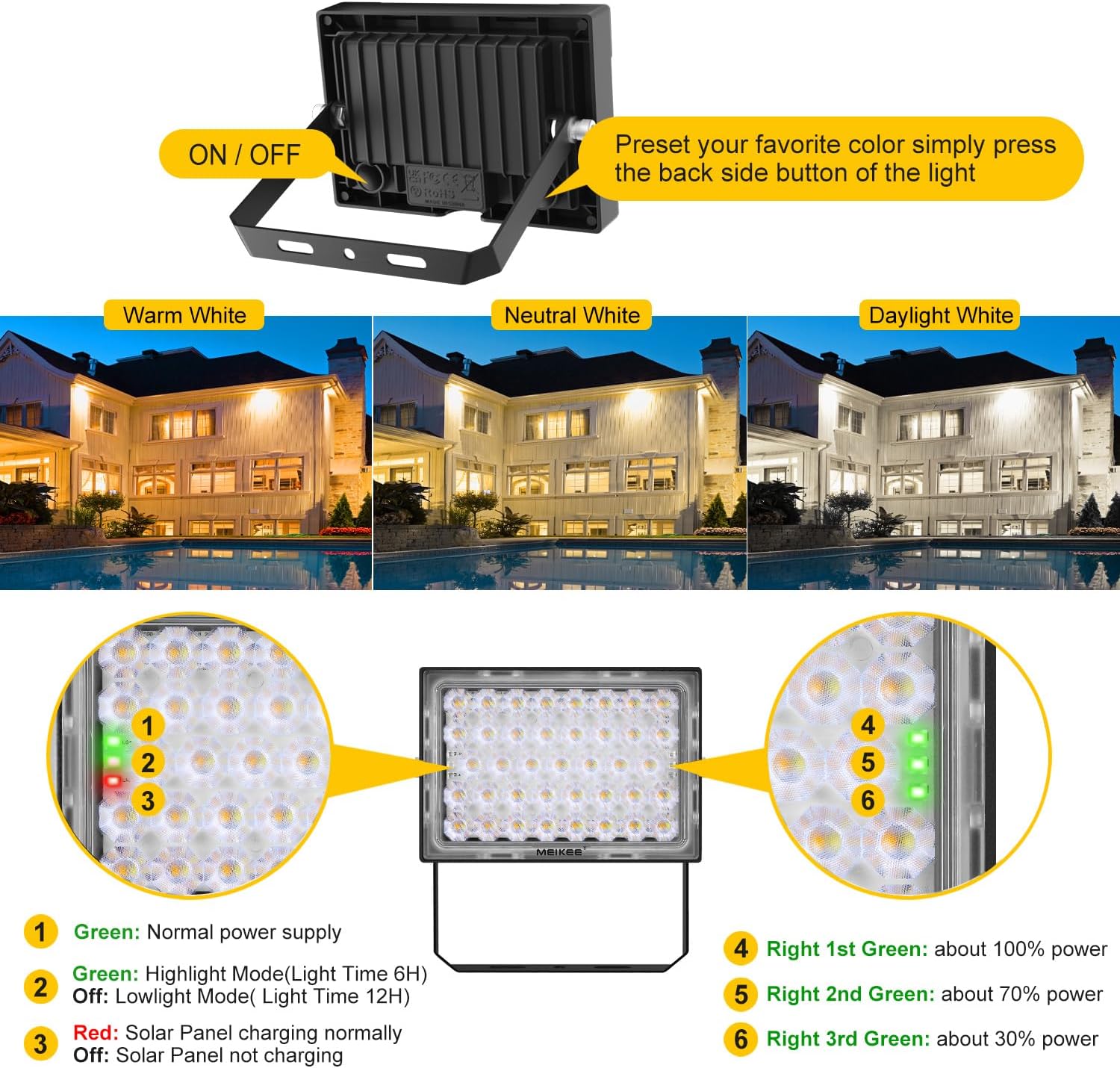
- Initial Activation: Locate the ON/OFF button on the back of the spotlight. Press this button once to activate the light. The light will then operate automatically from dusk till dawn.
- Remote Control Preparation: Before first use, remove the insulating plastic tab from the battery compartment of the remote control.


6. Operating Instructions
Once installed and activated, the MEIKEE SL-FL05 operates automatically. The solar panel charges the internal battery during the day, and the spotlight illuminates from dusk till dawn. You can use the remote control to adjust settings.
Automatic Operation
The spotlight is designed to automatically turn on at dusk and turn off at dawn, provided the main ON/OFF button on the light itself is in the 'ON' position. The high-efficiency solar panel ensures the 5000mAh battery is fully charged within 8 hours of direct sunlight, providing 8-20 hours of continuous illumination depending on the selected brightness level.

7. Remote Control Functions
The RF remote control allows for comprehensive management of the spotlight's features. Ensure the insulating tab is removed before use.

- ON/OFF: Turns the spotlight on or off.
- Force Lighting 2H: Activates the light for 2 hours, then it turns off. Useful for daytime use or specific events.
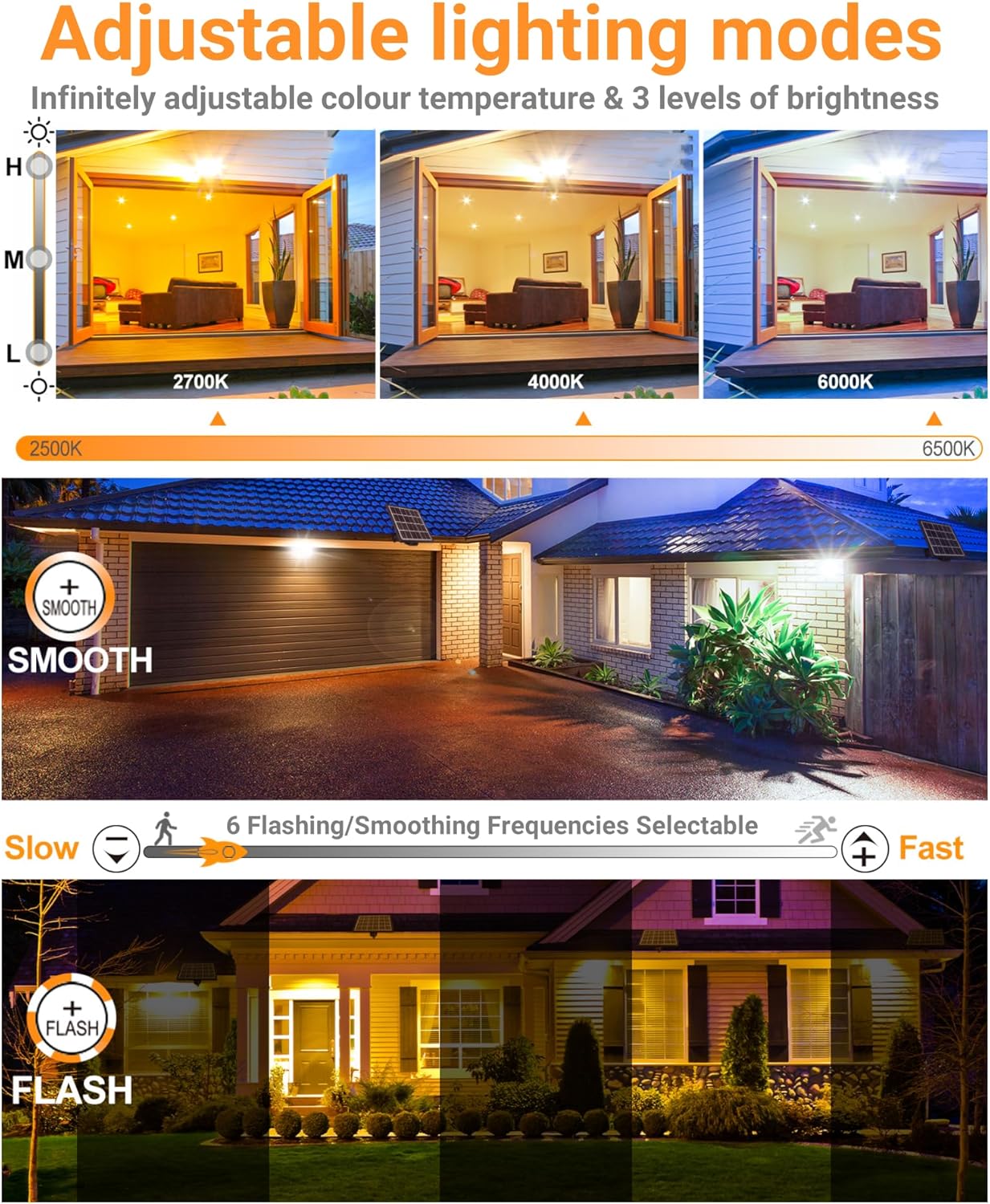
- Brightness Adjustment (High/Medium/Low): Cycles through 100LM, 200LM, and 400LM brightness levels.
- Light Gradient (SMOOTH): Activates a smooth transition between warm and cold light colors. Color temperature and brightness are not adjustable in this mode.
- Light Strobe (FLASH): Activates a flickering light effect in a single color. The color temperature is adjustable, but brightness is not.
- Color/Speed Adjustment (+/-): In dynamic modes (SMOOTH/FLASH), these buttons adjust the speed of the effect. In static mode, they can fine-tune the color temperature.
- Color Temperature Shortcut Keys (2700K/4000K/6500K): Directly sets the light to Warm White (2700K), Natural White (4000K), or Daylight White (6500K).
- Timing Settings (2H/4H/6H): Sets the spotlight to automatically turn off after 2, 4, or 6 hours of operation.
8. Lighting Modes
The MEIKEE SL-FL05 offers both static and dynamic lighting options to suit various needs and preferences.
Static Lighting Mode
In static mode, you can precisely control the color temperature and brightness:
- Color Temperature: Infinitely adjustable from 2500K (very warm white) to 6500K (cool daylight white). Use the dedicated 2700K, 4000K, and 6500K buttons for quick selection, or the +/- buttons for fine-tuning.
- Brightness: Three distinct levels are available: 100LM, 200LM, and 400LM. Select using the brightness adjustment buttons on the remote.


Dynamic Lighting Modes
For more dynamic effects, the spotlight offers FLASH and SMOOTH modes:
- FLASH Mode: Creates a vibrant, flickering light effect. The speed of the flash can be adjusted using the +/- buttons on the remote.
- SMOOTH Mode: Provides a gentle, rhythmic transition between different light colors. The speed of this transition can also be adjusted.


9. Maintenance
To ensure the longevity and optimal performance of your MEIKEE SL-FL05 Solar Outdoor Spotlight, follow these maintenance guidelines:
- Clean the Solar Panel: Regularly wipe the surface of the solar panel with a soft, damp cloth to remove dust, dirt, leaves, or snow. A clean panel ensures maximum sunlight absorption and charging efficiency.
- Check Connections: Periodically inspect the waterproof DC connector between the solar panel and the spotlight to ensure it remains securely tightened and free from corrosion.
- Inspect Mounting: Verify that the solar panel and spotlight remain securely mounted and have not become loose due to weather or other factors.
- Battery Care: The internal lithium polymer battery is designed for long life. Avoid prolonged storage of the product in a completely discharged state. If storing for an extended period, ensure the battery is partially charged.
10. Troubleshooting
If you encounter issues with your MEIKEE SL-FL05, refer to the following common problems and solutions:
| Problem | Possible Cause | Solution |
|---|---|---|
| Spotlight does not turn on at night. | 1. Main ON/OFF button is off. 2. Insufficient solar panel charging. 3. Solar panel is dirty or obstructed. 4. Battery is depleted or faulty. | 1. Press the ON/OFF button on the back of the spotlight to turn it on. 2. Ensure the solar panel is placed in direct sunlight for 6-8 hours daily. Relocate if necessary. 3. Clean the solar panel surface. 4. Allow several days of full charging. If the problem persists, contact support. |
| Light output is dim or short-lived. | 1. Insufficient charging. 2. High brightness setting consuming more power. 3. Cold weather affecting battery performance. | 1. Ensure optimal solar panel placement and cleanliness. 2. Select a lower brightness setting using the remote control. 3. Battery performance can be reduced in extreme cold; this is normal. |
| Remote control is not working. | 1. Insulating tab not removed. 2. Remote battery is dead. 3. Remote is too far or obstructed. | 1. Remove the plastic insulating tab from the remote's battery compartment. 2. Replace the remote control battery (typically CR2025 or similar). 3. Ensure you are within the 12-meter range. RF remote does not require line of sight, but extreme obstructions can interfere. |
| Water ingress in the spotlight. | Waterproof connector not properly sealed. | Ensure the DC waterproof connector is securely tightened. If damage is visible, contact support. |
11. Specifications
| Feature | Specification |
|---|---|
| Model Number | SL-FL05 |
| Light Source | 78 Bicolor SMD LEDs |
| Max Luminous Flux | 800 Lumen |
| Brightness Levels | 100LM / 200LM / 400LM |
| Color Temperature | Adjustable 2500K-6500K (Warm White, Natural White, Cool White) |
| Solar Panel | Monocrystalline Silicon, 25% efficiency |
| Battery | 1 x 5000mAh Lithium Polymer (included) |
| Charging Time | Approx. 8 hours (full direct sunlight) |
| Working Time | 8-20 hours (depending on brightness) |
| Remote Control | RF Remote Control, 12m range, 360° coverage |
| Waterproof Rating | IP66 |
| Beam Angle | 120 Degrees |
| Illumination Distance | Up to 5 meters |
| Cable Length | 5 meters (solar panel to spotlight) |
| Product Dimensions | 19.5 x 18.7 x 6 cm |
| Product Weight | 1.04 kg |
| Material | Aluminum, ABS |
| Certifications | CE, RoHS |
| Operating Temperature | -25°C to 45°C |

12. Warranty & Support
MEIKEE products are designed for durability and performance. This product comes with a standard manufacturer's warranty. For specific warranty details, please refer to the documentation provided with your purchase or visit the official MEIKEE website.
If you require technical assistance, have questions about installation, or need to report a defect, please contact MEIKEE customer support through the retailer where you purchased the product or via the contact information available on the official MEIKEE website.
Please have your model number (SL-FL05) and proof of purchase ready when contacting support.


