
ECONTROLLY HTR-U27E
ECONTROLLY HTR-U27E Voice Remote Control User Manual
For Haier Google Android TV Models
Introduction
This manual provides essential instructions for setting up, operating, and maintaining your ECONTROLLY HTR-U27E Voice Remote Control. This remote is designed to be compatible with various Haier Google Android TV models, offering voice control functionality for enhanced user experience. Please read this manual carefully before use.
Setup
1. Battery Installation
The HTR-U27E remote control requires two (2) AAA ALKALINE batteries for operation. Rechargeable batteries are not supported and should not be used.
- Locate the battery compartment cover on the back of the remote control.
- Slide the cover open.
- Insert two AAA ALKALINE batteries, ensuring the correct polarity (+ and -) as indicated inside the compartment.
- Close the battery compartment cover securely.
Note: Batteries are not included with the remote control.
2. Pairing the Remote Control
The HTR-U27E is a voice remote control and requires pairing with your Haier Google Android TV before its voice and full functionality can be utilized.
- Ensure your Haier Google Android TV is powered on.
- Point the remote control towards your TV.
- Press and hold the Red button and the Blue button simultaneously for approximately 5 seconds. These buttons are typically located near the bottom of the remote's main button cluster.
- Once the pairing process initiates, a message such as "HaierTV-RC" should appear in the upper right corner of your TV screen.
- Press the "OK" button on the remote control to confirm the pairing when prompted on the screen.
- If pairing is unsuccessful, wait a few minutes and repeat the steps.
- To exit the accessory adding process at any time, press the "EXIT" button.
Successful pairing is indicated by a confirmation message on your TV screen.
Operating the Remote Control
Once paired, your HTR-U27E remote control provides comprehensive control over your Haier Google Android TV.
Key Functions Overview

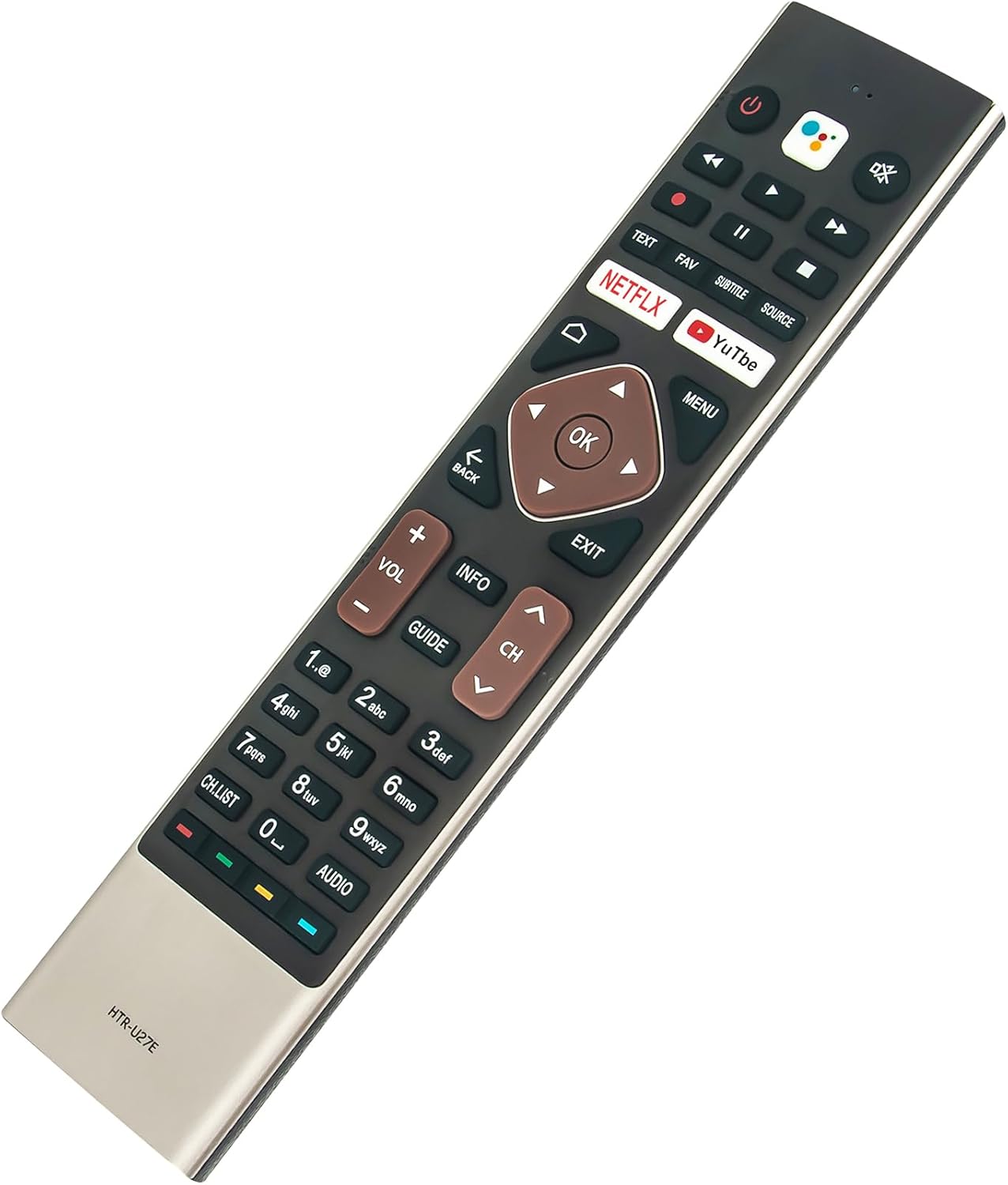
Image: Front and angled views of the HTR-U27E remote control, showing button layout.
- Power Button (Red Circle): Turns the TV on or off.
- Google Assistant Button (Colored Circle): Activates voice control for commands and searches.
- Navigation Pad (Directional Arrows and OK): Used to navigate menus and select options.
- Volume Up/Down (VOL +/-): Adjusts the TV volume.
- Channel Up/Down (CH +/-): Changes TV channels.
- Netflix / YouTube Buttons: Direct access to these streaming applications.
- Back / Exit Buttons: Navigates back in menus or exits current functions.
- Numeric Keypad: For direct channel input or other numeric entries.
- Media Playback Controls (Play, Pause, Fast Forward, Rewind): Controls media playback.
Voice Control Functionality
To use the voice control feature, press the Google Assistant button on the remote. Speak clearly into the microphone located at the top of the remote. You can use voice commands to:
- Search for content (e.g., "Find action movies").
- Open applications (e.g., "Open Netflix").
- Control TV functions (e.g., "Turn up the volume").
- Get information (e.g., "What's the weather?").
Compatible Haier Google Android TV Models
This remote control is compatible with the following Haier Google Android TV models:
- LE58K6600UG, LE55K6600HQGA, LE43K6700UG, LE40K6600G, LE32K6600SG, LE43K6600SG, LE50U6900UG, LE50K6600HQGA, LE43K6600G, LE43K6600UGA
- LE58U6900UG, LE65K6600HQGA, LE55K6600UG, LE55U6900UG, LE50K6700UG, LE40K6600GA, LE32K6600GA, LE58U6900HQGA, LE58K6600HQGA
- LE65K6700UG, LE65K6600UG, LE43K6600GA, LE65U6900UG, LE50K6600UG, LE55K6700UG
Maintenance
Battery Replacement
When the remote control's performance degrades or it stops responding, it is likely time to replace the batteries. Follow the battery installation steps outlined in the "Setup" section.
- Always replace both AAA batteries at the same time.
- Use only new, non-rechargeable AAA ALKALINE batteries.
- Dispose of old batteries responsibly according to local regulations.
Cleaning
To clean the remote control, use a soft, dry cloth. Do not use liquid cleaners, sprays, or abrasive materials, as these can damage the remote's surface or internal components.
Troubleshooting
- Remote not responding:
- Check if the batteries are correctly inserted with the proper polarity.
- Replace the batteries with new AAA ALKALINE batteries.
- Ensure there are no obstructions between the remote and the TV's sensor.
- Re-pair the remote control with the TV following the "Pairing the Remote Control" steps.
- Voice control not working:
- Ensure the remote is successfully paired with the TV. Voice functionality relies on Bluetooth pairing.
- Speak clearly and directly into the microphone.
- Check your TV's internet connection, as voice commands often require online processing.
- Pairing unsuccessful:
- Ensure the TV is on and within range.
- Confirm that you are pressing the correct Red and Blue buttons simultaneously for 5 seconds.
- Try moving closer to the TV during the pairing process.
- If multiple remotes are being paired, ensure only one is attempting to pair at a time.
Specifications
| Model | HTR-U27E |
| Brand | ECONTROLLY |
| Special Feature | Voice Search |
| Compatible Devices | Haier Google Android Televisions |
| Power Source | 2 x AAA ALKALINE Batteries (not included) |
| Product Dimensions | 3.94 x 1.57 x 0.59 inches |
| Item Weight | 1.76 ounces |
| Color | Black |
Warranty and Support
Information regarding product warranty and customer support contact details is not provided within this instruction manual. For warranty inquiries or technical assistance, please refer to the product packaging or contact the retailer where the product was purchased.
Ask a question about this manual
Ask about setup, troubleshooting, compatibility, parts, safety, or missing instructions. Manuals+ will review the question and use this page’s manual context to help answer it.